



Use Wozber and land your dream job
Create CV
No registration required
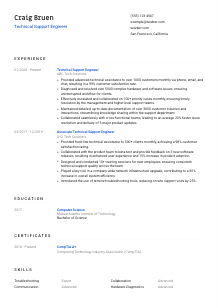
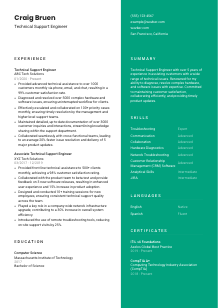
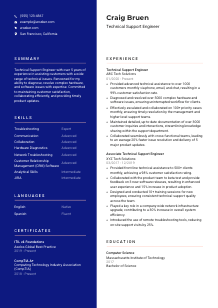
Resolving tech glitches, but your CV looks like a bug? Check out this Technical Support Engineer CV example, created with Wozber free CV builder. Learn how to map your problem-solving prowess and IT acumen to match job requirements, guiding your career as smoothly as the systems you troubleshoot.
Technical Support Engineers work where product behaviour, customer frustration, and operational uptime meet. Hiring teams want a CV that makes your troubleshooting range visible fast, from handling front-line ticket volume to diagnosing software, hardware, and network issues without losing the thread on communication or documentation.
That becomes especially important when support hiring runs through an ATS and a busy review queue. Wozber's free CV builder helps you shape an ATS-compliant CV around the language of the role, so a hiring manager can quickly see whether you have the support depth, escalation judgment, and customer-facing clarity the job requires.
Support work depends on accuracy from the first interaction, and your contact section should reflect that same discipline. For a Technical Support Engineer, this area should make it easy to confirm who you are, what role you target, and whether you meet practical requirements such as location and professional availability.
Use your full name at the top in a clean, readable format. Keep it more prominent than the rest of the header so it anchors the page immediately, much like a clear subject line on a high-priority support case.
Place "Technical Support Engineer" directly beneath your name if that is the role you are pursuing. This keeps your positioning consistent with the posting and helps frame the rest of the CV around troubleshooting, customer support, escalation, and issue resolution rather than general IT work.
List the phone number and email address you actually monitor. In support roles, response reliability matters, so even small errors here can undercut the impression of precision you need to project.
Some support roles have location constraints because of shift coverage, office presence, or equipment handling. In the example posting, San Francisco, California is a stated requirement, so showing that city and state in your header removes an avoidable screening question right away.
If you maintain LinkedIn, a portfolio, or a technical profile that supports your application, include it. For support candidates, this works best when it reinforces the same experience shown on the CV, such as product support scope, certifications, or technical projects.
Skip details such as age, marital status, or other personal identifiers that do not affect your ability to troubleshoot systems, document cases, or communicate with customers. Keep the section focused on information that supports hiring decisions.
This section should confirm your professional identity in seconds. When your name, title, contact details, and any required location are clear, the reader can move straight to the technical and customer support experience that matters most.




Technical support hiring often turns on proof of execution under pressure. Your experience section should show the kinds of issues you handled, the channels you supported, the ticket volume or case complexity you managed, and the business results of your work, whether that meant faster resolution, better customer satisfaction, or stronger cross-team handoffs.
Pull out the recurring tasks in the job description and reflect them in your bullets using your own real experience. For Technical Support Engineer roles, that usually includes customer assistance across phone, email, or chat, troubleshooting hardware and software issues, documenting cases, and escalating complex problems when needed.
List your positions in reverse chronological order, including job title, employer, and dates. That context matters in support hiring because a "Technical Support Engineer" title usually suggests more ownership over complex cases than an associate or front-line support title, and your progression should make that visible.
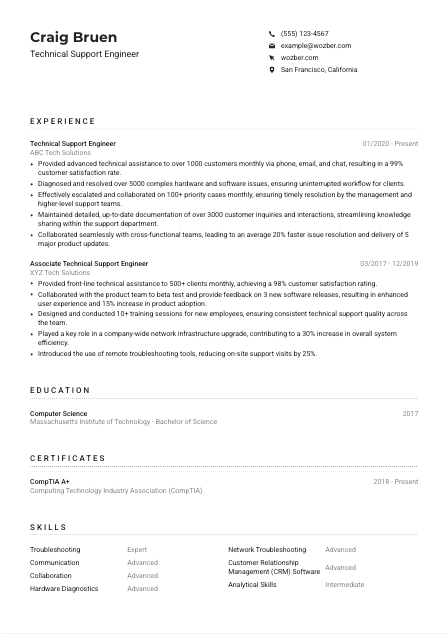
Replace generic duty statements with concrete support wins. A stronger bullet shows what broke, what you did, and what improved. The sample CV does this well by pointing to large monthly customer volume, complex issue resolution, and collaboration on product updates rather than simply stating "provided support."
Support teams are often measured through customer satisfaction, case volume, resolution speed, escalation quality, repeat issue reduction, and documentation consistency. Numbers like 99% customer satisfaction, 5000 issues resolved, or a 20% faster resolution cycle tell a hiring team far more than broad claims about being effective.
If an older role included mixed responsibilities, keep the bullets that strengthen your case for this job. Prioritise troubleshooting depth, customer communication, knowledge base contribution, cross-functional coordination, remote support tools, and process improvements over unrelated tasks that do not support the target role.
A Technical Support Engineer CV should make one thing easy to recognize. You can handle real issue volume, communicate clearly with users, document accurately, and know when to escalate so problems get solved without stalling the customer or the team.
Education usually does not carry a support CV on its own, but it still matters when a posting asks for a technical degree. Present it clearly so the reviewer can confirm your academic foundation and move on to the hands-on troubleshooting and customer support work that defines the role.
Read the posting for the minimum academic expectation before you format this section. Here, a bachelor's degree in Computer Science, Engineering, or a related technical field is requested, so applicants with that background should make it easy to find.
List degree, field of study, school, and graduation year or date if you want to include it. Clean structure helps ATS parsing and prevents the section from becoming cluttered with details that matter less than your support experience.
If your degree directly supports the role, surface that clearly. In the example CV, a Bachelor of Science in Computer Science lines up neatly with the posting's technical education requirement and reinforces the candidate's foundation in systems and problem-solving.
Early-career candidates can benefit from listing coursework in areas such as networking, operating systems, database fundamentals, or systems analysis. If you already have several years of support work, those lines are usually less valuable than additional room for documented job impact.
Honors, research, lab work, or technical projects can help if they connect to troubleshooting, systems thinking, or customer-facing technology work. Keep them only when they sharpen your profile rather than stretching the section.
This section should quickly establish that you meet the technical baseline. Once that is clear, the rest of the CV can do the heavier work of showing how you apply that knowledge in live support environments.
Certifications matter in technical support because they show structured knowledge in areas employers already care about, such as hardware fundamentals, service management, and operational discipline. When a posting names certifications directly, your CV should make them easy to spot.
Start with certifications the employer explicitly asks for or strongly prefers. In this case, CompTIA A+ and ITIL v4 Foundations are directly relevant because they reinforce troubleshooting fundamentals and service workflow knowledge that support teams use every day.
Lead with certifications tied to the target role rather than listing every credential you have earned. For Technical Support Engineer positions, that usually means support, networking, systems, cloud, or service management credentials before broader or less relevant training.
Add the year earned and, if relevant, whether the certification remains active. This helps the reviewer understand how current your training is, especially for frameworks or vendor credentials that change over time.
Technical support evolves with products, infrastructure, and customer expectations. Updated certifications can strengthen your CV when they reflect the environments you support, whether that means endpoint troubleshooting, IT service management, cloud platforms, or security-aware support practices.
Relevant certifications add another layer of trust to your CV. They work best when they reinforce the exact support environment and troubleshooting expectations already visible in your experience section.
A Technical Support Engineer is hired for a mix of technical depth and customer-facing execution. Your skills section should show the tools and abilities you use to diagnose issues, communicate clearly, document accurately, and work across teams when a case needs escalation or product input.
Read the posting closely and note both technical and interpersonal requirements. Here, the obvious priorities are troubleshooting software, hardware, and network issues, along with communication, collaboration, and analytical ability. Those should shape what appears in your skills list.
Prioritise capabilities that connect directly to ticket handling and issue resolution, such as troubleshooting, hardware diagnostics, network troubleshooting, CRM or help desk systems, documentation, and escalation management. The sample CV also adds JIRA, which is useful when support work overlaps with engineering or product teams.
Place the most job-relevant skills first and consider grouping them by technical support function if your format allows it. A short, focused list reads better than an overloaded inventory and helps both ATS systems and hiring managers quickly identify where your support strengths sit.
Every skill listed should connect to how you actually support users and systems. If the section reflects the real workflow of diagnosing, documenting, communicating, and resolving, it will reinforce the rest of your CV instead of repeating generic strengths.
Technical support depends on clear communication as much as technical diagnosis. If the role requires a specific language, or if the customer base is multilingual, your language section can help explain how effectively you can guide users through issues, document interactions, and reduce misunderstanding during troubleshooting.
If a posting names a required language, list it first with an accurate proficiency level. In the example job description, English is critical, so that should appear prominently because it directly affects customer communication and written case documentation.
Place essential or business-use languages above secondary ones. That ordering helps the reviewer quickly confirm whether you can support the communication demands of the role before they look at added language strengths.
If you can support customers in more than one language, include that. For some support teams, multilingual capability helps with regional coverage, customer satisfaction, or smoother handling of escalations involving international users. The sample CV's Spanish fluency is a good example of a useful extra, though not every role requires it.
Use clear labels such as Native, Fluent, Advanced, or Intermediate. Technical support often involves explaining steps precisely, so overstating your ability can quickly become a problem in interviews or on the job.
For roles tied to global products, regional accounts, or multilingual user bases, language skills can carry more weight than they would in a purely local support setup. Include them when they add practical support value, not just because they are nice to have.
If language skills help you support users more effectively, include them with precision. This section is most useful when it strengthens the picture of you as someone who can troubleshoot clearly across real customer conversations.
The summary is often where a hiring manager decides whether your background matches the level of support work they need. For a Technical Support Engineer, it should immediately establish your years of experience, your troubleshooting scope, and the kind of customer or operational results you consistently deliver.
Build the opening around the main work you do, not a broad statement about being in tech. Mention your role, experience level, and support scope so the reader quickly understands whether you handle front-line inquiries, complex technical issues, or cross-team escalations.
Start with a line such as your title and years of experience, then narrow into your technical strengths. The sample CV gets this mostly right by leading with more than 5 years in technical support and then moving into hardware and software issue resolution.
Choose accomplishments that match how support performance is judged, such as customer satisfaction, issue volume, resolution speed, or collaboration with engineering and product teams. Keep the examples tight and relevant rather than trying to summarise your whole career.
Aim for a short paragraph that can be scanned in seconds. A summary should sound specific to the role you are targeting, so adjust the language for each application and use the same terminology the employer uses when it honestly matches your background.
A well-written summary should tell the reader, quickly and credibly, that you understand customer-facing technical support and have the troubleshooting record to back it up. That gives the rest of the CV a clear frame from the start.
With the right details in place, your CV should now present a clear picture of how you troubleshoot issues, support customers, document cases, and work across teams when problems need deeper escalation. Wozber's free CV builder helps you turn that experience into an ATS-friendly CV format built for technical support hiring.
Before you apply, run a final review with Wozber's ATS CV scanner to check keyword alignment, missing requirements, and section-level match strength against the posting. That extra pass can sharpen your ATS optimisation and make it easier for a hiring team to recognize you as a Technical Support Engineer who can step into real support volume from day one.




