




Use Wozber and land your dream job
Create CV
No registration required
Bridging tech gaps, but your CV feels disconnected? Check this Support Engineer CV example, created with Wozber free CV builder. Learn how to match your troubleshooting talents to job needs, building a career that's as supported as your apps!
Support engineering sits at the point where technical troubleshooting meets day-to-day user trust. Hiring teams want to see how you handle real support volume, diagnose software and hardware issues, work across network environments, and turn recurring problems into documented fixes or better processes. Your CV should make that operational range visible fast.
When a support CV is tailored well, the first read answers a practical question: can this person resolve issues, communicate clearly with users, and work effectively with developers or infrastructure teams? Wozber's free CV builder helps shape that story into an ATS-compliant CV by aligning your wording with the posting and keeping the structure clean, so your experience reads as support work with clear technical depth.
Support engineers are expected to be organised, responsive, and precise. That expectation starts at the top of the CV. Your personal details should confirm who you are, how to reach you, and whether you meet any stated logistical requirement without adding clutter.
Place your full name at the top in a clear, slightly larger font. In technical support hiring, quick scanning matters, and a clean header sets the tone for the structured documentation and communication this work requires.
Add the title "Support Engineer" directly under your name when that matches the role you are pursuing. This keeps your CV aligned with the posting and helps distinguish you from adjacent profiles such as Help Desk Technician, System Administrator, or Technical Support Specialist.
List one reliable phone number and a professional email address. Support work depends on clear communication and follow-through, so avoid outdated email handles or multiple numbers that create confusion. If recruiters cannot reach you quickly, your response habits are already in question.
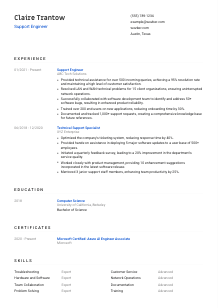
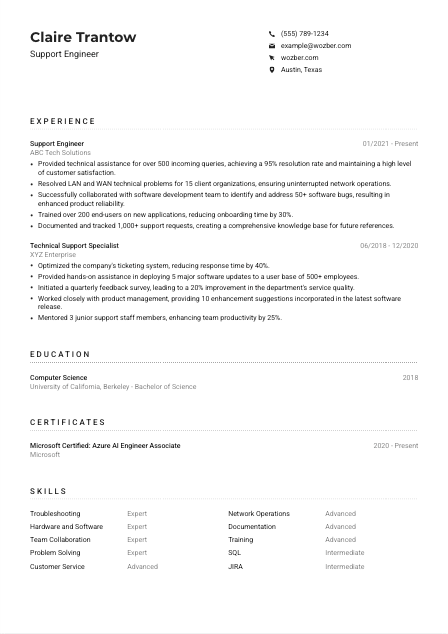
Some roles filter for on-site or local candidates early. Here, Austin, Texas is a stated requirement, so showing Austin, Texas in your header immediately removes that uncertainty. Treat location this way only when it is relevant to the job you are targeting.
Include LinkedIn, a professional website, or a certification profile if it supports your candidacy. For support roles, that might mean a profile that confirms your work history, Microsoft or Cisco credentials, or projects that show hands-on system and troubleshooting experience. Keep every link current and relevant.
Your header should answer the basics without friction: who you are, how to contact you, and whether you meet an important requirement such as location. Clean personal details make the rest of your support experience easier to trust.




Support engineering CVs are strongest when they show the mechanics of the work. Hiring teams look for issue volume, resolution quality, escalation handling, network or application troubleshooting, user training, and collaboration with product or engineering teams. Generic duty lists miss the point. Your bullets should show what you supported, how you solved problems, and what improved because of your work.
Read the posting for the tasks that define the role, then mirror those themes in your experience. In this case, the priority areas are technical assistance, software and hardware troubleshooting, LAN and WAN support, developer collaboration, end-user training, and documentation. Those are the areas your bullets should cover before secondary tasks.
List your positions in reverse chronological order with job title, company name, and dates. For support careers, this layout helps employers see progression from general technical support into broader ownership, whether that means faster incident response, more complex environments, or closer work with engineering and operations teams.
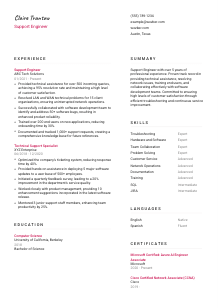
Each bullet should show the work and the result. Instead of writing "provided technical support," show scale, system type, and outcome. The example CV does this well with details such as handling 500+ incoming queries at a 95% resolution rate and resolving network issues across 15 client organizations. That tells a hiring manager far more than a task label alone.
Quantify results with numbers that matter in technical support: ticket volume, first-contact resolution, response time, downtime reduction, user base size, bug counts, onboarding speed, or knowledge base growth. Metrics like a 40% faster response time or 1,000+ documented requests show service quality and process discipline, both of which matter in support environments.
Cut or compress work that does not strengthen your case for support engineering. Keep space for experience with troubleshooting, networking, ticketing workflows, user communication, documentation, and cross-functional bug resolution. If you have worked in a broader IT role, pull forward the support-heavy parts rather than listing every unrelated responsibility.
Your experience section should make it easy to picture you handling a queue, diagnosing incidents, working across systems, and improving support operations over time. Show technical range, service quality, and results in the same bullet.
For many support engineer openings, education is a baseline qualification rather than the main selling point. Still, when a posting asks for a bachelor's degree in Computer Science, Information Technology, or a related field, your education section should confirm that requirement clearly and without extra searching.
If you hold the degree the employer asked for, list it plainly and accurately. A Bachelor of Science in Computer Science, like the one in the example, directly matches the academic requirement and helps your CV clear an early screening step.
Present degree, field of study, school, and graduation year in a consistent order. Support hiring rarely needs a dense academic narrative. Clear formatting works best because it lets reviewers confirm your qualification quickly and move back to your technical support record.
Do not shorten or paraphrase your degree in a way that obscures relevance. If your background is in Computer Science, Information Technology, Information Systems, or another closely related field, write the full title so the connection is obvious.
If you are early in your career or your degree title is broader, a brief note on coursework can support your case. Prioritise subjects that relate to support engineering, such as networking, operating systems, databases, system administration, or software troubleshooting.
Projects, labs, or honors can be useful when they show hands-on technical problem solving. This is especially helpful for newer candidates who need to bridge limited job history with practical experience in diagnosing systems, working with infrastructure, or supporting applications.
Education should confirm that you have the technical grounding for support work. Once that box is checked, the rest of the CV should carry the conversation toward troubleshooting ability, service delivery, and technical results.
Certifications are not mandatory for every support engineer role, but they can sharpen your profile when they match the systems, networks, or platforms mentioned in the posting. They are especially useful when the employer explicitly lists preferred credentials, as this one does with Azure AI Engineer Associate and CCNA.
When a job description names certifications, include those first if you hold them. Listing Microsoft Certified: Azure AI Engineer Associate or CCNA directly reflects the employer's preferred background and helps your CV line up with their technical environment or future support scope.
Do not turn this section into a complete training archive. Prioritise certifications tied to networking, cloud platforms, systems administration, service management, or vendor technologies you actually support. A shorter, targeted list is more useful than a long list of marginal credentials.
Include the date earned and, when relevant, whether the certification is still active. Current dates matter in technology roles because they show that your knowledge reflects current tools, platform updates, and support practices.
A support engineer often works across evolving software, devices, and infrastructure. Recent certifications or renewals suggest that you keep pace with those changes, whether that is in networking, cloud services, endpoint support, or troubleshooting workflows.
A relevant certification tells employers that your knowledge has been tested in an area they care about. Keep this section focused on credentials that reinforce your support scope, not just your interest in learning.
The skills section should read like a condensed view of the work you can handle on the job. For support engineering, that usually means a mix of troubleshooting depth, network and system knowledge, ticketing or documentation discipline, and customer-facing communication. Keep it specific enough to support both ATS matching and a human review.
Start with the capabilities the role actually depends on. Here, that includes troubleshooting software and hardware issues, supporting LAN and WAN environments, documenting resolutions, training users, and communicating clearly in English. Those are more useful than generic labels that could belong to almost any office role.
Use the same terminology the employer uses when it reflects your real experience. If you have worked with hardware and software troubleshooting, network operations, documentation, or tools such as JIRA, say so directly. The example CV works because it pairs broad strengths like Troubleshooting and Customer Service with support-specific terms such as Network Operations and Documentation.
Group your strongest, most relevant skills first instead of listing everything you know. For support roles, prioritise issue diagnosis, operating systems or device support, network troubleshooting, customer communication, ticket handling, training, and collaboration with development teams. A focused list gives a clearer picture of your day-to-day usefulness.
Your skills section should reinforce the support problems you can solve and the environment you can work in. If the list feels generic, it is probably hiding your strongest technical value.
Support engineering often requires translating technical issues into language users can follow. That makes communication skills practical, not decorative. If a posting specifies English proficiency, your languages section should confirm that requirement clearly, especially when the role includes end-user training, documentation, or cross-team coordination.
If the job calls for professional English, list English first and indicate your proficiency level clearly. That tells employers you can handle tickets, write resolution notes, explain fixes to users, and coordinate with developers or network teams without unnecessary friction.
Use familiar labels such as Native, Fluent, Professional, Intermediate, or Basic. Avoid vague terms. In support work, language level affects customer communication, escalation quality, and documentation accuracy, so precision matters here.
Extra languages can strengthen your CV when you support diverse users or multinational teams. For example, Spanish alongside English may help in user-facing environments, but it should remain a secondary advantage unless the posting asks for it directly.
Only claim the level you can use in a real workplace setting. If you may need to explain troubleshooting steps, write support notes, or run user training in that language, your stated proficiency should reflect what you can actually do on the job.
If your language skills have helped you train users, support a broader customer base, or work with international teams, that is worth noting elsewhere in the CV as well. In support roles, communication strength is often visible in outcomes such as smoother onboarding, fewer repeat questions, or better ticket resolution.
Language skills matter most when they help you support users, document issues clearly, and work across teams. List them with the same accuracy you would bring to a support ticket.
The summary is where you frame your support background in a few lines before the hiring manager reaches the detailed sections. For a Support Engineer, that means quickly establishing your technical support experience, the types of issues or systems you handle, and the results you produce for users or internal teams.
Start from the job's central needs: troubleshooting, user support, network or system issue resolution, cross-functional collaboration, and documentation. Your summary should reflect the support environment you know best rather than trying to cover every skill you have.
A simple opening such as "Support Engineer with over 5 years of experience" works because it establishes seniority immediately. If your background is more mixed, you can also anchor it with adjacent titles like Technical Support Specialist, provided the summary stays focused on support engineering work.
Include a few points that connect directly to the target role, such as high ticket resolution rates, LAN and WAN troubleshooting, software bug collaboration, end-user training, or documentation at scale. The example summary succeeds because it combines technical assistance, network issue resolution, training, and customer satisfaction in a compact way.
Aim for three to five lines. That is enough space to show your support scope and strongest outcomes without repeating the experience section. Skip broad claims about passion or dedication unless they are backed by details the rest of the CV proves.
A useful summary tells the reader, within a few lines, what kinds of issues you solve, who you support, and what level of technical ownership you bring. It should make the rest of the CV feel consistent before they reach the first job entry.
A Support Engineer CV works when every section points back to the same practical picture: you can troubleshoot real issues, communicate with users, document what happened, and improve service quality over time. That is what hiring teams need to see quickly.
Use Wozber's free CV builder and ATS CV scanner to align your wording with the job description, strengthen ATS optimisation, and keep your CV in an ATS-friendly CV format. The final read should make your support scope, technical judgment, and day-to-day reliability easy to recognize.




