



Use Wozber and land your dream job
Create CV
No registration required
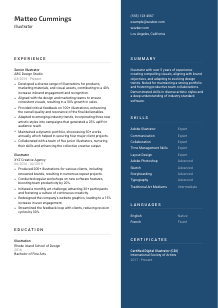
Bringing visuals to life, but your CV seems a bit sketchy? Check out this Illustrator CV example, created with Wozber free CV builder. Learn how to effortlessly show off your creative prowess to match job specifics, crafting a career narrative as vibrant as your portfolio!
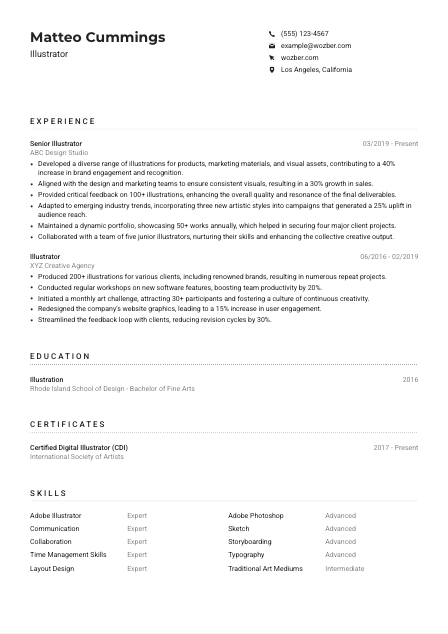
Illustration hiring rarely turns on style alone. Teams want to see whether you can translate a brief into visuals that work across products, campaigns, packaging, web assets, or other brand touchpoints, while keeping quality consistent under deadlines and feedback rounds. Your CV needs to show that your artwork was not created in isolation. It supported a brand, a launch, a client need, or a measurable audience response.
A tailored CV helps separate fine artists from illustrators who can operate inside a commercial workflow. When your bullets mirror the language of the role, an ATS-compliant CV built in Wozber's free CV builder makes software skills, collaboration with design and marketing, and portfolio-backed delivery easier to surface in ATS screening. That gives hiring teams a faster read on whether you can produce visuals that fit both the brand and the brief.
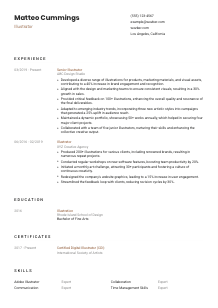
For an Illustrator, the top of the CV should read like a clean professional header, not a design experiment. Hiring teams are looking for easy access to your portfolio, location, and contact details so they can quickly move from your CV to your work samples and confirm you match practical requirements.
Use the name you publish under professionally, especially if it matches your portfolio URL, Behance profile, or client-facing work. Keep it prominent and readable. If an art director opens your portfolio after reading the CV, the identity should match instantly and without confusion.
Place "Illustrator" directly under your name unless a more specific label, such as Editorial Illustrator or Product Illustrator, better matches the target role. Here, the posting is clearly centered on illustration work tied to products and marketing materials, so the sample CV keeps the title simple and direct.
Use a professional email address and a phone number you actually answer. This role also calls for strong English communication, so everything in this section should feel polished and straightforward. Avoid handles or nicknames that make you sound casual when the job involves presenting work to stakeholders and discussing revisions.
If a posting specifies a city or region, include it clearly. In this example, listing "Los Angeles, California" immediately answers a stated requirement and removes questions about availability. If a job does not require a specific location, city and state are still enough. Full street addresses are unnecessary.
For illustrators, the portfolio link is essential. Make sure it opens directly to current work and reflects the kind of illustration the employer needs, whether that is product visuals, campaign art, character work, packaging, or digital assets. If your portfolio includes strong brand-aligned pieces similar to the role, this section is the right place to make that path obvious.
Your header should answer three questions fast: who you are, how to reach you, and where to view your work. When those basics are clean and complete, the hiring team can move straight to judging your illustration experience.




This is where commercial illustration becomes visible. Hiring managers want more than a list of employers. They want to see what you created, which teams you supported, what kinds of assets you handled, how feedback worked, and whether your visuals improved engagement, sales, reach, or production quality.
Start by marking the core requirements in the job description, then shape your experience around them. For this role, that means illustrations for products and marketing materials, collaboration with design and marketing, feedback on other illustrators' work, and adaptability across styles. Those themes should appear in your bullets before less relevant accomplishments.
Use reverse chronological order and include job title, company, and dates. That structure matters because creative teams often want to see progression from hands-on production to broader creative influence, such as mentoring juniors, reviewing work, or handling more visible brand assets.
Each bullet should combine the work itself with the result. Name the asset type first, then the impact. The sample does this well by pairing illustration work for products and marketing materials with outcomes like a 40% increase in brand engagement and a 30% growth in sales. That kind of phrasing tells a hiring manager both what you made and why it mattered.
Choose bullets that show you can take direction, work with brand guidelines, manage revisions, and deliver visuals that support business goals. Personal art projects may belong in a portfolio, but CV space is better used for client work, campaign art, packaging, web graphics, cross-functional collaboration, and review responsibilities unless freelance or independent work is your main professional background.
If the employer asks for Adobe Illustrator, Adobe Photoshop, Sketch, collaboration, and time management, use those terms where they reflect real experience. ATS optimisation works best when the wording is natural and attached to real deliverables. Instead of dropping software into a generic list, connect it to output, such as creating campaign illustrations in Adobe Illustrator or preparing marketing visuals in Photoshop.
Your experience section should make the reader confident that you can create production-ready illustrations, work inside a team process, and tie visual decisions to brand or campaign goals. If that is clear in the first few bullets, the rest of the CV gets much easier to trust.
Formal training still carries weight in illustration roles, especially when a posting names a bachelor's degree in Illustration, Fine Arts, or a related field. Education is often a quick qualification check, so present it clearly and make the connection to the role obvious.
When a job asks for a bachelor's degree, place your relevant undergraduate degree first. A Bachelor of Fine Arts in Illustration is a direct match here, so it should be impossible to miss. If your degree is in a related discipline, the field of study should still help the employer connect it to illustration work.
List degree, field, school, and graduation year in a consistent order. Creative CVs sometimes overdesign the education section, but hiring teams and ATS tools both read this information better when it is plain and structured.
If your coursework, studio concentration, or capstone work focused on digital illustration, visual storytelling, brand illustration, or adjacent disciplines such as typography or layout, include that detail when it helps explain your fit. The sample CV already benefits from a clean field match, so extra explanation is optional there.
If you are early in your career, selected coursework, thesis projects, exhibitions, or senior portfolio work can help show range and technical grounding. Once you have several years of professional illustration experience, those details usually matter less than client work and measurable outcomes.
If you have workshops, short courses, or software training that support your illustration practice, decide whether they belong under education or certificates and stay consistent. The key is not to scatter the same story twice. Use this section for foundational training and let certifications show more recent professional development.
This section should quickly show that you meet the baseline academic requirement and have relevant visual training behind your portfolio. Once that is clear, the reader can focus on your work quality, software fluency, and commercial experience.
Certifications are not mandatory for every Illustrator role, but they can strengthen your case when they reinforce software depth, digital illustration practice, or continued professional development. In a field shaped by changing tools and evolving styles, recent learning can add useful context.
Choose certificates that connect to digital illustration, design software, visual communication, or specialised workflows. A credential such as Certified Digital Illustrator works because it complements the role's emphasis on software proficiency and adaptable technique.
A short, focused certificate section is stronger than a crowded one. Prioritise credentials that reinforce the target role's needs, especially if the employer mentions tools such as Adobe Illustrator, Photoshop, or Sketch, or expects you to stay current with new styles and methods.
Include issue dates, renewal periods, or active status if the credential is current. That helps the reader understand whether the training reflects your present workflow rather than something you completed years ago and no longer use.
Illustration trends, digital workflows, and software features move quickly. Relevant certificates can signal that you actively update how you work, whether that means sharpening vector technique, improving digital painting methods, or learning new tools used by design teams.
A well-chosen certificate section tells the reader that your skills are not static. It adds one more layer of credibility around the tools, techniques, and professional habits that support your illustration work.
Illustrator hiring usually blends tool proficiency with collaboration and production discipline. Your skills section should reflect both. It needs to show that you can create the work and operate inside the process that gets the work approved, revised, and delivered.
Pull the hard skills directly from the job description first. For this role, Adobe Illustrator, Adobe Photoshop, and Sketch belong near the top because they are explicit requirements. Then add adjacent illustration skills that support the work, such as storyboarding, layout design, typography, or traditional media when they are relevant to your portfolio.
Illustrators are often hired into team environments, not solo studios. If the posting calls out communication, collaboration, and time management, include them. These are especially relevant when the role involves presenting visuals, handling feedback, and aligning work with design and marketing stakeholders.
Put the most job-relevant skills first so both ATS systems and human readers see them quickly. In the sample CV, software and collaboration strengths are listed prominently, which makes sense for a role focused on brand-aligned illustration production. Keep the list tight enough that every skill supports the type of work you want to be hired for.
By the time someone finishes your skills section, they should know which tools you use professionally, how you function on a creative team, and whether your technical range matches the illustration work in front of you.
Language skills matter more in illustration roles than many candidates assume, especially when the work involves creative reviews, stakeholder presentations, client feedback, or collaboration across teams. If the posting specifies communication ability, treat this section as part of your working toolkit, not as an extra.
When a job explicitly requires English communication, list your English proficiency in plain terms. If you are a native speaker, say so. If you work professionally in English, use an honest label such as Fluent or Professional. This role includes collaboration and client discussion, so clarity here matters.
Additional languages can strengthen your profile, particularly in agencies, consumer brands, publishing, or global marketing teams. They are not a substitute for illustration ability, but they can help when projects involve multilingual stakeholders or broader audience reach.
Keep levels easy to interpret with terms like Native, Fluent, Intermediate, or Basic. Avoid vague descriptions. Hiring managers do not need a narrative here. They need a quick sense of whether you can participate in meetings, present concepts, or handle written feedback.
For illustrators, language skill often shows up in brief interpretation, revision notes, client calls, and cross-functional communication. That is why this section belongs on the CV when language is named in the posting or genuinely expands the environments where you can work effectively.
If you have improved through regular use, coursework, or client work, update the rating. Accurate language levels matter because they set expectations for communication in creative reviews and day-to-day collaboration.
When illustration work includes presentations, feedback loops, and stakeholder conversations, language proficiency becomes part of execution. A clear languages section helps confirm that you can communicate your ideas as well as draw them.
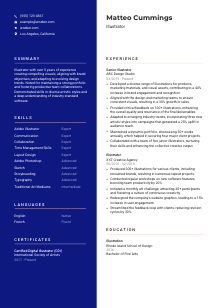
The summary should read like the opening frame of your professional profile. For an Illustrator, that means quickly establishing your years of experience, the kind of visual work you handle, the tools or styles you are known for, and the business or brand context where your illustrations perform best.
Lead with your title and years of experience, then narrow into the kind of work you actually do. Product illustration, campaign visuals, brand assets, editorial work, packaging, digital content, or cross-channel marketing art all create a clearer picture than a generic creative statement.
Pull in the capabilities the employer cares about most. In this example, that includes creating visual assets, aligning with brand objectives, adapting to changing design trends, and collaborating with teams. The sample summary handles this well by combining experience, brand alignment, trend adaptability, and portfolio strength in a compact way.
Aim for 3 to 5 lines. That is enough space to mention your experience level, one or two specialization areas, key software or stylistic strengths, and a concrete value point. Avoid broad claims like "passionate artist" unless the rest of the sentence adds real professional detail.
Your summary should set up the evidence that appears in experience, skills, and portfolio links. If you mention collaboration, your bullets should show cross-functional work. If you mention impact, the experience section should include results like engagement growth, reduced revision cycles, or successful client wins.
A strong summary gives a quick, accurate read on the kind of illustrator you are and the environments where your work performs best. Once the rest of your CV supports that opening, Wozber can help you turn it into an ATS-friendly CV format that stays aligned with the posting and easy to review. The result should make your illustration range, commercial experience, and team value clear from the first screen.
A polished Illustrator CV does more than list software and past employers. It shows how your visuals served a brief, supported a brand, improved a campaign, or helped a team deliver stronger creative work. Keep your portfolio link visible, your experience tied to real deliverables, and your summary focused on the kind of illustration you want to keep doing.
Use Wozber's free CV builder and ATS CV scanner to align your wording with the job description, strengthen ATS optimisation, and keep the structure clean in an ATS-friendly CV template. When the CV and portfolio tell the same story, hiring teams can quickly see that you are ready to contribute as a working Illustrator.




