



Use Wozber and land your dream job
Create CV
No registration required
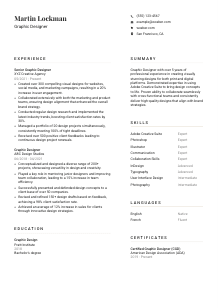
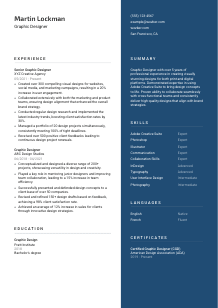
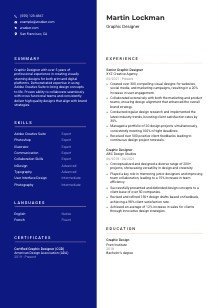
Turning sketches into pixel perfection, but your CV design feels a bit off-grid? Browse this Graphic Designer CV example, created with Wozber free CV builder. Learn how to blend your creative flair with the career blueprint, making your graphic genius stand out in the job gallery!
Graphic design hiring moves quickly when the work is clear. Employers want to see how you turn briefs into visuals that perform across digital and print channels, how you work within brand systems, and how you handle revision cycles without losing quality or deadlines. A graphic designer CV needs to show creative range, software fluency, and the business value behind the visuals.
When your CV is tailored to the role, marketing teams and hiring managers can immediately connect your portfolio-backed experience to the kind of design work they need, whether that is campaign assets, social graphics, web visuals, or cross-functional brand work. Wozber's free CV builder helps shape that content into an ATS-compliant CV with language that matches the posting, so your strongest Adobe Creative Suite experience, collaboration history, and delivery scope are easier to recognize early.
This section should read like the top of a professional portfolio page. For graphic designers, the priority is simple: make it easy to contact you, place you correctly for the role, and connect your CV to the work you want reviewed.
Your name should be the most visible text at the top of the page. Use clean formatting that fits the overall CV style without becoming decorative. Graphic design roles reward visual judgment, but a CV header still needs to stay readable in both human review and ATS parsing.
Place "Graphic Designer" directly under your name if that is the role you are pursuing. This removes guesswork for recruiters and keeps your positioning aligned with the posting. If your current title is more senior or more specialised, you can still lead with the target title when it reflects the work you want, as long as the experience below supports it.
Include your phone number and a professional email address you check often. Designers are often contacted for interviews, portfolio reviews, and test projects on short notice, so this information needs to be accurate and immediate. If you include a website, make sure it leads to an active portfolio with polished case studies, campaign samples, or brand work that matches the kind of role you are applying for.
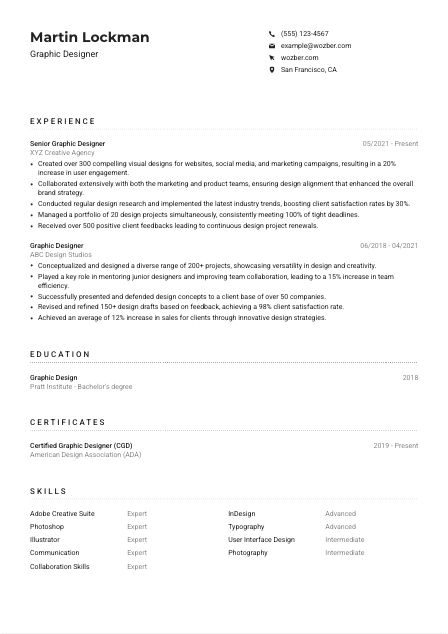
If the employer asks for a specific location or relocation willingness, reflect that clearly in your contact details. In the example, listing San Francisco, CA directly supports a stated requirement. For other applications, only include location detail that helps remove friction around availability.
For graphic designers, a portfolio link often carries as much weight as the CV itself. Link to work that shows range across formats such as social media, web design, campaign assets, print collateral, or brand systems. Keep project descriptions concise and outcome-focused so the portfolio reinforces the same story your experience section tells.
Your header should quickly answer three questions: who you are, what role you are targeting, and where your work can be reviewed. When those details are clean and relevant, the rest of the CV gets read in the right context.




This is where a graphic designer CV proves it can support real business goals. Hiring teams look beyond style and want to understand volume of work, project types, collaboration across teams, revision discipline, and whether your designs improved engagement, sales, satisfaction, or brand consistency.
Start by identifying the operating themes in the job description. For a graphic designer, those often include producing assets for both print and digital channels, collaborating with marketing and product partners, managing multiple deadlines, and refining work based on stakeholder or user feedback. Those themes should shape which bullets you choose and how you phrase them for ATS optimisation.
List your most recent design role first, then work backward. For each position, include company, title, and dates, followed by accomplishment bullets. This format makes it easy to track your progression from production work to broader ownership, such as leading campaigns, mentoring junior designers, or managing larger project loads.
Show what you designed, who you worked with, and why the work mattered. Strong bullets mention concrete outputs such as website assets, social media visuals, landing pages, print pieces, or campaign materials, then connect them to cross-functional work with marketers, product managers, or clients. The example does this well by tying design output to marketing and product collaboration instead of describing design in isolation.
Metrics make design work easier to evaluate when they reflect real outcomes. Use numbers tied to engagement, conversion lift, client satisfaction, project volume, turnaround speed, deadline consistency, or portfolio scope. In the sample CV, achievements such as creating 300+ designs, handling 20 projects at once, and increasing engagement by 20% give hiring teams a clearer sense of scale and impact.
Keep the section focused on work that supports your case for the role. If an older job does not connect to visual communication, brand execution, production design, or client-facing creative work, trim it or leave it out. Space is better spent on stronger bullets about campaign results, revision workflows, presentation skills, or software-heavy design execution.
After this section, a hiring manager should understand the kind of design environment you have worked in, the channels you have designed for, and the results your work helped drive. That is what moves your CV beyond aesthetics and into hiring relevance.
Education matters most when it confirms the design foundation the role calls for. For graphic designers, that usually means formal training in visual communication, typography, layout, branding, digital design, or a related field that supports professional studio or in-house work.
If the posting asks for a Bachelor's degree in Graphic Design or a related field, place that qualification clearly in this section. A direct match helps immediately. In the example, a Bachelor's degree in Graphic Design from Pratt Institute aligns cleanly with the requirement and does not need extra explanation.
List degree, school, field of study, and graduation year or date. Graphic design hiring teams usually spend more time on portfolio and experience than on education formatting, so clarity matters more than detail here. Let the section confirm qualifications without competing with your project history.
If your official degree title closely matches the language in the posting, use that wording. For example, "Bachelor's degree in Graphic Design" is more useful than a shortened or casual version because it aligns with both ATS matching and recruiter review.
Early-career designers can benefit from listing relevant coursework, capstone projects, or thesis work in areas like branding, editorial design, UI design, motion graphics, or typography. If you already have several years of professional experience, keep education brief unless an academic project directly relates to the employer's design focus.
Honors, scholarships, juried exhibitions, or student design awards can be worth adding when they point to strong visual craft or creative recognition. Keep these details if they reinforce your trajectory as a designer, not simply to fill space.
This section should quickly establish that you have the training the employer asked for. Once that box is checked, let your portfolio, software skills, and project outcomes carry the heavier part of the case.
Certifications are secondary to portfolio quality in graphic design, but they can still add value when they point to current tools, specialised workflows, or ongoing professional development. Use them to support your technical range, not to replace proof of design work.
Prioritise certificates that support the work in the posting, such as Adobe tools, brand design, UI design, production workflows, or related creative disciplines. If the role emphasizes Adobe Creative Suite, a certificate that backs up Photoshop, Illustrator, or InDesign proficiency can strengthen the technical story already shown elsewhere on the CV.
Only include certifications that a creative lead or recruiter would recognize as relevant to your day-to-day work. The sample's Certified Graphic Designer credential works because it supports professional credibility in the field rather than adding an unrelated learning item.
Include the year earned, and if applicable, the active period. This is especially helpful for software-based or platform-based learning, where current knowledge matters. Design tools, production standards, and digital formats change often enough that recent training can carry weight.
Graphic designers are expected to keep up with changing trends, tools, and media formats. Updated learning in areas like accessibility, motion, digital product design, or advanced Adobe workflows can signal that your skills are current and practical for modern design teams.
Certifications work best as supporting proof of current tools and ongoing development. They are most effective when they complement a strong portfolio and experience section built around actual design output.
A graphic designer skills section should look curated, not crowded. Hiring teams want to see the software, design fundamentals, and collaboration skills that support the work in the posting, especially when the role spans digital assets, print work, brand execution, and stakeholder feedback.
Start with the tools and working skills the employer named. In this posting, that includes Adobe Creative Suite, Photoshop, Illustrator, InDesign, communication, collaboration, and English fluency. Build from there only if the added skills reflect real experience and support the same type of design work.
A useful skills section balances software proficiency with craft and collaboration. Include technical tools such as Photoshop or InDesign, design capabilities such as typography or UI design when relevant, and work skills like presenting concepts, taking feedback, and partnering with marketing or product teams. The example CV does this well by mixing Adobe tools with communication and collaboration strengths.
Avoid turning this into a master inventory of everything you have touched. Prioritise the skills most likely to matter for the job at hand. For a marketing-focused graphic designer role, campaign design, digital asset production, brand consistency, and Adobe proficiency will usually matter more than peripheral tools or hobby-level creative interests.
Your skills section should confirm that you can execute the actual workflow of the job, from design production and layout work to feedback rounds and cross-functional communication. Keep it aligned with the role, and it becomes a strong support section instead of a keyword dump.
Language ability matters in graphic design when the job involves client communication, presenting concepts, writing rationale, or collaborating across teams. Include languages when they support how the work gets done, especially if the posting names one as essential.
If the employer specifically asks for English fluency, list English first and state your level clearly. That directly addresses a stated requirement and helps avoid any uncertainty about your ability to work through briefs, revisions, presentations, and stakeholder feedback.
Additional languages can be useful when design work touches international audiences, multicultural campaigns, or global teams. They are especially worth including if you have used them in client-facing work, market localization, or cross-border collaboration.
Terms such as "Native," "Fluent," "Intermediate," and "Basic" are usually enough. Keep the labels straightforward so hiring teams can quickly understand your communication level without interpretation.
Some graphic design roles are purely local, while others involve brand systems, campaigns, or product experiences used in multiple regions. In those broader environments, a second language can support collaboration and audience awareness, even when it is not a core requirement.
List languages you can genuinely use in meetings, presentations, written communication, or feedback exchanges. A language section should help the employer picture how you work with teams and clients, not create doubt once interviews begin.
When listed well, languages show communication range that supports real design work, from discussing briefs to handling revision notes and presenting visual decisions. Keep this section practical and honest.
The summary should quickly position you as a designer who can handle the kind of visual work, tools, and collaboration the role requires. For graphic design, that usually means years of experience, design channels, software strengths, and one or two outcomes that show your work performs, not just looks polished.
Open with your title, years of experience, and core area of practice. That might include brand design, campaign design, digital marketing assets, print production, or multi-channel visual communication. Keep the opening grounded in the work you actually do.
If Adobe Creative Suite proficiency is central to the role, say so early. You can also mention the teams or business contexts you work in, such as collaborating with marketers, product teams, creative directors, or clients. This helps the reader place your experience immediately.
Use outcomes that make sense for design work, such as engagement growth, campaign performance, client satisfaction, deadline reliability, or the scale of work produced. The sample summary works because it combines years of experience, Adobe expertise, and cross-functional collaboration without drifting into vague self-description.
Aim for a short paragraph that can be read in seconds. Skip broad claims about passion or creativity and focus instead on the kind of design work you deliver, the tools you use, and the business or brand results your work supports.
By the end of these lines, the employer should know your level, your design scope, and the value you tend to create. When that is clear upfront, the rest of the CV lands with more force.
A graphic designer CV works when it connects visual craft to actual business outcomes. Show the platforms you designed for, the tools you use fluently, the teams you work with, and the results your design decisions helped produce.
Use Wozber to shape that experience into an ATS-friendly CV format, tighten role-specific wording with AI support, and check alignment with an ATS CV scanner before you apply. The finished CV should make your design range, software strength, and collaboration style easy to judge from the first read.




