



Use Wozber and land your dream job
Create CV
No registration required
Painting palettes, but your CV feels grayscale? Check out this Colorist CV example, created with Wozber free CV builder. Learn how to blend your chromatic talents with job specifications, painting a career canvas that radiates with vibrancy and hue!
Colour work gets reviewed through results on screen. Hiring teams want to see whether you can shape mood, protect continuity across scenes, and work with directors and cinematographers without slowing the post pipeline. Your CV needs to make that creative judgment and technical control visible quickly, especially when projects move between grading, editing, and final delivery.
When the CV is tailored to the job, your grading software, collaboration scope, and visual decision-making are easier to read in the right order. Wozber's free CV builder helps you structure an ATS-compliant CV around the terms studios and post houses already use, so the document surfaces the kind of colour grading experience that matters for a production team.
The top of a Colorist CV should read like reliable production information. Keep it clean, professional, and easy to scan so nothing gets in the way of your credits, portfolio, or location fit.
Your name should sit at the top in a clear, readable style, slightly larger than the rest of the text. In post-production hiring, speed matters, and a cluttered header creates friction before anyone reaches your grading work.
Place "Colorist" directly under your name if that is the role you are pursuing. Matching the target title helps both recruiters and ATS software connect your CV to colour grading openings rather than broader editing or finishing roles.
List a reliable phone number and a professional email address, then check them carefully. Colorists work through constant feedback loops with directors, DPs, editors, and finishing teams, so your contact details should reflect the same level of precision you bring to calibrated work.
If a role names a required city or region, show that clearly in your header. For the example posting, listing "Los Angeles, California" immediately answers a stated requirement and removes questions about relocation or availability for on-site post work.
A website, reel, or portfolio link is especially valuable for Colorists because the CV alone cannot show your eye for tone, contrast, skin tone handling, or scene-to-scene consistency. Make sure the link works and leads to polished examples of graded projects, ideally with film, commercial, music video, or episodic work relevant to your target jobs.
Treat the header like a clean slate in a finishing suite. It should confirm who you are, what role you do, how to reach you, and, when relevant, whether you meet practical requirements such as location.




For a Colorist, experience carries the most weight when it shows both craft and workflow. Hiring teams look for proof that you can shape a visual language, keep grades consistent, and collaborate smoothly through post-production deadlines.
Read the posting closely and mark the requirements that define the work. In this example, the most important themes are professional grading experience, command of tools like DaVinci Resolve or Baselight, collaboration with directors and cinematographers, consistency across scenes, and guidance for junior team members. Those themes should shape which bullets you lead with.
Start with your current or most recent position and work backward. Include job title, company, and dates so employers can track your progression from supporting grades to owning visual tone, client sessions, or larger finishing responsibilities.
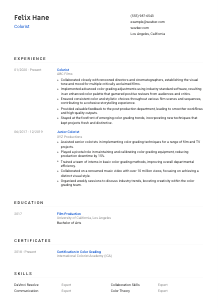
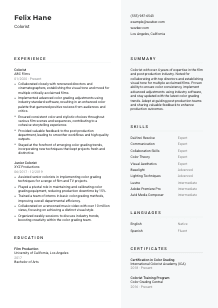
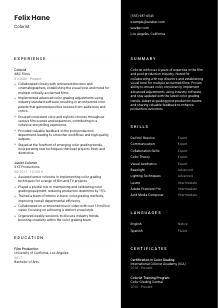
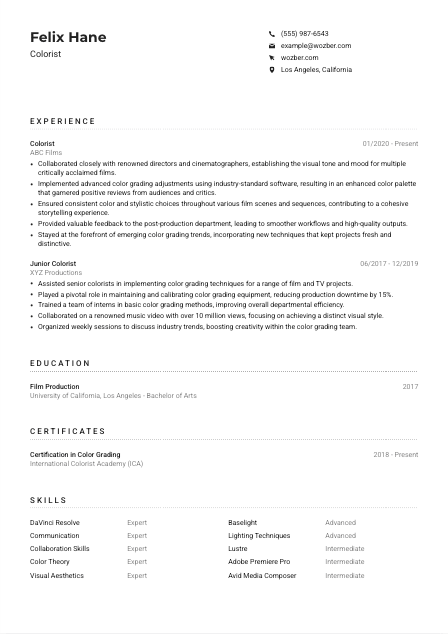
Each bullet should show what you handled and what it changed. Strong Colorist bullets mention grading decisions, visual continuity, director or DP collaboration, post workflow input, and final look development. The sample CV does this well by pointing to establishing visual tone, implementing advanced adjustments, and maintaining stylistic consistency across sequences.
Metrics work best when they match the kind of impact your work actually has. That might mean audience scale, reduction in downtime, number of projects delivered, turnaround improvements, or team efficiency. In the sample, "over 10 million views" and a "15%" reduction in downtime give concrete scale without forcing numbers into every bullet.
If you have editing, assistant editor, online, conform, or cinematography experience, include it only when it strengthens your case as a Colorist. Frame that work around colour pipeline awareness, media prep, lighting judgment, or collaboration with post teams, not as a separate identity that muddies your specialty.
Your experience section should make it easy to picture you in a grading suite: shaping looks, protecting continuity, handling professional tools, and contributing to a smooth post-production workflow.
Education matters most when it reinforces your visual foundation and connection to film or post-production work. Keep this section straightforward, then add detail only if it strengthens your relevance as a Colorist.
If the posting does not require a specific degree, list the education that best supports your work in grading. A Film Production degree, like the one in the example, signals familiarity with image-making, production language, and the broader context in which colour decisions are made.
Include your degree, school, field of study, and graduation year or date range. Colorist hiring decisions are driven more by portfolio, software fluency, and project work than by elaborate education formatting, so clarity matters more than detail for its own sake.
If you studied colour theory, cinematography, digital imaging, post-production workflows, or visual storytelling, those details can help, especially earlier in your career. Only add courses that genuinely support your transition into grading work.
Student films, thesis projects, festival selections, or academic honors can be useful if they connect directly to visual finishing, image treatment, or collaboration with directors and DPs. For established professionals, this level of detail is usually only worth keeping when it still adds relevant context.
Workshops, extension courses, or newer training in HDR workflows, colour-managed pipelines, or current grading practices can sit here if they are academic in nature. This is a practical way to show that your knowledge has kept pace with changes in post-production technology.
Keep education grounded in what it contributes to your grading profile. It should support your visual and technical foundation without taking attention away from project experience and portfolio quality.
Certifications are useful in colour grading when they point to current training, recognized programs, or deeper tool knowledge. They are rarely the main reason someone gets hired, but they can strengthen your case when the posting mentions them or your experience is still growing.
Start with the certifications the employer is likely to value. Here, colour grading certification is listed as a plus, so credentials such as "Certification in Colour Grading" or a dedicated Colorist Training Program deserve clear placement because they directly reinforce the role.
Choose certificates tied to grading, image finishing, post-production, or specific software workflows. A short list of relevant programs says more than a long list of generic media courses.
Dates help employers understand whether the training is recent and whether your methods are likely to reflect current software and grading practices. That matters in a field where workflows, deliverables, and display standards continue to evolve.
If you are actively updating your skills through advanced training, calibration workshops, or platform-specific programs, keep this section current. Ongoing development is especially relevant for Colorists working with new grading features, finishing standards, or changing client expectations.
Use certifications to underline technical seriousness and up-to-date training. They work best when they clearly connect to colour grading practice, software fluency, and current post-production standards.
The skills section should give a quick reading of your technical range and your ability to work inside a creative post pipeline. Prioritise the tools and judgment areas that actually define Colorist performance.
Start with the software, knowledge areas, and collaboration skills named in the job description. For this role, that includes DaVinci Resolve, Baselight or Lustre, colour theory, lighting, visual aesthetics, communication, and collaboration with directors or post teams. This keeps your skills section aligned with both ATS terms and real hiring priorities.
Put your core grading tools first, followed by the craft knowledge behind them. In the example, leading with DaVinci Resolve, Baselight, colour theory, and visual aesthetics immediately tells a hiring manager that the candidate can operate both the software and the eye behind the grade.
Do not overload this section with every tool you have touched. Include adjacent software such as Adobe Premiere Pro or Avid Media Composer only if it supports your work in conform, editorial handoff, or post collaboration. The list should still read "Colorist" before it reads "general post-production professional."
A focused skills section should confirm your grading toolkit, your visual judgment, and your ability to work with the people who shape the final image.
Language ability matters in post-production when it affects client sessions, written notes, and day-to-day collaboration. Keep this section factual and useful, with the required language listed first.
If the posting specifies English, list it first and state your level clearly. This job calls for strong verbal and written English, so that requirement should be easy to confirm at a glance.
Use direct labels such as "Native" or "Fluent" rather than leaving proficiency open to interpretation. For a Colorist, that matters in review sessions, written feedback, shot notes, and communication with directors, producers, and finishing teams.
Additional languages can be valuable when you work on international projects, multilingual productions, or with globally distributed post teams. In the example, Spanish adds another layer of communication range without distracting from the role's core requirements.
Stick with standard terms such as "Native," "Fluent," "Intermediate," or "Basic." Consistent labels make the section easier to read and prevent inflated claims.
For most Colorist jobs, language skills are supportive rather than central, unless the work is heavily client-facing across markets. Include them, but let your grading experience, software command, and visual collaboration remain the main focus.
List languages in a way that supports the role's communication demands. The section should confirm that you can work clearly with clients and post teams, not compete with your core grading credentials.
A Colorist summary should quickly establish your level, your environment, and the kind of visual and collaborative work you handle. Keep it short, but make every sentence point toward grading practice and post-production value.
Before writing, identify the two or three themes the employer cares about most. Here, that means years of professional experience, mastery of grading software, visual judgment, and collaboration with directors and cinematographers. Those should anchor the summary rather than generic enthusiasm for film.
Start with your experience level and the environment you work in, such as film, commercials, episodic, or post-production. The sample summary does this effectively by establishing more than 4 years in film and post-production before moving into the candidate's strengths.
Choose strengths that reflect how Colorists are actually evaluated. That could be establishing visual tone, maintaining consistency across sequences, guiding junior team members, or using Resolve and Baselight to shape a final look that supports story and cinematography.
Aim for a tight paragraph that can be understood in seconds. A hiring manager should leave the summary knowing your level of experience, your core grading strengths, and the production context in which you have delivered results.
Your summary should position you immediately as a Colorist who can handle the visual demands, software workflow, and collaboration style of professional post-production.
A Colorist CV works when it presents your craft in the same way good grading presents an image: controlled, intentional, and consistent from top to bottom. Focus on the material that best proves your command of grading software, your visual judgment, and your ability to collaborate with directors, cinematographers, and post teams.
Use Wozber to turn that experience into an ATS-friendly CV format with sharper job alignment. Wozber's AI CV builder and ATS CV scanner can help you match the language of a posting, surface missing requirements, and improve section-by-section ATS optimisation so hiring teams can quickly recognize your value in the suite.
When you finish, your CV should make one thing clear without extra explanation: you know how to shape the final image and deliver it reliably in a professional post-production environment.




