



Use Wozber and land your dream job
Create CV
No registration required
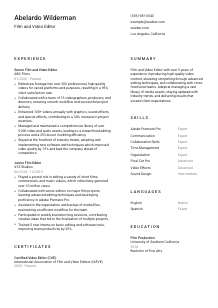
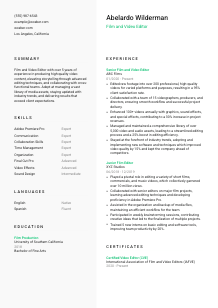
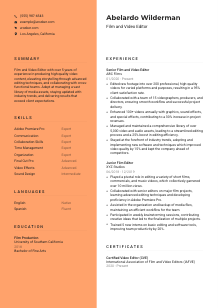
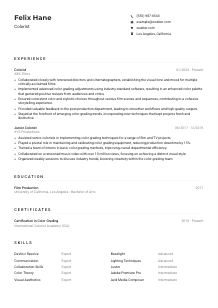
Crafting on-screen magic, but your CV lacks the right frame? Check out this Film and Video Editor CV example, created with Wozber free CV builder. It shows how to cut and blend your editing genius to match job expectations, making your career story as captivating as the films you work on!
Editing work gets judged in the cut. Hiring teams want to see whether you can shape raw footage into a finished piece with rhythm, narrative control, clean transitions, and the technical judgment to support the director's intent. A Film and Video Editor CV should make that visible fast through platform range, post-production tools, collaboration with producers and videographers, and outcomes tied to quality, turnaround, or audience response.
When the CV mirrors the language of the posting, it becomes much easier to separate a true editor from someone with only adjacent production experience. Wozber's free CV builder helps you build an ATS-compliant CV that reflects the right editing software, storytelling strengths, and post-production terminology, so the hiring team can quickly see whether your background fits the type of content and workflow they need.
This section is simple, but it still affects how smoothly your application moves. For editing roles, the header should identify you clearly, confirm how to reach you, and remove any friction around location or portfolio access.
Use your full name in the most prominent text on the page. Keep it clean and professional, the same way you would label final deliverables or project files for a client or production team.
Place your current or target title directly under your name. If "Film and Video Editor" matches your background and the posting, use it. This immediately aligns your CV with the role instead of making the reader infer whether you are primarily an editor, producer, or motion designer.
Include a reliable phone number and a professional email address. Double-check both. In freelance-heavy and deadline-driven environments, missed calls or bounced emails can cost interviews as easily as they can cost projects.
If a role calls for a specific city, list that clearly in your header. Here, Los Angeles, California matters because the employer asked for it directly. For other applications, use location only when it helps confirm your availability for on-site shoots, edit sessions, or hybrid post-production work.
Add a portfolio, reel, or professional website if it is current and easy to review. For editors, this link often carries as much weight as the CV itself because it shows pacing, shot selection, sound layering, graphics use, and platform-specific finishing choices in actual work.
Your header should confirm who you are, how to contact you, where you are when that matters, and where to view your work. That is enough to let the reader move straight to your editing experience.




This is the section hiring teams read first for an editing role. They want to understand the kind of footage you handled, the production partners you worked with, the software and post workflows you used, and what changed because of your editing decisions.
Start by marking the recurring needs in the job description. Here, those include editing raw footage, collaborating with producers and directors, improving videos with graphics and sound effects, organising media assets, and staying current with editing tools and techniques. Then shape your bullets around matching work you have already done.
List every position with your title, company, and dates. For editors, the title progression matters. Moving from a junior editing role into a senior one, as in the example, signals deeper ownership over final cuts, revision rounds, creative choices, and delivery standards.
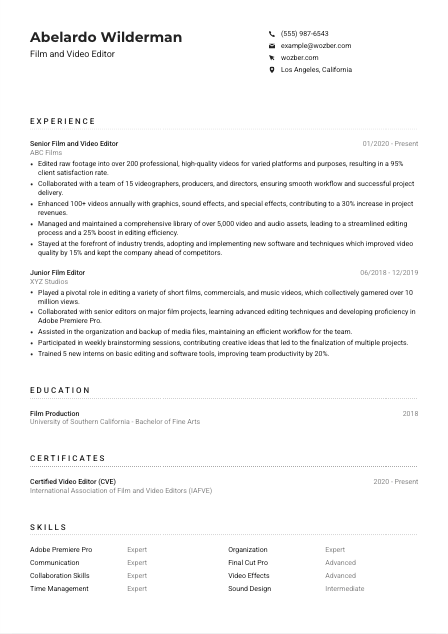
Each bullet should show what you edited, how you worked, and what the result was. Strong examples mention video volume, format range, workflow collaboration, post-production elements, or delivery impact. The sample does this well by showing work across 200+ videos, team collaboration with 15 creatives, and added graphics and effects tied to revenue growth.
Metrics make editing work easier to judge when they reflect the actual job. Useful measures include number of videos delivered, view counts, client satisfaction, editing efficiency, turnaround improvements, asset volume managed, or revenue influenced by higher-quality output. Managing a library of 5,000+ assets or improving workflow efficiency by 25% tells a clearer story than vague claims about being effective.
Keep bullets that strengthen your case for editing roles and trim unrelated tasks. If you include brainstorming, training, or cross-team support, tie them back to production results. Every line should reinforce that you can handle footage, shape story, collaborate in post, and deliver polished video for real audiences or clients.
Your experience should show the scale of your editing work, the production environment you worked in, and the results your cuts helped produce. If that comes through clearly, the reader can picture you in the edit workflow right away.
Education usually plays a supporting role for experienced editors, but it still matters when a posting asks for a degree in film production, video editing, or a related field. Present it clearly so the requirement is easy to confirm.
If the employer asks for a bachelor's degree, include yours in a way that is impossible to miss. In this case, a Bachelor of Fine Arts in Film Production lines up directly with the posting and helps confirm formal training in visual storytelling and production process.
List your degree, field of study, school, and graduation year. Recruiters and hiring managers should be able to verify your academic background in seconds, without reading through extra narrative.
When your degree connects directly to editing, film, media, or production, make that connection explicit. A film production degree supports the technical and storytelling foundation expected in editing roles, especially when paired with professional experience in Adobe Premiere Pro, Final Cut Pro, or similar tools.
Workshops, extension courses, or specialised training in colour correction, sound design, motion graphics, or editing workflows can add value if they support the kind of work the employer needs. Keep them brief and relevant.
Awards, competitive programs, or notable film-school activities can help if they point to serious craft development or industry exposure. Leave them out if they crowd the page or distract from stronger professional editing experience.
For this role, education should quickly confirm that you meet the degree requirement and have a credible foundation in film or video production. Then the CV can return focus to your editing results.
Certifications are not always mandatory for editors, but the right one can reinforce technical commitment, software fluency, or continued professional development. Include them when they add something your experience section does not already make obvious.
Prioritise certificates tied to video editing, post-production, motion graphics, or relevant software. A credential such as Certified Video Editor fits naturally because it supports the core work of assembling footage, refining narrative flow, and delivering polished final content.
Do not crowd this section with unrelated courses or general creative badges. Hiring teams care more about whether the certificate supports the editing workflow, software environment, or production standards they use.
Dates help the reader judge how current the training is. In editing, that matters because tools, codecs, workflows, and finishing expectations change quickly across platforms and production settings.
If you have ongoing coursework or recently completed training, include it when it reflects current techniques or software. That is especially useful for editors working with evolving formats, new effect pipelines, or updated platform delivery specs.
A short, relevant certification section can reinforce your technical range and professional commitment. It works best when it supports the story already established by your editing experience.
This section should read like a practical snapshot of how you work. For Film and Video Editor positions, that means balancing editing software, post-production craft, and the collaboration skills needed to move projects from rough cut to final delivery.
Start with the skills the employer named directly, then add adjacent strengths you genuinely use. Here, Adobe Premiere Pro, Final Cut Pro, storytelling, pacing, timing, communication, and collaboration all belong because they map to daily editing work and team-based production.
Lead with the software and craft areas most central to the role. If you are strongest in Premiere Pro, list it near the top. Then follow with complementary capabilities such as video effects, sound design, media organisation, or timeline management, depending on your real workflow.
Avoid filling this section with broad traits that are already implied elsewhere. Choose skills that help a hiring manager picture you in the suite, handling footage, revisions, effects, sound layers, and collaboration with directors or producers. The sample skill list works because it combines core tools with communication, organisation, and post-production support skills.
A hiring team should be able to scan this section and understand which editing tools you know, what parts of post-production you handle confidently, and how you function within a production team.
Language skills matter when the role calls for clear communication with directors, producers, clients, or crews. For editing roles, that usually means making sure required language fluency is visible rather than overstating multilingual ability for its own sake.
If the posting specifies fluent English, put English at the top with your actual level. For this role, strong English communication matters because editorial work depends on interpreting creative notes, discussing revisions, and aligning with project goals.
Additional languages can be useful in multilingual crews, client-facing environments, documentary work, or international distribution contexts. Include them when they are real working skills, not just casual familiarity.
Use clear labels such as Native, Fluent, Advanced, or Conversational. Editors often work in fast revision cycles, so clarity matters more than embellishment when language skills affect meetings, feedback, or written production notes.
If a position supports global campaigns, bilingual interview footage, or diverse production teams, extra languages can become a real advantage. If not, keep this section brief and accurate.
This section should confirm that you can communicate clearly in the production environment and, when relevant, collaborate across languages without slowing the workflow.
Your summary should capture the kind of editor you are in a few lines: your experience level, your editing strengths, and the production outcomes you are known for. It should sound specific enough to separate you from general media candidates.
Start with your title and years of experience, then anchor it in the actual work. "Film and Video Editor with 5+ years of experience" works because it quickly sets expectations for role level and specialization.
Mention the abilities most relevant to the target role, such as shaping high-quality video content, strengthening storytelling through pacing and timing, collaborating with cross-functional production teams, or managing organised media libraries. The example summary does this well by combining editing craft with asset management and team collaboration.
Aim for a short paragraph that includes concrete strengths or outcomes instead of generic enthusiasm. If you can reference scale, such as years of experience, content volume, or delivery quality, do it briefly. The summary should invite the reader into the rest of the CV, not repeat every bullet that follows.
By the end of these lines, the reader should know what kind of editor you are, what editing environment you work well in, and why your background matches the production needs of the role.
A Film and Video Editor CV works when it shows how you handle footage, story, collaboration, and delivery under real production conditions. Shape each section around the work itself: the software you use, the teams you support, the volume and type of content you edit, and the outcomes your post-production decisions help create.
Use Wozber's free CV builder to organise that experience in an ATS-friendly CV format, then refine it with the ATS CV scanner so the language matches the posting naturally. The final result should make it easy to judge your editing range, production fit, and readiness to step into the next cut.




