



Use Wozber and land your dream job
Create CV
No registration required
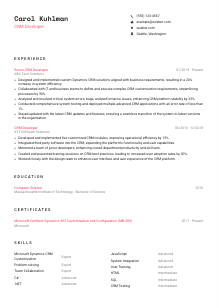
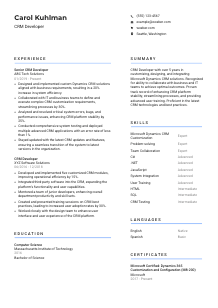
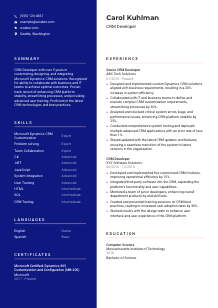
Crafting digital pipelines, but your CV seems disconnected? Check out this CRM Developer CV example, built with Wozber free CV builder. Learn how to neatly align your customer relationship skills with the job blueprint, making your career trajectory as seamless as a frictionless CRM workflow!
CRM development work sits at the point where business process design meets platform engineering. Hiring teams want to see how you turn requirements into working Dynamics CRM or Dynamics 365 customizations, integrations, and fixes that users can rely on in production. Your CV should quickly show that you can build, troubleshoot, test, and support CRM solutions in a live business environment.
When that experience is tailored well, the first screening pass becomes much easier. Wozber's free CV builder helps you shape an ATS-compliant CV around the language of the role, so terms like Dynamics customization, C#, JavaScript, SQL, testing, and deployment appear where they naturally belong. That makes it easier for a reviewer to understand your technical scope and how closely your background matches the CRM work they need covered.
For CRM Developer roles, the personal details section should remove basic questions immediately. Hiring teams should be able to see who you are, what role you target, how to contact you, and whether you meet practical requirements such as location without digging through the rest of the CV.
Use your full name as the most visible text at the top of the page. Keep the formatting simple and readable. In technical hiring, polished presentation matters less than clarity, and your header should feel as clean and structured as the systems you work on.
Place "CRM Developer" directly under your name when that is the role you are applying for. If your background is more specialised, a close variation such as "Dynamics 365 CRM Developer" can work when it accurately reflects your experience. This helps reviewers place you correctly before they even reach your work history.
Include a current phone number and a professional email address. Check them carefully. For a role that may involve interviews with both technical leads and business stakeholders, missed contact details can stall the process for no good reason.
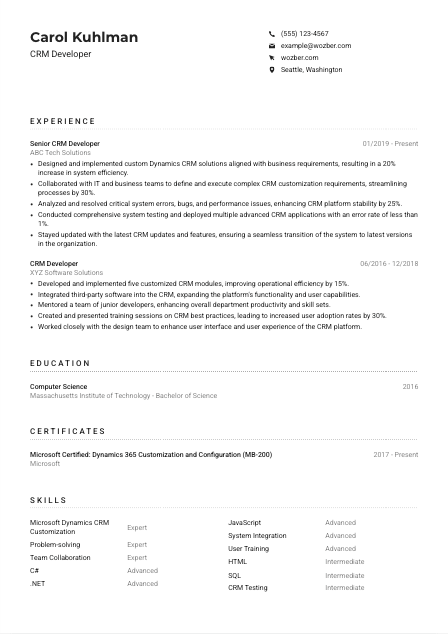
If a posting asks for a specific location or relocation readiness, state it plainly in this section. In the example, listing Seattle, Washington immediately supports a stated requirement. Use that approach when location is part of the hiring filter, but do not treat it as a universal need for every CRM Developer opening.
Include LinkedIn, a portfolio, GitHub, or another professional link only if it strengthens your application. For CRM Developers, that might mean showing solution work, integration projects, documentation samples, or a polished profile that reinforces your Dynamics, .NET, and JavaScript background. Keep titles, dates, and technologies consistent with the CV.
This section does not need flair. It needs accuracy, role alignment, and any logistics that matter to the posting. Once those basics are clear, the reader can focus on your CRM platform experience instead of hunting for missing details.




Experience carries the most weight in a CRM Developer CV because this is where employers look for platform depth, business-facing delivery, and technical problem solving. Your bullets should show what you configured or built, which teams you worked with, what issues you solved, and what changed because of your work.
Start by pulling out the actual work themes from the job description. For this role, that includes designing Dynamics solutions, customising the platform, collaborating on requirements, resolving bugs and performance issues, testing, deployment, and user training. Then make sure your experience bullets cover those same areas with your own real examples rather than generic software development language.
List positions in reverse chronological order with job title, employer, and dates. That format lets a hiring manager quickly track your progression from hands-on CRM development into broader ownership such as solution design, integration work, environment support, or mentoring. Clear structure also helps ATS parsing and prevents your most relevant work from getting buried.
Each bullet should show a concrete contribution to the CRM platform. Strong examples include custom entity or workflow development, plugin or integration work, bug resolution, user adoption improvements, deployment quality, or performance gains. The sample CV does this well with bullets like increasing system efficiency by 20% and improving platform stability by 25%, both of which connect technical work to operational results.
Quantify impact where you genuinely can. Useful measures in this field include reduced error rates, faster processing, adoption gains, efficiency improvements, successful module launches, fewer support incidents, or smoother upgrades. Numbers give context to your work, especially when they reflect how CRM systems affect sales, service, operations, or internal process teams.
Prioritise experience tied to CRM customization, Dynamics 365, integrations, database work, scripting, testing, release support, and cross-functional delivery. Earlier experience can stay if it shows adjacent value, but give most space to what proves you can deliver on a CRM roadmap. If you have unrelated work, trim it down so your strongest technical and business-facing achievements stay prominent.
The best experience sections show more than tenure. They show platform ownership, technical judgment, and business impact. When a reviewer can see what you built, what you fixed, and what improved, your CV starts to read like someone who can step into a live CRM environment and contribute quickly.
Education is usually not the deciding section for an experienced CRM Developer, but it still matters when the posting asks for a technical degree. Present it clearly, and use it to support your foundation in software development, systems thinking, and data work without overloading the section.
If the posting asks for a Bachelor's degree in Computer Science, Information Systems, or a related field, make that easy to confirm. A degree such as the example's Bachelor of Science in Computer Science meets the requirement directly, so it should be listed in a standard, easy-to-scan format.
Include degree, field of study, school, and graduation year or date. For most CRM Developer applications, that is enough. Hiring teams usually want to confirm that your academic background supports your technical training, then move on to the work that shows how you apply it in Dynamics environments.
If your coursework or academic concentration directly supports CRM work, you can mention it briefly. Relevant examples might include database systems, software engineering, web development, enterprise applications, or information systems analysis. Add this only if it sharpens your positioning rather than repeating what your experience section already proves.
If you are early in your career, one or two academic projects can help fill out your technical profile. Focus on projects that involved application customization, SQL-backed systems, JavaScript front ends, API integration, or business software workflows. Once you have several years of CRM experience, those projects usually belong only if they are unusually relevant.
CRM platforms evolve constantly through release waves, feature updates, and changing integration patterns. If you have recent training in Dynamics 365, Power Platform components, Azure integrations, or related development tools, mention it when it adds current relevance. That reinforces that your knowledge is active, not frozen at graduation.
This section should confirm your technical foundation without competing with your experience. When the degree requirement is easy to verify and any relevant coursework is used sparingly, the reader can move on to the parts of the CV that show how you build and support CRM solutions in practice.
Certifications carry real weight in CRM hiring when they confirm platform-specific knowledge. For Dynamics roles, they can support your credibility in customization, configuration, and current Microsoft ecosystem practices, especially when several candidates have similar years of experience.
Move Microsoft Dynamics credentials to the top when the job description names them. Here, certifications such as MB-200 or MB-210 are directly relevant, so listing them prominently helps. The example's Microsoft Certified: Dynamics 365 Customization and Configuration credential is a strong match because it speaks to the same platform area the employer wants.
Include certifications that support CRM development, platform configuration, integrations, or closely related Microsoft technologies. You do not need to list every technical badge you have earned if it does not add to your case for this type of role. A shorter list of relevant credentials usually lands better than a long catalogue of mixed topics.
Dates matter in platform roles because products, interfaces, and best practices change. Show when the certification was earned and, if relevant, whether it remains active. That gives hiring teams context on how current your Dynamics knowledge is, especially if the role involves keeping systems aligned with newer platform updates.
If you are studying for a newer Dynamics, Power Platform, or Azure certification, you can mention that when it is accurate and useful. It shows that you keep pace with the ecosystem and invest in staying current with deployment, integration, and customization practices that affect day-to-day CRM work.
Well-chosen certifications strengthen your CV when they map directly to the platform work you do. For a CRM Developer, they are most useful when they reinforce your Dynamics specialization and show that your knowledge keeps up with the product.
The skills section should act like a quick technical index for your CV. In CRM hiring, reviewers often scan here to confirm platform familiarity, programming languages, integration capability, and the practical strengths that show up in implementation and support work.
Read the job description for explicit technical requirements and the work behind them. Here that means Microsoft Dynamics CRM or 365 customization, C#, .NET, JavaScript, HTML, SQL, problem solving, and collaboration. Build your skills list around technologies you actually use plus the delivery capabilities that matter in CRM projects, such as testing, integration, debugging, and user training.
Lead with the skills that define your fit for the role. For this kind of opening, Dynamics CRM customization and development should appear near the top, followed by the coding stack and implementation-related skills. The sample CV handles this well by foregrounding Microsoft Dynamics CRM Customization, C#, .NET, JavaScript, system integration, and CRM testing instead of burying them under generic technical terms.
Avoid turning this section into a dump of every platform, language, and soft skill you have encountered. Choose the skills you can defend in an interview and that are supported elsewhere in the CV. A focused list makes it easier for both ATS tools and human reviewers to connect your technical stack to the CRM work the role requires.
A well-built skills section should tell the reader, within seconds, that you know the platform, the development stack, and the support work around it. When those skills line up with the job description and your experience bullets, your CV feels much more coherent.
Language fluency matters in CRM work when you need to gather requirements, explain system behaviour, train users, and work across business and technical teams. Even when the role is mainly technical, clear communication can shape implementation quality and user adoption.
If the posting specifies English proficiency, place English at the top of this section with an accurate level such as Native or Fluent. That matters for CRM roles because requirements workshops, bug triage, documentation, and training often depend on precise communication, not just coding ability.
Extra languages can be useful in global organizations, customer-facing environments, or distributed teams. They are rarely the core hiring factor for a CRM Developer, but they can still support collaboration across regions or business units. Use them as supporting information, not as a substitute for platform expertise.
Describe your level honestly with terms such as Native, Fluent, Intermediate, or Basic. That gives hiring teams a realistic sense of your communication range and avoids the ambiguity that comes from vague terms. The example's "English - Native" and "Spanish - Basic" is a clean model for this section.
Some CRM environments involve international users, offshore development support, or regional sales and service teams. In those cases, an additional language can help with stakeholder communication or user training. Mention that value if it is relevant, but keep the section concise.
For most CRM Developer CVs, languages should stay brief. They matter most when they satisfy a stated requirement or support a clear business need. Let your CRM implementation, debugging, and customization experience remain the main story.
Handled well, this section shows that you can communicate clearly in the environments where CRM work actually happens. That is useful context, especially when the role includes stakeholder meetings, training, or collaboration across teams.
The summary is where you frame your background before the reader enters the detail. For a CRM Developer, that means naming your platform focus, your level of experience, and the kind of implementation or support results you have delivered, all in a few lines that feel specific rather than generic.
Open with who you are in market terms. Mention your years of experience and your focus on Microsoft Dynamics CRM or Dynamics 365 development, customization, and integration. This gives immediate context and helps separate you from general .NET developers or broader enterprise application candidates.
Choose strengths that match the posting and that you can prove later in the CV. Good examples include translating business requirements into CRM solutions, resolving bugs and performance issues, supporting deployments, or training users after release. The example summary works because it connects customization, collaboration, platform stability, process improvement, and training into one coherent profile.
Aim for a short paragraph, not a mini biography. Use precise terms such as Dynamics CRM, integrations, C#, JavaScript, testing, deployment, or system performance when they reflect your background. That gives the summary substance and helps with ATS alignment without making it read like a keyword list.
Close by pointing toward the kind of contribution you can make in the target role. That might be cleaner customizations, more stable CRM environments, smoother business process support, or faster issue resolution. Keep it tied to CRM outcomes so the summary sets up the rest of the CV naturally.
A good CRM Developer summary tells the reader what platform you work in, how you contribute, and where your strength lies. Once that is clear, the rest of the CV has a much easier job proving depth in customization, integration, testing, and production support.
A CRM Developer CV works best when it shows platform-specific execution, not generic software experience. If your sections clearly cover Dynamics customization, coding tools, integrations, issue resolution, testing, deployment, and collaboration with business teams, you give hiring managers a much sharper picture of how you would perform in the role.
Use Wozber to tighten that alignment from top to bottom. Wozber's AI CV builder can help surface missing requirements, refine wording around real experience, and support ATS optimisation through stronger role terminology and structure. The result should be a CV that makes your Dynamics background easy to recognize, easy to parse, and easy to trust.




