



Use Wozber and land your dream job
Create CV
No registration required
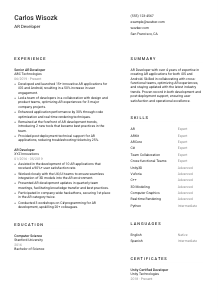
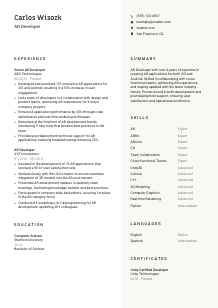
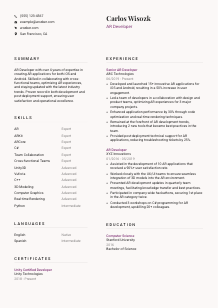
Blending virtual objects with reality, but your CV doesn't stand out? Check out this AR Developer CV example, created with Wozber free CV builder. It shows how to bring your augmented reality skills onto paper, crafting a career view as immersive as the experiences you develop!
AR development sits at the intersection of graphics, mobile engineering, and user experience. Hiring teams want to see more than general software work. Your CV needs to make it clear that you can build interactive AR features, work within real-time performance limits, and ship experiences that hold up on actual devices across iOS, Android, or both.
When AR CVs are tailored well, the first pass becomes much easier. Wozber's free CV builder helps you line up your experience with the posting's wording, keep the layout ATS-friendly, and surface platform, rendering, and collaboration details that often get buried. That matters when a team is sorting quickly between general Unity developers and candidates who have already delivered production AR work.
This section should confirm the basics fast and support the role you're targeting. For an AR Developer, that means clear contact details, a matching title, and links that help a hiring manager or recruiter move straight into your technical profile or portfolio.
Use your full name at the top in a clean, readable style. Keep it simple. In technical hiring, clarity beats decoration, especially when your CV may be reviewed in an ATS, by recruiting, and by an engineering lead.
If you're applying for an AR Developer position, label yourself accordingly when that matches your background. This immediately frames your experience around augmented reality rather than broader game development, mobile engineering, or 3D work. In the example, "AR Developer" keeps the positioning direct and aligned with the posting.
Include a phone number, professional email address, and, if relevant, a portfolio or LinkedIn profile. For AR work, a portfolio can be especially useful if it shows shipped apps, demos, 3D interaction work, or Unity-based prototypes. Double-check every link and number. Broken contact details are an easy way to lose an interview.
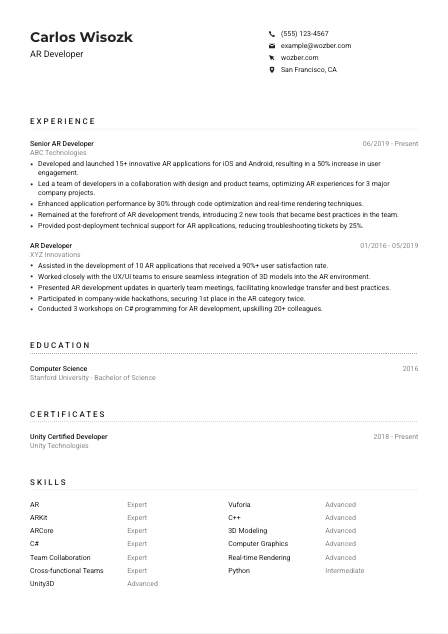
If a posting includes a location requirement, reflect it clearly. Here, the employer asked for someone located in San Francisco, CA, so listing "San Francisco, CA" removes a practical question before it slows down the process. Treat that as tailoring to this opening, not as a rule for every AR role.
A personal website is worth including when it shows AR projects, GitHub repos, case studies, app store links, or video captures of marker-based, spatial, or mobile AR experiences. For this field, visual proof of interaction design, 3D assets, and device performance can strengthen your CV far more than a generic homepage.
Your personal details should remove friction, confirm role alignment, and point toward your AR work quickly. Make it easy for the reader to know who you are, what you build, and whether you meet any practical requirements tied to the opening.




This is where AR hiring decisions usually take shape. Teams look for evidence that you've built real applications, worked across mobile platforms or engines, solved rendering or performance issues, and collaborated with design and product partners without losing sight of user experience.
Read the job description for the work patterns behind the wording. Here, the emphasis falls on building AR applications for iOS and Android, collaborating across teams, optimising performance, and supporting apps after launch. Those cues tell you which achievements to bring forward first, especially anything tied to ARKit, ARCore, Unity3D, Vuforia, rendering, or post-release troubleshooting.
List roles in reverse chronological order with job title, company, and dates. For technical hiring, that fast structure matters because readers often scan titles first to understand your level, then jump to bullets for platform scope, project scale, and outcomes. "Senior AR Developer" and "AR Developer" immediately give useful context in the sample CV.
Write bullets that show what you built, what stack or platform you used, and what changed because of your work. "Developed and launched 15+ innovative AR applications for iOS and Android" is stronger than a generic line about participating in development because it shows delivery volume and platform reach. Add collaboration details where relevant, especially with design, product, or UX teams, since AR work often lives or dies on that handoff.
Numbers are most convincing when they reflect how AR products are evaluated. Good examples include user engagement, frame-rate or rendering improvements, crash reduction, latency, ticket reduction, deployment count, or satisfaction scores. In the sample, a 50% increase in engagement, 30% performance improvement, and 25% reduction in support tickets all show business and technical impact in ways a hiring team can interpret quickly.
Prioritise work tied to augmented reality, 3D asset integration, graphics pipelines, mobile deployment, prototyping, optimisation, or cross-functional delivery. If an older role is less relevant, trim it down and keep the bullets focused on transferable work such as C#, Unity, computer graphics, or user-facing interactive features. Every line should help the reader understand your AR development range faster.
Your experience section should show that you can move from prototype to release, improve technical performance, and work effectively with product and design partners. When those points are concrete and measurable, your AR background becomes much easier to trust.
Education matters in AR because the work draws on programming, graphics, interaction design, and spatial thinking. Even when experience carries more weight, your degree still helps establish the technical base behind your work with engines, rendering, and mobile development.
If the posting asks for a bachelor's degree in Computer Science, Interactive Design, or a related field, make that match obvious. A degree in Computer Science, like the one shown in the example, directly supports work involving programming, graphics concepts, and system thinking.
List your degree, field, school, and graduation year. That is usually enough for an experienced AR Developer. The section should be quick to scan so the reader can confirm the academic requirement and move back to your project and delivery history.
If your degree is especially relevant, do not bury the field name. "Bachelor of Science in Computer Science" or "Bachelor's in Interactive Design" gives stronger context than a shortened degree line because it connects directly to the posting's expectations around software development and immersive experience work.
This is most useful early in your career or when your academic work maps closely to AR. Courses or projects in computer graphics, 3D modeling, human-computer interaction, mobile development, or real-time rendering can help show depth before you have years of shipped applications.
Honors, research, competition work, or technical clubs can add value when they relate to graphics, AR, XR, game engines, robotics, or interactive media. Keep them only if they add useful context for the role rather than filling space with general campus activity.
Keep this section straightforward, relevant, and easy to verify. For AR roles, it works best when it clearly supports the technical foundation behind your development, rendering, and interactive design work.
AR tools and workflows change quickly, so certifications can help reinforce current platform knowledge or engine proficiency. They are not mandatory for every opening, but the right one can strengthen your profile when it connects to the stack the employer actually uses.
Prioritise certifications connected to game engines, development platforms, or graphics workflows that matter in AR roles. A credential such as "Unity Certified Developer" is relevant because Unity remains common in mobile AR production and prototyping. In the example, that certificate supports the candidate's hands-on Unity3D experience well.
Do not crowd this section with broad or outdated certificates. Choose items that reinforce capabilities named in the posting, such as Unity, mobile development, graphics, or adjacent XR tools. Relevance is more persuasive than volume here.
Include certification dates or validity periods, especially in a technical field where tools evolve. Current or recently maintained credentials suggest that your knowledge keeps pace with newer engine versions, SDK updates, and workflow changes.
AR development rewards people who keep learning. If you are working with newer AR frameworks, real-time rendering techniques, or platform-specific tooling, updated certifications can show that your knowledge is not frozen at the point when you first learned Unity or mobile graphics.
Use this section to reinforce real technical capability in engines, platforms, or graphics workflows. The right certification adds confidence around your AR toolkit and shows that you keep your skills current.
An AR Developer skills section needs to do more than list software names. It should give a quick read on your platform range, programming depth, graphics knowledge, and ability to work inside the collaborative workflow that AR products usually require.
Pull the technical terms directly from the job description when they match your real experience. Here that includes ARKit, ARCore, Unity3D, Vuforia, C#, C++, Python, 3D modeling, computer graphics, and real-time rendering. Those are core search terms for both ATS matching and technical review, so place them clearly rather than hiding them in long experience bullets.
AR hiring usually looks for a combination of hard technical capability and cross-functional execution. Keep platform and coding skills at the centre, then include collaboration skills that matter in practice, such as working with design, product, or UX teams. The sample handles this well by pairing tools like ARKit and Unity3D with collaboration-oriented skills.
Lead with the skills most likely to matter on day one. For this role, that would usually mean AR platforms, Unity or related engines, core languages, and graphics or rendering knowledge before broader soft skills. If your CV format supports it, grouping by categories such as "AR Platforms," "Programming," and "Graphics" can make the section even easier to scan.
A well-built skills section helps the reader confirm that you already work with the platforms, languages, and graphics concepts the role depends on. Keep it focused on production-relevant tools and the collaboration habits that support AR delivery.
Language sections are brief, but they still matter when a posting names communication requirements directly. In AR development, clear communication affects sprint planning, product reviews, bug triage, and collaboration with designers, PMs, and engineers across disciplines.
When the employer explicitly asks for English fluency, list English clearly with an honest proficiency level. That confirms you can work through standups, technical discussions, documentation, and cross-functional review cycles without ambiguity.
Extra languages can be useful in global product teams, distributed development environments, or user research contexts. They are secondary to your AR and engineering qualifications, but they can still broaden your profile when presented cleanly.
Stick with standard labels such as Native, Fluent, Intermediate, or Basic. Consistent language levels are easier to interpret than creative wording, and they help avoid confusion during interviews or team placement discussions.
Most AR Developer openings care first about your ability to collaborate effectively in the working language of the team. If the posting names only English, meet that requirement directly and treat other languages as added context rather than the main point.
Additional languages can support multicultural teams or international products, but they rarely outweigh platform, graphics, and coding experience. Present them as a useful complement to your technical profile, not a substitute for core AR capability.
This section should quickly confirm that you can operate in the team's working language and collaborate smoothly across technical and non-technical groups. Keep it concise, accurate, and proportional to the role.
The summary is your quickest chance to frame your profile before the reader reaches the details. For AR roles, it should establish your experience level, your platform or engine focus, and the kind of outcomes you have delivered, without drifting into vague claims about innovation or passion.
Start by spotting the main priorities in the posting. Here, the emphasis is on building AR applications for iOS and Android, collaborating across teams, optimising performance, and supporting applications after launch. Those themes should shape your opening lines.
A direct first sentence works best. Something close to "AR Developer with 4+ years of experience building AR applications for iOS and Android" immediately tells the reader your seniority and delivery area. If your background leans more heavily into Unity, ARKit, ARCore, computer graphics, or real-time rendering, include that in the same sentence when it is central to the target role.
Use the summary to mention the kind of impact you have had, not to repeat a generic skill list. Performance optimisation, user engagement gains, cross-functional delivery, or post-launch support are all relevant choices for AR work. The sample summary does this well by combining platform scope, collaboration, optimisation, and operational support in a compact space.
Aim for 3 to 5 lines. Avoid broad statements that could describe any software developer. Your wording should sound grounded in AR development, with references to mobile platforms, immersive experiences, rendering, optimisation, or shipped applications depending on your background.
A strong summary should tell the reader, within a few seconds, whether you already operate in the AR environments they need. When it is tailored well, the rest of the CV reads as proof of that claim.
An effective AR Developer CV shows platform experience, graphics and rendering knowledge, measurable delivery, and the ability to work closely with design and product teams. Once those points are clear, hiring teams can picture you contributing to real AR applications instead of guessing from broad software experience.
Use Wozber's AI CV builder to tighten your wording, align your content with the job description, and build an ATS-compliant CV that highlights the right technical terms without sounding forced. The finished CV should make one thing easy to judge: whether you can step into AR development work and ship.




