



Use Wozber and land your dream job
Create CV
No registration required
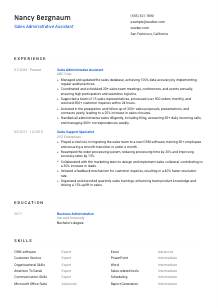
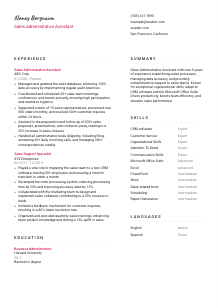
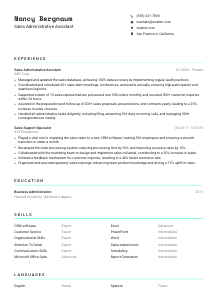
Juggling sales figures, but your CV isn't adding up? Check out this Sales Administrative Assistant CV example, created with Wozber free CV builder. It shows how to streamline your sales support skills to match job specifications, making your career trajectory as successful as a record-breaking quarter!
Sales teams move faster when the administrative side is tight. A Sales Administrative Assistant CV needs to show that you can keep CRM records accurate, process orders without delays, coordinate meetings and materials, and stay responsive when reps or customers need answers quickly. Hiring teams look for people who can reduce friction in the sales cycle, not just handle office tasks.
When that operational support is tailored clearly, it becomes easier to separate general admin experience from true sales support experience. Wozber's free CV builder helps you line up your wording with the posting and create an ATS-compliant CV that surfaces the right details first, from CRM work to reporting, order handling, and proposal follow-up. That gives the reader a faster read on how you support sales performance day to day.
This section is simple, but it still does real work. For a Sales Administrative Assistant role, your header should present you as organised, reachable, and already aligned with practical requirements the employer may screen for before they read your experience.
Use your full name in a clean, readable format at the top of the page. Keep it slightly larger than the rest of the text so it is easy to find during a quick review. This section should feel professional and orderly, which already supports the impression you want for a role built around coordination and accuracy.
Place "Sales Administrative Assistant" directly under your name if that is the role you are pursuing. Matching the title helps frame your background immediately, especially when your past work includes related positions such as sales support, customer service, or administrative coordination.
Include your phone number and a professional email address, and make sure both are current. For a position that involves customer inquiries, internal follow-up, and handling correspondence, even small errors in your contact details can undercut the reliability your CV is trying to communicate.
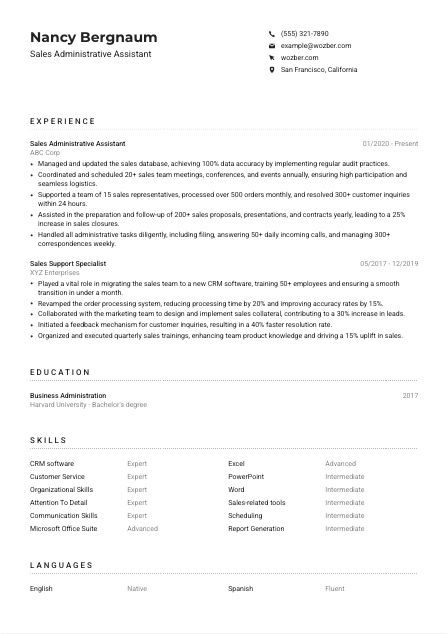
If the employer asks for candidates in a specific area, show your city and state clearly. In this example, listing "San Francisco, California" helps address the stated location requirement without adding explanation. Use this only when location matters to the job posting.
If you have a LinkedIn profile or professional website, include it only if the content reinforces your CV. For this kind of role, that usually means consistent job titles, clear experience dates, and professional detail around sales support, CRM work, reporting, or customer communication.
Your personal details should remove basic questions before they arise. Clear contact information, the right target title, and location when required help the employer move straight to your sales support experience and administrative strengths.




This is the section that carries the most weight for a Sales Administrative Assistant. Hiring teams want to see whether you have handled the behind-the-scenes work that keeps reps productive, customers informed, and records accurate enough for reporting and follow-up.
Start by marking the core tasks in the job description. In this case, that includes managing sales databases, coordinating meetings, processing orders, answering customer inquiries, preparing proposals and contracts, and handling general administrative support. Those priorities should shape which bullets you keep, which you rewrite, and which results you bring forward first.
List positions in reverse chronological order and make each entry easy to scan with title, company, and dates. Then build bullets around the work most relevant to a sales support environment. If you have held broader administrative roles, foreground the parts tied to CRM updates, scheduling, reporting, customer communication, or document preparation rather than unrelated office duties.
Sales support work is often measured by accuracy, response time, order volume, reporting cadence, and coordination load. Use numbers to make that visible. The example CV does this well with details such as processing 500+ orders monthly, resolving 300+ customer inquiries within 24 hours, and coordinating 20+ sales meetings and events each year. Metrics like these show pace, reliability, and scale.
Choose accomplishments that show how your work helped the sales team close business, stay organised, or move faster. A bullet about assisting with 200+ proposals and contracts that contributed to a 25% increase in sales closures works because it connects administrative support to commercial results. That is stronger than listing generic office tasks with no sales context.
Mention the systems and workflows you used when they are relevant to the role, especially CRM platforms, Excel-based tracking, order processing tools, and reporting routines. If you improved a process, include that too. The sample's CRM migration and order-processing improvements are good examples because they show tool proficiency, cross-team support, and measurable efficiency gains.
Your experience section should make it clear that you can support a busy sales function with accurate records, fast follow-up, organised scheduling, and dependable administrative execution. If the reader can picture you keeping the pipeline and paperwork moving, this section is doing its job.
Education usually plays a supporting role here, but it still matters when the posting asks for a degree or equivalent background. Present it clearly and let it confirm that you meet the baseline requirement while the experience section carries the stronger proof of day-to-day sales support capability.
If the job asks for a bachelor's degree or equivalent practical experience, make that easy to spot. A degree in Business Administration, Sales, or a related field fits naturally for this type of role because it supports work tied to customer communication, sales processes, and office operations.
List the degree, school, and graduation year in a straightforward format. This role does not require a complex academic presentation. Recruiters usually want to confirm quickly that you meet the education requirement and move on to the sections that show CRM use, reporting, and sales support performance.
If your major connects directly to the work, name it in full. In the example, "Bachelor's degree in Business Administration" aligns well with a job that blends administrative execution, coordination, and sales support. If your degree is in another field, that is fine, but let your experience carry the closer match.
Relevant coursework can help if you are earlier in your career or if your experience is lighter. Prioritise subjects tied to business communication, spreadsheet analysis, customer relations, operations, or sales fundamentals. Leave it out if your work history already demonstrates those abilities more convincingly.
Honors, projects, or leadership roles belong here only if they add something useful to your application. For example, a business project involving reporting, process organisation, or client communication may support the profile of a junior candidate. If you already have several years of direct experience, keep the education section concise.
Education should confirm that you meet the stated requirement and, when relevant, reinforce your grounding in business or sales support work. Keep it brief, accurate, and easy to verify.
The skills section should read like a practical match for the job, not a catch-all list. For a Sales Administrative Assistant, employers usually scan for software familiarity, coordination ability, communication strength, and the kind of detail management that keeps orders, records, and follow-up work on track.
Start with the language the employer uses. Here, that includes CRM software, Microsoft Office Suite, Excel, PowerPoint, Word, organizational skills, attention to detail, communication skills, and customer-facing support. Those belong near the top if they reflect your real experience.
Do not copy every keyword blindly. Keep the skills you can back up in your experience section. If you list CRM software, your bullets should show database maintenance, reporting, migration support, or pipeline updates. If you list communication skills, your experience should reflect customer inquiries, correspondence, or sales coordination.
Lead with the capabilities that support daily sales operations. That usually means CRM systems, customer service, scheduling, reporting, order processing, Microsoft Office tools, and administrative organisation. The example CV works because it groups both technical and support skills around the realities of the job rather than listing unrelated strengths.
This section should quickly confirm that you can work across systems, documents, customers, and sales team needs without losing accuracy. Keep the list focused enough that every skill points back to work you have actually done.
Language skills matter most when they affect daily communication. In a Sales Administrative Assistant role, that usually means handling calls, emails, customer questions, and internal coordination clearly enough to keep work moving without confusion.
If the posting names a required language, list it prominently with an honest proficiency level. Here, English competency is mandatory, so it should appear first. Use labels such as "Native" or "Fluent" only if they are accurate.
After the required language, include any others that may be useful in customer communication or internal support. A second language can be valuable in companies with diverse clients, regional sales coverage, or multilingual service needs, even when it is not required.
Use clear levels such as Native, Fluent, Intermediate, or Basic. In support roles, overstatement can create real problems if the job includes customer calls, written follow-up, or document handling in that language.
Not every Sales Administrative Assistant role needs multiple languages, but some do benefit from them. If your language ability helps with customer responsiveness, smoother handoffs, or broader service coverage, it is worth including. The sample's English and Spanish combination is one example of an added asset, not a requirement for every role.
List languages when they improve your ability to support customers, sales reps, or cross-functional communication. Keep the levels honest so the employer can judge where your language skills will be useful.
Your summary should give a quick, credible read on how you support a sales team. This is where you connect your years of experience, your core tools, and the outcomes you influence, such as cleaner data, faster order flow, better customer response, or stronger proposal support.
Before writing, identify the few themes that define the job. In this posting, those are sales support, CRM and reporting accuracy, customer communication, scheduling, and administrative coordination. Your summary should reflect that mix rather than sounding like a generic office assistant profile.
Open with your title or closest equivalent and your years of relevant experience. For example, a line such as "Sales Administrative Assistant with 5+ years of experience supporting sales teams, managing CRM records, and coordinating customer and order workflows" quickly positions you in the right lane.
Include two or three specifics that match the role, such as CRM software, Microsoft Office, order processing, reporting, proposal support, or customer inquiry handling. The sample summary is effective because it pairs tools with outcomes like streamlining sales processes, improving data accuracy, and boosting team efficiency.
Stay within 3 to 5 lines. That is enough room to show your specialty, your level, and your value without repeating details better left to the experience section. Aim for concise language that sounds operational and credible, not promotional.
A well-written summary should make it obvious that you can support a sales team with structure, speed, and accuracy. If those strengths come through in a few lines, the rest of the CV has a clear direction.
A Sales Administrative Assistant CV should show more than general admin capability. It should make your CRM work, order handling, reporting accuracy, customer communication, and support for sales materials easy to find and easy to trust.
Use Wozber to tighten that alignment with an ATS-friendly CV format, stronger job-specific phrasing, and practical ATS optimisation that reflects your real experience. When the CV is tailored well, hiring teams can quickly see that you are ready to support the pace and precision a sales team depends on.




