



Use Wozber and land your dream job
Create CV
No registration required
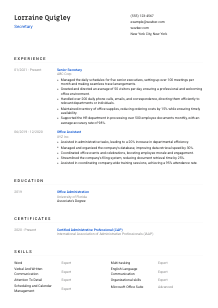
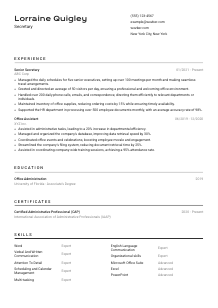
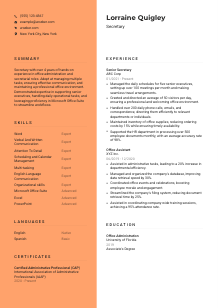
Juggling appointments, but your CV gets lost in the filing cabinet? Check out this Secretary CV example, created with Wozber free CV builder. It shows how to turn your organizational skills into a professional document that aligns with company protocols, ensuring your career path stays right on schedule!
Secretaries keep office operations moving when calendars shift, visitors arrive unannounced, executives need documents fast, and routine admin work still has to stay accurate. Your CV should make that dependability visible quickly through the kind of support you provide, the pace you handle, and the office workflows you keep organised.
A tailored CV changes how hiring teams sort administrative candidates, especially when they are scanning for direct experience with scheduling, correspondence, front-desk coordination, and document support. Wozber's free CV builder helps you shape that experience into an ATS-compliant CV that reflects the language of the posting, so your application reads clearly as secretary-level support rather than general office help.
Administrative hiring starts with practical information. For a Secretary, the header needs to confirm who you are, how to reach you, and whether you meet any basic location or contact requirements without making the reviewer hunt for them.
Use your full name in a larger, clean font so it is easy to spot on the page. Secretarial work depends on order and professionalism, and even the top line of your CV should reflect that same standard.
Place "Secretary" directly under your name when that is the role you are applying for. Matching the posted title helps position your background correctly, especially if your past roles include related titles such as Office Assistant, Administrative Assistant, or Senior Secretary.
List one reliable phone number and a professional email address you check daily. Since secretarial roles often involve fast coordination around interviews, schedule changes, and follow-up communication, small errors here can cost you an opportunity.
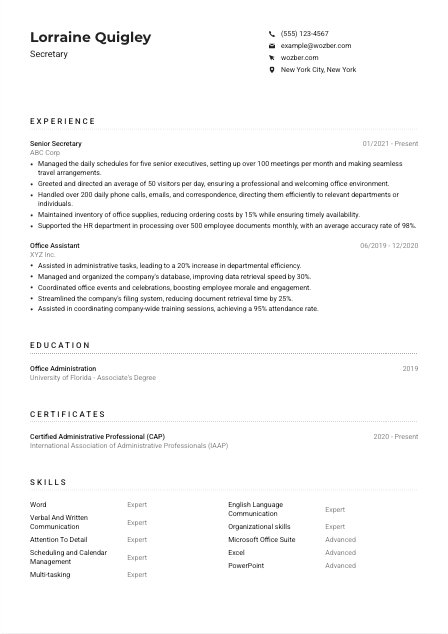
If the employer requires candidates to be based in a specific city, show that plainly in your header. In the example, listing New York City, New York directly supports a stated requirement and removes any doubt about local availability.
A LinkedIn profile or professional website can support your application if it is current and consistent with your CV. For most Secretary roles, this is optional, but it can reinforce your work history, administrative scope, and office software experience when presented cleanly.
Your personal details should answer the practical basics immediately: identity, role target, contact access, and any stated location requirement. When this section is tidy and complete, the rest of the CV can stay focused on your administrative work.




For Secretary roles, experience carries the most weight when it shows how you handled office flow, protected executive time, managed communication, and kept routine tasks accurate under pressure. Hiring teams want more than a task list. They want to see the scale, pace, and reliability of your support.
Before editing bullets, identify the administrative work the employer repeats or prioritises. For this role, that includes greeting visitors, managing calendars, arranging meetings and travel, handling calls and correspondence, maintaining supplies, and processing documents. Your experience section should mirror that operating rhythm using your own real examples.
Start with your most recent position and include job title, employer, and dates. That format helps hiring teams quickly track your progression from broader office support into more independent secretarial work, as the example does from Office Assistant to Senior Secretary.
Secretarial hiring is practical, so your bullets should show what you handled and how well you handled it. Instead of writing "managed calendars," write something closer to "managed daily schedules for five senior executives and coordinated more than 100 meetings per month." That kind of detail makes the workload concrete.
Quantified bullets work especially well in administrative CVs because the role is often measured by throughput, responsiveness, cost control, and error reduction. The example uses metrics naturally: 50 visitors per day, 200 daily communications, 15% lower supply costs, and 98% document accuracy. Those are the kinds of numbers that show control over office operations.
Keep the section centered on coordination, communication, document handling, scheduling, reporting support, and office organisation. If an older bullet does not strengthen your case for front-office support or executive assistance, replace it with one that does. Relevance matters more than listing every duty you have ever done.
By the end of your experience section, a reader should understand the environment you supported, the volume you handled, and how reliably you kept office work moving. That is the core proof a Secretary CV needs to deliver.
Education matters in Secretary hiring when it confirms foundational preparation for office work and reinforces your administrative training. Even when experience leads the decision, the right credential helps frame you as someone who understands business correspondence, office systems, and organised support work.
Include the education that best aligns with the employer's requirements or preferences. Here, a high school diploma meets the baseline, while post-secondary study in office administration strengthens the application. An Associate's Degree in Office Administration fits that preference well without overstating it.
List the degree, field of study, school, and graduation year or date. For administrative roles, neat structure matters because your CV is also demonstrating your ability to present information clearly and consistently.
If your studies connect directly to office support work, make that connection obvious through the field name or program title. A diploma or degree in office administration, business support, or administrative services tells the reader that your training matches the daily demands of scheduling, communication, and document handling.
You do not need to expand this section unless the course work strengthens your candidacy. If you are earlier in your career, classes in business writing, Microsoft Office applications, records management, or office procedures can help support limited work experience.
Honors, leadership roles, or relevant student projects are worth listing when they show organisation, communication, or administrative discipline. If you already have several years of secretary experience, keep this section tighter and let your work history carry more of the story.
This section should confirm that you meet the role's baseline requirements and, where applicable, that you have training in office administration. Keep it structured, relevant, and proportionate to your level of experience.
Certificates are not always required for Secretary roles, but the right one can sharpen your profile, especially when it reflects office administration, communication, or executive support. They are most useful when they show current professional development rather than just filling space.
Start with certificates that clearly relate to secretarial or administrative work. In the example, the Certified Administrative Professional credential adds weight because it connects directly to office processes, business communication, and professional administration.
A short, focused certificate section works better than a long list of unrelated courses. If a credential does not help prove your readiness for scheduling, documentation, coordination, or office systems, leave it out.
Add the earned date or active period so employers can see how recent the credential is. This matters when the certificate reflects tools, business practices, or administrative standards that evolve over time.
If you are adding certifications, look for topics such as office administration, Microsoft Office, records management, business writing, or executive support. These areas strengthen the kind of day-to-day performance employers expect from a capable Secretary.
Use this section to show focused professional development, not to pad the CV. One relevant credential can reinforce your administrative range and make your background easier to trust at a glance.
A Secretary skills section should reflect the actual tools and working habits behind the role. That usually means a mix of office software, calendar coordination, document handling, communication, and the judgment to keep several requests moving at once without dropping details.
Mirror the technical skills the employer already uses to define the job. For this position, Microsoft Office Suite is central, with Word, Excel, and PowerPoint called out specifically. If you use those programs regularly for reports, spreadsheets, presentations, or correspondence, name them clearly rather than hiding them inside broad wording.
Secretarial work is built on more than software. Verbal and written communication, attention to detail, scheduling, calendar management, multitasking, and organisation all belong here because they directly affect meeting flow, message handling, and document accuracy. The sample skills list reflects that balance well.
Do not overload this section with every transferable skill you have. Pick the capabilities that match secretary work most closely and make sure they are backed up elsewhere in your CV through bullets, responsibilities, or results. A focused list reads as credible and easier to match in ATS screening.
Your skills section should make it easy to see that you can run the practical side of office support: software, scheduling, communication, and organisation. Keep it aligned with the posting and grounded in experience you can discuss confidently.
Language ability matters in Secretary roles when it affects front-desk interaction, phone coverage, written correspondence, or support for a multilingual office. Even when only one language is required, the way you present proficiency should be clear and usable.
If strong English communication is stated in the posting, list English with an honest proficiency level. For this role, that matters because the work includes greeting visitors, managing correspondence, and supporting day-to-day communication across the office.
Additional languages can be useful when the office serves a diverse client, employee, or visitor base. In the example, basic Spanish is a modest but relevant addition because it may help with simple in-person interactions or routing requests.
Terms such as Native, Fluent, Intermediate, and Basic are easier to interpret than vague descriptions. Hiring teams need a realistic sense of whether you can handle casual conversation, business correspondence, or professional phone communication in that language.
For a Secretary, language ability is most valuable when it improves reception coverage, communication flow, and responsiveness. If a second language has helped you assist visitors, answer inquiries, or coordinate across teams, it supports your candidacy well.
Do not force extra emphasis on languages unless they are relevant to the employer's setting. For some secretary jobs, English alone is enough. For others, especially public-facing or multilingual offices, additional language skills can make your support more versatile.
Present language skills as practical communication capability, not decoration. The value lies in whether you can support calls, visitors, written communication, or office coordination more effectively.
Your summary should quickly establish your level of experience and the kind of office support you provide best. For a Secretary, that usually means combining administrative scope with a few concrete strengths such as calendar management, communication, document accuracy, or executive support.
Start with a direct line that names your profession and years of experience. The example does this well with "Secretary with over 4 years of hands-on experience in office administration and secretarial roles," which immediately places the candidate in the right hiring lane.
Use language from the posting where it reflects your real background. For this job, phrases related to office administration, communication, multitasking, scheduling, and maintaining a professional environment all belong naturally if your experience supports them. This helps both ATS matching and human review.
A summary works best when it points to how you operate, not when it stays abstract. Focus on strengths such as supporting executives, coordinating schedules, handling correspondence, preparing reports, or keeping administrative workflows efficient and accurate.
Adjust this paragraph for each application so the emphasis matches the role. One employer may care most about front-desk coverage and visitor management, while another may need more executive scheduling and document support. Your summary should direct attention to the work you are most ready to do.
A hiring manager should finish your summary with a clear picture of your administrative level, your main strengths, and the kind of office support you can take over quickly. That clarity sets up the rest of the CV well.
A Secretary CV works best when it shows dependable office support in concrete terms: who you supported, what you coordinated, how much volume you handled, and where you kept communication or documentation accurate. That is what turns administrative experience into a convincing application.
Use Wozber's free CV builder to organise your content in an ATS-friendly CV format, then refine it with the ATS CV scanner so the final version reflects the posting's terminology for scheduling, correspondence, office software, and administrative support. The finished CV should make it easy to judge that you can keep an office running smoothly from day one.




