



Use Wozber and land your dream job
Create CV
No registration required
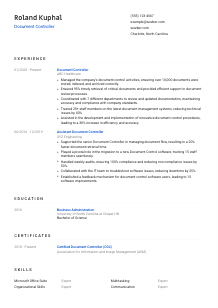
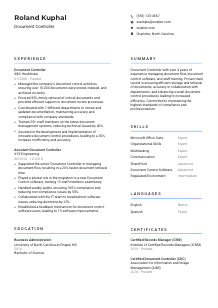
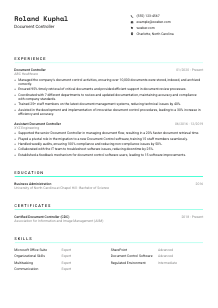
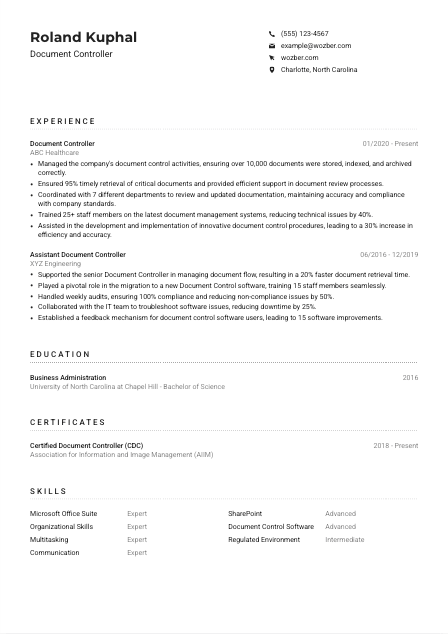
Cataloging data, but your CV feels misplaced? Explore this Document Controller CV example, created with Wozber free CV builder. Learn how to arrange your record-keeping expertise to fit job specifications, navigating your career trajectory as efficiently as you do the files!
Document control work is judged in the details long before an audit ever starts. Hiring teams look for people who can keep records traceable, current, and easy to retrieve across revision cycles, approval workflows, and archive rules. Your CV needs to show that you can manage documentation with the same discipline you bring to controlled files, version histories, and cross-functional updates.
When a CV is tailored well, it becomes much easier to see whether your background matches the company's document environment, compliance demands, and system tools. Wozber's free CV builder helps you shape that experience into an ATS-compliant CV by aligning your wording with the posting and keeping the structure clean for ATS parsing. For a Document Controller, that means the hiring team can quickly recognize your command of retrieval accuracy, document systems, and procedure-driven work.
Document control is a precision job, so the top of your CV should feel exact and dependable. This section gives the employer the practical information they need first and shows that you handle records, naming, and presentation with care.
Place your full name at the top in a clear, readable format. A Document Controller CV benefits from clean hierarchy, so avoid decorative styling and make your name stand out in the same way a well-labeled master document does.
Include the job title directly under your name when it matches the role you are pursuing. If the posting is for a Document Controller, use that exact title rather than a broader label like administrator or coordinator, especially when your experience already supports it.
Use one phone number you actually answer and a professional email address that looks current and credible. In an operations-heavy role where timely follow-up matters, even small errors here can slow down the hiring process.
Some Document Controller roles are tied to a site, plant, office, or regulated facility. Here, the employer specifically asks for Charlotte, North Carolina, so listing Charlotte helps remove a practical question early. If you are relocating, state that clearly instead of leaving the employer guessing.
Add LinkedIn or a professional website if it supports your application with consistent career history, certifications, or systems experience. Make sure the titles, dates, and credentials match your CV, especially if you work in controlled environments where accuracy matters.
Skip details such as age, gender, marital status, or other personal identifiers unless a local application process explicitly requires them. For this kind of role, the hiring value sits in your document systems experience, compliance work, and coordination ability, not unrelated personal information.
This section should read like a clean document header: accurate, complete, and easy to process. When the basics are handled well, the employer can move straight to your document control experience without unnecessary friction.




This is the section where hiring teams decide whether you have managed live documentation in a real operating environment. Document Controller CVs stand out when the experience shows control of document flow, retrieval speed, compliance practices, system use, and coordination across departments.
Read the posting with a process mindset. Identify the specific workflows they need help with, such as storing and indexing documents, supporting review cycles, training staff, updating procedures, or maintaining compliance in a regulated setting. Those are the themes your bullets should echo.
Start with your current or most recent position and work backward. For each role, include employer name, title, and dates so the progression is easy to follow. This format works especially well in document control because it shows the scale and continuity of your records experience over time.
Write bullets that show what changed because of your work. Instead of saying you managed archives or supported reviews, show volume, turnaround, accuracy, or compliance outcomes. The sample CV does this well by noting 10,000 documents managed, 95% timely retrieval, and a 30% efficiency gain after procedure improvements.
Metrics make this role tangible. Use counts of documents, retrieval rates, audit results, number of departments supported, training reach, reduction in technical issues, or gains in processing efficiency. These are more convincing than broad claims about being organised or detail-oriented.
Prioritise experience that involves document systems, controlled records, quality standards, departmental coordination, and process discipline. If you include less direct experience, tie it back to activities that matter here, such as indexing, version control, audit support, or procedure documentation.
A hiring manager should be able to scan this section and understand the scope you handled, the systems you used, and the reliability of your work. Strong experience bullets make it clear that you do more than maintain files. You keep documentation accurate, retrievable, and compliant under real business pressure.
Education matters here because many employers want a formal foundation in business, administration, or another field tied to process-heavy work. Keep this section straightforward, but make sure it reinforces that you can work inside structured systems and support controlled documentation practices.
If the posting asks for a bachelor's degree in Business Administration or a related field, make that easy to spot. Place the degree clearly in this section so the requirement is satisfied without the recruiter needing to search for it.
Use a simple sequence such as degree, field of study, school, and graduation date if applicable. Consistent formatting matters in a role built around standardised records and orderly information handling.
When your degree title is broad, use the field of study to sharpen the connection. Business Administration, information management, or operations-focused coursework can all reinforce your ability to work with procedures, records, and organizational systems.
Coursework is optional, but it can help if you are earlier in your career or your degree needs context. Classes in records management, compliance, quality systems, database use, or business operations can support a Document Controller application when they relate directly to the work.
Honors, leadership, or project work can be worth including when they point to reliability, organisation, or process improvement. Keep them brief and relevant. If you are already experienced, they should not take attention away from your document control track record.
This section should confirm that you meet the baseline academic requirement and, where relevant, show a background connected to structured administrative work. For an experienced Document Controller, that is usually all it needs to do.
Certifications carry real weight in document control because they point to formal knowledge of records practices, retention standards, and controlled processes. When a posting lists credentials such as CDC or CRM as preferred, use this section to make that advantage easy to see.
Start with certifications that the employer already recognizes, especially if they are listed in the requirements or preferences. For this role, CDC and CRM are directly relevant because they support your credibility in records governance and document control practice.
Focus on credentials tied to document management, records management, compliance, quality systems, or regulated operations. A shorter list of relevant certifications is usually more persuasive than a long list of unrelated courses.
Add the issue date and, if relevant, whether the certification is active. This helps employers understand recency and maintenance. In the sample CV, active CDC and CRM dates reinforce ongoing professional commitment rather than a one-time credential from years ago.
If you work in regulated industries such as healthcare, engineering, manufacturing, or quality-driven environments, additional training in records retention, audit readiness, or controlled documentation can strengthen future applications. Add new credentials when they connect to the kind of document environment you want to work in.
For Document Controllers, certifications do more than decorate the page. They show that your approach to records, retention, and compliance is grounded in recognized practice, which matters even more in regulated environments.
A Document Controller skills section should balance tools, process skills, and communication ability. Employers want to know whether you can work inside the software, maintain order under deadline pressure, and support colleagues who rely on accurate documentation.
Use the job description as your starting point. Look for named tools, operating requirements, and repeated capabilities. Here, the employer calls out Document Control software, Microsoft Office Suite, SharePoint, organisation, multitasking, and clear English communication, so those belong near the top if they reflect your actual experience.
Document control hiring rarely hinges on software alone. Pair systems knowledge with role-specific strengths such as indexing discipline, version control awareness, deadline management, staff training, and coordination across departments. The example CV balances this well by combining SharePoint and document control software with organizational skills and communication.
Place the most relevant tools and capabilities first. If the role leans heavily on SharePoint, document software, regulated documentation, or cross-functional support, those should appear before broad traits. Keep the list concise enough that each item earns attention.
A hiring manager should be able to glance here and understand both how you manage documentation and which systems you can step into quickly. The right mix shows operational readiness, not just general competence.
Language matters in document control because instructions, naming conventions, procedures, and review comments all depend on clarity. If the role requires strong English communication, your language section should make that immediately visible without overcomplicating it.
Some postings mention language only if it affects the job directly. Here, clear English communication is explicitly required, which makes it worth highlighting rather than leaving implied.
List English first when the job calls for it and include an honest proficiency level. For a Document Controller, this matters because retrieval requests, document revisions, training materials, and cross-department communication all rely on precise wording.
Additional languages can be useful if you support multilingual teams, global suppliers, or mixed-language documentation environments. They are a plus, but they should not overshadow the required language or the core systems and compliance parts of your CV.
Use clear labels such as native, fluent, intermediate, or basic. Avoid overstating ability. In document-heavy roles, inaccurate claims can become obvious quickly when work involves procedural writing or user support.
Not every Document Controller position needs more than one language. Include additional language skills when they connect to the employer's environment, such as regional operations, international documentation, or broader staff support needs.
This section should quickly answer one question: can you communicate clearly enough to manage controlled documentation and support the people who use it? For many applications, that is all the employer needs to know.
The summary is your chance to frame your experience before the hiring manager reads the rest of the CV. For a Document Controller, it should quickly establish your years of experience, the kind of document environment you have handled, and the outcomes you are known for improving.
Review the posting and identify the few points that matter most. For this job, that includes document control experience, work in a regulated environment, software proficiency, and the ability to support accuracy and efficiency. Those themes should shape your opening lines.
State your title, years of experience, and the kind of environment you have worked in. A line such as "Document Controller with 4+ years of experience in regulated environments" works because it gives immediate context without wasting space.
Use the next sentence or two to name the work you do well, such as document storage and retrieval, procedure improvement, staff training, or cross-functional coordination. Pull in one or two outcomes when possible. The example summary points to efficiency gains and stronger document accuracy, which are exactly the kinds of results employers want to see.
Aim for a short paragraph that says something concrete in every line. Skip vague claims about being hardworking or passionate unless they are backed by actual document control results, systems expertise, or regulated-environment experience.
A well-written summary helps the employer understand your scope before they reach the bullet points. For a Document Controller, it should quickly connect your experience to controlled documentation, system use, compliance expectations, and measurable improvement.
A Document Controller CV should present the same strengths the job demands every day: accuracy, consistency, retrieval discipline, and confidence working with documented procedures. When each section is tailored to the role, your experience becomes easier to read in operational terms, from document volume and audit support to system training and process improvement.
Use Wozber's free CV builder and ATS CV scanner to refine the language, structure, and ATS optimisation of your application, then review it with the same care you would give a controlled record. The final version should make one thing easy to judge right away: you can keep critical documentation organised, compliant, and accessible.




