Use Wozber and land your dream job
Create CV
No registration required
Juggling datasets, but your CV feels misplaced? Process the possibilities with this Data Processor CV example, created with Wozber free CV builder. Learn how to align your data-defining skills with job specifics, and chart your career's most efficient routes to success!
Data processing work is judged in the details. Hiring teams want to see whether you can handle high-volume records, clean messy inputs, catch discrepancies before they spread, and keep data accurate enough to support reporting, operations, or compliance. Your CV should make that operational discipline visible, not hide it behind generic phrases about being detail-oriented.
A tailored CV also helps separate true data processing experience from broader admin or entry-level analyst work. When your bullets use the same language employers use for validation, sanitization, accuracy checks, SQL, or Excel-based workflows, both recruiters and an ATS can place your background in the right lane faster. Wozber's free CV builder helps you shape that language into an ATS-compliant CV that makes your handling of data quality, scale, and business communication easier to recognize.
For a Data Processor, the contact section should be clean, complete, and easy to verify. It is a small section, but it still reflects the kind of precision the job itself requires, especially when the employer is screening for business communication and location-based eligibility.
Your name should be the most visible text on the page, set in a clear font and easy-to-read size. Keep it simple and professional. A cluttered header can undermine the exactness expected in data-heavy work before the reader reaches your experience.
Place your working title below your name when it matches the role you are pursuing. If you are applying for a Data Processor opening, using "Data Processor" immediately helps frame the rest of the CV. If your recent title was adjacent, such as Junior Data Analyst, use the title that best reflects your target direction only when your experience supports it.
Include a reliable phone number and a professional email address, ideally in a straightforward format such as firstname.lastname@domain.com. Then review them carefully. Accuracy matters in a role centered on validating inputs, and obvious mistakes in your own contact details send the wrong message.
Some employers filter for local candidates early. In the example job description, Los Angeles, California is a stated requirement, so listing that location in the header removes a basic point of doubt. Keep this kind of detail factual and brief rather than overexplained.
If you have a LinkedIn profile, portfolio, or professional website, include it only when it supports your candidacy. For Data Processors, this is most useful when it adds concrete value such as technical coursework, data projects, reporting samples, or a fuller work history that matches the CV.
Keep this section tidy, accurate, and aligned with the posting. For a Data Processor, even the header should show care with correctness, consistency, and required logistics.




The experience section carries most of the proof for a Data Processor CV. Employers want to understand what kinds of data you handled, how you maintained accuracy, which tools supported the work, and whether your output improved reporting, compliance, or decision-making.
Start by marking the duties and tools that define the opening. For this role, that includes processing structured and unstructured data, verifying completeness, resolving discrepancies, protecting data integrity, and using tools such as Excel, Access, or SQL. Those points should shape which bullets you keep, rewrite, or move higher on the page.
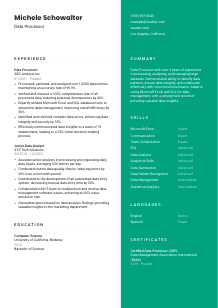
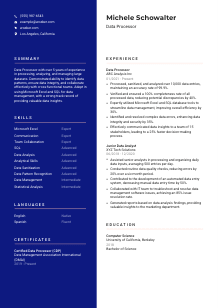
Use reverse chronological order and make the path easy to follow. Lead with positions where you owned data intake, cleansing, validation, reporting, or error resolution. In the sample CV, the move from Junior Data Analyst to Data Processor works because the scope clearly grows from assisting with daily inputs to managing large-volume processing and stakeholder-facing insights.
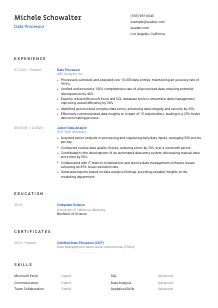
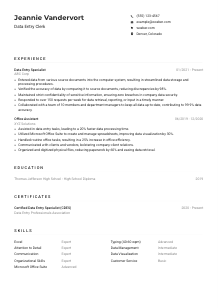
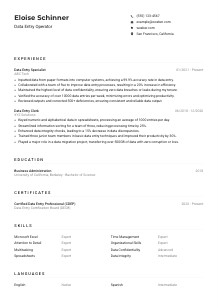
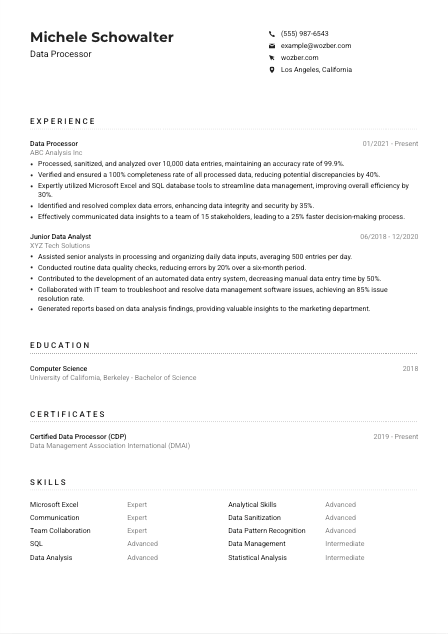
Data processing responsibilities become stronger when they show what changed because of your work. Instead of writing "responsible for data entry," show scale, quality, and result. A bullet like "Processed, sanitized, and analysed over 10,000 data entries, maintaining 99.9% accuracy" tells the reader far more about throughput and control.
Use metrics that fit the profession naturally, such as record volume, accuracy rate, completeness rate, error reduction, processing speed, automation gains, or reporting turnaround time. The sample CV does this well with details like 100% completeness and a 40% drop in discrepancies. Numbers like these help hiring teams picture your reliability in live data workflows.
Focus your space on work that demonstrates data hygiene, tool usage, problem resolution, and collaboration around data outputs. If an older bullet does not show processing volume, validation, analysis, software proficiency, or business impact, trim it. A concise set of relevant bullets is more persuasive than a long work history filled with unrelated tasks.
The best experience sections for Data Processors make the workflow visible. When your bullets show scale, accuracy, tools, and measurable improvements, employers can quickly see that you can be trusted with critical data operations.
Education matters here because many Data Processor roles ask for a technical or systems-oriented degree, especially when the work includes structured data, database tools, and analytical review. Present your academic background in a way that makes that foundation easy to confirm.
If the posting calls for a Bachelor's degree in Computer Science, Information Systems, or a related field, make that information unmistakable. In the example, "Bachelor of Science in Computer Science" directly meets the stated requirement and should appear clearly in the education entry.
Use a simple structure: degree, field, school, and graduation year or date. Data roles often involve quick eligibility checks, so avoid decorative formatting or extra text that makes the credential harder to scan.
Write out your major rather than leaving the reader to infer it. "Computer Science" or "Information Systems" carries more value than a vague abbreviation because it immediately connects your education to databases, systems logic, and analytical problem-solving.
Coursework can help if you are early in your career or your professional history is lighter than the job requires. Include classes that support the role, such as database management, statistics, data structures, information systems, or data analysis. Skip general coursework that does not add useful context.
If you completed a project involving SQL queries, data cleansing, reporting dashboards, or large dataset analysis, it can support your profile, especially for junior applicants. Honors can also help, but keep the emphasis on work that relates to handling data accurately and systematically.
For this kind of role, your education section does not need much space. It needs clarity. Make the degree, field, and any directly relevant project work easy to spot.
Certifications are optional for many Data Processor jobs, but they can strengthen your profile when they reinforce data quality, database work, analytics, or ongoing technical development. Used well, this section shows that your skills have kept pace with the tools and standards used in the field.
Prioritise credentials tied to data processing, database management, analytics, or information quality. In the sample CV, a "Certified Data Processor" credential fits the role because it reinforces specialization in the exact kind of work being advertised.
A short list of relevant certifications is stronger than a long list of loosely connected courses. Choose credentials that deepen your case for handling large datasets, maintaining data accuracy, or working with systems such as Excel, SQL, or other data management platforms.
Include the year earned and, if relevant, the active period or expiration date. This helps the employer see whether the credential is current, especially when the certification relates to evolving tools or compliance practices.
If your target jobs increasingly ask for stronger SQL, reporting, automation, or governance skills, certifications can help bridge that gap. Keep learning aligned with the direction of the work you want, not just what is easiest to collect.
They are not a substitute for hands-on results, but they do add weight when they clearly support data accuracy, system fluency, and professional development in data operations.
The skills section should read like the toolset and working habits the role depends on every day. For a Data Processor, that usually means a mix of data management software, analysis capability, quality control, and communication strong enough to explain issues or findings to other teams.
Pull skill terms directly from the posting when they match your real background. Here, that includes Microsoft Excel, Access, SQL, analytical skills, pattern recognition, and cross-functional communication. Matching the employer's wording improves ATS optimisation and makes your CV easier to categorize correctly.
Do not stop at software. Data Processors often work across operations, IT, finance, marketing, or compliance teams, so communication and collaboration belong beside your technical skills. The sample CV handles this well by pairing Excel and SQL with communication and team collaboration.
Put the most job-relevant skills first, especially the tools and capabilities named in the posting. If Excel and SQL are central to the work, they should appear above broader items. Keep the list scannable and avoid padding it with vague traits that are already implied by stronger, more specific skills.
When the section reflects the employer's tools, data tasks, and collaboration needs, it supports both ATS matching and a faster human read of your qualifications.
Language skills matter when the role calls for business communication, stakeholder updates, or work across multilingual teams. For Data Processors, this section is usually brief, but it should still reflect what the posting requires and how you actually communicate on the job.
If the employer specifies English for business communication, list English clearly and give an honest proficiency level. That requirement matters because the role includes presenting findings, documenting issues, and coordinating with cross-functional teams.
Order the list by job relevance, not personal preference. For this opening, English belongs at the top because it is explicitly required for business use.
Additional languages can be useful when the company serves diverse teams, vendors, or customer groups. In the sample CV, Spanish adds regional communication value, but it works as a supporting asset rather than a replacement for the required English proficiency.
Terms such as native, fluent, intermediate, or basic are usually enough. Avoid inflated descriptions. The point is to show how comfortably you can write, discuss issues, or present data-related updates in each language.
Only expand this section if language use is likely to matter in the role. For many Data Processor applications, one or two lines are enough unless multilingual reporting or stakeholder communication is part of the job scope.
Keep the section brief, honest, and aligned with the posting. For this role, the key point is clear business communication, with any additional language skills acting as a useful extra.
Your summary should quickly place you in the right category of candidate. For a Data Processor, that means leading with experience in high-volume data work, the tools you use, and the quality standards you can maintain, rather than opening with broad statements that could apply to almost any office role.
Review the posting before writing. If the employer emphasizes data processing, sanitization, analysis, discrepancy resolution, and tools like Excel or SQL, those ideas belong in your opening lines. This keeps the summary anchored in the work, not in generic self-description.
State your title or close equivalent, followed by years of relevant experience. The sample summary starts effectively with "Data Processor with over 5 years of experience," which immediately tells the reader both your lane and your tenure.
Mention the tools, workflows, and strengths that matter most for the role, such as processing large datasets, maintaining data integrity, identifying patterns, and supporting stakeholders with usable insights. Keep this grounded in the type of output you have delivered, not just a list of buzzwords.
Aim for a short paragraph of 3 to 5 lines. That is enough space to establish your background, name the most relevant tools, and point to a measurable strength such as accuracy, efficiency, or reporting support. Save the full detail for the experience section.
When written well, it tells the reader that your background belongs in data processing and gives them a reason to read the experience section with that frame in mind.
A Data Processor CV should show control over volume, accuracy, tools, and communication. When each section reinforces those strengths, the application reads as credible and job-ready rather than broadly administrative.
Wozber's free CV builder can help you turn that experience into an ATS-friendly CV format, refine wording with AI support, and check alignment with an ATS CV scanner before you apply. The result should make one thing easy to judge: whether you can be trusted to process, validate, and communicate data with consistency.