



Use Wozber and land your dream job
Create CV
No registration required
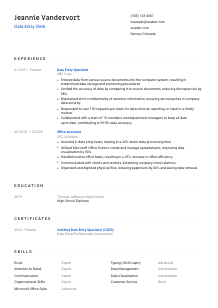
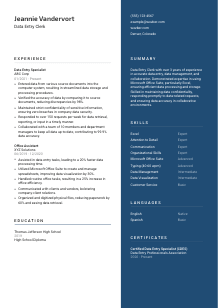
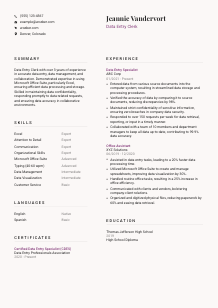
Keying in details, but your CV feels out of sequence? Refine your approach with this Data Entry Clerk CV example, created with Wozber free CV builder. Learn how to present your precision and speed to match job requirements, ensuring your career trajectory is as accurate as your entries!
Data entry work is built on accuracy that holds up under repetition. Hiring teams look for people who can move information from source documents into systems quickly, catch discrepancies before they spread, and handle sensitive records without creating extra cleanup for everyone else. Your CV should make that precision visible in the way you describe daily volume, error reduction, reporting support, and the tools you use to keep records current.
When a Data Entry Clerk CV is tailored well, the first read is much simpler. Clear alignment between your experience and the posting's language around Excel, typing speed, accuracy, and record handling helps both screeners and applicant tracking systems understand where you match. Wozber's free CV builder helps organise that language into an ATS-friendly CV format so the employer can quickly see whether you can keep data reliable from intake through retrieval.
For a Data Entry Clerk, even the header sends a signal. This role depends on accuracy, consistency, and clean record handling, so your personal details should be complete, easy to scan, and free of avoidable errors.
Use your full name as the most prominent line at the top of the page. Keep the formatting simple and professional. For office support and data-focused roles, flashy styling works against you. A clean header suggests the same discipline you would bring to entering records, updating spreadsheets, and maintaining organised files.
Place "Data Entry Clerk" under your name if that is the role you are pursuing. This keeps your CV aligned with the opening from the start and helps avoid confusion if your past titles were broader, such as Office Assistant or Data Entry Specialist. A clear title also supports ATS matching when the employer is screening for that exact function.
List a reliable phone number and a professional email address, then proofread them carefully. In a job centered on entering and verifying information, a typo in your own contact line immediately raises questions. Use a straightforward email format and make sure every character, including area code and domain, is correct.
If the employer asks for someone based in Denver, Colorado, include your city and state exactly as shown in the example CV. That kind of detail matters when a company wants someone local for on-site record handling or department support. If a posting does not mention location, keep your address brief and current without adding unnecessary detail.
A website or LinkedIn profile is optional for many data entry roles, but include one if it supports your application and matches your CV. If your profile shows administrative experience, software familiarity, or steady tenure in data-heavy support work, it can reinforce your application. Leave it out if it is incomplete or inconsistent.
Your personal details should read like a clean record entry. Accurate, current, and easy to process. That gives the employer one less reason to hesitate before moving into your work history.




This is the section that carries the most weight for a Data Entry Clerk. Hiring managers want to see how you handled records, how often you worked with source documents or spreadsheets, how you kept data accurate, and whether you supported reporting or retrieval requests without slowing the team down.
Start by marking the phrases that define the work: entering data from source documents, verifying accuracy, correcting discrepancies, maintaining confidentiality, responding to data requests, and collaborating with managers or team members. Those ideas should appear naturally in your experience bullets when they reflect your background. The sample CV does this well by mirroring the posting's core duties instead of relying on vague office language.
List your jobs in reverse chronological order with title, employer, and dates. For data entry hiring, job titles matter because they help clarify whether your experience came from direct record processing, administrative support, customer operations, or a mix of duties. If an earlier role was not pure data entry, frame it around the parts that involved spreadsheet work, file organisation, document handling, or database updates.
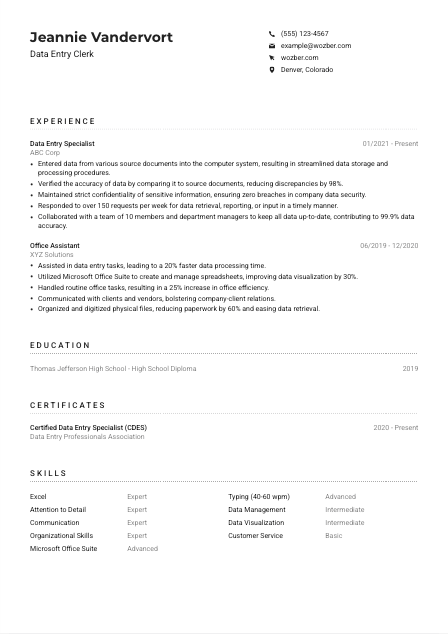
Each bullet should show what you handled and what improved because of your work. Good examples for this profession include entering records into a database, reviewing source documents for completeness, updating spreadsheets, preparing reports, or responding to internal data requests. In the example CV, "Responded to over 150 requests per week for data retrieval, reporting, or input" works because it shows both the task and the pace of the work.
Metrics are especially persuasive in data entry because the role is often measured by speed, volume, and error control. Include figures such as discrepancy reduction, weekly request volume, turnaround time, record counts, typing speed when relevant, or accuracy rates. The example's 98% discrepancy reduction and 99.9% data accuracy are strong illustrations because they connect precision to business results.
Keep the focus on data handling, software use, confidentiality, coordination, and process support. If you include broader office achievements, make sure they still help explain why you can manage structured information reliably. For example, organising and digitizing physical files is worth keeping because it shows document control and retrieval discipline. Generic duties with no connection to records, spreadsheets, or information flow can be trimmed.
Your experience section should show that you can enter information accurately, catch mistakes early, and keep records usable for the people who depend on them. When the bullets reflect real workload, tools, and outcomes, your fit is much easier to judge.
Education is usually straightforward for Data Entry Clerk roles, but it still matters because the employer may be screening for a minimum credential before looking deeper into your experience. Present it clearly and do not overcomplicate it.
If the posting asks for a high school diploma or equivalent, make sure that appears exactly in your education section. For this role, that baseline requirement is often enough when paired with relevant experience. The example CV handles this simply by listing the high school diploma, school name, and graduation year.
Use the credential, school name, and graduation date or year. Data entry CVs benefit from clean presentation, and this section does not need extra commentary unless it adds clear value. A concise education entry keeps attention on the work history and skills that usually matter more for this kind of position.
If you completed coursework in keyboarding, office software, business applications, records management, or administrative support, include it when space allows. That is especially useful early in your career or when your job titles do not fully reflect your computer-based work. Keep the detail practical rather than academic.
Awards, projects, or activities belong here only if they support the role directly. A technology club, office assistant program, or coursework heavy in Excel or document processing can help. General extracurriculars are less useful unless they show organisation, reliability, or system-based work.
Once you have a year or more of relevant work, your education section should stay lean. Employers filling data entry roles usually care more about whether you can manage records accurately in real workflows than about a long school section. Keep education complete, then let experience and skills do the heavy lifting.
Education should confirm that you meet the baseline requirement and then get out of the way. In this profession, the real differentiators are your accuracy, software comfort, and track record handling information responsibly.
Certificates are not always required for Data Entry Clerk positions, but the right one can reinforce your software proficiency, data handling discipline, or commitment to office support work. Include them when they strengthen the story your experience already tells.
Choose certificates that relate to data entry, Excel, Microsoft Office, records management, or administrative support. A credential such as Certified Data Entry Specialist can help because it directly supports the role's core function. The key is relevance, not volume.
If a certificate does not help explain your ability to enter, verify, organise, or protect information, leave it off. CV space is limited, and unrelated certifications can dilute the message. Keep the section focused on tools, process accuracy, and office workflow support.
Dates help employers see whether your training is current, especially for software-based credentials or certifications with active status. If a certificate is recent or ongoing, that can suggest you are keeping your Excel and administrative skills up to date. The example CV includes the certification date range, which is enough context without adding clutter.
Data entry is often seen as entry-level work, but the best candidates keep improving their speed, spreadsheet fluency, and document handling habits. If you have recent training in Excel functions, database tools, or information security basics, it belongs here. That kind of training signals reliability in environments where small mistakes create larger reporting issues.
Relevant certificates can strengthen your case when they back up the exact work the employer needs done. Keep the section selective and role-focused, and it will support your experience instead of competing with it.
A Data Entry Clerk skills section should reflect how the job actually gets done. Employers expect a mix of computer fluency, keyboard accuracy, document control, and enough communication skill to handle requests, corrections, and coordination with other departments.
Pull the required skills directly from the posting when they match your background. For this job, that means Microsoft Office Suite, especially Excel, plus accurate typing in the 40 to 60 words per minute range. If you also work with databases, file digitization tools, or reporting spreadsheets, add those too. Use wording that matches your real proficiency.
For data entry, soft skills are only useful when they connect to real work output. "Attention to detail" matters because it reduces discrepancies. "Organizational skills" matter because records need to be current and retrievable. "Communication" matters because managers and teammates request updates, reports, and corrections. The example CV balances these well by pairing Excel and typing with accuracy-focused traits.
Place the most relevant skills first so the employer sees the essentials immediately. For many data entry openings, Excel, typing speed, accuracy, confidentiality, and data management belong near the top. Supporting skills such as customer service or data visualization can stay lower on the list unless the posting emphasizes them. Keep the list tight enough that every item earns its spot.
Your skills section should read like a practical inventory of how you process, verify, and manage information. When the order and wording reflect the job description, it strengthens both ATS optimisation and the human read.
Language ability matters in data entry because instructions, source documents, and internal requests all depend on precise reading and clear communication. If the posting calls for strong English, make that easy to see.
If the employer asks for superior English language skills, list English clearly with an honest proficiency level. In data entry work, strong English supports accurate document interpretation, fewer input errors, and smoother communication around corrections or reporting requests. The example CV lists English as Native, which addresses this requirement directly.
Extra languages can be helpful in workplaces that process multilingual documents or interact with diverse customers and teams. They are usually secondary to speed and accuracy, but they can still broaden your usefulness. Add them if they are real working skills, not casual familiarity.
Choose simple levels such as Native, Fluent, Intermediate, or Basic and apply them consistently. Employers do not need a long explanation here. They need a quick read on whether you can comfortably handle workplace communication and document review in each listed language.
Do not overstate the value of extra languages if the role is mainly internal data processing. Mention them as an added capability, especially if your past work involved client communication, multilingual records, or front-office support. For most data entry CVs, English remains the key language to emphasize first.
This section should follow the same standard as the rest of the CV: no guessing, no inflation. If you list a language, assume you may be asked to use it in email, phone communication, or document handling. Honest labeling protects your credibility.
Language skills should confirm that you can read instructions carefully, communicate clearly, and handle records without confusion. For this role, that usually starts with strong English and only then expands to any additional languages you genuinely use.
The summary sits at the top of the CV, so it should quickly tell the employer whether your background fits the pace and precision of the job. For a Data Entry Clerk, that means leading with relevant experience, software familiarity, and a clear record of accurate information handling.
Read the job description first and decide which points matter most for the opening. In this case, the employer is asking for data entry experience, Excel proficiency, accurate typing, strong English, attention to detail, and coordination with team members. Your summary should reflect the requirements you genuinely meet instead of using broad office language.
Start with a direct line that establishes your professional identity and scope, such as a Data Entry Clerk with more than 3 years of experience in accurate data entry and record maintenance. The example CV does this effectively because it immediately frames the candidate around the exact work the employer needs.
After the opening, highlight the abilities that drive performance in this profession. Good choices include Excel and Microsoft Office proficiency, discrepancy checking, confidentiality, reporting support, or high-volume request handling. Keep these tied to actual work rather than vague personal traits. If you can support the claim elsewhere in the CV with metrics such as 98% discrepancy reduction or 150 weekly requests, even better.
Aim for 3 to 5 lines that can be read quickly. A hiring manager should come away knowing whether you can process records accurately, work comfortably in office systems, and support a team that depends on current data. Skip generic claims and use the space for concrete qualifications that match the posting.
A focused summary gives the employer an immediate read on your accuracy, software skills, and day-to-day fit for the role. When it mirrors the real demands of data entry work, the rest of the CV has a much clearer starting point.
A Data Entry Clerk CV works best when it shows dependable record handling, software fluency, and measurable accuracy instead of generic administrative language. Keep your examples grounded in the work itself: source documents entered, discrepancies corrected, requests handled, spreadsheets maintained, and confidential information protected.
Use Wozber's free CV builder to tailor each section to the posting, strengthen ATS optimisation, and present your background in an ATS-compliant CV that stays easy to read. When your CV makes your speed, accuracy, and day-to-day data discipline clear, employers can quickly see that you are ready to keep their records dependable.




