




Use Wozber and land your dream job
Create CV
No registration required
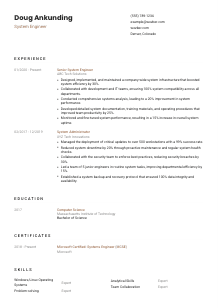
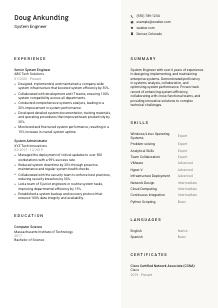
Designing robust systems, but your CV feels like it's in safe mode? Check out this System Engineer CV example, created with Wozber free CV builder. It shows how to align your systems expertise with job specifics, booting your career into an advanced run state!
System engineering work is judged in production. Hiring teams want to see whether you can keep infrastructure stable, improve performance, and make complex environments easier to run across Windows, Linux, virtualized platforms, and networked systems. Your CV should make that operating range visible quickly, with concrete examples of deployment work, system analysis, and measurable improvements to uptime, efficiency, or compatibility.
A tailored CV changes how your background is sorted and prioritised, especially when an ATS is looking for terms tied to enterprise infrastructure, virtualization, operating systems, and systems engineering experience. Wozber's free CV builder helps you align that language cleanly in an ATS-friendly CV format, so the hiring team can move from keyword match to a clearer read on whether you can design, implement, and maintain the environment they need.
For a System Engineer, the header should do one practical job well: confirm who you are, how to reach you, and whether you meet any immediate screening requirements. Keep it clean and professional so nothing distracts from your technical background.
Use your full name as the top line of the CV in a clear, readable format. This is basic, but it matters. System engineering CVs often carry dense technical content, so a clean header helps the document feel organised from the first glance.
Place "System Engineer" directly under your name when that matches the role you are applying for. It creates instant alignment with the opening and helps frame the rest of the CV around infrastructure design, systems support, and platform reliability rather than a broader IT profile.
Make it easy for recruiters and hiring managers to contact you. One typo in a phone number or email address can stall the process before your experience is even reviewed.
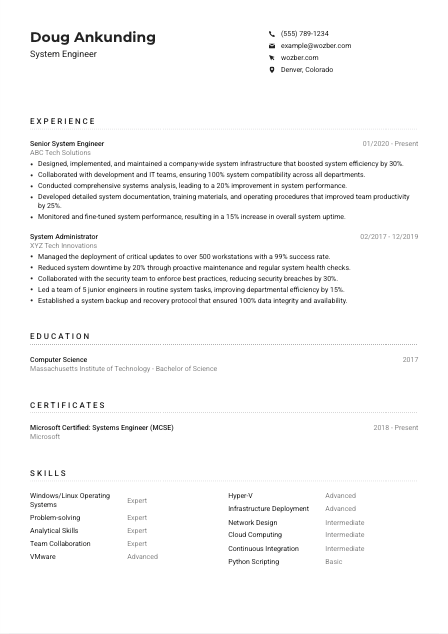
If the employer has a location requirement, address it directly in your header. In the example, listing Denver, Colorado immediately supports the posting's Denver-based requirement and removes an avoidable question about relocation. For other roles, only include location details that help clear a real application filter.
A LinkedIn profile, portfolio site, or professional webpage can strengthen your application if it adds useful detail such as project scope, infrastructure work, certifications, or technical write-ups. Only include links that are current and consistent with the experience on your CV.
Your personal details should resolve the basics fast: identity, role alignment, contact accuracy, and any location requirement that affects eligibility. Once those points are clear, the reader can focus on your infrastructure experience.




This section carries the most weight for a System Engineer. Employers want to see the scale of the environments you supported, the technologies you worked with, and the results you produced when systems needed to be deployed, integrated, tuned, or stabilized.
Start by identifying the technical and operational themes in the posting. Here, the clearest priorities are systems engineering experience, network design, infrastructure deployment, Windows and Linux administration, virtualization, cross-functional collaboration, documentation, and performance monitoring. Those are the threads your experience bullets should reflect.
List your positions in reverse chronological order and make each one easy to scan with job title, employer, and dates. For system engineering work, the title progression also matters. Moving from System Administrator to Senior System Engineer, as in the example, naturally signals growth in ownership, architecture responsibility, and operational impact.
Replace generic duty statements with outcomes tied to infrastructure health and delivery. "Designed and maintained enterprise systems" is much stronger when followed by a result such as improved efficiency, uptime, or compatibility. The sample does this well with bullets like improving system efficiency by 30% and raising uptime by 15%, which tells the reader what changed because of the work.
Numbers help hiring teams understand scope. Use metrics that fit system engineering work, such as uptime gains, deployment success rates, workstation or server counts, incident reduction, performance improvements, or backup integrity. The example's 99% update deployment success rate across 500+ workstations gives a much sharper picture than a line about "managing updates."
Prioritise experience that supports enterprise infrastructure, systems analysis, virtualization, documentation, and cross-team integration. Leave out bullets that do not help prove that you can support production systems. Even when you include leadership or collaboration, tie it back to technical delivery, such as coordinating with development, security, or IT operations to keep environments stable and compatible.
Your experience section should make it easy to picture you in a live environment: deploying systems, resolving performance issues, documenting procedures, and improving reliability over time. If the reader can see both technical depth and operational results, this section is doing its job.
Education is usually a supporting section for experienced System Engineers, but it still matters because many roles screen for a bachelor's degree in computer science, engineering, or a related discipline. Present it clearly so the requirement is satisfied without forcing the reader to hunt for it.
If the posting asks for a bachelor's degree in Computer Science, Engineering, or a related technical field, list that qualification in direct terms. In the example, a Bachelor of Science in Computer Science cleanly matches the stated requirement and removes any ambiguity early.
Include degree, field of study, school, and graduation year or date. For technical hiring, consistency matters more than decoration. A straightforward entry keeps the section readable and lets the employer confirm your academic background in seconds.
When your degree directly supports the role, let that relevance stand out. A computer science or engineering background suggests grounding in systems, networking, operating systems, scripting, and troubleshooting, all of which support infrastructure work even if your strongest proof comes from experience.
Most mid-level and senior System Engineers do not need to list coursework unless it strengthens a gap or supports a more specialised target, such as network architecture, distributed systems, or virtualization. Use it selectively, especially if you are earlier in your career or moving into a more engineering-focused systems role.
Honors, technical research, or relevant student projects can add value, but only if they contribute something your experience section does not already cover. Keep the emphasis on qualifications that matter to the role rather than turning this section into a full academic profile.
For most System Engineer applications, education should answer one question quickly: do you meet the technical degree requirement? Once that is clear, the rest of the CV can carry the deeper proof.
Certifications carry real weight in system engineering when they support the environment you will be working in. They help show current platform knowledge, especially in operating systems, networking, and enterprise infrastructure.
When a job description specifically mentions credentials such as MCSE, CCNA, or RHCE, give those certifications clear visibility if you hold them. In this case, the example aligns well by listing both MCSE and CCNA, which supports the role's mix of systems and network-focused expectations.
Do not bury the certifications that actually matter to the target role under unrelated training. For a System Engineer position, platform, networking, cloud, virtualization, and operating system certifications usually matter more than broad general-interest courses.
Certification dates help employers understand whether your knowledge is current. That is especially useful in infrastructure hiring, where product versions, administration tools, and deployment practices evolve quickly. If a certification is active, say so clearly.
Use this section to reflect the direction of your career. If your recent work involves VMware, Linux administration, network infrastructure, automation, or cloud-hosted systems, your certifications should support that path. Ongoing development signals that you can keep up with changing enterprise environments.
Relevant certifications strengthen your CV when they match the platforms, systems, and infrastructure work the employer needs. Keep the list focused, current, and tied to the kind of environment you want to support.
A System Engineer skills section should read like a concise map of the environments you can support. That means naming the operating systems, virtualization tools, infrastructure capabilities, and core technical strengths that appear repeatedly in the role.
Read the posting closely and separate required skills from general preferences. In this example, Windows, Linux, VMware, Hyper-V, network design, infrastructure deployment, analytical problem-solving, and team collaboration are all directly relevant. Start with those before adding adjacent skills.
Use the same terminology the employer uses when it accurately describes your experience. If the posting says "Windows/Linux operating systems" or names "VMware" and "Hyper-V," include those exact terms rather than relying only on broader labels like "system administration" or "virtualization." That improves both ATS alignment and human readability.
Avoid turning the skills section into a complete inventory of every tool you have touched. Choose the skills that support the target role first, then add a few adjacent capabilities such as scripting, cloud platforms, or CI tools if they strengthen your profile. The example handles this well by leading with operating systems, virtualization, deployment, and analysis instead of burying them under secondary tools.
When the right platforms and infrastructure capabilities appear in a clean, relevant list, the employer can quickly connect your background to the environment they need supported. That is exactly what this section should accomplish.
System Engineers spend plenty of time on technical work, but communication still affects the job every day. You may need to explain incidents, document procedures, coordinate with developers, or train internal teams, so language proficiency can matter more than candidates expect.
If the posting names a required language, treat it as a screening item rather than an afterthought. Here, strong English communication is specifically requested, so English should appear clearly in the section.
List the primary required language at the top with an honest proficiency level. In the example, English is shown as Native, which directly addresses the communication requirement and supports responsibilities like documentation, training materials, and cross-functional collaboration.
Extra languages are worth listing when they reflect real communication ability that could help in distributed teams, vendor coordination, or multinational environments. They are secondary to the required language, but they can still strengthen the profile.
Choose plain terms such as Native, Fluent, Intermediate, or Basic. Avoid vague descriptions. Hiring teams want a realistic sense of whether you can write documentation, lead meetings, or handle technical discussions in that language.
For system engineering roles, language skills are most valuable when they support practical tasks like writing operating procedures, explaining outage impacts, or collaborating across teams. Keep that context in mind instead of treating this as a filler section.
This section should quickly confirm that you can handle the communication side of the job, especially when documentation, coordination, and English proficiency are part of the role.
The summary is your opening technical profile. For a System Engineer, it should quickly establish years of experience, infrastructure scope, and the kinds of outcomes you have delivered, without drifting into vague claims or generic IT language.
Take the job description and identify the few themes that matter most, such as enterprise systems, infrastructure deployment, systems analysis, virtualization, operating system expertise, and collaboration. Those should shape the summary far more than broad phrases like "results-driven" or "hard-working."
Start with a direct line that names your profession and depth of experience, such as "System Engineer with 6+ years of experience." That immediately positions you for a role asking for at least five years in systems engineering and infrastructure work.
Include two or three capabilities that match the job and one or two outcomes that show business impact. The sample summary works because it references designing and maintaining enterprise systems, systems analysis, collaboration, and performance optimisation instead of generic career adjectives.
Aim for a short paragraph that can be scanned quickly before the reader moves into your experience section. Four to five lines is usually enough. Focus on the environment you support, the work you do, and the results you produce.
A well-written summary gives the hiring team an immediate read on your level, your infrastructure strengths, and the kind of system engineering work you have already handled. That context makes the rest of the CV easier to trust.
A System Engineer CV works when it makes your operating range clear: the systems you have designed, the environments you have supported, the platforms you know, and the improvements you delivered. Each section should reinforce that picture with specific, job-aligned detail.
Use Wozber to build an ATS-compliant CV that reflects the language of the role, highlights missing requirements with its ATS CV scanner, and presents your background in an ATS-friendly CV template built for technical hiring. The finished CV should make one thing easy to judge: whether you can step into the environment and improve how it runs.




