



Use Wozber and land your dream job
Create CV
No registration required
Creating immersive worlds, but your CV feels flat? Check out this Virtual Reality Designer CV example, created with Wozber free CV builder. Learn how to show off your 3D talents in line with job expectations, making sure your career path is as dynamic as the environments you craft!
Virtual reality design sits at the intersection of interaction design, 3D production, and real-time performance. Hiring teams want to see more than visual imagination. They need proof that you can shape immersive experiences that feel intuitive in-headset, run smoothly, and hold up through user testing, iteration, and handoff to developers.
A tailored CV changes how quickly that proof comes through. When your project scope, VR tools, UX decisions, and collaboration with engineers are framed in the same language as the role, both recruiters and an ATS can separate headset-ready product work from generic 3D or UI experience. Wozber's free CV builder helps structure that alignment clearly, so your ATS-compliant CV shows where you have already delivered strong VR interaction and production results.
This section should read like clean product metadata. For a Virtual Reality Designer, that means accurate contact information, a clear role label, and professional links that support your application without distracting from it.
Use your full name as the most visible text on the page. Keep it easy to scan and professional. In design hiring, your name often becomes attached to a portfolio link, presentation deck, or prototype review, so consistency across CV, portfolio, and LinkedIn matters.
Place the job title directly under your name when it matches the role you are pursuing. Using "Virtual Reality Designer" immediately positions you for openings centered on immersive product design, spatial interaction, and VR experience development rather than broader 3D artist or game design work.
Add a phone number and a professional email address that you check regularly. Small errors here can cost interviews, especially when hiring moves quickly after portfolio review or a successful screening call. Keep the format simple and avoid casual usernames.
Include your city and state when location is part of the employer's requirements. Here, listing "San Francisco, California" directly answers a stated constraint and removes questions about relocation. If another VR role is remote or flexible, tailor this detail to that posting instead of treating location as fixed across every application.
A portfolio, personal site, or polished LinkedIn profile is especially important in VR hiring. Use it to show headset interactions, environment design, UX flows, prototype videos, or shipped simulations. If your CV mentions work in Unity3D, Unreal Engine, or Blender, those links should reinforce the same level of capability.
Personal details do not need flair. They need to make it easy to contact you, confirm key requirements, and move straight from your CV into your VR work samples.




This is the section most likely to decide whether your CV advances. For Virtual Reality Designer roles, experience has to show what you built, how users interacted with it, which tools and engines you used, and what changed because of your work.
Review the posting and identify the exact capabilities it emphasizes. For this role, that includes immersive VR experience design, visual quality and performance, user testing, UX and UI work, cross-functional collaboration, and documentation. Mirror those themes in your bullets where they reflect your real work. Terms such as "Unity3D," "Unreal Engine," "user testing," and "design specifications" help both ATS matching and human review when used naturally.
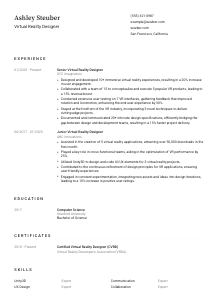
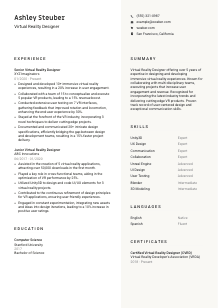
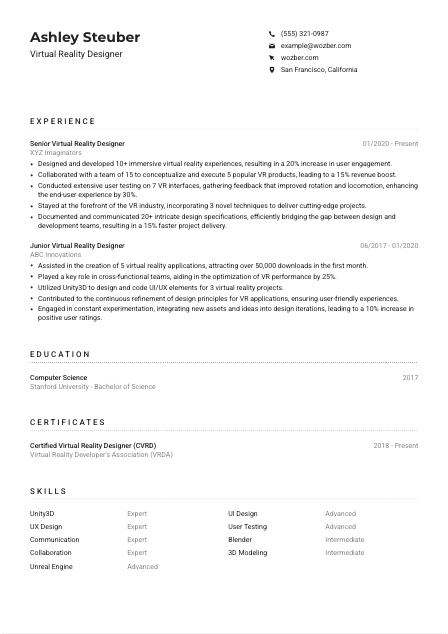
List positions in reverse chronological order and emphasize jobs where you owned VR product work, simulations, or interactive 3D environments. Title, company, and dates should be followed by bullets that clarify your scope. The sample CV does this well by moving from a junior VR role into a senior one, making progression in ownership and complexity easy to follow.
Generic bullets about "designing virtual experiences" are too thin for this field. Show volume, performance, user response, or delivery impact. Useful metrics include number of VR experiences shipped, user engagement lift, improvement in locomotion or interface usability, faster delivery cycles, frame-rate optimisation, or adoption and download numbers. The example's bullets about 10+ VR experiences, a 20% engagement increase, and a 15% faster project delivery give hiring teams a much clearer picture of results.
Prioritise accomplishments tied to immersive interaction, spatial UI, environment design, prototyping, optimisation, and testing. Cut bullets that could belong to any digital designer unless they connect back to VR workflows or outcomes. If you improved onboarding, explain whether that happened through interaction redesign, clearer motion cues, or better in-headset navigation.
Virtual reality products are rarely built in isolation. Hiring managers want to see how you collaborated with developers, 3D artists, product managers, researchers, or simulation specialists. Be specific about the collaboration surface. You might have translated UX concepts into Unity implementation notes, documented interaction logic for engineers, or used user testing feedback to revise interface behaviour. That kind of detail carries more weight than simply saying you are a strong communicator.
Your experience section should make it easy to picture you on a VR team: building in real-time engines, refining interactions through testing, and shipping experiences that perform well for users and for the product.
Education usually plays a supporting role in VR hiring, but it still matters when the posting calls for a specific academic background. Present it clearly so reviewers can confirm the foundation behind your design and technical work.
If the job asks for a bachelor's degree in Computer Science, Design, or a related field, make that information easy to find. A degree such as "Bachelor of Science in Computer Science" speaks directly to this requirement and can reinforce your grounding in interactive systems, graphics, or development workflows.
List your degree, field of study, school, and graduation year in a straightforward order. Recruiters and ATS systems should not have to decode the structure. Clean formatting matters here because this section is usually scanned quickly for qualification checks.
Your major can help frame the kind of VR designer you are. Computer Science can support engine-level fluency and technical collaboration. Design can reinforce spatial UX, interaction thinking, and visual systems. In the example, a Computer Science degree pairs naturally with experience using Unity3D and building VR interfaces.
Relevant coursework is most useful for earlier-career candidates or applicants whose degree title alone does not explain their VR preparation. Include courses like 3D modeling, human-computer interaction, game design, real-time graphics, or UI and UX design only if they add meaningful context.
If you are early in your career, strong academic projects, research, labs, or design showcases can help fill out this section. Prioritise work tied to immersive environments, interaction systems, simulation, prototyping, or 3D content creation rather than listing unrelated campus activities.
Keep this section concise, but make sure it clearly backs up the technical and design foundation your VR work depends on.
Certifications are not always required for Virtual Reality Designer roles, but the right ones can reinforce specialization, current knowledge, and commitment to emerging tools and methods.
List certificates that connect to immersive design, real-time development, 3D production, spatial UX, or related technical workflows. Relevance matters more than volume. A VR-specific credential can strengthen your profile far more than a broad certificate with no clear tie to the work.
If you hold several certificates, feature the ones that best support the target role's requirements. A certification such as "Certified Virtual Reality Designer" fits naturally with postings that emphasize immersive product design and portfolio-backed experience. Leave out items that do not improve your case for VR design work.
Dates help hiring teams understand whether your training is recent and still relevant to current workflows. That matters in a field where engines, headset capabilities, optimisation practices, and interaction standards evolve quickly.
Use certifications to reinforce that you keep up with changes in VR tools and design practice. A concise list is enough. The message is strongest when it complements experience with current engines, user testing methods, or production collaboration rather than trying to replace that experience.
The best certifications strengthen your existing VR story. They work well when they confirm focused learning in the same areas your experience and portfolio already demonstrate.
For a Virtual Reality Designer, the skills section should read like a practical toolkit for building, testing, and refining immersive experiences. Keep it focused on tools, design methods, and collaboration strengths that directly support the work.
Start with the requirements and responsibilities in the job description. Here, the obvious technical skills include Unity3D, Unreal Engine, Blender, UX design, UI design, and user testing. Also note collaboration and communication, since VR work often depends on close coordination with engineering and art teams. Build your list from those priorities when they match your background.
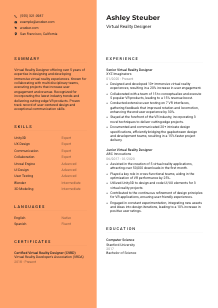
Do not make this a tools-only list. Hiring teams need to know whether you can design for immersion and also work effectively inside a production pipeline. A strong mix might include real-time engines, 3D modeling, spatial UI, prototyping, user research, communication, and collaboration. The sample CV handles this balance well by pairing engine skills with UX and teamwork strengths.
Place the most relevant skills first so the reader immediately sees your fit for the role. Lead with the tools and methods central to the posting, then follow with adjacent capabilities. If the job is heavily interaction-focused, UX, UI, and user testing may deserve equal prominence alongside Unity3D or Unreal Engine. Keep the list selective enough that every item supports your case.
A focused skills section helps hiring teams quickly understand the environments, methods, and collaboration style you bring to VR product work.
Language skills matter most when they affect day-to-day collaboration, documentation, stakeholder communication, or client-facing work. Present them clearly and in the order that supports the role best.
If the posting specifies English fluency, list English prominently and use an accurate proficiency level. For this role, that requirement is explicit, so placing English first helps confirm that you can work through design reviews, testing feedback, and implementation documentation without friction.
Order languages based on what the employer is most likely to need. The required language comes first, followed by any others that could support global teams, user research, or collaboration across regions. This keeps the section useful rather than decorative.
Extra languages can be helpful in internationally distributed product teams, research environments, or client-facing VR work. They are not usually a deciding factor on their own, but they can widen the range of teams and users you can work with effectively.
Choose clear labels such as "Native," "Fluent," "Advanced," or "Intermediate." Avoid vague wording. Precise levels help employers judge whether you can present concepts, run testing sessions, or contribute to written documentation at the level the work requires.
If another language has helped you collaborate with distributed developers, conduct feedback sessions, or support international product launches, that context can be valuable in interviews. On the CV, a clean language list is usually enough unless multilingual work is central to the role.
Keep this section concise and accurate. For VR roles, the key question is simple: can you communicate clearly with the team, document decisions well, and support the users or stakeholders involved?
Your summary should quickly establish what kind of Virtual Reality Designer you are. Focus on your level of experience, your strongest VR capabilities, and the outcomes you have delivered, not broad statements that could apply to any creative technologist.
Start with a direct description of your professional identity. Mention your years of experience and core focus, such as immersive experience design, spatial UX, VR product development, or simulation design. This gives the reader an immediate frame for the rest of the CV.
Choose two or three strengths that match the role most closely, then connect them to outcomes. Strong examples include designing VR interfaces that improved usability, building experiences in Unity3D or Unreal Engine, or collaborating across design and engineering to ship polished interactive products. The sample summary works because it links years of experience with user engagement, revenue impact, and user-centered design.
Aim for three to five lines with specific language. Replace generic phrases like "passionate designer" with tangible descriptors such as "5+ years designing immersive VR experiences" or "experienced in user-tested spatial interfaces and cross-functional product delivery." Dense, credible wording works better than big claims.
Close with what you are prepared to contribute in the target position. That might be immersive product design, stronger VR usability, faster iteration based on testing, or clear documentation for development teams. Keep the focus on immediate value, not generic ambition.
A strong summary should tell a hiring team, in a few lines, what kind of VR work you have done and why your background fits the product challenges ahead.
A Virtual Reality Designer CV works best when it connects immersive design decisions to product outcomes. Show the engines you use, the interfaces you shaped, the user testing you ran, and the results your work produced in engagement, usability, performance, or delivery speed.
Before you apply, review the posting one more time and align your wording to the tools, workflows, and collaboration points it emphasizes. Wozber's free CV builder, ATS CV scanner, and ATS-friendly CV templates can help you tighten that alignment and produce an ATS-friendly CV format that makes your VR experience easy to read and easy to shortlist.
The finished CV should make one thing clear right away: you can design virtual reality experiences that users can navigate, teams can build, and products can ship with confidence.




