



Use Wozber and land your dream job
Create CV
No registration required
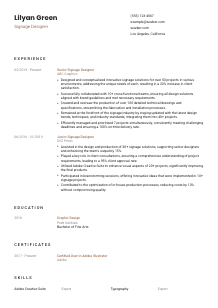
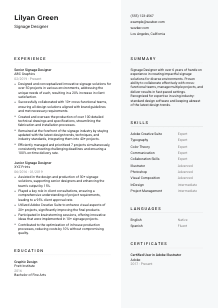
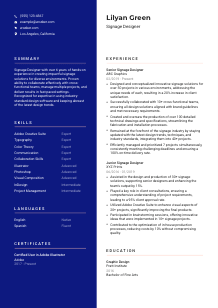
Crafting signs, but your CV doesn't quite reflect your design skills? Slide through this Signage Designer CV example, created with Wozber free CV builder. Learn how to blend your artistic flair with job specs, making your career path as clear and impactful as your most eye-catching signs!
Signage design sits at the intersection of visual communication, spatial thinking, and production reality. Hiring teams want to see more than attractive layouts. They need proof that you can turn brand standards, site conditions, and wayfinding needs into signage that works in the real world and can move cleanly into fabrication and installation.
A targeted CV makes that practical range easier to read quickly, especially when an ATS is sorting for design software, technical drawings, and project experience. Wozber's free CV builder helps you align your wording with the role, keep an ATS-compliant CV structure, and surface the details that show you can handle both concept development and production-ready signage work.
For a Signage Designer, the contact section should feel as clear and deliberate as a well-planned directional system. Keep it simple, accurate, and directly aligned with the basics the employer needs to confirm before they spend time on your portfolio and project history.
Use your full name in a clean, readable style at the top of the page. This is basic, but it matters. Signage roles often involve client-facing collaboration, plan reviews, and cross-functional communication, so your header should look polished and easy to identify at a glance.
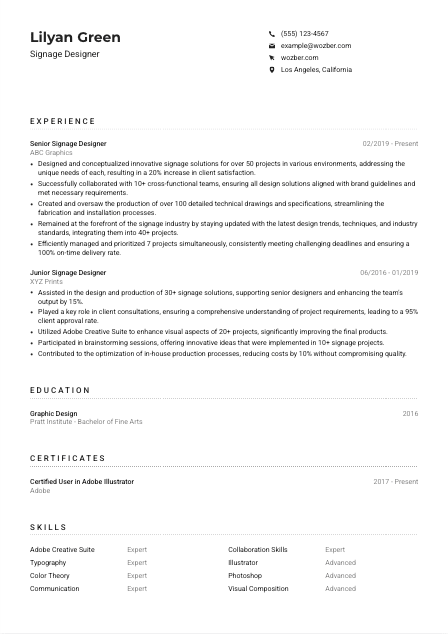
Place the job title "Signage Designer" directly under your name when that reflects the role you are pursuing. It immediately connects your CV to the opening and helps recruiters and ATS tools categorize your profile correctly. If your current title is slightly different, such as Environmental Graphic Designer, use the target title only when your work genuinely overlaps with signage design, technical documentation, and wayfinding.
If the employer specifies a location requirement, include your city and state so they can confirm it immediately. In the example here, listing Los Angeles, California directly supports a stated requirement and removes an early point of uncertainty. Only include a full street address if the application process specifically requests it.
A website or portfolio link is especially useful for signage design because employers will want to see how you handle typography, hierarchy, environmental context, and brand application across actual installations or mockups. Make sure the work you show matches the level and type of projects named in your CV, whether that is retail signage, corporate environments, exhibitions, or wayfinding systems.
This section should answer three questions fast: who you are, how to reach you, and whether you match any stated logistics such as location. Once that is clear, the reader can move straight to your design and production experience.




In signage hiring, experience is where concept work has to connect with execution. Employers look for project volume, design range, collaboration with clients or internal teams, and evidence that your files, drawings, and specifications hold up during fabrication and installation.
Before rewriting your bullets, isolate the requirements that define the role. Here, the important themes are signage concept development, brand alignment, technical drawings, collaboration, trend awareness, and managing multiple deadlines. Those themes should appear across your experience section in the language of actual work, not as a copied checklist.
Start with your most recent role and include title, company, and dates in a consistent format. For signage positions, a title like Senior Signage Designer or Junior Signage Designer already tells the reader a lot about scope, but the bullets need to clarify what kinds of environments, stakeholders, and production responsibilities came with that title.
Focus each bullet on a concrete contribution and outcome. Good signage bullets often include the type of project, what you designed or coordinated, and what improved as a result. The sample CV does this well with details like creating signage solutions across more than 50 projects and producing over 100 technical drawings that streamlined fabrication and installation. That kind of phrasing shows both creative output and production value.
Quantify the parts of your work that employers actually care about: number of projects handled, client approval rates, on-time delivery, drawing volume, cost reduction, satisfaction scores, or improvement in production efficiency. A bullet such as managing seven projects at once with 100% on-time delivery says much more than simply claiming strong project management.
Keep the emphasis on work that relates directly to signage systems, visual communication in built environments, fabrication-ready files, and client or cross-functional collaboration. If you also have broader graphic design experience, keep only the parts that support this target, such as brand implementation, typography systems, print production, or stakeholder presentation work. Every line should help explain why you can handle signage projects from concept through installation support.
Your experience section should make your working range obvious: you can design for physical environments, coordinate with others, and produce documentation that keeps projects moving. When those points are backed by project counts, delivery metrics, or production outcomes, your candidacy becomes much easier to trust.
Education matters in signage design because it often reflects training in visual hierarchy, typography, composition, and design process. Keep this section concise, but make sure it clearly supports the foundation the role calls for.
If the posting asks for a bachelor's degree in Graphic Design, Industrial Design, or a related field, make that match easy to see. The example CV does this directly with a Bachelor of Fine Arts in Graphic Design, which aligns well with the employer's stated preference.
List your degree, field of study, school, and graduation year or date. This is enough for most mid-level Signage Designer applications. Clear formatting matters because recruiters often scan education quickly after confirming your work history and software background.
When your degree closely matches the job, do not bury that detail. Graphic Design, Visual Communication, Environmental Design, and related fields are all useful, but if your training directly covered typography, layout systems, print production, or spatial communication, your degree already reinforces core signage skills.
If you are early in your career, a short mention of coursework or studio projects in wayfinding, branding, exhibition design, typography, or production methods can add context. For someone with several years of signage experience, that detail is usually less important than professional project work.
Honors, scholarships, or design competition recognition can strengthen this section when they are relevant and recent enough to matter. Keep the emphasis on distinctions that connect to design quality, communication, or execution rather than filling space with unrelated achievements.
Education should confirm that you have formal design training that supports the role's visual and technical demands. Once that is clear, your experience and portfolio can carry the heavier proof.
Certifications are not always required in signage design, but they can strengthen your CV when they support the software, production, or design systems the role depends on. They are most useful when they confirm a skill the employer already cares about.
Start with the software and workflows named in the job description. In this case, Adobe Creative Suite is a clear priority, so certifications tied to Illustrator, Photoshop, or InDesign make sense because they reinforce tools used for layout, vector artwork, image prep, and presentation materials.
Prioritise credentials that support your everyday design work instead of adding unrelated courses. A certification such as Adobe Illustrator is relevant because signage designers regularly build scalable artwork, typographic layouts, and production-ready assets in vector format.
Design software evolves, and so do production standards. Showing when a certification was earned or maintained helps the reader understand whether the knowledge is recent. The example's Adobe Illustrator credential works because it supports a software requirement named in the posting.
If you have additional training in wayfinding, ADA-related accessibility standards, large-format production, materials, or environmental graphic design, include only the most relevant items. A short, focused list is more convincing than a long catalogue of loosely related certificates.
Use certificates to reinforce technical credibility, especially around software and production-related knowledge. They should support the story your experience already tells, not distract from it.
For a Signage Designer, the skills section should quickly confirm two things: you understand core design principles, and you can execute the work in the tools and workflows the role requires. Keep it focused on skills that connect directly to project delivery.
Pull the terms the employer is likely using to screen CVs. Here that includes Adobe Creative Suite, Illustrator, Photoshop, InDesign, typography, colour theory, visual composition, communication, collaboration, and project management across multiple deadlines. These should appear naturally if they reflect your actual background.
Map your real capabilities to those hiring terms. If you have stronger experience in Illustrator and Photoshop than InDesign, say so through your proficiency levels or placement. If you work often with technical drawings, production specifications, brand guideline application, or wayfinding systems, include those as long as they are genuine parts of your work.
Arrange skills with the most relevant ones first. For signage design, software skills and visual communication fundamentals usually come before broader soft skills. A structure that separates design software, design principles, and collaboration or project skills can make the section easier to scan without turning it into a keyword dump.
This section should confirm that you have the software fluency and design judgment the role requires. Keep the list tight, relevant, and consistent with the project work described elsewhere on the CV.
Language ability can matter more in signage design than candidates sometimes assume. You may need to discuss concepts with clients, interpret project requirements clearly, and in some settings contribute to signage that serves multilingual audiences.
If the role asks for English proficiency, make that easy to see. Listing English as native or fluent directly satisfies that requirement and avoids any ambiguity in a role that depends on written specifications, client communication, and presentation clarity.
Additional languages can be helpful when you work in diverse public environments, retail settings, hospitality, education, healthcare, or transit-related projects. They are not mandatory for every Signage Designer role, but they can support client communication or local audience awareness.
Use realistic levels such as native, fluent, intermediate, or basic. If a client-facing role assumes conversational ability and you only have beginner knowledge, overstating that skill can create problems quickly.
If you are studying another language, include it only if it adds value to the type of markets or communities you serve. It can suggest adaptability, but it should not take attention away from your design, documentation, and project management qualifications.
In some signage settings, multilingual familiarity can strengthen your understanding of accessibility, cultural nuance, and public-facing communication. For a market like Los Angeles, that can be a useful supporting detail, especially when paired with experience designing for varied environments and audiences.
List languages when they support communication requirements or the environments you design for. They are a useful supplement, especially for public-facing or diverse-market work, but they should stay secondary to your core signage expertise.
Your summary should quickly explain the kind of signage designer you are, how much experience you bring, and what parts of the work you handle well. This is where you connect your design strengths with the production and collaboration demands of the role.
Build the summary around the work the employer needs done. For signage design, that usually means concept development for physical environments, brand-consistent visual communication, technical documentation, and coordination with clients or cross-functional teams.
Lead with your title and years of experience, then anchor it in signage work rather than generic design language. The example summary works because it establishes more than 6 years of hands-on experience creating signage solutions for varied environments.
Include two or three strengths that align closely with the posting. Here, useful details include Adobe Creative Suite proficiency, collaboration with client teams, managing multiple projects, and staying current with signage and wayfinding practices. Keep the wording specific enough to sound credible, but broad enough to apply across roles in the field.
Aim for three to five sentences with clear claims you can support elsewhere in the CV. Avoid adjectives that do no real work. A concise summary that mentions environment-based signage design, production-ready documentation, and deadline management will carry more weight than a generic statement about passion and creativity.
By the time someone finishes your summary, they should understand your level, your core signage strengths, and the kind of project demands you can handle. That gives the rest of the CV a clear frame.
A Signage Designer CV works best when it connects visual design skill with the practical realities of fabrication, installation, and client requirements. If your sections consistently show project scope, software fluency, technical drawing experience, and reliable delivery, the hiring team can picture you in the workflow.
Use Wozber's free CV builder to shape that story in an ATS-friendly CV format, refine wording with role-specific terminology, and check alignment with an ATS CV scanner before you apply. The final result should make one thing easy to judge: you can design signage that looks right, functions clearly, and holds up in production.




