



Use Wozber and land your dream job
Create CV
No registration required
Blending digital dexterity with educational insight, but your CV isn't earning top-grade recognition? Click through this Educational Technologist CV example, created with Wozber free CV builder. Learn how to quickly align your tech talents with academic demands, ensuring your career progression is as seamless as a virtual classroom!
Educational technology work sits at the point where teaching practice, digital tools, and real classroom constraints meet. Hiring teams want to see whether you can move beyond enthusiasm for edtech and show practical results, such as better LMS adoption, stronger digital course design, useful tool selection, and training that helps educators teach more effectively.
The first scan often looks for direct alignment with instructional technology work rather than general education experience. Wozber's free CV builder helps you shape an ATS-compliant CV around the language of the job description, so your background in technology integration, educator support, and digital learning design is easier to recognize quickly.
For Educational Technologist roles, the header should make your professional identity and availability easy to confirm right away. Keep it clean, accurate, and aligned with the basics the employer can screen in seconds.
Use your full name in a larger, readable font so it anchors the CV clearly. In education settings, where hiring often involves HR, academic leaders, and instructional teams, a clean header helps each reviewer find and reference your application quickly.
Placing "Educational Technologist" under your name helps frame the rest of the CV before a reviewer reaches your experience bullets. If your recent work used a close title such as "Instructional Technology Specialist," use the target title only when your responsibilities genuinely match technology integration, digital learning support, and educator training.
List a current phone number and a professional email address, ideally a simple firstname.lastname format. This role depends on clear communication with teachers, administrators, and vendors, so even small details in your contact section should reflect professionalism and reliability.
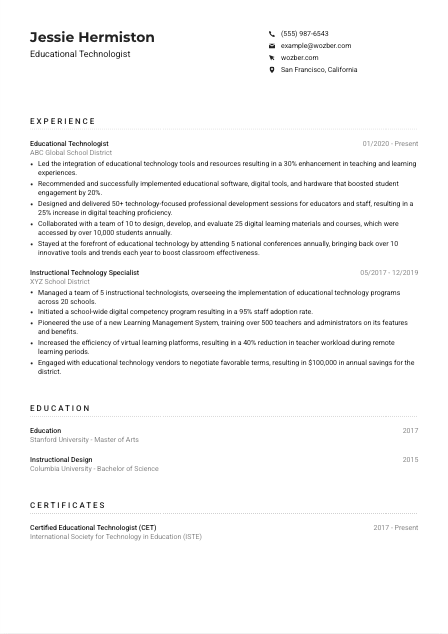
If the employer asks for candidates based in a specific area, show that clearly in your header. Here, listing San Francisco, California immediately addresses a stated requirement and removes uncertainty about local availability or relocation.
Include LinkedIn or a personal site if it supports your candidacy with concrete material such as digital course samples, professional development work, edtech presentations, or implementation projects. Make sure the content matches your CV, especially around LMS work, curriculum support, and training outcomes.
Your personal details should quickly establish who you are, what role you are targeting, and whether you meet any practical screening requirements. For an Educational Technologist, that means a header that feels organised, professional, and ready for review.




This section carries the most weight because Educational Technologist hiring usually turns on applied results. Show how you improved teaching, supported staff adoption, built digital learning resources, or guided edtech decisions with measurable outcomes.
Read the job description for the actual work being done day to day. For this role, the priorities include integrating technology tools, evaluating software and hardware, running professional development, collaborating on digital materials, and staying current with edtech practices. Your bullets should mirror those functions with specific examples from your own work.
List roles in reverse chronological order with job title, organisation, and dates. Educational institutions and learning organizations often review many CVs at once, so a straightforward structure helps them move quickly from your title history into the scope of your instructional technology work.
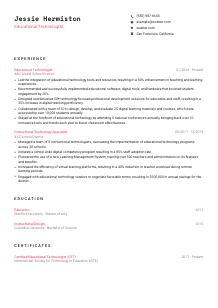
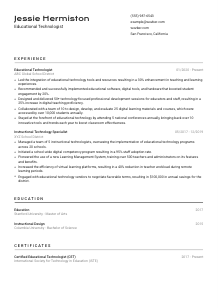
Educational technology work is easier to trust when the result is visible. Instead of saying you "supported classroom technology," show what changed: adoption rates, course usage, student engagement, teacher efficiency, or training completion. The sample CV does this well by tying technology integration to a 30% improvement in teaching and learning experiences.
Numbers matter here because they show whether you worked at classroom, school, district, or organisation level. Useful metrics include number of educators trained, courses developed, students served, schools supported, adoption rates, savings from vendor decisions, or reductions in teacher workload. The example's "50+ professional development sessions" and "10,000 students annually" give reviewers a clear sense of scope.
Prioritise experience that proves you can support digital instruction, evaluate learning tools, and collaborate with educators. If you have older or less relevant roles, trim them down unless they add something useful, such as curriculum design, staff coaching, or platform implementation experience that connects directly to educational technology work.
Your experience section should make it clear that you have already done the core work of an Educational Technologist and delivered results people can point to. When the bullets show adoption, training impact, course development, or tool implementation clearly, the rest of the CV becomes much easier to trust.
Educational Technologist roles often ask for a degree that connects directly to teaching, instructional design, or learning development. Present that academic background clearly so the reviewer can confirm the foundation behind your classroom technology and course design work.
When the posting asks for a bachelor's degree in Education, Instructional Design, or a related field, make sure that match is obvious. If your background aligns directly, as it does in the example with a bachelor's in Instructional Design, that connection should be easy to spot without extra interpretation.
List degree, field of study, school, and graduation year in a consistent format. Clean structure matters because this section is usually checked quickly for qualification standards before reviewers move back to experience and skills.
For this profession, the field of study often matters almost as much as the degree level. Education, Instructional Design, Learning Technologies, Curriculum and Instruction, and similar fields help explain your grounding in pedagogy, content design, and technology-supported learning.
If you are early in your career or shifting into educational technology, relevant coursework can help. Focus on subjects such as instructional design models, e-learning development, assessment design, LMS administration, or educational media production rather than listing broad general education classes.
Honors, capstone projects, research, or thesis work can be useful if they connect to digital learning, curriculum development, or technology integration. Keep these details brief and relevant so the section supports your candidacy without distracting from the experience section.
Your education should confirm that your work in educational technology rests on a relevant academic base. Keep the section straightforward, and let it support the stronger proof in your implementation, training, and digital learning achievements.
Certifications can add useful credibility in a field where platforms, standards, and teaching technologies keep evolving. The value comes from relevance, especially when a credential supports your work in digital learning, training, or instructional technology leadership.
List credentials that connect directly to educational technology, instructional design, online learning, or educator training. A certification such as the CET in the example works because it supports the same kind of responsibilities the role emphasizes, including technology integration and professional development.
A short list of targeted certifications is more effective than a long catalogue of marginal ones. Reviewers are looking for credentials that reinforce your ability to evaluate tools, support instruction, and guide technology adoption, not every workshop or platform badge you have completed.
Dates matter in edtech because tools and practices shift quickly. Showing when a certification was earned, and whether it is still active, helps demonstrate that your knowledge reflects current platforms, training methods, and implementation standards.
Use this section to reflect ongoing professional development. That might include recognized credentials, updated platform training, or continuing learning tied to LMS use, digital pedagogy, accessibility, or learning experience design. It supports the kind of role that expects you to stay informed about emerging educational technology trends.
Certificates should strengthen your credibility in the parts of the role that depend on current practice and specialised knowledge. Keep the section selective, recent, and closely tied to technology-supported teaching and learning.
The best skills sections for Educational Technologists feel grounded in actual practice. Focus on capabilities that support technology integration, digital learning design, educator training, and the evaluation of instructional platforms and tools.
Start with the skills the posting names directly, then add closely related ones you genuinely use. For this role, that includes LMS proficiency, educational software platforms, analytical thinking, organisation, collaboration, and communication. Matching this language helps both ATS screening and human review.
Choose skills that reflect how the work gets done. Strong options often include instructional design, classroom technology integration, professional development facilitation, curriculum design, digital learning tools, and stakeholder collaboration. The sample CV's mix of LMS, instructional design, and professional development is a good model for balancing technical and instructional strengths.
Place the most job-relevant skills first so reviewers see your core capability quickly. For an Educational Technologist, platform fluency, course design, training delivery, and cross-functional collaboration usually carry more weight than broad soft-skill wording on its own.
Your skills section should read like the toolkit of someone who can support educators, evaluate platforms, and improve digital learning delivery. Keep it specific enough that a school, district, or learning organisation can picture where you would contribute first.
Educational Technologists spend a lot of time explaining tools, leading training, and working across different educator and staff groups. Language proficiency matters most when it supports clear communication, facilitation, and collaboration.
If the posting asks for proficient English communication, reflect that directly in your languages section. This role involves workshops, guidance, documentation, and collaboration, so English proficiency is part of how you perform the job, not just a background detail.
List English at the top and label your proficiency accurately, such as "Native" or "Fluent." That makes it easy for reviewers to confirm a stated requirement before moving on to your experience in training, support, and digital learning design.
Additional languages can be helpful in school systems, community-facing organizations, and diverse learning environments. If you can support communication with multilingual educators, staff, students, or families, that can broaden your usefulness even when it is not a formal requirement.
Use honest labels for your level. If you may be asked to facilitate training, answer support questions, or work with translated materials, overstating proficiency can create problems quickly. Clear ratings are more credible than ambitious ones.
Language skills become especially relevant when the organisation supports diverse communities or cross-border learning programs. In those settings, an additional language can complement your instructional technology work by improving training access, user support, or adoption across different user groups.
Language skills should support the communication demands of the role. For an Educational Technologist, that usually means making your English proficiency clear first and then adding any additional languages that strengthen your ability to train, collaborate, and support diverse learning communities.
The summary should quickly show that you understand educational technology as applied work. Use it to connect your years of experience with the kinds of results this field values, such as effective implementation, educator support, and stronger digital learning experiences.
Start with the central theme of the job description. Here, that is improving teaching and learning through technology integration, digital resource development, and staff support. Your summary should reflect that operating focus rather than sounding like a generic education profile.
Open with a direct statement such as "Educational Technologist with 6+ years of experience" if that is accurate for you. This immediately tells the reader your level and specialization, which is especially useful when they are sorting candidates across adjacent backgrounds like teaching, curriculum design, and IT support.
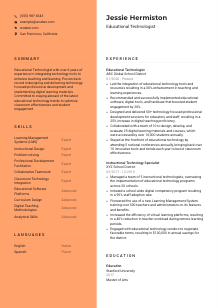
Choose strengths that line up with the posting and with your strongest evidence. Good examples include LMS implementation, professional development delivery, digital course design, software evaluation, or educator collaboration. The sample summary works because it ties experience to technology integration, training, and digital learning materials rather than staying broad.
Aim for a short paragraph that carries real information in every line. Three to five lines is enough to establish your background, highlight your strongest educational technology contributions, and point the reader toward the evidence in your experience section.
Your summary should give a clear first read of the value you bring as an Educational Technologist. When it names your level, your instructional technology focus, and the kind of outcomes you deliver, the rest of the CV lands with more context.
A well-tailored Educational Technologist CV makes your teaching-and-technology work easy to follow from the first line to the last bullet. It should show that you can guide tool adoption, support educators, build digital learning resources, and turn technology choices into better learning outcomes.
Use Wozber to tighten the language, improve ATS optimisation, and organise your experience in an ATS-friendly CV format that reflects the real demands of the role. The final version should make one thing clear quickly: you know how to make educational technology useful in practice.




