



Use Wozber and land your dream job
Create CV
No registration required
Crafting sleek apps, but your CV has bugs? Streamline your credentials with this iOS Developer CV example, created with Wozber free CV builder. Learn how to bring your Apple mastery together with job specifics, keeping your career path as smooth as a swiping gesture!
iOS hiring moves quickly past CVs that only say "Swift" and "Xcode" without showing what was built, how it performed, and where the candidate contributed across the development cycle. Teams want to see whether you can ship polished mobile features, work within Apple's frameworks and design patterns, and improve app stability, responsiveness, and release quality under real product deadlines.
The first scan often separates general mobile experience from actual iOS depth. A tailored CV makes that distinction clear by tying your work to iOS frameworks, app performance, feature delivery, and cross-functional shipping experience. Wozber's free CV builder helps you shape that into an ATS-compliant CV with language that matches the role, so hiring teams can quickly understand how you build and improve iOS products.
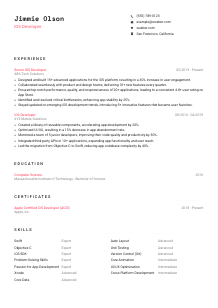
For iOS developers, the top of the CV should read like clean interface design. It needs to be simple, accurate, and immediately useful. This section is not where you tell your story. It is where you make it easy to contact you, confirm role alignment, and, when relevant, show that you meet practical requirements such as location.
Use your full name as the most visible text on the page. Hiring teams reviewing several developer CVs should be able to identify you in seconds, especially if your profile is forwarded between engineering managers, recruiters, and product leads.
Place "iOS Developer" directly under your name if that is the role you are applying for. This keeps your positioning clear and helps when your background includes adjacent work such as mobile engineering, platform work, or cross-platform development. If you are more senior, use a title that matches your level only when your recent experience supports it.
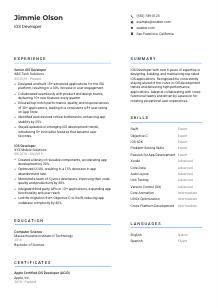
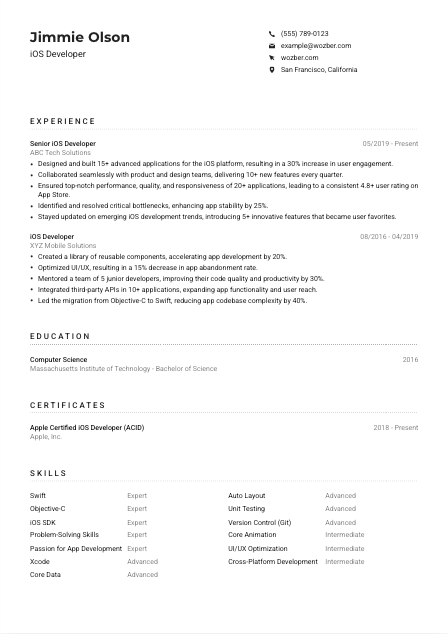
Include a reliable phone number, a professional email, and, when the posting specifies it, your city and state. In the example role, "San Francisco, California" matters because the employer explicitly requires local candidates. That kind of detail belongs here, not buried later in the CV.
A GitHub profile, portfolio site, or shipped-app showcase can strengthen your application when it contains relevant code samples, App Store links, or technical project context. Prioritise examples that show native iOS work, reusable components, interface decisions, or architecture choices rather than unrelated side projects.
Do not add age, marital status, gender, or other personal identifiers that are unrelated to software delivery. Save the space for content that helps a reviewer understand your technical background, platform focus, and availability.
Your header should confirm who you are, what role you want, and how to reach you without distraction. When location is a stated requirement, include it clearly. Then let the rest of the CV carry the technical conversation.




This is the section most likely to decide whether an iOS developer moves forward. Hiring teams look for shipped work, feature ownership, code quality, collaboration with design and product, and measurable improvements in app performance or reliability. Generic bullets about "responsible for development" do very little here.
Read the job description closely and pull out the actual work: building advanced iOS applications, shipping new features with cross-functional teams, improving performance, fixing bottlenecks, and keeping up with platform changes. Then rewrite your bullets so they reflect comparable responsibilities from your own history, using the same professional language where it is accurate.
List positions in reverse chronological order and make each entry easy to scan with title, employer, and dates. For developers, chronology also shows technical progression, such as moving from implementation into feature ownership, architecture decisions, mentoring, or migration work like an Objective-C to Swift transition.
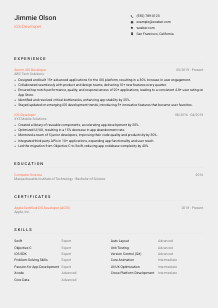
Each bullet should connect your work to an outcome the team cared about. That could be release velocity, crash reduction, App Store ratings, user engagement, conversion, or development efficiency. The sample CV does this well by tying app delivery to a 30% increase in engagement and stability work to a 25% improvement.
If you have used Swift, Objective-C, Xcode, iOS SDK, Core Data, Auto Layout, or Core Animation in real projects, include them in context instead of dropping them into a list of vague responsibilities. This helps both ATS matching and human review because the tools appear alongside actual implementation work.
Performance tuning, memory issues, layout defects, API integration failures, and UI responsiveness problems are part of day-to-day iOS development. Include at least a few bullets that show how you identified bottlenecks, debugged root causes, and improved the app. Results such as fewer crashes, smoother rendering, or faster development cycles carry real weight.
Your experience section should show that you can contribute to a shipping iOS codebase, not just write isolated features. Focus on platform-specific work, team collaboration, and outcomes that matter in mobile products.
For many iOS roles, education is a supporting section rather than the headline. Still, when a degree in Computer Science or a related field is listed in the requirements, this section needs to answer that requirement clearly and without extra digging.
If the posting asks for a bachelor's degree in Computer Science or a related field, list that qualification plainly with degree, field, school, and graduation year. In the example, a Bachelor of Science in Computer Science immediately satisfies that checkpoint.
Use a straightforward structure for each education entry. Engineering recruiters and hiring managers should not have to decode your academic history. Clean formatting also helps preserve ATS readability.
If you are earlier in your career, coursework, capstone projects, mobile development labs, or software engineering research can help show applied knowledge. If you already have several years of iOS experience, those details usually matter less than your shipped apps and technical results.
Academic distinctions are most useful when they connect to engineering ability, such as a strong systems project, mobile app thesis, hackathon result, or leadership in a development team. Choose details that strengthen your technical profile rather than filling space.
iOS development changes with each SDK cycle, so recent coursework, platform training, or Apple-focused learning can support your CV, especially if it covers frameworks, architecture, testing, or current development practices. Put formal certificates in the certificates section, but brief additional learning can be noted here when appropriate.
This section should confirm that you meet the academic baseline and, if useful, add technical context from your early training. Keep it concise, accurate, and aligned with where you are in your iOS career.
Certifications are not mandatory for every iOS developer role, but relevant ones can support your profile when they show current platform knowledge or specialised training. They are most useful when they strengthen the technical story your experience already tells.
List certifications or formal training that support native iOS work, Swift development, testing, architecture, or related platform knowledge. A credential such as an Apple-focused iOS certification is far more useful here than a general course with little connection to mobile engineering.
Dates matter because mobile frameworks, tooling, and platform conventions evolve quickly. Showing when you completed or renewed a credential helps a reviewer understand whether the training reflects current iOS development practices.
A short list of certifications tied to app development, code quality, or the Apple ecosystem is stronger than a long list of loosely related technical badges. Keep the section focused on credentials that genuinely support the job target.
As Apple updates Xcode, iOS SDKs, UI frameworks, and development guidance, ongoing training can become a useful differentiator. If you regularly invest in learning, make sure the certifications you keep on the CV reflect the parts of iOS engineering that employers are actually hiring for.
Relevant certificates can strengthen your case, especially when they show recent platform learning. Keep the section selective and closely tied to native iOS development.
The skills section should confirm your technical range quickly, but it works best when it reflects the same tools and practices already demonstrated in your experience. For iOS roles, hiring teams want to see clear platform alignment, not a crowded list of every technology you have touched once.
Pull the technical skills that appear in the posting and include the ones you genuinely use. For this role, that includes Swift or Objective-C, current Xcode usage, iOS SDK knowledge, and frameworks such as Core Data, Core Animation, and Auto Layout. These are core signals for native iOS work.
Hard skills should lead, but a few supporting strengths matter when they connect to how iOS teams work. Problem-solving, debugging, collaboration with product and design, and attention to app quality all belong if they reflect real working habits rather than generic traits.
Do not overload the section with unrelated tools, especially if they are not backed up elsewhere in the CV. A focused set of iOS languages, frameworks, testing practices, version control, and performance-related skills makes a stronger impression than an inflated inventory. The sample CV handles this well by centering native iOS tools and only then adding adjacent capabilities.
A hiring manager should be able to scan this section and immediately place you in an iOS team. Prioritise platform languages, Apple frameworks, development tools, and working strengths that show up again in your experience.
Language requirements matter more in development roles than many candidates assume. Engineers write tickets, review pull requests, explain tradeoffs, and collaborate with product, QA, and design. If a role specifies fluency in a particular language, your CV should make that clear without ambiguity.
When a posting specifically asks for English fluency, include it plainly in the languages section. For an iOS developer, that affects day-to-day work such as code review comments, technical documentation, sprint planning, and cross-functional discussion.
Additional languages can be worth listing when they are relevant to distributed teams, international products, or customer-facing collaboration. They are supplementary, but they can add useful context, especially in global engineering environments.
Choose labels such as Native, Fluent, Intermediate, or Basic and keep them accurate. Overstating language ability can create problems quickly in technical interviews or team settings where precise communication matters.
If the role involves global coordination, multilingual stakeholders, or products aimed at international users, language breadth may carry more weight. Otherwise, keep the section short and make sure the required language remains the clearest item.
Language skills can become more valuable over time, especially as your responsibilities expand into mentoring, architecture reviews, or stakeholder communication. Keep the section current so it reflects how you can contribute on a real team.
For this kind of role, the priority is simple. Show that you can communicate fluently in the required working language, then add any other languages that genuinely support your collaboration range.
The summary needs to do one job well. It should tell a reviewer, within a few lines, what kind of iOS developer you are, how much experience you bring, and what outcomes or technical strengths define your work. Skip broad statements and use details that belong to mobile product development.
Before writing, identify the few priorities that show up repeatedly in the posting. Here, those include native iOS development, modern Apple tooling, app performance, cross-functional feature delivery, and problem-solving. Build your summary around those themes rather than trying to mention everything.
Start with a direct line that states your years of experience and your specialization. A phrase like "iOS Developer with 6+ years of experience building and improving native iPhone applications" gives immediate context and is stronger than a generic label about being passionate or results-driven.
Use the next sentence to mention the kind of work that sets you apart, such as improving app stability, shipping high-volume feature releases, leading migrations to Swift, or maintaining strong App Store ratings. The sample summary works because it pairs years of experience with high-performance applications and cross-functional delivery.
Aim for three to five lines with clear wording and recognizable iOS terminology. This section should feel like a concise technical introduction, not a paragraph of soft claims. If every sentence cannot be backed up in your experience section, revise it.
A well-written summary gives immediate context on your iOS background, your technical focus, and the results you tend to deliver. Keep it brief, role-specific, and aligned with the experience and skills that follow.
A strong iOS Developer CV makes it easy to see what you have built, which Apple technologies you know well, and how your work improved app quality, delivery, or user experience. When the content is tailored carefully, hiring teams can quickly place you in the product and engineering work they need done.
Use Wozber to sharpen that tailoring with an ATS-friendly CV format, role-matched wording, and focused ATS optimisation. The final version should make one thing clear right away: you can build, improve, and ship iOS applications in a real team environment.




