



Use Wozber and land your dream job
Create CV
No registration required
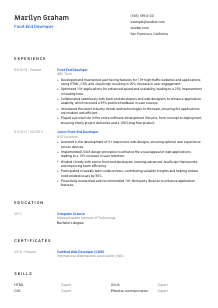
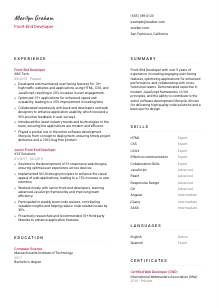
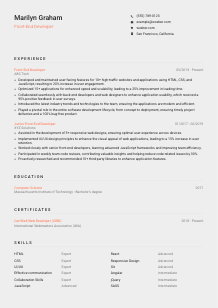
Crafting unforgettable interfaces, but your CV is hidden behind the DOM elements? Check out this Front-End Developer CV example, created with Wozber free CV builder. It shows how to align your code-slinging skills with job criteria, lighting up career opportunities as vividly as your CSS gradients!
Front-end hiring moves quickly when a CV shows how you build interfaces people actually use. Teams want to see more than a list of languages. They look for shipped user-facing features, performance work such as load-time improvements, fluency with component-based frameworks, and collaboration with designers and back-end engineers across the development lifecycle.
A tailored CV changes the first read from "general web developer" to "someone who can improve our product UI and ship clean front-end code." Wozber's free CV builder helps you align your wording with the posting, keep an ATS-friendly CV format, and surface the exact mix of JavaScript, UI/UX, and delivery experience that makes a front-end candidate easier to shortlist.
This section handles the basics, but in front-end hiring, small details still matter. Clean contact information, the right title, and a relevant portfolio link immediately frame you as a developer who understands presentation and pays attention to the user experience of your own application materials.
Lead with your full name, then place "Front-End Developer" directly underneath if that is the role you are targeting. This helps recruiters and ATS systems connect your profile to the opening right away, especially when they are sorting candidates across adjacent titles such as UI Developer, Web Developer, or Front-End Engineer.
Use the same job title wording when it reflects your actual background. For this posting, "Front-End Developer" is the clearest choice. That simple alignment matters when a hiring team is scanning for candidates with direct front-end ownership rather than broader full-stack or design-only experience.
Add a professional email address and a reliable phone number. If you have LinkedIn, GitHub, or a portfolio site with production work, case studies, reusable components, or responsive layouts, link them here. For front-end roles, these links often do real screening work because they let employers inspect code style, UI choices, and project range before the interview.
Some roles treat location as a hard filter. Here, the employer asks for someone based in San Francisco, CA, so that should appear clearly if it applies to you. In the example CV, listing San Francisco, California removes a practical objection before anyone gets to the experience section.
A personal site should do more than exist. Feature projects that show responsive design, JavaScript framework work, accessibility thinking, performance improvements, or polished UI implementation. If your portfolio is outdated or thin, leave it off until it reflects the level of front-end work you want to be hired for.
By the time someone finishes your header, they should know your target role, how to reach you, and whether you meet any location requirement. For front-end work, a sharp portfolio link can already start proving your range.




This is where front-end CVs separate themselves. Hiring teams want to understand what you built, how complex the product surface was, which tools you used, and whether your work improved usability, speed, responsiveness, or release quality. Vague duty lists do not carry much weight here.
List roles in reverse chronological order and make each entry easy to scan with company, title, and dates. For front-end positions, your timeline should show increasing ownership of interface work, framework usage, performance tuning, component development, or collaboration across design and engineering. Even a junior role can demonstrate strong foundations if the bullets show shipped work and growing technical scope.
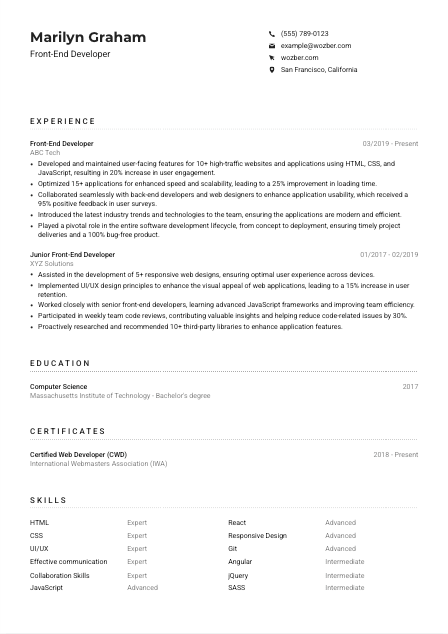
Replace task language with what you delivered and what changed because of it. Good front-end bullets mention user-facing features, frameworks, devices, page performance, usability gains, or release quality. The example does this well with lines such as developing features for 10+ high-traffic websites and improving user engagement by 20%, which tells a hiring manager both the scale and result of the work.
Metrics are especially persuasive in front-end hiring because they connect visual and technical work to business outcomes. Include figures tied to load time, Core Web Vitals, user engagement, retention, conversion, support reduction, defect rates, or delivery volume when you have them. A bullet about optimising 15+ applications and cutting loading time by 25% is stronger than a generic claim about improving performance.
Front-end development sits between design, product, and back-end systems, so your bullets should show how you worked across those surfaces. Mention partnering with designers on usability improvements, coordinating API integration with back-end developers, contributing in code reviews, or translating mockups into responsive components. In the sample, the note about working with back-end developers and web designers is useful because it ties collaboration to a measured usability outcome.
Modern front-end work changes fast, so show how you adopt better practices, libraries, or workflows when they improve the product. You might mention introducing a framework feature, modernizing a legacy UI, improving accessibility patterns, or recommending a library that reduced development time. The example's reference to bringing new trends and technologies to the team works because it connects learning to keeping applications current and efficient.
Your experience section should make it easy to picture you building production interfaces, improving performance, and working smoothly with adjacent teams. If the bullets read like shipped product work instead of job duties, you are on the right track.
Education usually sits behind experience in front-end hiring, but it still matters when the posting names a degree requirement. Keep it straightforward and relevant, especially if your degree supports your foundation in computer science, software engineering, interaction design, or related technical work.
When a posting asks for a bachelor's degree in Computer Science or a related field, make that easy to spot. List the degree, field, school, and graduation year in a clean format. The example CV handles this well by stating a Bachelor's degree in Computer Science, which directly matches the requirement.
This section does not need extra explanation unless you are early in your career. Use short lines, not paragraphs. Hiring teams should be able to confirm your academic background in seconds and move back to the parts of the CV that show framework experience, UI work, and delivery results.
If you are a newer developer or your degree is broad, selected coursework can help connect your studies to front-end work. Useful examples include web development, human-computer interaction, software engineering, data structures, or visual design. Keep it selective and only include courses that support the kind of front-end role you want now.
Honors, scholarships, or notable academic projects can be worth listing when they point to technical rigor or product-building ability. A capstone involving responsive web apps, interface design, or JavaScript-heavy development is more relevant here than general campus activities.
Front-end stacks evolve faster than most degree programs, so recent coursework, bootcamps, or structured training can help if they cover current tools or methods. That is especially useful when you are adding React, Angular, accessibility, testing, or performance optimisation to a CV anchored by an older degree.
For most front-end candidates, education confirms your foundation. Let it do that cleanly, then give the main attention to the sections that show how you build and improve interfaces in practice.
Certifications are not mandatory for most front-end developer roles, but the right one can reinforce technical commitment or current platform knowledge. Include them when they add something your experience section does not already make obvious.
Prioritise certifications tied to web development, JavaScript ecosystems, accessibility, UI engineering, or related tooling. A credential such as the Certified Web Developer listed in the example works because it sits close to the actual work of building and maintaining front-end applications.
Front-end tools and best practices change quickly, so timing matters. Add the year earned and, if relevant, whether the certification remains active. This helps employers judge whether the content is likely to reflect current development standards rather than an outdated stack.
If you are currently completing a certification in React, Angular, web accessibility, or another role-related area, you can include it with an expected completion date. That is most useful when the credential supports a skill the target job emphasizes and your CV would otherwise understate.
Do not turn this section into a long archive. Remove certificates that no longer support your target role, and keep the focus on credentials that strengthen your front-end profile today. A short list of relevant, current certifications reads better than a crowded section with mixed value.
A certificate should sharpen your positioning as a front-end developer with current technical range. If it does not strengthen that story, it does not need space on the page.
The skills section should reflect how front-end work is actually done. That means core languages, frameworks, styling approaches, version control, responsive design, and the collaboration skills needed to turn product requirements and design files into stable user-facing features.
Pull the exact skills that define the role and include them when they match your experience. Here that means HTML, CSS, JavaScript, and a modern framework such as React or Angular, plus UI/UX understanding and collaboration. This kind of wording helps both ATS matching and human reviewers who want direct confirmation of the stack.
Order your skills by relevance, not by everything you have ever touched. Start with the technologies most central to daily front-end delivery, then add supporting tools such as Git, SASS, responsive design, testing libraries, or browser debugging workflows if they are part of your real practice. The example list gets this mostly right by leading with HTML, CSS, JavaScript, and React.
Communication and cross-functional teamwork belong here because front-end developers constantly coordinate with designers, product managers, QA, and back-end engineers. Keep the wording grounded. "Effective communication" and "Collaboration skills" work when the experience section also shows code reviews, usability improvements, and shared delivery across teams.
A hiring manager should be able to glance at this section and recognize the tools, frameworks, and working style you would bring to the team. Keep it focused on skills you can discuss and defend in detail.
Language skills matter differently by company, but they should always be listed clearly. For front-end roles, English proficiency often matters because it affects documentation, ticket writing, code review discussions, and day-to-day collaboration with distributed product and engineering teams.
If the job asks for proficient English, list English prominently with an honest level such as Native or Fluent. That requirement is explicit in this posting, so it should never be buried at the bottom of the CV.
Additional languages can be valuable when companies work across regions, support multilingual products, or collaborate with international teams. They are not usually a deciding factor for front-end hiring on their own, but they can add useful context, especially in customer-facing or global product environments.
Choose simple terms such as Native, Fluent, Intermediate, or Basic. Avoid vague descriptions. Clear labels help employers understand whether you can comfortably join meetings, write documentation, or support cross-team communication in that language.
Language ability is most relevant when it supports the work, whether that means discussing implementation with stakeholders, reviewing product copy, or helping on multilingual UI projects. Keep the section factual and let the job context determine how much weight it carries.
For most front-end developer applications, this section should stay short. English may be essential, and a second language can be a plus. Beyond that, your CV will still be judged mainly on shipped features, framework depth, performance work, and collaboration history.
Make the required language easy to confirm, then keep the rest concise. In front-end hiring, this section supports the application. It rarely replaces stronger technical or product-facing proof.
A front-end summary needs to establish your technical lane quickly. In a few lines, it should tell the reader what kind of interfaces you build, which technologies you work in, and what kind of product results or engineering strengths tend to follow from your work.
Open with your title and years of experience so the reader knows your level immediately. For example, a summary for this type of role might begin with "Front-End Developer with 5+ years of experience" if that is true. That gives hiring teams a fast frame before they look deeper into frameworks, product scope, and delivery results.
Choose themes that match front-end hiring priorities, such as building user-facing features, optimising performance, improving usability, or collaborating across design and engineering. The sample summary does this well by combining interface development, performance optimisation, and cross-functional collaboration instead of listing generic strengths.
Include the technologies or capabilities that define your candidacy for the target job. Here, that could mean JavaScript, React or Angular, UI/UX awareness, and full lifecycle contribution from concept to deployment. Keep this grounded in your real experience rather than trying to mention every tool on your CV.
Aim for a short paragraph that can be read in one pass. Dense wording works better than broad claims. The summary should sound like a developer who has shipped interfaces and improved products, not like a template filled with adjectives.
If your summary is doing its job, the reader should already expect to see user-facing builds, framework depth, performance improvements, and effective teamwork in the sections that follow. That is the right setup for a front-end interview.
A front-end developer CV should read like someone who ships polished interfaces, improves performance, and works well with design and engineering partners. When your experience, skills, and summary all point to those outcomes, the application feels focused instead of generic.
Use Wozber's free CV builder to tighten the structure, strengthen ATS optimisation, and present your background in an ATS-friendly CV format. Wozber's ATS CV scanner can also help you align the language of your CV with the job description so the hiring team can quickly recognize your front-end range, framework experience, and product impact.




