Use Wozber and land your dream job
Create CV
No registration required
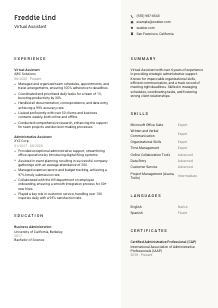
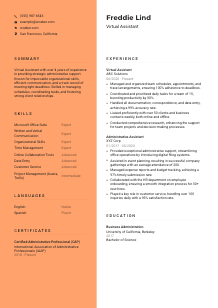
Juggling remote tasks, but your CV feels detached? Check out this Virtual Assistant CV example, created with Wozber free CV builder. Learn how to bring your digital dexterity and organizational savvy in line with job specs, optimising your career path just like a well-managed inbox!
Virtual Assistant work is judged in the details. A hiring team wants to see whether you can keep calendars accurate, move tasks forward without constant follow-up, handle documents cleanly, and communicate with clients or internal stakeholders in a way that saves time rather than creates extra work. Your CV should make that operating standard visible from the start.
Screening for this role often happens fast because administrative candidates can look similar on paper. Wozber's free CV builder helps you shape an ATS-compliant CV that mirrors the job's language around scheduling, coordination, documentation, research, and collaboration tools, so your background reads clearly as practical support experience rather than general office exposure. That makes it easier to see how you would keep day-to-day operations moving.
For a Virtual Assistant, the header does more than identify you. It sets the tone for how organised, reachable, and job-aligned you appear before anyone reads your experience. Keep it clean, professional, and tailored to any stated requirements.
Place your full name at the top in a clear, readable size. Virtual Assistant hiring moves quickly, and a cluttered header creates the wrong impression for a role built on order and accuracy. Keep the presentation simple and polished rather than decorative.
Use the target title directly under your name. If you are applying for a Virtual Assistant opening, say "Virtual Assistant" instead of a broad label like "Administrative Professional." This immediately frames your background around remote coordination, calendar support, correspondence, and task management.
List a current phone number and a professional email address, then verify both carefully. In an administrative role, small errors in contact details can raise concerns about the same kind of accuracy needed for scheduling, data entry, and documentation.
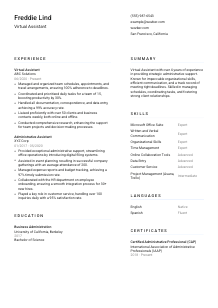
Some Virtual Assistant jobs are fully remote, while others still require local availability for time zone coverage, occasional in-person support, or client coordination. In the example posting, San Francisco, California is explicitly requested, so listing that location helps remove an early screening obstacle.
If you have a LinkedIn profile or professional website, include it only if it supports your candidacy. For this profession, that profile should reinforce administrative experience, software familiarity, communication style, and steady work history rather than act as a personal portfolio with unrelated content.
Do not include age, marital status, photo, or other nonessential personal information unless local norms specifically require it. Virtual Assistant hiring should stay focused on coordination ability, software fluency, communication, and reliability.
This section should confirm that you are reachable, professional, and aligned with any logistical requirement in the posting. For a role centered on smooth coordination, even the header should feel orderly and dependable.




This is the section that carries the most weight for most Virtual Assistant roles. Hiring teams want proof that you have already handled calendars, deadlines, correspondence, research, travel, client communication, and task flow in a real working environment.
Before you write a single bullet, mark the responsibilities and tools that appear most often in the posting. For a Virtual Assistant, that usually means schedule management, travel coordination, documentation, data entry, client communication, research support, and task prioritization. Then shape your experience bullets around those exact work streams instead of listing every admin task you have ever done.
Use reverse chronological order and make each entry easy to scan. Include your job title, employer, and dates so the reader can quickly understand your progression from administrative support into broader coordination responsibility.
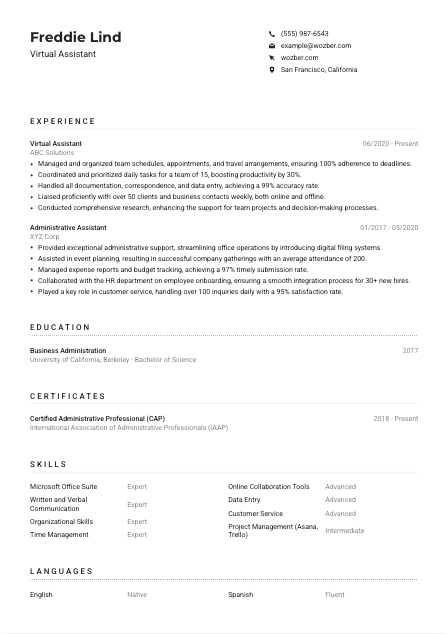
Generic bullets like "managed calendars" or "handled emails" do not tell enough. Show volume, pace, or business outcome. The example CV does this well by pairing responsibilities with concrete scope, such as coordinating daily tasks for a team of 15 or liaising with more than 50 clients weekly. That gives the reader a sense of workload and trust level.
Quantify what matters in this profession. Useful measures include deadline adherence, data accuracy, response volume, scheduling volume, productivity gains, timely submissions, client satisfaction, or onboarding throughput. A bullet such as "achieved a 99% accuracy rate in documentation and data entry" is stronger than a vague claim about being detail-oriented because it reflects the actual standard of the work.
Keep the focus on experience that maps to executive support, team coordination, client communication, document handling, and operational follow-through. If an older role includes useful overlap, frame it around transferable work such as budget tracking, onboarding coordination, event logistics, or customer inquiries. The point is to show administrative range while keeping the story centered on Virtual Assistant responsibilities.
By the end of this section, a hiring manager should be able to picture you keeping schedules on track, handling communication professionally, and reducing friction for the team. Make the operational value of your support easy to see.
Education usually will not outweigh hands-on support experience for a Virtual Assistant, but it can strengthen your profile when the employer asks for a degree or prefers business-related training. Present it clearly and keep the emphasis on relevance.
If the posting asks for a bachelor's degree in Business Administration or a related field, make that connection obvious. In the example, a Bachelor of Science in Business Administration aligns directly with the requirement. If your degree is in a different area, list it honestly and let your experience do the heavier lifting.
List your school, degree, field of study, and graduation year or date if you want to include it. This section should be quick to scan because the recruiter is mainly checking whether you meet the education bar and whether your background supports office, business, or administrative work.
If you are early in your career or changing direction, relevant coursework can help connect your education to the role. Classes in business communication, office systems, operations, project coordination, or information management can reinforce your readiness for administrative support work. If you already have several years of direct experience, keep this brief or skip it.
Academic distinctions can add value when they point to habits that matter in administrative work, such as consistency, organisation, or high performance. Dean's List, scholarships, or project-based recognition are worth including if they are credible and still support the professional story you are telling.
Clubs, leadership roles, and major projects are useful when they show coordination, event planning, documentation, research, or team support. For example, helping run a student organisation or managing logistics for campus events can reinforce transferable administrative skills. Leave out activities that do not contribute to that picture.
Your education section should confirm the qualification level the employer asked for and, when relevant, support your background in business or administrative work. Let it strengthen the CV without competing with your experience.
Certifications are helpful in Virtual Assistant hiring when they point to practical office capability, current software knowledge, or a serious commitment to administrative work. They are supporting proof, not decoration.
Prioritise credentials that strengthen your ability to handle scheduling, office systems, communication, records, or productivity software. A certification should add something meaningful to your profile, especially if the role expects organised support across multiple tools and workflows.
Dates matter because they help the employer judge whether the credential is current. For software-related certificates or professional designations, include the issue date and renewal period if applicable. The example CAP credential works well because it signals recognized administrative training and shows ongoing validity.
For this profession, certificates such as Certified Administrative Professional, Microsoft Office credentials, or project management tool training can strengthen your case. They are especially useful when the job description names tools like Microsoft Office, Asana, or Trello, or when you want to show structured administrative expertise beyond job titles alone.
Administrative work changes with software, remote collaboration habits, and employer expectations. Continuing education in productivity systems, calendar management, business writing, document control, or remote operations can keep your CV current and make you more competitive for higher-trust support roles.
A well-chosen certification tells the reader that your administrative skills are current, relevant, and worth trusting. Include the ones that support how you actually work.
The skills section should reflect the tools and working habits that make a Virtual Assistant effective in daily operations. Focus on abilities that support execution, communication, and dependable follow-through rather than filling space with broad traits.
Start with the technical and functional skills the employer names. In this case, Microsoft Office Suite, online collaboration tools, project management platforms such as Asana or Trello, written and verbal communication, and English fluency all deserve attention. This gives your CV stronger alignment with both ATS filters and human review.
Lead with the skills most central to the work. For a Virtual Assistant, that often means calendar coordination, document preparation, data entry, communication, task tracking, time management, and client-facing professionalism. The example CV handles this well by keeping the list focused on office software, organisation, communication, and collaboration instead of drifting into unrelated tools.
This role requires both tool proficiency and dependable working habits. Pair hard skills like Microsoft Office, online collaboration tools, and project management software with operational strengths such as organisation, time management, and accurate data handling. The combination should reflect someone who can use the systems and keep the work moving inside them.
When this section is done well, the reader should see a candidate who can step into calendars, documents, communication channels, and task boards with very little ramp-up. Keep it specific, current, and tied to the actual work.
Language matters in Virtual Assistant roles because the work often depends on clear written updates, polished correspondence, and smooth communication across clients, managers, and vendors. Present your language skills in a way that reflects that practical reality.
If the posting calls for English fluency, place English first and state your level clearly. For an administrative support role, this is not a minor detail. It affects email quality, meeting coordination, client communication, and document handling every day.
Order matters. Lead with the language required for the role, then add any others that could support client service or cross-border communication. In the example, English is listed first and Spanish adds useful range without distracting from the main requirement.
Choose labels that are easy to understand and avoid inflated claims. Hiring teams need a realistic sense of how well you can write, speak, and work in each language, especially if the role includes client-facing communication or documentation.
A second or third language can strengthen your CV when the company works with diverse clients, vendors, or internal teams. For Virtual Assistants, extra language ability can support customer communication, scheduling across regions, or basic translation of routine messages, but it should remain secondary to the core requirement if only one language is requested.
Do not overstate your proficiency. If you claim fluency, be prepared to write polished emails, join calls, and handle professional conversations in that language. Accuracy matters here just as much as it does in documentation or scheduling.
This section should make it clear that you can handle the communication demands of the role with confidence. For a Virtual Assistant, that usually starts with strong English and may extend to other useful client-facing languages.
Your summary should quickly position you as someone who can keep work organised, communicate clearly, and support a team without constant direction. In a Virtual Assistant CV, the best summaries are specific enough to sound credible and short enough to scan in seconds.
Pull out the recurring themes from the job description and use those to shape your opening lines. For this role, that includes schedule management, task coordination, documentation, client communication, research support, and comfort with digital tools. These are the elements that should anchor your summary, not vague statements about being hardworking or passionate.
Start with your title or closely related experience plus your years in administrative or virtual support. The example summary does this effectively by leading with more than 4 years of experience, which immediately establishes depth before moving into strengths like organisation and communication.
Use two or three of your strongest capabilities, then connect them to what they help you deliver. A stronger line might mention managing schedules, coordinating priorities, and maintaining accurate records while supporting deadlines and client relationships. That gives the reader a clearer picture of how you operate than a generic list of traits.
End with a short statement that reinforces the kind of support you provide and the environment you are ready for. Keep it focused on administrative value, such as dependable coordination, polished communication, or efficient remote support, so the section reads like a sharp professional introduction rather than a broad personal statement.
A good summary should make the hiring team expect organised execution, accurate communication, and reliable support before they reach the experience section. Keep it specific enough to sound earned.
When each section is tailored to the actual work, your CV starts to read like dependable operational support rather than general admin experience. Wozber's free CV builder helps you structure that story in an ATS-friendly CV format, and its ATS CV scanner can highlight missing requirements, role-specific keywords, and section-level gaps so your alignment is easier to tighten.
Use that structure to sharpen what matters most: scheduling accuracy, communication quality, software fluency, task coordination, and trusted follow-through. Whether you start from an ATS-friendly CV template or revise an existing draft, the finished CV should make it easy to judge how well you can support a team, clients, and deadlines from day one.