Use Wozber and land your dream job
Create CV
No registration required
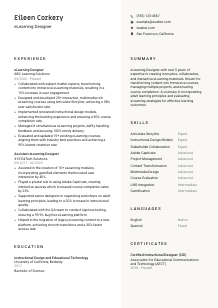
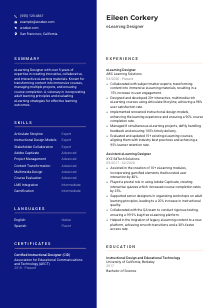
Shaping digital knowledge, but your CV feels offline? Check out this eLearning Designer CV example, created with Wozber free CV builder. Learn how to match your virtual teaching talents to job specifics, ensuring your career trajectory stays online and on top!
eLearning design gets reviewed through the quality of the learning experience you can build, not through generic content-production claims. Hiring teams want to see how you turn raw subject matter into structured courses, interactive modules, and measurable learner outcomes using sound instructional design and the right authoring workflow.
When that story is tailored well, your CV quickly separates you from general instructional support or content roles. Wozber's free CV builder helps you align your wording with the posting, keep an ATS-friendly CV format, and surface the mix of authoring tools, learning design methods, and project delivery experience that makes you credible for the seat.
This section is straightforward, but it still does important work. For an eLearning Designer, the header should immediately confirm who you are, what role you target, and whether basic logistics like contactability and location line up with the job requirements.
Use your full name as the most prominent text on the page. Keep the formatting clean and readable so the CV feels polished from the first line, much like a well-structured course interface.
Place "eLearning Designer" directly under your name when that is the role you are applying for. Matching the posted title helps frame the rest of your CV around course development, instructional design, and multimedia production instead of leaving room for broader interpretations like trainer or content specialist.
List a reliable phone number and a professional email address. If a recruiter wants to discuss your experience with Storyline builds, SME collaboration, or project delivery timelines, they should be able to reach you without friction.
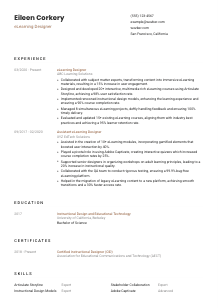
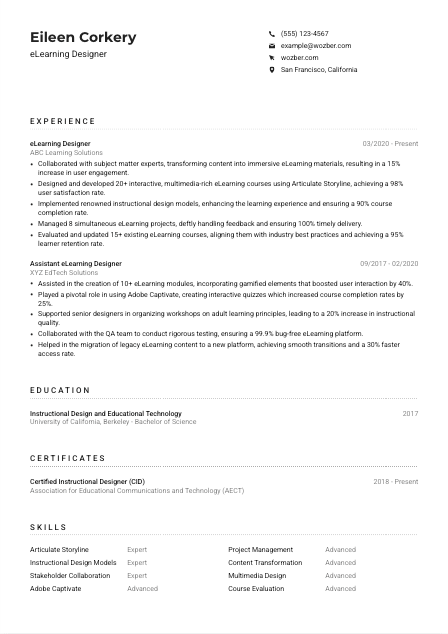
If the job calls for candidates in a specific area, show your city and state clearly. In the example, listing "San Francisco, California" directly supports a stated location requirement. Use that approach when geography matters for onsite collaboration, hybrid work, or relocation review.
Include a portfolio, LinkedIn profile, or personal site if it strengthens your case. For eLearning work, a portfolio is especially useful when it shows course samples, interaction design, visual treatments, LMS work, or before-and-after redesign examples that back up the claims in your experience section.
Your header should answer the basics in seconds: who you are, what role you want, how to reach you, and whether a practical requirement like location is already covered. That leaves more room for the hiring team to focus on your learning design work.




This is the section most likely to decide whether you move forward. For eLearning Designer roles, employers look for proof that you can work with SMEs, build engaging digital learning, manage production timelines, and improve learner performance through thoughtful design choices.
Read the posting for the actual work patterns behind the role. Here, the key themes are SME collaboration, interactive course development, instructional design strategy, multi-project management, and course evaluation. Those should become the backbone of your bullet points, not generic statements about supporting training initiatives.
List your most recent position first, then work backward. For each role, include job title, company, and dates so the reviewer can quickly track your progression from support work into ownership of full course design, development, and revision cycles.
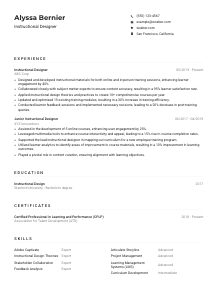
Each bullet should show what you designed, how you worked, and what changed because of it. The example does this well with lines about collaborating with SMEs to create immersive materials and building 20+ multimedia-rich courses in Articulate Storyline. That kind of phrasing links process to deliverable and then to results such as engagement, completion, or satisfaction.
Quantify the scale and performance of your work wherever you can. Useful metrics in this field include number of courses launched, completion rates, learner satisfaction, engagement lift, retention, bug rates, turnaround time, or the number of concurrent projects managed. Metrics like 98% user satisfaction, 90% course completion, and 8 simultaneous projects tell a hiring team far more than "responsible for course development."
Prioritise experience that points directly to instructional design, multimedia authoring, learner engagement, review cycles, QA, and delivery. If an older bullet does not help explain your ability to build or improve digital learning, trim it or rewrite it. Every line should reinforce why you can handle the design and development demands of the role you want now.
By the end of this section, a reader should understand the kinds of courses you built, the tools and design methods you used, the scale you handled, and the learner or business outcomes you improved. That is the level of detail that makes an eLearning Designer CV convincing.
For this role, education is usually a qualification check first and a differentiator second. The degree matters because it signals formal grounding in instructional design, educational technology, learning theory, and content development for adult learners.
Check whether the posting names a specific educational background. In this case, a bachelor's degree in Instructional Design, Educational Technology, or a related field is requested, so your education section should make that alignment easy to spot.
List your degree, field of study, school, and graduation year in a clean structure. That gives the reviewer an immediate read on whether your academic background supports work in curriculum planning, digital learning development, and instructional methodology.
If your degree lines up closely with the posting, make that clear. The example lists a Bachelor of Science in Instructional Design and Educational Technology, which directly reflects the requirement and strengthens relevance without extra explanation.
If you are early in your career or your work history is lighter, relevant coursework can help. Choose classes tied to learning theory, multimedia production, UX for learning, assessment design, LMS administration, or instructional systems design rather than broad academic filler.
Honors, capstone projects, or standout academic work are worth mentioning when they connect to the role. A project involving scenario-based learning, course prototyping, accessibility design, or evaluation of learner outcomes can strengthen your profile more than a generic achievement line.
For most eLearning Designer candidates, education should quickly confirm the required foundation and then get out of the way. If your degree or academic work closely supports instructional design and digital learning, make that connection obvious.
Certifications can strengthen your profile when they show continued development in instructional design, eLearning development, or learning technology. They are especially helpful when they support the methods, tools, or standards the role relies on.
Choose credentials that connect to instructional design practice, eLearning development, adult learning, learning technologies, or platform-specific expertise. A certification such as Certified Instructional Designer fits because it reinforces the design methodology behind course creation, not just software familiarity.
If you hold several certifications, lead with the ones that strengthen your candidacy for the specific role. For an eLearning Designer opening, credentials linked to course design, authoring tools, accessibility, LMS work, or assessment design deserve priority over general professional development badges.
Add the date earned or active range when it helps show recency. In a field shaped by changing authoring tools, media formats, accessibility expectations, and learner experience standards, current certification timing can add useful context.
eLearning design changes with new tool capabilities, design standards, and delivery models. Updating this section over time shows that your practice stays current, whether that means deeper work in Storyline, Captivate, xAPI, accessibility, or learning analytics.
Certifications should support your experience, not repeat it. When chosen well, they show that your learning design practice is current and that you invest in staying sharp on methods and tools the role actually uses.
A useful skills section for this profession should show both production capability and learning-design judgment. Hiring managers want to see the tools you can work in, the frameworks you understand, and the collaboration skills that help you move from SME input to finished course.
Identify the tool, method, and workflow language in the job ad. Here that includes Articulate Storyline, Adobe Captivate, instructional design models, adult learning principles, multimedia design, communication, and project management. Those terms should guide how you shape your own list.
Reflect the employer's wording where it accurately describes your background. If you have built branching scenarios in Storyline, produced assessments in Captivate, or applied ADDIE and adult learning principles in course design, name those skills directly instead of using vague labels like "eLearning expertise."
Lead with the capabilities most central to the job. In this field, that often means authoring tools, instructional design methods, stakeholder collaboration, multimedia design, project management, LMS-related knowledge, and evaluation skills. The example works well because it foregrounds Storyline, instructional design models, stakeholder collaboration, and Captivate before secondary capabilities like gamification.
A hiring team should be able to scan this list and understand how you build courses, how you design for adult learners, and how you work with others to deliver projects on time. Specific tools and methods carry much more weight than broad claims.
Language ability matters in eLearning because the work depends on clear writing, learner-facing content, and smooth collaboration with SMEs and stakeholders. If the posting names a required language, treat that as a clear CV priority.
Some eLearning roles require strong written and spoken language skills because the designer shapes scripts, screen text, assessments, and stakeholder feedback rounds. In this posting, strong English is explicitly required, so it should appear clearly in your CV.
List English prominently and mark your level accurately, such as Native or Fluent. That makes it easy for the employer to connect your profile with a role that depends on precise communication across learning content and project collaboration.
Additional languages can be valuable when organizations serve multilingual learners, global teams, or regional audiences. A second language will not replace core eLearning skills, but it can strengthen your profile when content localization or cross-border collaboration is part of the environment.
Terms like Native, Fluent, Intermediate, and Basic are usually enough. Avoid overstating your level, especially in a profession where writing quality, learner instructions, and review feedback all depend on accurate communication.
If your language skills have supported translated modules, localized course assets, bilingual SME interviews, or global learner support, make that connection elsewhere in the CV. The language section itself can stay brief while still signaling useful reach.
For eLearning work, language skills matter most when they support clear content and reliable collaboration. State them plainly, lead with the required language, and let the rest of your CV show how that communication ability plays out in practice.
Your summary should give a fast, accurate read on the kind of eLearning Designer you are. In a few lines, it needs to connect your experience level with the tools, design approach, and outcomes that define your work.
Before writing, identify the two or three themes that matter most in the posting. For this role, that means eLearning design and development experience, authoring-tool proficiency, instructional design knowledge, and the ability to manage projects while producing engaging learning content.
Start with a direct line that states your title and level of experience. "eLearning Designer with 5+ years of experience" works because it immediately places you in the right lane and matches the seniority range the employer requested.
Use the next sentence to name the work you are trusted to do. That may include collaborating with SMEs, building interactive courses in Storyline or Captivate, applying adult learning principles, and improving completion or engagement metrics. The example summary points in the right direction, but you can make yours even stronger by anchoring those strengths to specific tools or outcomes.
Aim for a short paragraph that reads cleanly on first pass. Skip broad adjectives and focus on what you consistently deliver: course design, multimedia development, learner engagement, revision of existing content, and dependable project execution across multiple deadlines.
After reading these lines, the employer should already understand your experience level, authoring environment, instructional design approach, and the learning outcomes you tend to improve. That sets up the rest of the CV to confirm the details.
A well-tailored eLearning Designer CV should make it easy to see the courses you have built, the tools you know, the design methods you apply, and the learner results you influence. That is what moves you beyond generic training or content roles.
Use Wozber's AI CV builder and ATS CV scanner to align your wording with the posting, strengthen ATS optimisation, and present your experience in a clean ATS-compliant CV. The final read should make one thing clear: you can turn content into effective digital learning and deliver it with consistency.