



Use Wozber and land your dream job
Create CV
No registration required
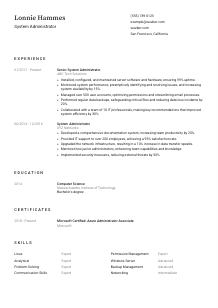
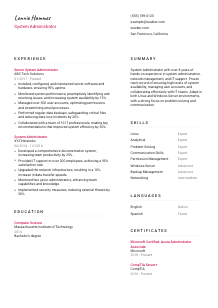
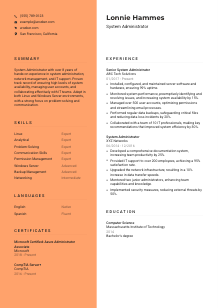
Mastering networks, but your CV seems offline? Check out this System Administrator CV example, built with Wozber free CV builder. Learn how to thread your IT expertise into job-critical cables, keeping your career connected and out of a crash loop!
System administration work gets noticed when systems stay available, access stays controlled, backups hold, and users can keep working without disruption. That creates a common CV problem for System Administrators. A lot of the work is preventive, operational, and behind the scenes, so weak CVs read like generic IT support even when the candidate has been managing servers, permissions, performance, and uptime at a much higher level.
A tailored CV changes that reading quickly by making your environment, scope, and operational impact obvious in both human review and ATS parsing. Wozber's free CV builder helps you align your wording with the job description, keep an ATS-friendly CV format, and surface role-specific terms such as Linux, Windows Server, backups, user account management, and system availability, so hiring teams can quickly understand the infrastructure responsibilities you've actually handled.
This section is simple, but it still does real work. For a System Administrator, clear contact details and relevant location information remove avoidable friction before the hiring team gets to your server, network, and support experience.
Place your name at the top in a clean, readable format, then use the exact job title or a close match underneath. If you are applying for a System Administrator role, labeling yourself "System Administrator" or "Senior System Administrator" helps frame the rest of the CV around infrastructure ownership, system maintenance, and operational support from the first line.
List a current phone number and a professional email address that you check regularly. In technical hiring, interview coordination can move fast, especially when a team needs coverage for server administration, troubleshooting, or support escalations, so accuracy matters more than style here.
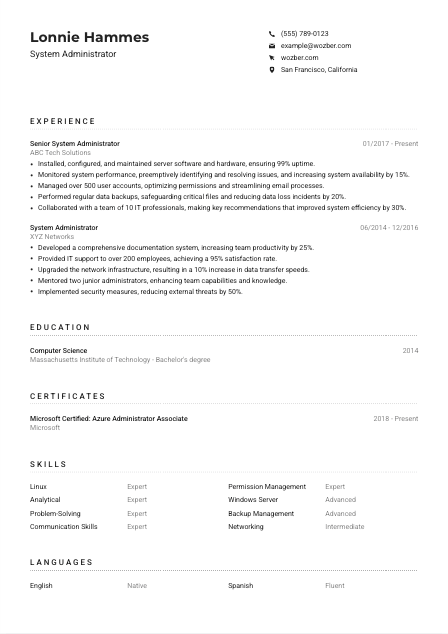
Some roles include an on-site, regional, or relocation requirement. Here, the employer wants someone in San Francisco or willing to relocate, so showing "San Francisco, California" immediately addresses a practical filter. Use this only when it is relevant to the job you are targeting, not as a default rule for every application.
A LinkedIn profile or professional website can support your application when it matches the CV and expands on your infrastructure work, certifications, or technical projects. If you include one, make sure it reflects the same roles, dates, and technologies so there is no mismatch around your Linux, Windows Server, cloud, or networking background.
Skip extra personal information, photos, and unrelated hobbies in this section. Keep the focus on the details that help a hiring manager contact you and confirm practical requirements. Save the CV space for the work that proves you can maintain systems, resolve incidents, and support availability.
When this section is accurate and stripped of distractions, the reader can move straight into your technical background without pausing over logistics. That is exactly what you want at the top of a System Administrator CV.




The experience section carries most of the hiring weight for System Administrators. Hiring teams want to see what environments you maintained, what issues you solved, how much infrastructure or user volume you supported, and whether your work improved uptime, performance, security, or support efficiency.
Read the posting closely and identify the recurring operational themes. In this case, the priorities include installing and maintaining server hardware and software, monitoring performance, troubleshooting issues, managing user accounts and permissions, handling backups, and working with IT teams on improvements. Your bullets should reflect the same kind of work using language that matches your actual experience, which also strengthens ATS optimisation.
List your most recent role first, then work backward with job title, employer, and dates clearly shown. For infrastructure roles, this format helps hiring managers quickly understand your current level of responsibility, whether you have moved from support into administration, and how long you have been working with production systems, user management, or network operations.
Do not stop at duties like "monitored servers" or "managed accounts." Show what your work changed. The sample CV does this well with bullets such as ensuring 99% uptime, increasing system availability by 15%, and managing more than 500 user accounts. Those statements tell the reader about scale, reliability, and daily administrative scope, not just task ownership.
Numbers carry more weight when they reflect how system administration is actually measured. Good examples include uptime, incident reduction, response time, backup success, user volume, patching coverage, ticket resolution, system efficiency, transfer speeds, and security improvements. Metrics such as reducing data loss incidents by 20% or improving system efficiency by 30% make your contribution easier to understand in operational terms.
If an older role or bullet does not support your target position, trim it or rewrite it so the relevance is clear. A System Administrator CV should concentrate on infrastructure support, server environments, troubleshooting, account administration, backups, security practices, and collaboration with IT teams. The goal is not to document every job you have held. It is to show a hiring team where you have already handled the kind of systems work they need.
A System Administrator's experience section should read like a record of operational responsibility. When each bullet ties your work to uptime, support scale, performance, access control, backups, or infrastructure improvements, the hiring team can quickly see that you have already done the job in a real environment.
Education usually does not outweigh hands-on administration experience, but it still matters, especially when the posting asks for a degree in Computer Science, Information Systems, or a related field. Keep this section clear and relevant so it confirms your technical foundation without taking space away from stronger proof in your experience.
If the role asks for a bachelor's degree in a technical field, make that information easy to find. A Bachelor's degree in Computer Science, as shown in the example, directly answers the requirement and helps you clear an early screen without extra explanation.
Include degree, field of study, school name, and graduation year or date range. Reverse chronological order is best if you have more than one credential. For experienced System Administrators, this section should be concise and easy to scan, not overloaded with detail that belongs elsewhere.
When your field of study closely matches the posting, use the exact wording naturally. "Computer Science" and "Information Systems" are common examples. This helps both ATS matching and human review, especially in roles that blend system administration with network management, scripting, or broader IT operations.
Early-career candidates can use relevant coursework, lab work, or projects to show exposure to operating systems, networking, virtualization, security, or server administration. If you already have several years of production experience, those details usually matter less than your actual results in live environments.
Honors, research, or participation in technical organizations can be worth listing when they support your profile, especially for recent graduates. Keep them brief. For experienced candidates, the CV should stay centered on operational work, certifications, and measurable system administration outcomes.
This section only needs to do a few things well: confirm you meet the education requirement, show the field clearly, and stay easy to scan. Once that is covered, your experience and certifications can carry the heavier argument.
Certifications matter in system administration because they can validate platform knowledge, current tooling, and continued development. They are especially useful when the employer names a certification directly or when your day-to-day work spans Microsoft environments, cloud administration, security, or server support.
If a job mentions certifications such as Microsoft Certified: Azure Administrator Associate or CompTIA Server+, move those to the top if you have them. In the example CV, both certifications reinforce the candidate's server and administration background without needing extra explanation.
List certifications that support the kind of infrastructure work the role includes. For System Administrators, that usually means server administration, cloud administration, operating systems, networking, security, or backup and recovery. A shorter, focused list works better than a long catalogue of less relevant credentials.
Add the certifying body and the date earned. If the certification is active or renewed, show that clearly. Technical teams often care whether a credential reflects current platform knowledge, especially in areas such as Azure administration, Windows Server, or security operations.
You do not need a long paragraph about continuous learning. A current certification list already shows that you keep your technical knowledge updated. If you are working toward a relevant certification, you can note it if it is genuinely close to completion and helps your application.
Relevant certifications add weight when they support the environments and responsibilities named in the job description. They work best as confirmation of your technical range, not as a substitute for hands-on administration experience.
For System Administrators, a skills section should mirror the systems, tools, and problem-solving demands of the job. Generic skill lists waste space. What helps is a focused set of technical and interpersonal skills that matches the environment you have actually worked in.
Start with the technologies and functions named in the posting. Here that includes Linux, Microsoft Windows Server, system administration, network management, troubleshooting, user accounts, permissions, backups, and communication. Build your list around real experience with those areas instead of broad IT buzzwords.
Technical depth matters, but so do the soft skills that keep infrastructure work moving. Analytical thinking, problem-solving, and communication belong on a System Administrator CV because the role often involves incident response, user coordination, cross-team troubleshooting, and recommendations for system improvements. The sample CV handles this balance well by pairing Linux and Windows Server with analytical and communication strengths.
Choose the skills most relevant to the target role and avoid turning this section into a catch-all inventory. It is better to show a clean set of capabilities such as Linux, Windows Server, permission management, backup management, networking, and troubleshooting than to bury the reader in every tool you have touched once. Use wording that matches the posting where it reflects your real work.
A focused skills section helps the hiring team confirm your platform knowledge and day-to-day operating strengths at a glance. Keep it aligned with the environment, responsibilities, and support demands of the role you are targeting.
Language ability is not always a major differentiator in system administration, but clear communication matters. Admin work often includes documenting issues, explaining outages, coordinating with users, and working with IT teams during incidents or change windows, so language proficiency can be relevant when the posting calls it out.
If the job asks for strong English communication, make that visible in your languages section or elsewhere on the CV. This posting does, so listing English with an accurate proficiency level helps confirm you can document issues, handle support communication, and collaborate with technical and non-technical colleagues.
Additional languages are worth listing when they are real strengths, especially in teams that support diverse user groups or global operations. In the example, Spanish adds useful breadth without distracting from the core infrastructure profile.
Stick with straightforward labels such as Native, Fluent, Intermediate, or Basic. Hiring teams do not need vague wording here. They need a realistic sense of how well you can communicate in written and spoken settings.
Some System Administrator roles are heavily internal and local. Others involve distributed teams, vendor coordination, or support across regions. If language skills help you work across those settings, they are worth keeping on the CV. If not, keep the section short and factual.
Do not inflate language ability. If you may be asked to write documentation, join troubleshooting calls, or support users directly, your stated proficiency should hold up in practice. Accuracy matters just as much here as it does in your technical claims.
When language skills are relevant, list them plainly and honestly. For System Administrators, that supports the broader point that you can communicate clearly during support work, documentation, and cross-team coordination.
Your summary should quickly establish what kind of System Administrator you are, how much experience you bring, and what environments or outcomes define your work. This is the place to connect years of experience with the operational strengths that matter most for the role.
Start with a direct line that states your title and years of experience. A phrase like "System Administrator with over 8 years of hands-on experience in system administration, network management, and IT support" works because it immediately places you within the right technical scope and seniority level.
Use one or two achievements that reflect the infrastructure responsibilities named in the posting. The example summary points to high system availability, user account management, and collaboration with IT teams, which all align well with the role. If your background is stronger in security, virtualization, cloud operations, or large-scale support, emphasize those where relevant.
System administration is not only about maintaining servers. The role also depends on troubleshooting under pressure, explaining issues clearly, and working with other IT functions. Mention analytical, problem-solving, and communication strengths if they are backed by your experience and fit the job description.
Aim for a short paragraph that can be read in seconds. Focus on years of experience, core environments such as Linux and Windows Server, and a few operational strengths or outcomes. Skip generic adjectives and broad career goals. This section works best when it sounds like the top line of an experienced technical profile, not a personal statement.
A good summary gives the hiring team a fast, accurate read on your administration background before they reach the detail below. When it names your experience level, environments, and operational strengths clearly, the rest of the CV lands with more context and more credibility.
Your CV should now show the parts of system administration that often stay invisible on the job: uptime protection, access control, backup discipline, troubleshooting depth, and the improvements you made to keep infrastructure running smoothly. That is what separates a generic IT profile from one that looks ready for production responsibility.
Use Wozber's free CV builder to tighten the structure, align your wording with the posting, and produce an ATS-compliant CV that keeps your Linux, Windows Server, user management, backup, and support experience easy to parse. The final result should make one thing clear quickly. You can maintain the environment, solve the problems, and support reliable operations from day one.




