Use Wozber and land your dream job
Create CV
No registration required
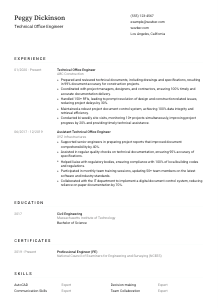
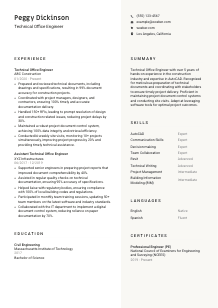
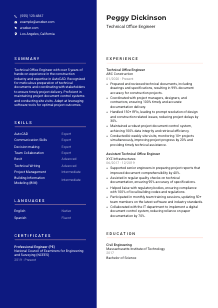
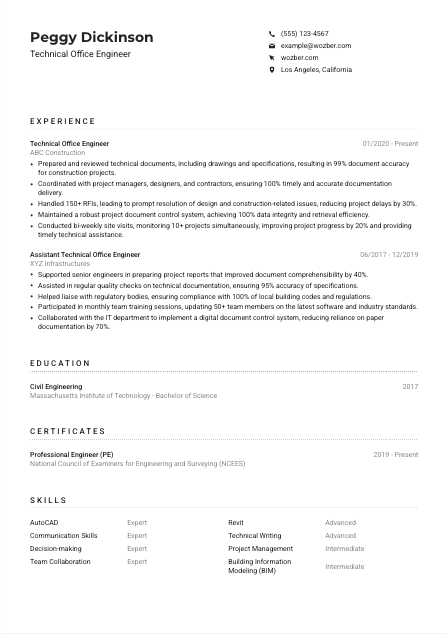
Blending blueprints, but your CV feels like sketching in the margins? Check out this Technical Office Engineer CV example, created with the Wozber free CV builder. It shows how you can draft your construction coordination skills to match job specs, building a career that's as structurally sound as your projects!
Technical Office Engineers sit at the point where drawings, specifications, RFIs, and site progress have to stay in sync. Hiring teams look for people who can keep technical documentation accurate while supporting project delivery, because one missed revision or unresolved coordination issue can slow procurement, approvals, or work on site.
When your CV mirrors the language of the role, it becomes much easier to separate document-control experience from broader project engineering work. Wozber's free CV builder helps you shape that experience into an ATS-compliant CV, so keywords like technical documents, RFIs, AutoCAD, and building codes are visible in the right places and your construction support scope is clear from the first scan.
Construction employers expect precision before they ever reach your experience section. Your personal details should read like the top line of a well-managed project document: accurate, current, and immediately useful for contacting you and confirming basic eligibility.
Use your full name in a slightly larger font so it is easy to identify on the first pass. For a Technical Office Engineer, clarity matters. A crowded or stylized header can make the document feel less controlled than the role requires.
Place "Technical Office Engineer" directly under your name when that matches the role you are applying for. This helps position you correctly, especially when employers are sorting between site engineers, design engineers, estimators, and technical office staff.
List the phone number and email address you actually monitor. Check them carefully. In project-based hiring, interview requests and follow-up questions often move quickly, especially when a team needs support with drawing reviews, RFIs, or document control.
If the employer wants someone based in Los Angeles, California, say so directly in your personal details if that applies to you. Location is a posting-specific filter, but when it is listed, removing doubt here can prevent your application from being screened out before your technical background is reviewed.
Include LinkedIn or a relevant professional profile if it supports the same career story as your CV. This is useful when your profile reinforces construction-sector experience, software exposure, project types, or credentials without introducing conflicting dates or titles.
Skip details such as age, marital status, or other personal identifiers. Keep the section focused on information that helps a construction employer contact you, confirm availability, and move to the next step.
This section should do what strong technical documentation does from the start: give the reader exactly what they need without confusion. If your header is accurate and aligned to the opening, the hiring team can move straight to your engineering background.




For Technical Office Engineers, experience is where employers look for proof that you can keep documents moving, respond to site and design queries, and support construction teams without losing control of revisions or deadlines. Broad engineering claims are less persuasive than specific examples of documentation accuracy, coordination volume, and issue resolution.
Read the job description closely and mark the operational duties that define the role. For this type of opening, that usually means preparing drawings and specifications, coordinating with project managers and contractors, handling RFIs, maintaining document control, and supporting site activity. Those priorities should shape which bullets you keep, cut, or rewrite.
Start with your most recent position and work backward. Include the job title, company name, and employment dates for each role. This helps the employer quickly see your progression from supporting technical office tasks to owning documentation flow, coordination, and issue tracking across active projects.
Focus each bullet on work a Technical Office Engineer actually owns or influences. Good material includes drawing preparation, specification review, submittal support, RFI tracking, coordination with consultants, and document updates tied to live construction packages. The sample CV does this well by describing technical documents, stakeholder coordination, and site visits rather than using generic engineering language.
Quantify where the work naturally produces measurable outcomes. That can include document accuracy, number of RFIs handled, reduction in delays, number of projects supported, retrieval efficiency in a document control system, or compliance rates tied to code requirements. For example, noting 150+ RFIs handled or a 30% reduction in delays tells the reader how much coordination pressure you managed.
Prioritise experience that proves you can support project delivery from the technical office side. AutoCAD, BIM coordination, document control systems, code compliance, and communication with project teams all belong here. If a past duty does not help explain your ability to manage construction documentation or resolve technical queries, it can be shortened or removed.
Your experience section should make one thing easy to understand: you know how to manage the information flow behind construction delivery. If the bullets show documentation quality, coordination scope, and practical support to site teams, you are presenting the right kind of engineering experience for this role.
A Technical Office Engineer role usually starts with an engineering degree, especially in civil engineering or a closely related field. This section does not need decoration. It needs to confirm that you have the academic base for reading drawings, interpreting specifications, and working within construction standards.
If the posting requires a Bachelor's degree in Civil Engineering or a related field, place that qualification clearly in your education section. For many construction employers, this is a basic eligibility checkpoint before they review software skills or project history.
List your field of study, degree, school, and graduation year or date in a consistent format. Technical office work depends on clean records and clear references, so your education section should follow the same standard.
When your degree directly matches the requirement, let that alignment be obvious. A Civil Engineering degree connects naturally to drawing interpretation, material specifications, structural coordination, and compliance awareness, all of which matter in technical office work.
If coursework, capstone work, or additional training strengthens your case, include it only when it adds role-specific value. Subjects such as construction management, CAD drafting, BIM, specifications, or building regulations can help early-career candidates show usable context beyond the degree title.
Academic honors, scholarships, or standout projects can help if they relate to engineering rigor, technical reporting, or construction problem-solving. If you already have several years of industry experience, keep this brief so the CV stays focused on project delivery work.
This section should quickly confirm that you meet the role's educational bar and have a credible engineering base. Once that is established, the employer can focus on the project documentation and coordination experience that matters most.
Certifications matter most when they strengthen your authority in construction, engineering practice, software use, or compliance-related work. For Technical Office Engineers, the value is not in listing every course completed. It is in showing qualifications that support better technical judgment and stronger project documentation.
Put the most relevant credentials first, especially those that relate to professional engineering, construction coordination, or technical software used in the role. A PE license, for example, can add weight because it reflects recognized engineering standards and accountability.
Be selective. A short list of credentials that support drawing review, code awareness, design coordination, or construction systems is stronger than a long list of unrelated learning badges. Choose certifications that help explain how you operate in a technical office environment.
Name the issuing organisation and show the issue date or active period when relevant. This helps the reader place the credential in context and quickly see whether it is current. The sample CV handles this well by pairing the PE credential with its issuing body and active dates.
Update this section whenever you renew a license or complete training that supports your current target roles. In construction environments, current credentials can strengthen trust in your familiarity with standards, software changes, and professional requirements.
A focused certification section tells the employer that your technical background is current and professionally grounded. That is especially useful when the role touches code compliance, drawing accuracy, and cross-functional construction coordination.
This section should read like the working toolkit behind your CV, not like a generic list of strengths. For Technical Office Engineers, the mix usually includes drafting software, document control capability, coordination skills, and enough communication strength to keep designers, project managers, and contractors aligned.
Start with the skills the employer called out directly. In this case, AutoCAD, communication, organisation, and familiarity with local building codes clearly matter. Those should appear if you genuinely have them, using wording close to the posting so both ATS systems and human reviewers can connect the match quickly.
Technical office work is part software, part control, part communication. Include drafting and modeling tools such as AutoCAD or Revit, then add role-specific capabilities like technical writing, document control, RFI handling, and team coordination. The sample CV strikes this balance by pairing AutoCAD and BIM-related tools with collaboration and communication skills.
Do not turn this into a master inventory of everything you have ever used. Prioritise the tools and capabilities most relevant to construction documentation and project support. A concise list is easier for a hiring manager to connect to the job, and it also improves ATS optimisation when the terms match your real experience.
Every skill listed should help explain how you support design coordination, documentation accuracy, and construction progress. If the section reads like the toolset behind your project work, it is doing its job.
Technical Office Engineers often spend their day moving between written documents and live coordination with internal teams, consultants, and contractors. Language ability matters here because specifications, RFIs, meeting notes, and site clarifications all depend on precise communication.
If the role asks for advanced English speaking and comprehension, show that clearly. English is central to technical office work in many construction settings because drawings, specifications, correspondence, and issue logs all need to be understood and communicated accurately.
List the language most relevant to the job first, then add any others that could support team coordination or project communication. This keeps the section aligned to the role rather than turning it into background information.
Extra languages can be helpful on construction projects, especially when teams include diverse site staff, subcontractors, or external stakeholders. If another language improves your ability to communicate on site or across project participants, it is worth listing.
Choose standard terms such as native, fluent, intermediate, or basic, and use them consistently. Avoid vague wording. For example, the sample CV's "English - Native" and "Spanish - Fluent" make the candidate's communication range immediately understandable.
Only emphasize multilingual ability if it adds practical value for the jobs you target. In some construction environments, an additional language can help with field coordination and stakeholder communication. In others, advanced English may be the only language requirement that matters.
This section should help the employer trust your ability to manage technical communication clearly, whether that means strong English for documentation or an additional language that helps on active construction sites.
The summary is your chance to define your professional lane before the reader reaches the details. For this role, that means establishing your construction background, your command of technical documentation, and the kind of coordination work you handle without turning the opening into a long list of duties.
Start from the actual priorities in the job description and choose two or three that match your background best. For a Technical Office Engineer, that often means years in construction, technical document preparation, software proficiency, document control, RFIs, and coordination with project teams.
Lead with a direct professional identity and your years of experience. This quickly tells the reader whether you are coming from technical office work, broader civil engineering, or an adjacent construction support role.
Include the tools and responsibilities most central to the role. AutoCAD, technical document review, site support, and coordination across project stakeholders are stronger summary material than broad claims about being hardworking or detail-oriented. The sample summary does this effectively by combining years of experience, AutoCAD, documentation work, and site visits in a compact format.
Aim for a few lines that can be read in seconds. Focus on construction-relevant facts, not general personality language. If your summary makes the reader expect strong experience in RFIs, document control, and project coordination, it has set up the rest of the CV well.
A useful summary gives the hiring team an immediate sense of your construction documentation scope and coordination strength. That opening should make them expect a CV filled with clear project support, accurate technical records, and dependable engineering follow-through.
You now have a clear structure for presenting your background as a Technical Office Engineer, from education and certifications to RFIs, document control, site support, and software skills. Use Wozber's free CV builder to organise that experience into an ATS-friendly CV format that stays clean, readable, and aligned to construction hiring needs.
Before you apply, run a final check against the posting with Wozber's ATS CV scanner so missing keywords, weak phrasing, or gaps in role alignment are easier to catch. The finished CV should make one point quickly: you can support construction projects with accurate documentation, reliable coordination, and strong technical office discipline.