Use Wozber and land your dream job
Create CV
No registration required
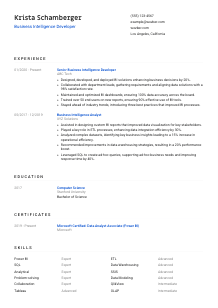
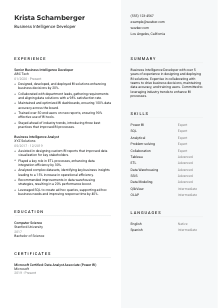
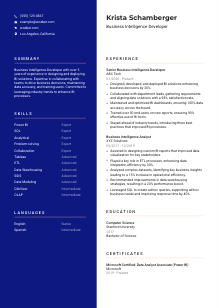
Deciphering data, but your CV doesn't compute? Check out this Business Intelligence Developer CV example, created with Wozber free CV builder. It shows how to code your analytics expertise into a format that clicks with job algorithms, positioning your career for a strategic breakthrough!
Business intelligence work gets judged in production, not in theory. Hiring teams want to see how you turn messy business questions into reliable dashboards, usable reports, and data models people actually trust. Your CV should make that practical impact visible early, whether your strengths lean toward Power BI development, SQL-heavy reporting, ETL workflows, or stakeholder-facing analytics.
A tailored Business Intelligence Developer CV also helps separate dashboard builders from developers who understand the full reporting pipeline. With Wozber's free CV builder and an ATS-friendly CV format, you can mirror the language of the posting, surface tools such as SQL, ETL, or OLAP where they genuinely apply, and make it easier for reviewers to see your depth in data delivery, accuracy, and business support.
This section is simple, but it still carries a few useful signals. For BI roles, the header should immediately show that you are reachable, professional, and geographically aligned when the employer has a location requirement. Keep it clean so the reader gets to your technical and business-facing experience without friction.
Use your full name in the largest text on the page so it is easy to spot in a CV stack or ATS profile. Skip extra descriptors or branding language here. For a Business Intelligence Developer, clarity matters more than style flourishes.
Place the job title directly below your name when it matches your background. If you are applying for a Business Intelligence Developer role, say exactly that. This helps both recruiters and ATS systems connect your profile to the opening without guessing whether you are closer to a BI Analyst, Data Analyst, or Reporting Developer.
Include one phone number and a professional email address, ideally in a straightforward format such as first name and last name. If you also share a portfolio, GitHub, or LinkedIn profile, make sure it supports the same story your CV tells, especially around dashboards, data models, reporting projects, or SQL work.
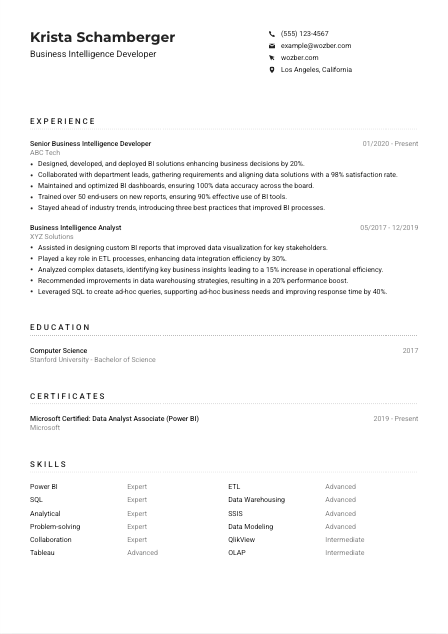
Some BI roles are tied to a specific office, hybrid schedule, or local hiring pool. When that is stated, match it clearly in your header. In the example, listing "Los Angeles, California" directly supports the employer's location requirement and avoids unnecessary questions about relocation.
A relevant LinkedIn profile, portfolio, or personal site can strengthen this section if it shows report samples, project outcomes, or tool proficiency. For BI candidates, that is most useful when it reinforces your experience with dashboards, stakeholder reporting, data visualization, or business-facing analytics rather than acting as a generic online profile.
Your header does not need personality tricks. It needs accuracy, professionalism, and any logistical details that matter for the role. Once that is in place, the reader can move straight to the parts of your CV that prove you can build BI solutions people rely on.




This is the section hiring teams study most closely for BI roles. They want proof that you have built reporting solutions, worked with stakeholders, handled real data complexity, and improved decisions or operations through the systems you delivered. Generic bullets about "analysing data" are not enough when the role calls for dashboard development, SQL fluency, and BI platform ownership.
Read the posting for the work the employer actually needs done, then make sure your bullets cover those same categories when they reflect your experience. For this role, that includes designing and deploying BI solutions, gathering requirements, maintaining dashboards, improving data accuracy, and supporting end users. If your current bullets focus only on analysis, add the development, optimisation, and stakeholder pieces that show full BI ownership.
List your most recent position first and include your job title, employer, and dates. That structure matters because BI hiring often depends on recency with modern reporting platforms and SQL-heavy work. A recent title such as "Senior Business Intelligence Developer" immediately frames the level of responsibility you have carried.
Each bullet should show what you built, improved, or supported. Strong BI bullets usually include a deliverable and an outcome, such as a dashboard rollout, ETL improvement, reporting automation, data quality gain, or faster decision cycle. The example does this well by pairing actions like deploying BI solutions or training users with business results and adoption metrics.
Use numbers that fit the work naturally. In Business Intelligence, that might mean better dashboard adoption, faster report turnaround, improved data accuracy, reduced manual reporting time, higher stakeholder satisfaction, or operational gains from insights delivered. Metrics such as 20% better decision support, 30% stronger ETL efficiency, or training 50+ users make the scale of your work much easier to understand.
Keep the section focused on reporting platforms, SQL, database work, ETL processes, data warehousing, collaboration with business teams, and measurable results. Older or unrelated achievements can stay brief unless they strengthen your case for this opening. The reader should come away seeing a developer who can build, maintain, and improve business intelligence systems, not just someone who has worked around data.
Your experience section should show that you have delivered reporting and analytics solutions people used to make decisions. If the bullets clearly connect tools, business context, and measurable outcomes, hiring teams can quickly picture you operating in their BI environment. Wozber's free CV builder helps present that experience in an ATS-compliant CV that stays structured and easy to scan.
For Business Intelligence Developer roles, education usually serves as a baseline qualification rather than the main differentiator. It still matters, especially when the employer asks for a bachelor's degree in Computer Science, Information Technology, or a related field. Present it clearly, then let your experience and technical scope do the heavier lifting.
If the posting asks for a bachelor's degree in a technical field, list yours in direct language. A degree such as "Bachelor of Science in Computer Science" aligns immediately with a BI development opening and removes ambiguity about your academic background.
Include the degree, school, field of study, and graduation year or date in a consistent format. That is all most experienced BI candidates need. The cleaner the structure, the easier it is for reviewers to confirm the requirement and move on to your SQL, reporting, and dashboard experience.
If your degree is directly tied to data or systems work, make that visible. Computer Science, Information Technology, Information Systems, Data Analytics, and related disciplines all support BI hiring well. In the example, the Computer Science degree reinforces the candidate's technical base for database and BI tool work.
Relevant coursework can help if you are earlier in your career or shifting into BI from an adjacent role. Include classes that genuinely support the work, such as databases, data warehousing, statistics, business analytics, or software engineering. For experienced candidates, this is often less useful than another strong project or accomplishment in the experience section.
If you completed a capstone, thesis, research project, or honors work tied to reporting systems, data modeling, analytics, or business decision support, include it selectively. This is especially helpful when that work demonstrates SQL, visualization, or structured problem-solving before your professional experience fully covers those areas.
Education should quickly answer the qualification question and support your technical credibility. Once that is clear, the CV should move the reader back to the work you have done with BI platforms, data pipelines, and reporting outcomes.
Certifications can add useful weight in BI hiring, especially when they map directly to the reporting stack or analytics platform named in the posting. They are most valuable when they reinforce applied skills the rest of the CV already shows, such as Power BI development, data modeling, or analytics platform fluency.
Even when certifications are not required, the job description usually points to what matters. A request for experience with Power BI, Tableau, or QlikView gives you a clear signal about which credentials deserve space. Prioritise certifications that match the employer's reporting environment or adjacent BI workflow.
Lead with credentials that directly support the opening. A Power BI certification is especially useful when the role mentions Power BI among its preferred tools. The example's "Microsoft Certified: Data Analyst Associate (Power BI)" works well because it supports the technical stack already shown in the experience section.
If a certification is current, renewed, or tied to an active validity period, include the date or date range. That helps show you are keeping pace with changes in BI platforms, reporting features, and analytics practices rather than relying on outdated product knowledge.
Business intelligence keeps shifting across cloud data platforms, visualization tools, and governance practices. Add certifications that support where your work is heading, whether that means deeper Power BI specialization, Tableau expertise, Azure data tooling, or broader analytics engineering knowledge. Choose depth that fits your target roles instead of collecting unrelated badges.
A certification section works best when it confirms real platform capability. If your CV already shows dashboards, SQL work, ETL involvement, and stakeholder reporting, relevant credentials give that profile extra technical credibility without taking over the page.
The best BI skills sections do not read like a software inventory. They show the mix of tools, data concepts, and working habits that let you build reliable reporting solutions. For this role, that means balancing platform knowledge with core data skills and the collaboration required to turn business questions into usable outputs.
Start with the explicit requirements and then add closely related skills you truly use. Here, that includes BI tools such as Power BI, Tableau, or QlikView, strong SQL, relational databases, ETL, OLAP, data warehousing, analytical thinking, problem-solving, and collaboration. Those are the terms most likely to matter in both ATS matching and recruiter review.
List your technical skills first if the role is tool-heavy, then follow with business-facing strengths such as stakeholder collaboration, requirements gathering, user training, or problem-solving. That balance matters in BI because developers often work across data teams and non-technical business users. The example does this well by combining platform skills with analytical and collaboration strengths.
Keep only the skills that support your target BI role. A shorter list with strong relevance is more convincing than a long list of loosely related software and vague soft skills. If you mention a tool or method, you should be ready to support it with project work, production use, or measurable outcomes elsewhere in the CV.
Your skills section should make the technical environment feel familiar to the reader. When it clearly reflects reporting tools, SQL depth, data architecture concepts, and stakeholder-facing BI work, it strengthens both ATS optimisation and the human read of your CV.
Language skills are rarely the headline for a Business Intelligence Developer, but they can still matter. BI professionals often gather requirements, explain dashboard logic, train users, and respond to questions from business teams, so clear communication is part of the job even when the role is deeply technical.
If the posting names a language requirement, list it clearly and early. Here, spoken and written English are essential, so your English proficiency should be easy to find. For BI work, that matters because requirements gathering, report documentation, and user training depend on precise communication.
Order languages by relevance to the role, not just by personal preference. If one language is required for stakeholder meetings, documentation, or cross-team communication, place it at the top. That keeps this section practical rather than decorative.
Extra languages can be useful when BI teams support regional stakeholders, customer-facing reporting, or multilingual business environments. They are not a substitute for technical depth, but they can strengthen your profile when communication across markets or departments is part of the work.
Choose plain, accurate levels such as native, fluent, advanced, intermediate, or basic. Overstating language ability creates problems quickly in interviews or on the job, especially when a BI role involves presenting findings, writing requirements, or training users.
Some BI jobs are highly internal and technical. Others involve frequent workshops, documentation, and end-user enablement. If the role has a broader communication footprint, language skills carry more weight and are worth keeping on the page. If not, keep the section concise and let your technical content lead.
For a BI CV, language skills should support how you communicate insights, requirements, and reporting outputs. List what matters, stay accurate, and keep the section proportional to the role.
Your summary sits at the top of the CV, so it should quickly establish your level, your BI focus, and the kind of work you handle well. This is where you connect years of experience with the reporting platforms, data practices, and business outcomes most relevant to the opening. A vague summary wastes valuable space.
Before writing, identify the few themes that define the opening. In this case, that includes BI development, SQL and relational database strength, dashboard accuracy, stakeholder collaboration, and support for business decision-making. Those themes should shape the summary instead of broad claims about being "results-driven."
Start with your title and level of experience in direct language. For example, "Business Intelligence Developer with 5+ years of experience building dashboards, reports, and data solutions for business teams" gives the reader immediate context and sets a clear technical direction.
Use the next sentence to name the capabilities that matter most for the target role. That could include Power BI or Tableau development, SQL and relational database work, ETL or data warehousing exposure, stakeholder requirements gathering, or user training. The sample summary is on the right track because it connects BI solution delivery with data accuracy and collaboration.
Aim for a short paragraph that can be read in a few seconds. Focus on concrete terms and role-relevant outcomes instead of broad personality language. A good BI summary should leave the reader expecting to see dashboards, SQL, reporting improvements, and business-facing delivery in the experience section that follows.
A strong summary gives the reader a quick, accurate read on your BI profile before they reach the detail below. When it clearly states your platform experience, data strengths, and business contribution, the rest of the CV lands faster. Wozber's free CV builder can help you tighten that message, align it with ATS optimisation, and keep the final CV focused on the work this role needs.
A Business Intelligence Developer CV should show more than familiarity with dashboards and databases. It should show that you can turn requirements into reporting solutions, keep data trustworthy, and help business teams act on what they see.
As you tailor each section, keep the emphasis on tools you actually use, outcomes you can measure, and the business context behind your work. Wozber helps you shape that into an ATS-compliant CV with stronger keyword alignment, cleaner structure, and a clearer hiring read.
When the final version is done, a hiring team should be able to tell quickly that you can build BI systems people rely on.