



Use Wozber and land your dream job
Create CV
No registration required
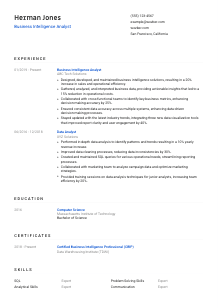
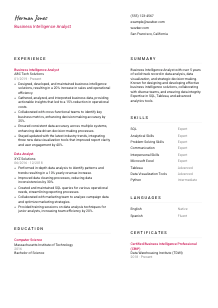
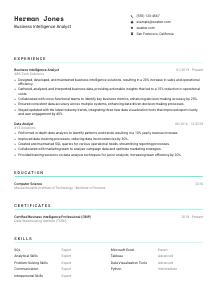
Unraveling data puzzles, but your CV feels like a riddle? Check out this Business Intelligence Analyst CV example, created with Wozber free CV builder. Learn how to present your analytical acumen clearly, ensuring your career insights are as sharp and clear as the trends you detect!
Business intelligence work gets judged through decisions, not dashboards alone. Hiring teams want to see how you turn messy source data, competing metric definitions, and cross-functional requests into reporting that leaders can actually use. A Business Intelligence Analyst CV needs to show command of data interpretation, KPI design, visualization, and data quality, with enough business context to prove your analysis changed something measurable.
When your CV mirrors the language of the role, SQL, Tableau, KPI ownership, data integrity, and cross-functional reporting become easier to surface in both ATS screening and human review. Wozber's free CV builder helps organise that alignment in an ATS-friendly CV format, so your experience reads clearly as business intelligence work rather than generic analyst support. That distinction matters when employers are choosing between candidates who all work with data, but not all drive decisions.
For a Business Intelligence Analyst, the top of the CV should establish professional alignment quickly. Keep this section clean, accurate, and tailored to the role so the reader can move straight into your reporting, analysis, and dashboard experience.
Use your full name in a larger, readable font so it anchors the page immediately. Business intelligence CVs often carry technical detail, metrics, and tool names, so a clean header helps frame the document with the same clarity expected in reporting work.
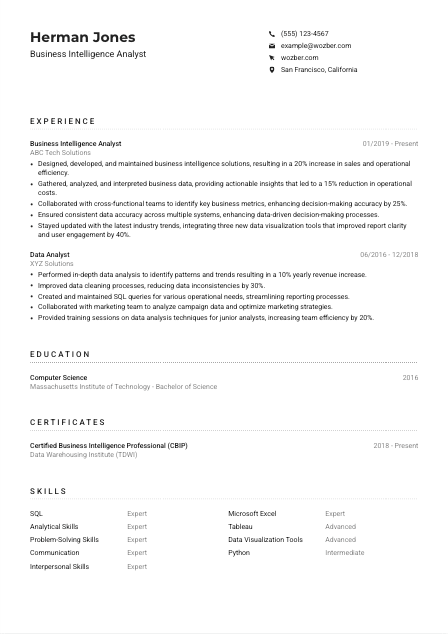
Place "Business Intelligence Analyst" directly under your name when that matches the role you are pursuing. This instantly positions your background around BI deliverables such as dashboards, KPI tracking, SQL analysis, and business reporting, instead of leaving the reader to infer whether you are closer to a data analyst, reporting analyst, or analytics consultant.
Include a reliable phone number and a professional email address with no formatting errors. Accuracy matters here for the same reason it matters in a dashboard or recurring report. Small mistakes can suggest weak attention to detail, which is a real concern in work tied to data integrity and executive reporting.
If the employer specifies a location requirement, include your city and state clearly. In this example, listing San Francisco, California directly addresses a stated requirement and removes an avoidable question early in the review process. For other BI roles, only include location details that genuinely support your candidacy.
Link to an updated LinkedIn profile or portfolio when it supports your case with BI-specific content. Useful additions include dashboard samples, reporting projects, SQL case studies, or short descriptions of analytics initiatives that improved revenue, cost control, or operational visibility.
This section does not need personality flourishes or extra detail. It should confirm who you are, what role you are targeting, and whether basic logistical requirements are already covered, so the hiring team can get to your analysis work without friction.




Business intelligence hiring turns on whether your work improved decisions, reporting quality, or operational outcomes. Your experience section should show the systems you worked with, the analyses you produced, the stakeholders you supported, and the measurable results that followed.
Start by marking the repeated requirements in the posting. For a Business Intelligence Analyst, that often includes SQL, visualization tools, KPI development, large data sets, data accuracy, and collaboration with business teams. Those are the themes your bullets should reflect if they are part of your actual background.
List your most recent position first, then work backward with company name, title, and dates kept easy to scan. In BI hiring, progression from data analysis or reporting work into broader dashboard ownership, metric definition, or decision support helps show increasing scope and business trust.
Replace duty-only statements with work that led to a business result. "Built Tableau dashboards for sales leadership" becomes stronger when paired with what changed, such as faster reporting cycles, cleaner KPI visibility, or stronger forecasting decisions. The sample CV does this well with bullets tied to sales growth, cost reduction, and improved decision-making accuracy.
Quantify impact wherever the result is credible and relevant. Strong BI metrics include revenue growth, cost savings, reporting time reduced, adoption rates, accuracy improvements, user engagement, or fewer data inconsistencies across systems. Numbers are especially persuasive in this field because your work is supposed to clarify performance.
Prioritise achievements that involve analysis, dashboards, data modeling support, reporting automation, metric alignment, or data governance. If an accomplishment does not reinforce your ability to turn data into useful business decisions, cut it or rewrite it. Even when your prior title was "Data Analyst," frame the bullets around BI-adjacent work such as SQL reporting, trend analysis, and stakeholder collaboration.
A hiring manager should be able to scan this section and understand the scale of your reporting work, the teams you supported, and the outcomes your analysis influenced. That is what separates general data experience from proven business intelligence performance.
Education matters in business intelligence because it helps establish your grounding in data, systems, and analytical thinking. Keep it straightforward, then use detail selectively when it adds context for tools, methods, or domain knowledge relevant to BI work.
If the role asks for a bachelor's degree in Computer Science, Business Analytics, or a related field, make that information easy to find. In the example, a Bachelor of Science in Computer Science directly supports the technical side of SQL work, data structures, and analytical problem-solving expected in BI roles.
List degree, field of study, school, and graduation year in a clean structure. Recruiters and hiring managers often scan this section quickly to confirm baseline qualifications before moving back to your dashboards, reporting tools, and analytical achievements.
If you are early in your career or your experience section is still developing, include relevant coursework, capstone work, or academic projects. Prioritise projects involving database queries, data visualization, statistics, forecasting, or business reporting rather than generic school activities.
Additional training in analytics, data warehousing, reporting, or visualization can reinforce your foundation, especially if your degree is adjacent rather than directly technical. Mention education that supports the kind of work BI teams handle, such as dashboard design, data storytelling, or metric development.
Honors, scholarships, and leadership in relevant analytics or technology groups can help if they strengthen your profile. Keep them when they add substance, especially for newer candidates, but give more space to practical BI work once you have several years of experience.
Your education section should confirm that you have the academic base for analytical work without distracting from your professional results. If the degree aligns cleanly and the formatting is simple, it has done its job.
Certifications are useful in business intelligence when they deepen your case around reporting tools, analytics methods, or data platform knowledge. They work best as supporting proof of current capability, not as filler.
Choose certifications tied to business intelligence, analytics, visualization, or related data disciplines. A credential such as Certified Business Intelligence Professional supports your positioning because it connects directly to BI concepts, data environments, and reporting practice.
Keep the list focused on certifications that matter for the role you are targeting. For BI positions, that usually means analytics, data visualization, cloud data platforms, reporting, or database-related learning rather than broad professional development courses.
Show the year earned and, if applicable, the active period. This helps the reader understand whether your training is current, which matters in a field shaped by evolving visualization tools, BI platforms, and modern data workflows.
If you are actively renewing certifications or adding new training, that can support roles that value current tool knowledge and evolving best practices. Use this section to show that you stay engaged with BI methods, not that you collect credentials for their own sake.
A well-chosen certification section adds depth to your CV by reinforcing your command of BI tools and practices. Keep it relevant, current, and tied to the kind of analysis and reporting work the role requires.
The skills section should read like the toolkit behind your dashboards, SQL queries, and performance reporting. For a Business Intelligence Analyst, that means balancing technical tools with the analytical and stakeholder-facing abilities needed to turn data into action.
Pull the exact skill themes from the job description first. In this case, SQL, Tableau, data visualization, analytical problem-solving, large data sets, and cross-functional communication are clear priorities. If you have them, use those terms naturally so both ATS systems and hiring teams can connect your background to the role quickly.
Lead with the skills most central to BI delivery. SQL, Tableau, dashboarding, KPI analysis, data quality, and business reporting usually deserve higher placement than broader tools. The sample CV handles this well by foregrounding SQL, Tableau, analytical skills, and communication instead of burying them under a long software list.
Do not overload this section with every platform you have touched. Prioritise the tools, methods, and business skills you can back up in your experience section. A focused list creates a clearer picture of how you build reports, investigate trends, work with stakeholders, and maintain data trust across systems.
Every item here should connect to a real deliverable, whether that is a SQL query, Tableau dashboard, KPI framework, or stakeholder-facing analysis. The tighter the link between skills and achievements, the stronger your BI profile reads.
Language skills matter in business intelligence when they affect reporting, stakeholder communication, or collaboration across teams and markets. Keep this section factual and relevant to the work environment.
If the posting specifies English proficiency, show it clearly. Here, advanced English is required, so listing English at the appropriate level removes doubt about your ability to present findings, explain metrics, and work with cross-functional teams.
Include additional languages when they could help with international stakeholders, regional reporting, customer data contexts, or collaboration across markets. They are especially useful when your BI work touches global operations, sales regions, or multilingual business teams.
Label each language accurately with terms such as native, fluent, advanced, or intermediate. Precision matters. A BI analyst may need to explain trends, document definitions, or present dashboard findings, so overstating language ability can backfire quickly.
If another language helped you work with cross-border teams, localize reporting, or interpret market-level data, it can add depth to your profile. Keep the point practical and tied to communication or analysis rather than treating languages as a generic bonus.
Languages should support your candidacy, not compete with your analytical qualifications. Include them when relevant, but give more CV space to SQL, visualizations, KPI ownership, and measurable business results.
For BI roles, communication is part of the job, especially when explaining trends to non-technical stakeholders. If your language skills improve that ability, list them clearly and let the rest of the CV carry the analytical weight.
The summary should quickly establish your level, core BI strengths, and the business outcomes you are known for. Keep it brief, but make sure it sounds grounded in real reporting, analysis, and stakeholder work rather than generic data language.
Read the job description and identify the handful of capabilities the employer cares about most. For this role, that includes business data analysis, visualization, SQL, KPI collaboration, data integrity, and communication. Your summary should reflect those priorities in two to four lines.
Start with your title and level of experience. "Business Intelligence Analyst with 5+ years of experience" immediately gives context, then you can narrow into the kind of BI work you handle, such as dashboard development, decision support, or cross-functional metric reporting.
Mention the tools, workflows, and outcomes that define your value. The sample summary works because it includes data analysis, data visualization, SQL, Tableau, strategic decision-making, and data integrity rather than vague claims about being results-driven. If you can tie one line to revenue, cost reduction, reporting quality, or operational efficiency, even better.
Aim for a short paragraph that can be read in seconds. BI hiring managers often move quickly from the summary into experience to confirm the substance behind it, so give them a sharp overview of your analytical scope without repeating entire bullets from later sections.
A strong summary tells the reader what kind of Business Intelligence Analyst you are before they reach the detail. It should make your SQL, dashboard, KPI, and stakeholder work feel coherent from the first lines of the page.
Your CV should now make three things easy to see: the data tools you use, the business questions you answer, and the results your reporting influences. That combination is what gives a Business Intelligence Analyst CV real traction in hiring.
Use Wozber's free CV builder, ATS-friendly CV templates, and ATS CV scanner to align your wording with the job description, strengthen ATS optimisation, and present your experience in a clean BI-focused structure. The final version should make it easy to judge your ability to build reliable reporting and deliver insights leaders can act on.




