



Use Wozber and land your dream job
Create CV
No registration required
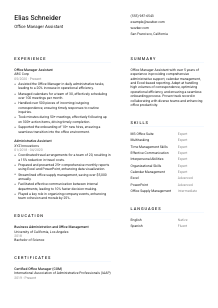
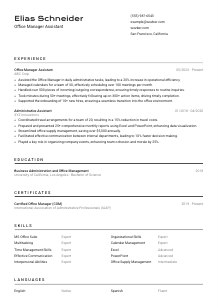
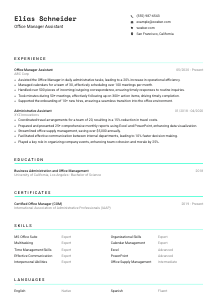
Streamlining operations, but your CV feels cluttered? Check out this Office Manager Assistant CV example, created with Wozber free CV builder. Learn how to showcase your support prowess to align with job requirements, making your career trajectory as efficient as a well-managed office!
Office Manager Assistant hiring often comes down to one practical question: can you keep an office running smoothly when calendars shift, reports are due, supplies run low, and follow-ups cannot slip. Your CV needs to show dependable coordination, not just general admin experience. Hiring teams want to see how you support daily operations, keep information moving, and help the office manager stay ahead of routine and unexpected work.
A tailored CV changes how quickly that operational value comes through, especially in ATS screening. With Wozber's free CV builder, you can align your wording with the posting's language around scheduling, reporting, correspondence, onboarding, and MS Office proficiency while keeping an ATS-compliant CV easy to scan. That makes it much clearer that your background fits the pace and support demands of office operations.
Administrative roles are built on reliability and clear communication, and your contact section should reflect that from the first line. Keep this part clean, accurate, and directly aligned with the role you are targeting.
Use your full name in a slightly larger font so it stands out immediately. For office support roles, a polished presentation matters because employers associate attention to detail in the CV with attention to detail in scheduling, records, and day-to-day coordination.
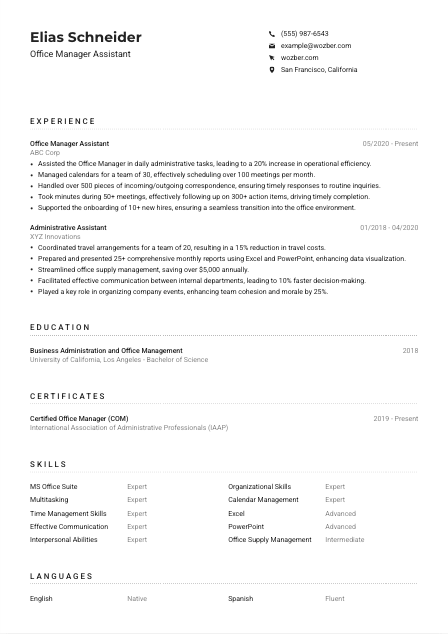
Place "Office Manager Assistant" directly under your name if that is the role you are applying for. Matching the posted title helps position you correctly in ATS searches and signals that your background is geared toward office administration rather than a broader or unrelated support function.
List a reliable phone number and a professional email address that uses a simple format. Office Manager Assistants are often the point of contact for meetings, correspondence, and routine inquiries, so even this small section should suggest professionalism and responsiveness.
If the employer requests a local candidate or someone willing to relocate, include your city and state. In the example, listing San Francisco, California directly supports a stated requirement. Use this detail when location affects eligibility, not as filler.
Add LinkedIn or a professional website only if it supports your application. For this kind of role, that profile should reinforce administrative experience, software proficiency, and coordination work, not distract with unrelated content.
This section should confirm that you are reachable, appropriately titled, and logistically viable for the role. Keep it simple and accurate so the hiring team can move straight to your administrative experience.




For an Office Manager Assistant, experience is where employers look for proof that you can handle recurring administrative work without dropping details. Focus on the volume, pace, and outcomes of the support you provided, especially where your work improved office flow, reporting, or follow-through.
Read the description closely and mark the operational tasks it emphasizes. Here, that includes scheduling meetings, preparing reports, managing travel, handling expense reimbursement, responding to correspondence, taking minutes, and supporting onboarding. Your experience bullets should reflect the same type of work when it matches your background.
List your positions in reverse chronological order and make the titles easy to scan. Administrative career growth often moves through roles such as Administrative Assistant, Office Coordinator, or Office Manager Assistant, so your CV should show how your responsibility expanded across calendars, reporting, vendor support, or team coordination.
Each bullet should pair a concrete responsibility with a result. Strong examples in this field often sound like managing calendars for a defined team size, preparing recurring reports for leadership, or following up on meeting action items to keep work moving. In the sample CV, "Managed calendars for a team of 30" works because it gives both scope and function.
Quantify wherever the work naturally allows it. Useful metrics for this role include number of meetings scheduled, reports prepared, travel arrangements handled, correspondence volume, action items tracked, onboarding cases supported, supply savings, or efficiency improvements. Those numbers help employers picture the pace you can manage, such as 100 meetings per month or $5,000 saved through tighter supply control.
Choose experience points that support the actual office management assistant remit. Event planning, customer service, or general coordination can stay if they reinforce communication, organisation, or multitasking, but the strongest bullets will still centre on office administration, internal support, documentation, and follow-up discipline.
A hiring team should be able to glance through this section and understand the scale of office support you have handled. When your bullets show coordination, reporting, responsiveness, and measurable follow-through, your experience reads as immediately usable.
Education usually plays a supporting role here, but it still matters when the posting asks for a bachelor's degree in business, office management, or a related field. Present it clearly so the requirement is easy to confirm without slowing the reader down.
If the job asks for a bachelor's degree, make sure that credential is easy to find. In this case, a degree in Business Administration, Office Management, or a related field lines up well with the role's administrative and organizational focus.
Include your degree, field of study, school name, and graduation year. Clean formatting matters because this section is usually scanned quickly for qualification checks rather than read for narrative detail.
When your field of study closely matches the posting, let that work for you. The example CV's "Business Administration and Office Management" is a strong fit because it mirrors the employer's stated preference and reinforces office operations knowledge.
Most experienced administrative candidates do not need course lists. Include relevant coursework only if you are early in your career or if classes in business communication, office systems, spreadsheet analysis, or operations support add useful context.
Academic honors, leadership roles, or relevant extracurriculars can stay if they strengthen your case, especially for newer candidates. Keep them only when they support traits that matter in office support work, such as organisation, coordination, communication, or process discipline.
This section does not need much decoration. It should simply confirm that your academic background meets the stated baseline and supports your path into office administration.
Certifications are not always mandatory for Office Manager Assistant roles, but they can reinforce your professionalism, especially when they relate to office administration, business operations, or productivity tools. Use them to show continued development, not to pad the page.
Prioritise credentials that connect to administrative coordination, office management, records handling, or workplace systems. A certification such as Certified Office Manager can add useful weight because it speaks directly to the environment and workflows of the role.
A short list of closely related certificates is more persuasive than a long list of generic training. For this profession, software, business administration, project coordination, or office management credentials usually carry more value than unrelated short courses.
Add the issue date or active period so employers can see whether the credential is current. This is especially helpful for certifications tied to modern office tools, process standards, or continuing professional development.
Administrative work changes with new reporting tools, collaboration habits, and office systems. Ongoing learning in Excel, PowerPoint, business communication, or workplace coordination can strengthen your profile, especially when the posting places clear emphasis on software fluency.
Relevant certificates can sharpen your CV by showing commitment to the administrative side of the work. They are most effective when they connect directly to the tools, coordination, and support responsibilities the employer needs.
This section should read like the toolkit you actually use to keep office work on track. For Office Manager Assistant roles, that usually means a mix of software capability, organisation, communication, calendar control, and follow-up discipline.
Start with the posting, then match it against your actual strengths. Here, the employer clearly values MS Office Suite, especially Excel and PowerPoint, along with multitasking, time management, organisation, communication, and interpersonal ability. Those should shape the core of your skills section if they reflect your experience.
Use wording close to the job description where it is accurate. This helps with ATS optimisation and makes your fit easier to recognize. If the posting says "MS Office Suite" and "strong organizational skills," use those terms rather than broader substitutes that could weaken the match.
Order your skills so the most role-critical ones appear first. For this type of work, software used for reporting and presentations, calendar management, communication, and organisation usually matter more than secondary abilities. The sample CV handles this well by pairing broad administrative strengths with specific tools like Excel, PowerPoint, and office supply management.
A hiring manager should be able to scan this list and picture you handling the actual rhythm of the office. Put the tools and coordination skills first, and keep every item relevant to administrative support work.
Language ability matters in administrative roles because you often handle written correspondence, meeting notes, routine inquiries, and communication across teams. Present languages clearly, with honest proficiency levels that match the communication demands of the job.
Some employers state language expectations directly. In this case, strong English language competence is required, so English should appear clearly in your languages section or elsewhere on the CV if you can demonstrate it through your experience and summary.
List English first when it is specifically requested, and use a clear proficiency label such as Native or Fluent. That removes any ambiguity for roles where meeting notes, reports, and routine office communication depend on strong written and verbal command.
Additional languages can still add value, especially in offices that work with diverse staff, clients, or external partners. In the sample, Spanish is a useful secondary language, though it complements the profile rather than serving as a core requirement.
Choose labels you can stand behind. Administrative roles rely on accuracy, so avoid overstating your level. If you can manage professional email and phone communication in a language, reflect that honestly.
Not every Office Manager Assistant role needs multiple languages, but some do benefit from them. If your office support work involves external visitors, multilingual teams, or partner communication, this section can add practical value beyond the minimum requirement.
Keep this section factual and relevant. For this role, the main priority is showing that you can handle office communication clearly in English, with any additional language skills serving as a useful extra.
Your summary should quickly establish the kind of administrative support you provide and the office demands you can handle well. Keep it focused on scope, tools, and outcomes rather than broad personality claims.
Review the job description and identify the work that defines success in the role. For this one, that means daily administrative support, calendar management, reporting, correspondence handling, meeting follow-up, onboarding support, and strong MS Office use. Your summary should foreground the parts of your background that cover those areas.
Lead with your title or closest equivalent and your years of experience. A line such as "Office Manager Assistant with 5+ years of experience in administrative support and office coordination" immediately gives the reader level and specialization.
Use the middle of the summary to mention strengths that matter in office operations, such as managing high-volume calendars, producing Excel-based reports, coordinating travel, or improving office efficiency. The sample summary works because it pairs support functions with outcomes like operational efficiency and smooth onboarding.
Aim for a short paragraph that can be read in seconds. Avoid generic phrases about being hardworking or detail-oriented unless they are backed by actual office responsibilities, software capability, or measurable results.
A well-written summary tells the reader, early, that you can support the office manager, handle recurring admin work, and keep details under control. That is the impression this section should leave before the rest of the CV fills in the proof.
An Office Manager Assistant CV works best when it shows reliable administrative execution in concrete terms: meetings scheduled, reports prepared, correspondence handled, action items tracked, onboarding supported, and tools used well. That is what makes your value easy to recognize.
Use Wozber's AI CV builder to tighten wording around the posting, improve ATS optimisation, and shape your experience into an ATS-friendly CV format that reflects how office support is actually evaluated. Your final CV should make one thing clear right away: you can keep the office running smoothly.




