



Use Wozber and land your dream job
Create CV
No registration required
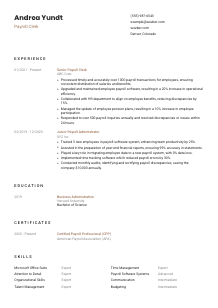
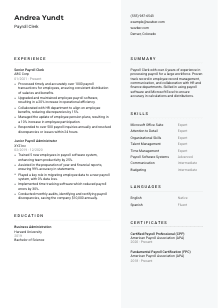
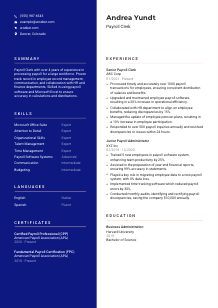
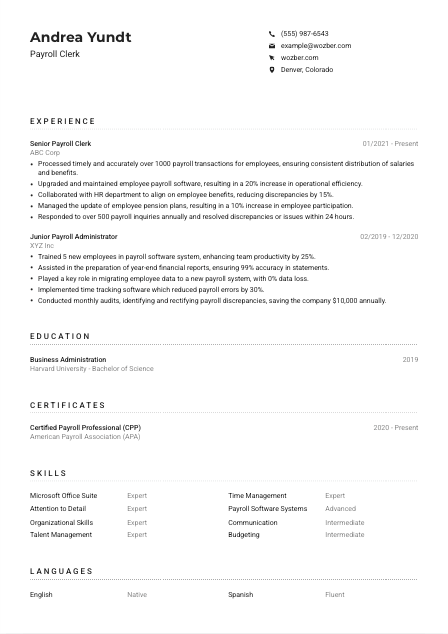
Calculating paychecks, but your CV isn't adding up? Check out this Payroll Clerk CV example, built with Wozber free CV builder. It shows how to organise your numerical finesse to match job specifics, making sure your career trajectory is as well-compensated as the hours you tabulate!
Payroll work leaves very little room for approximation. A Payroll Clerk is trusted to turn hours, deductions, leave records, bonuses, and benefits data into pay that is accurate and on time, while also keeping clean records that hold up when HR or finance needs answers. Your CV should make that dependability visible quickly through payroll volume, system use, error reduction, reporting support, and the way you handle employee questions.
For this role, tailoring changes how fast a hiring team can place you in the right lane, whether that is payroll processing, payroll reporting, or issue resolution. Using Wozber's free CV builder to align your wording with the posting and keep an ATS-compliant CV easy to scan helps surface the details that matter here, such as payroll software, Excel use, cross-functional work with HR, and accuracy under recurring deadlines.
Payroll CVs are expected to start cleanly. This section should confirm who you are, how to reach you, and, when relevant, whether you already meet a stated location requirement without making the reader hunt for it.
Use your full name in a clear, professional format that is slightly more prominent than the rest of the header. For a Payroll Clerk role, that simple presentation already supports the impression you want to build: organised, precise, and easy to work with.
Place "Payroll Clerk" beneath your name if that is the role you are applying for. Matching the title helps frame your CV immediately, especially when your past titles vary, such as Payroll Administrator or Senior Payroll Clerk.
List a reliable phone number and a professional email address, then verify both carefully. Accuracy matters in payroll, and avoidable mistakes in your own contact information can undercut the detail-oriented image the role requires.
If the employer specifies a city or state, reflect that clearly in your header. In this example, listing Denver, Colorado directly answers the location requirement and removes a possible screening question early in the process.
Include LinkedIn or a professional website only if the content supports your application and matches your CV details. For most Payroll Clerk candidates, a polished LinkedIn profile with consistent job titles, dates, and certifications is enough.
Keep the header straightforward and accurate. For payroll roles, even the contact section should reinforce reliability, attention to detail, and alignment with the employer's basic requirements.




This section carries the most weight for a Payroll Clerk. Hiring teams want to see whether you have handled real payroll cycles, maintained employee data correctly, supported reporting, and resolved issues without letting errors or delays spread.
Start by identifying the work the employer needs done now. For payroll roles, that usually includes processing pay, updating employee records, handling deductions and leave changes, supporting payroll reporting, and responding to inquiries. Build your bullet points around those tasks so the connection is obvious.
List your most recent position first, followed by earlier relevant roles. For each entry, include job title, employer, and dates. This format makes it easier to follow your payroll progression, whether you moved from a junior payroll support role into full-cycle payroll processing or added reporting and system responsibilities over time.
Generic payroll statements do not show enough range. Focus on outcomes tied to accuracy, timeliness, efficiency, and service. The example CV does this well with points such as processing more than 1000 payroll transactions, improving operational efficiency by 20%, and resolving over 500 inquiries annually within 24 hours.
Quantify the size and pace of your work wherever possible. Strong metrics include employee count, payroll frequency, error reduction, turnaround time, reporting accuracy, audit findings, discrepancy reduction, or savings from corrected overpayments. Numbers like 99% statement accuracy or a 30% drop in payroll errors tell a much clearer story than "responsible for payroll."
Choose achievements that support the target role, even if you have broader administrative experience. Prioritise payroll software updates, Excel-based reporting, benefits coordination, data maintenance, audits, and employee support over unrelated office tasks. That focus helps your experience read as payroll depth, not general administration.
A hiring manager should be able to see payroll volume, system familiarity, reporting support, and issue resolution from this section alone. Show the scale of your work and the accuracy you maintained under routine deadlines.
Education usually plays a supporting role in Payroll Clerk hiring, but it still helps establish your foundation in business, finance, accounting, or administration. Present it clearly, and use it to support the practical payroll experience shown elsewhere on the page.
Include your degree, school, field of study, and graduation year. Even when the posting does not require a specific degree, coursework in business administration, accounting, finance, or human resources can reinforce your understanding of payroll records, reporting, and compliance-related processes.
Avoid overloading this section with unnecessary detail unless you are early in your career. For most experienced Payroll Clerk candidates, a concise entry with degree, institution, field, and year is enough.
If your education connects naturally to payroll work, make that visible. A business administration degree, like the one in the example CV, supports the operational side of payroll, reporting, and coordination with finance and HR.
If you are newer to payroll, include classes related to accounting, compensation, benefits, Excel, finance, or business systems. That added context can help explain your readiness for payroll processing even if your job history is still developing.
Honors, scholarships, or leadership in finance or business organizations are worth including when they strengthen your professional profile. Keep them brief and relevant, especially if they point to analytical discipline or structured recordkeeping.
Education should support your payroll story, not compete with it. Present the basics cleanly and use this section to reinforce your business or finance foundation where it genuinely helps.
Payroll certifications carry real weight because they show formal knowledge of payroll practices, calculations, and compliance expectations. When an employer mentions CPP or FPC as a plus, that is a clear invitation to make those credentials easy to find.
Read the requirements closely and lead with the credentials the employer already values. Here, Certified Payroll Professional and Fundamental Payroll Certification are both directly relevant and deserve prominent placement.
If you hold several certifications, list the payroll-specific ones first. CPP and FPC speak directly to the work of processing pay, maintaining records, and handling payroll-related issues, so they carry more weight than general business courses.
Add the certifying organisation and the date earned or validity period. That gives hiring teams useful context and shows whether your credential is current. The example CV handles this well by naming the American Payroll Association and showing ongoing status.
Payroll systems, reporting practices, and compliance expectations change over time. Even if a certification is listed as optional, maintaining active credentials or adding recent payroll training shows that your knowledge has stayed current with the work.
For a Payroll Clerk, certifications can quickly raise confidence in your technical grounding. If you have recognized payroll credentials, make them visible and current.
Payroll skills need to look practical, not inflated. This section should reflect the tools, habits, and working relationships that make payroll run accurately every cycle, from system use and Excel work to organisation and cross-department communication.
Pull skills directly from the posting when they match your real background. For this kind of role, that often means payroll software systems, Microsoft Office Suite, Excel, attention to detail, organisation, and communication with HR and finance. Matching that language supports ATS optimisation while keeping your skills grounded in the work.
Put the most role-relevant skills first. Payroll software proficiency and Excel usually belong near the top, followed by detail orientation, record maintenance, discrepancy resolution, and reporting support. In the example CV, those choices make the payroll focus easy to understand.
Do not crowd this section with every general office skill you have used. A shorter list with true payroll relevance reads better than a long inventory. Choose the abilities that support accurate calculations, timely processing, clean documentation, and smooth coordination with employees, HR, and finance.
Your skills should describe how you actually keep payroll accurate and moving. Prioritise software, Excel, organisation, and issue resolution over broad filler.
Language matters in payroll because employees ask questions about pay, deductions, benefits, and corrections in real time. If the posting names English communication as a requirement, your CV should address that clearly and without overcomplicating the section.
When a job specifically asks for effective English communication, list English prominently. That is the language you will likely use for payroll inquiries, cross-functional coordination, and written updates tied to employee records.
Use a straightforward label such as "Native" or "Fluent" if it accurately reflects your ability. The point is to remove doubt about whether you can communicate clearly in the day-to-day payroll environment.
Additional languages can strengthen your profile, especially in workplaces with a multilingual employee base. For example, Spanish alongside English may be useful when responding to payroll questions or explaining routine pay issues.
Stick with familiar labels such as Native, Fluent, Intermediate, or Basic. Consistent terminology keeps the section easy to scan and avoids vague claims.
Only include languages you can use meaningfully in a professional setting. In payroll, the benefit is practical: clearer employee communication, fewer misunderstandings, and smoother issue resolution.
For payroll roles, language skills are most useful when they support accurate communication. Confirm the required English proficiency first, then add any other languages that genuinely help on the job.
A Payroll Clerk summary works best when it reads like a compact snapshot of payroll scope, system fluency, and reliability. In a few lines, show the kind of payroll work you handle and the business functions you support.
Start with your title and years of relevant experience. That gives immediate context and helps position you correctly, whether you are a Payroll Clerk with 2+ years of experience or someone bringing broader payroll administration experience into a clerk role.
Include details that show scope, such as workforce size, payroll volume, reporting support, or turnaround expectations. The example summary works because it mentions more than 4 years of experience and payroll processing for a large workforce.
Mention payroll software, Excel, and collaboration with HR or finance if those are genuine strengths in your background. These details matter because the role depends on accurate data handling and regular coordination across departments.
Aim for 3 to 5 lines with direct, role-relevant language. Skip broad adjectives and focus on what you process, what systems you use, and how you help keep payroll accurate, timely, and well documented.
After reading your summary, a hiring manager should already understand your payroll experience, your working tools, and the scale of pay operations you can support. That is the standard to aim for.
A Payroll Clerk CV should show accuracy, consistency, and control over recurring payroll tasks. When your experience, skills, certifications, and summary all point to payroll processing, record maintenance, reporting support, and prompt issue resolution, the application becomes much easier to place in the interview pile.
Wozber's free CV builder can help you shape that content into an ATS-friendly CV format, align your wording with the posting, and strengthen ATS optimisation without losing the specifics of your actual work. The finished CV should make one thing clear fast: you can be trusted to keep payroll accurate and on schedule.




