



Use Wozber and land your dream job
Create Resume
No registration required
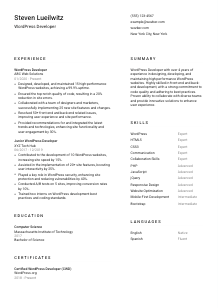
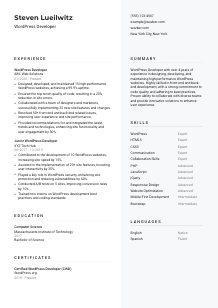
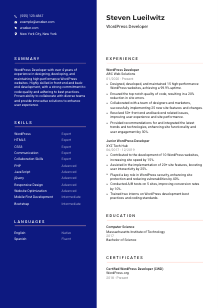
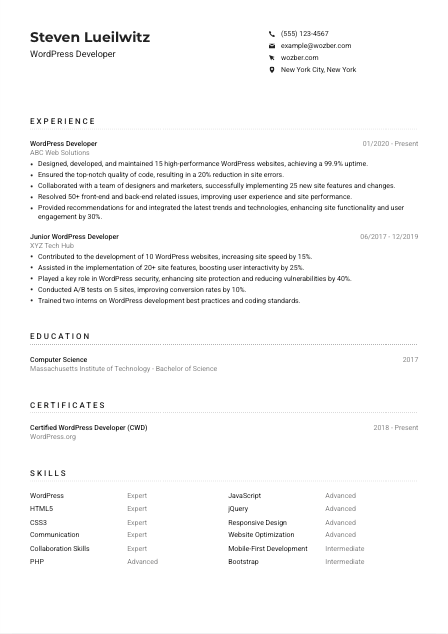
Crafting themes, but your resume feels like a plugin conflict? Check out this WordPress Developer resume example, created with Wozber free resume builder. Learn how to align your customization chops with job specifics, setting your career path as user-friendly as a well-optimized website!
WordPress hiring tends to move quickly past generic web claims. Teams want to see who can actually build and maintain production sites, work comfortably across PHP and front-end layers, and ship updates without slowing performance, breaking templates, or creating plugin conflicts. Your resume should make that operating range visible from the first few lines.
The first scan usually looks for a clear WordPress match, not a broad "web developer" profile. When your resume uses the same language as the role, including theme and plugin development, responsive work, and collaboration with design or marketing teams, Wozber's free resume builder helps you turn that experience into an ATS-compliant resume that reads cleanly for both filters and hiring managers. That makes it much easier to see whether you can handle the site's codebase and day-to-day delivery.
This section is simple, but it still carries screening value. For WordPress roles, your header should confirm who you are, what job you are targeting, and whether basic requirements like location or portfolio access are already covered.
Place your full name at the top in a clean, easy-to-read format. Keep the styling professional and consistent with the rest of the document so the focus stays on your experience with WordPress builds, site maintenance, and development work rather than on visual decoration.
Add "WordPress Developer" directly below your name when that is the role you are applying for. This removes ambiguity for recruiters and ATS filters, especially when your background could also be read as web development, front-end development, or CMS work.
Include a reliable phone number and a professional email address, then check both carefully. If a hiring team wants to discuss theme customization, plugin troubleshooting, or a recent project in your portfolio, you do not want a typo to block that follow-up.
If a posting asks for a specific location, include it plainly in your header. In the provided example, New York City, New York supports a stated requirement, so listing it removes an avoidable question early in the review process.
A website, GitHub, or portfolio link is especially useful in WordPress hiring because it lets employers see the quality of your theme work, responsive layouts, custom functionality, and overall build standards. Make sure the projects you link to reflect the same level of skill and tools described in the resume.
Your personal details should answer the first practical questions fast: who you are, which role you want, how to reach you, and whether you meet basic logistical requirements. Then the reader can move straight to your WordPress work.




Experience carries the most weight in this field because WordPress work is evaluated through shipped websites, custom development, maintenance quality, and problem solving under real constraints. Your bullets should show what you built, how you improved it, and what business or site performance changed because of your work.
Start by marking the specific responsibilities and requirements in the job description. For a WordPress role, that often means theme development, plugin development, site maintenance, responsive design, troubleshooting, and collaboration with designers or marketers. Use those terms where they accurately reflect your work so your background maps to the role without sounding forced.
List positions in reverse chronological order with job title, company, and dates. That structure helps reviewers quickly track how long you have worked in WordPress, whether you progressed from junior to more independent delivery, and how recent your hands-on development experience is.
Each bullet should describe a concrete contribution, such as building websites, maintaining a plugin-driven environment, improving code quality, or resolving front-end and back-end issues. The sample resume does this well with specifics like maintaining 15 WordPress websites and implementing 25 site changes with cross-functional teams. That kind of detail is much stronger than a vague line about "working on web projects."
Quantify results with numbers that make sense for WordPress work: uptime, site speed, error reduction, issue volume, feature delivery, conversion gains, engagement, or security improvements. For example, 99.9% uptime, a 20% drop in site errors, or 50+ issues resolved tells the reader far more about execution than general claims about impact.
Keep the section centered on experience that supports this kind of role. If a bullet does not connect to CMS development, performance, code standards, debugging, collaboration, or user-facing improvements, trim it or rewrite it. Your goal is a focused record of WordPress delivery, not a catch-all history of every technical task you've handled.
By the end of this section, a reviewer should understand the scale of your WordPress work, the kind of problems you solve, and how your code affected uptime, performance, features, or user experience. That is the clearest proof that you can contribute quickly.
Education matters most when it confirms the technical foundation behind your development work. In WordPress hiring, a degree usually supports the overall picture rather than replacing hands-on experience, but it should still be presented in a way that matches the role's stated requirements.
If you hold a bachelor's degree in Computer Science, Web Design, or a related field, list it clearly. That is especially important when the posting explicitly asks for one, as it does here. In the example, a Bachelor of Science in Computer Science aligns cleanly with the requirement.
Use a simple structure: degree, field of study, school, and graduation date. This makes the information easy to scan and keeps the emphasis on qualifications that support your development work rather than on unnecessary academic detail.
When a job description specifies a degree level or field, reflect that language honestly in your education section. Matching terms such as "Bachelor's degree" and "Computer Science" can help with ATS optimization while also making it easier for a recruiter to confirm that you meet a baseline requirement.
If you are a newer developer, include coursework or academic projects that relate to web development, CMS architecture, responsive design, databases, JavaScript, or PHP. A class project involving custom templates, web application structure, or front-end performance can add context when professional experience is still limited.
Honors, scholarships, hackathons, or developer club involvement can strengthen this section when they point toward real technical engagement. Keep them only if they support your profile as someone who has been building web and development skills in a meaningful way.
This section should quickly confirm that your academic background matches the posting and complements your WordPress experience. Clear, relevant entries are enough.
Certifications are optional for many WordPress jobs, but the right ones can strengthen your profile when they relate directly to platform expertise, web performance, security, or modern development practices. Use this section to reinforce current capability, not to pad the page.
Choose certifications that connect directly to WordPress development or adjacent areas that matter in the role, such as PHP, front-end performance, accessibility, SEO implementation, or security. In the example, a WordPress-focused certification supports the candidate's specialization even though the posting does not require one.
A short list of relevant credentials carries more weight than a long list of loosely related courses. If a certificate does not help explain your ability to build themes, develop plugins, maintain websites, or improve site quality, leave it out.
Add issue dates or validity periods when they help show current knowledge. This is useful for credentials tied to evolving practices, especially in areas like security, performance optimization, or platform-specific development standards.
WordPress development changes with core updates, plugin ecosystems, coding standards, and front-end expectations. Updating this section from time to time shows that you stay engaged with the platform and continue sharpening the skills that affect real production sites.
Well-chosen certifications can strengthen your WordPress profile, especially when they support the exact kind of development and maintenance work named in the job description.
This section should read like the toolkit behind your actual work. For WordPress positions, hiring teams want to see the stack, development methods, and collaboration strengths that support reliable site builds, clean implementation, and smooth work across functions.
Start with the languages and platform skills named in the posting, then add closely related capabilities you genuinely use. Here, that means WordPress, PHP, HTML5, CSS3, JavaScript, jQuery, responsive design, and mobile-first development. If you have stronger experience in theme customization, plugin development, or site optimization, include those too.
Communication and collaboration belong here when they are part of how you deliver work. WordPress developers often translate design requirements into templates, coordinate content changes with marketers, and explain technical constraints to non-developers. Those soft skills are directly tied to project execution, not filler.
Place the most job-relevant technical skills near the top, followed by supporting tools or softer strengths. The sample resume does this effectively by leading with WordPress, HTML5, CSS3, and core collaboration skills, then following with PHP, JavaScript, jQuery, responsive design, and optimization. Keep the list focused enough that every item supports your case for the role.
A hiring manager should be able to connect your skills section directly to your experience bullets. When the same technologies and working strengths appear in both places, your resume reads as credible and consistent.
Language skills matter when the role depends on clear written updates, team collaboration, documentation, or client-facing communication. For WordPress work, this can be especially relevant when developers work with designers, marketers, content teams, or distributed stakeholders.
If the job description calls out a specific language, list it clearly with your proficiency level. This posting asks for strong verbal and written English, so English should appear first and be labeled accurately.
Place the most professionally relevant language at the top, then add any others that could support the role. This keeps the section aligned with the job while still showing broader communication range where it may be useful.
Additional languages can help if the company supports multilingual audiences, international teams, or client communication across regions. They are secondary here, but still worth including when you can use them professionally.
Use clear proficiency labels such as Native, Fluent, Professional, or Conversational. Avoid overstating ability. If your role may involve writing documentation, handling tickets, or joining client calls, accuracy here matters.
For WordPress developers, language ability often shows up in practical work such as writing status updates, documenting fixes, clarifying content implementation, or collaborating on site changes. Keep the section concise, but treat it as part of how you operate on a team.
This section should confirm that you can communicate at the level the role requires, especially when the posting explicitly asks for strong English skills.
Your summary should quickly establish the type of WordPress work you do best and the level at which you do it. Skip broad statements about being passionate or results-driven. Use the space to position yourself around real development scope, technical strengths, and the kind of outcomes you have delivered.
Before writing, identify the two or three themes the role stresses most. Here, those include WordPress development experience, theme and plugin work, responsive development, code quality, and collaboration. Let those priorities shape the summary instead of writing a generic web developer introduction.
Start with a direct statement such as "WordPress Developer with 4+ years of experience" and add the kind of work you handle, for example building, maintaining, or optimizing WordPress websites. The sample summary uses this approach well and immediately places the candidate in the right category.
Use one or two lines to name your relevant stack and the outcomes you influence. Mentioning high-performance websites, front-end and back-end development, code quality, plugin or theme work, or user experience improvements gives the reader a compact picture of your value.
Aim for a short paragraph that can be read in seconds. If every sentence names a real capability or outcome, the summary will do its job. If it starts sounding like a generic profile statement that could fit any developer, cut and refine it.
A good summary tells the reader, right away, that your background is grounded in real WordPress delivery. It should prepare them to find the same story again in your experience, skills, and project results.
A WordPress resume works best when it shows real platform depth: the sites you built, the themes or plugins you worked on, the performance and maintenance issues you handled, and the teams you collaborated with to ship changes cleanly.
Use Wozber's AI resume builder to align your wording with the role, strengthen ATS optimization, and organize your experience in an ATS-friendly resume format that highlights the technical work employers actually care about.
When the resume is tailored well, hiring teams can quickly tell whether you can step into their WordPress environment and contribute from day one.




