Use Wozber and land your dream job
Create Resume
No registration required
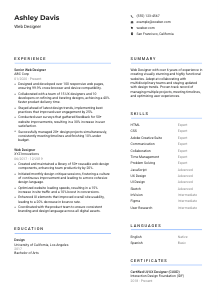
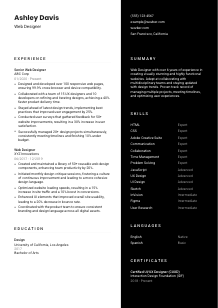
Crafting digital masterpieces, but your resume doesn't render right? Check out this Web Designer resume example, created with Wozber free resume builder. Learn how to shape your creative code to match job frameworks, turning your career site into a pixel-perfect layout!
Web design sits at the meeting point of visual judgment, front-end execution, and user behavior. Hiring teams want to see whether you can shape layouts that look polished, hold up across devices, and support real product goals such as stronger engagement, smoother navigation, or faster delivery with developers. Your resume should make that practical range visible, not read like a generic list of creative tasks.
When the resume is tailored well, the first scan answers a specific question fast: can this designer handle responsive page design, collaborate with UX and engineering, and work in the tools and code layer the team already uses. Wozber's free resume builder helps tighten that alignment in an ATS-friendly resume format, so terms like HTML, CSS, UI, UX, and cross-browser compatibility appear naturally and point back to the kind of web design work the employer needs reviewed first.
This section is brief, but it sets the professional frame immediately. For a Web Designer, the basics should make it easy to contact you, place you geographically when relevant, and reach the portfolio or site where your interface work, responsive layouts, and visual style can be reviewed.
Use your full name in a clean, readable style that suits the overall resume. Web design hiring does involve visual judgment, but your header should show restraint. Clear hierarchy and polished spacing say more about your design sense than decorative typography.
Place "Web Designer" directly beneath your name if that is the role you are pursuing. This helps frame your experience before a recruiter reaches your work history and keeps your positioning aligned with searches for designers who can handle UI, layout, and front-end implementation.
List a reliable phone number and a professional email address. If you also include a personal website, portfolio, or domain-based email, make sure the branding and project examples support the same story your resume tells about responsive design, UX awareness, and production-ready work.
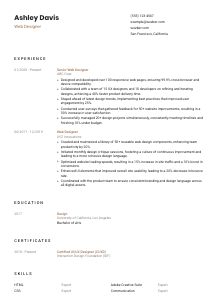
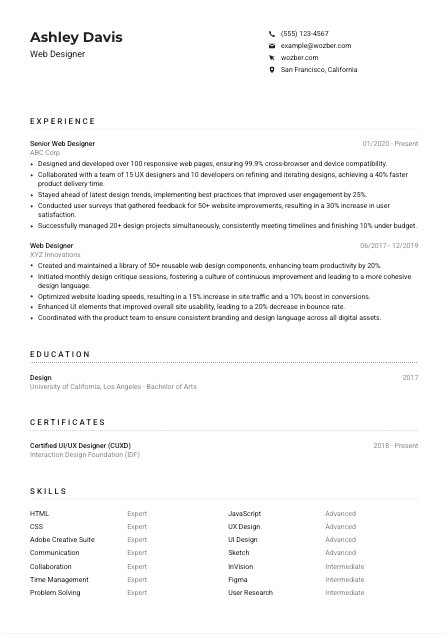
If the employer asks for a specific location or relocation flexibility, reflect that clearly. In the example, listing San Francisco, California directly addresses the posting's location requirement and removes an avoidable question early in the review process. For other roles, only include location detail that helps with hiring logistics.
A portfolio link is especially important in web design because hiring teams often want to compare your claims with live work, case studies, prototypes, or shipped pages. Make sure the projects, tools, and outcomes shown there line up with your resume. If you mention responsive builds, UX improvements, or collaboration with developers, your portfolio should reinforce that.
This section does not need personality flourishes. It needs accuracy, a clear role identity, and a direct path to your portfolio so the hiring team can move quickly from your name to your work.




For Web Designers, the experience section carries most of the weight. Employers are looking for more than software familiarity. They want to see what you designed, how you worked with developers or UX partners, whether the pages performed well across devices, and what changed because of your work.
Read the posting for the work patterns underneath the bullet points. Here, the important themes are responsive page design, cross-browser compatibility, collaboration with UX and development teams, user feedback, and managing several projects at once. Those should shape which accomplishments you bring to the top of each role, and which wording you mirror naturally.
List positions in reverse chronological order with job title, company, and dates. For web design roles, recent work usually carries the most weight because tools, conventions, and browser expectations change quickly. If you progressed from Web Designer to Senior Web Designer, that progression itself signals stronger ownership and broader project scope.
Replace vague duties like "designed websites" with bullets that show what you shipped and what improved. The example does this well by tying design work to outcomes such as 99.9% compatibility, a 25% lift in user engagement, or a 30% increase in user satisfaction after feedback-driven improvements. That kind of phrasing tells a hiring team how your design decisions performed in production.
Numbers help when they reflect real web design measures such as pages delivered, delivery speed, conversion changes, bounce rate reduction, component reuse, or project volume. Use metrics that fit your actual work. If you optimized UI patterns across a product area or created a reusable design library, say how many pages, components, or stakeholders were affected.
Keep older or less relevant design work brief if it does not support the target role. Put the strongest overlap first: responsive layouts, HTML and CSS implementation, UX-informed iteration, design system contributions, stakeholder collaboration, and project management. If one job was more brand-focused or print-heavy, only keep the parts that still support your web design case.
A Web Designer's experience section should show shipped work, collaboration across product teams, and measurable improvements to the user experience. When those details are specific, hiring managers can quickly picture how you would work inside their design and development process.
Education is usually a supporting section for Web Designers, but it still matters when the posting asks for a degree or when your studies connect directly to design, web development, HCI, or digital media. Keep it clean and relevant so it strengthens your background without distracting from portfolio-quality work and experience.
If the posting asks for a bachelor's degree in Design, Web Development, or a related field, make that match obvious. In the example, a Bachelor of Arts in Design directly supports the requirement. When your degree is adjacent, use the field name and any relevant concentration to clarify the connection.
List degree, field of study, school, and graduation year in a simple structure. This section is usually scanned quickly, so clarity matters more than extra description. Recruiters should be able to confirm your academic background in seconds and move back to your design experience.
If your experience is still growing, include coursework, studio projects, capstones, or thesis work tied to responsive design, front-end development, UX research, interaction design, or accessibility. Those details can help bridge the gap when professional project volume is lighter.
Honors, scholarships, or extracurricular work are worth adding when they support your design profile. A leadership role in a student design club, a digital product project, or recognized work in interface design adds more value here than unrelated campus activity.
Web design changes quickly, especially around tooling, responsive standards, accessibility expectations, and design systems. If you completed later coursework in UI design, front-end development, prototyping, or user research, include it when it strengthens the story your recent experience is telling.
Use this section to confirm the academic foundation the employer asked for and, when useful, to reinforce your grounding in design or front-end thinking. Then let your portfolio and experience carry the main argument.
Certifications are not mandatory for most Web Designer roles, but the right one can reinforce a specialty such as UI design, UX research, accessibility, or a specific workflow. Treat this section as supporting proof, not filler.
Start with the job description. If the role emphasizes UI, UX, prototyping, research, or collaborative product work, certifications in those areas can help. In the example, a UI/UX certification complements the employer's focus on user experience and interface design, even though no certificate is explicitly required.
Choose certifications that relate to the work you want to do now. A focused list is more convincing than a long inventory of loosely related courses. Prioritize credentials tied to interface design, digital product design, front-end workflow, accessibility, or user-centered design methods.
Design tools and practices evolve, so dates matter. Show when you earned the certification and, if applicable, whether it is still current. That helps a reviewer understand whether the credential reflects present-day methods rather than outdated platform knowledge.
This section can also signal where your web design work is deepening. If your recent projects involve more research, prototyping, or component systems, a relevant certification helps explain that shift and supports the way you present your experience and skills.
One well-chosen certification can sharpen your profile. Pick credentials that reinforce the kind of web design work the employer is hiring for, and let them support the experience already on the page.
A Web Designer skills section should read like the toolkit behind your work, not a random mix of software and personality traits. Hiring teams want to see the design tools, front-end foundations, UX knowledge, and collaboration strengths that match how websites and product pages get designed and shipped.
Pull out the explicit requirements first. For this role, that includes HTML, CSS, JavaScript, and design tools such as Adobe Creative Suite, Sketch, InVision, or Figma, along with UX and UI knowledge. If you genuinely use those tools, list them in language close to the posting so both human reviewers and ATS screening can connect your background to the role.
Web Designers rarely work alone for long. Add communication and collaboration if you work closely with UX designers, developers, product managers, or clients, but support those skills elsewhere with examples. In the sample resume, team-based delivery and faster product turnaround give those softer skills more credibility.
Lead with the capabilities most likely to affect performance in the role. Core front-end and design skills usually come first, followed by UX methods, prototyping tools, research, and then broader strengths like time management or problem solving. This keeps the section anchored in the real workflow of designing and refining websites.
The best skills lists feel connected to the job's deliverables. When your tools, code knowledge, UX abilities, and collaboration strengths reflect how web projects actually move from concept to launch, the section becomes much more convincing.
Language ability matters most in web design when the role involves client communication, stakeholder presentations, user research, or collaboration across distributed teams. Keep this section straightforward and relevant to how the work gets done.
If the posting asks for strong English skills, list English prominently with an honest proficiency level. For a Web Designer, strong written and spoken English supports design reviews, feedback rounds, handoff notes, client discussions, and collaboration with developers and product partners.
Additional languages can be useful when a company serves multilingual users, runs global projects, or works with international clients. Include them after the required language, especially if they connect to markets, research participants, or collaboration environments relevant to your work.
Use clear labels such as Native, Fluent, Intermediate, or Basic. Avoid vague terms. Honest proficiency matters because language skills often affect meetings, written feedback, research sessions, and client-facing communication.
If a role includes user interviews, workshop facilitation, or regular client interaction, language ability may matter more than it would in a purely execution-focused design role. Let the level of detail in this section reflect how central communication is to the job.
If you are actively improving a language that supports your market, team, or client base, that can be worth noting in other contexts. On the resume itself, keep this section concise and centered on usable proficiency rather than aspirations.
List the languages that support how you work and communicate. For most Web Designer roles, clear English proficiency is the key point, with any additional language skills serving as useful context rather than a headline.
The summary has one job here: tell the reader what kind of Web Designer you are before they dig into the details. Keep it grounded in the work itself, with enough specificity to hint at your level, your toolset, and the kinds of outcomes your design work tends to influence.
Start by identifying the mix the employer is hiring for. In this case, that blend includes responsive web design, front-end fluency, UX and UI understanding, collaboration, and managing multiple projects. Your summary should reflect the combination that genuinely defines your background.
Lead with your title and years of experience, then narrow quickly into your specialty. For example, instead of calling yourself a creative professional, describe yourself as a Web Designer with 3+ years or 6+ years of experience designing responsive websites, improving user journeys, or collaborating with developers on production-ready interfaces.
Include two or three details that mirror the posting and preview your value. That might be proficiency in HTML and CSS, experience with Figma or Adobe tools, measurable engagement gains, faster delivery through cross-functional collaboration, or research-led website improvements. The sample summary works because it ties years of experience to collaboration, trend awareness, project management, and user experience improvement.
Aim for a short paragraph, usually three to five lines. Avoid generic statements about passion or creativity unless they lead straight into real work. The summary should read like a compressed version of your strongest qualifications, not a personal mission statement.
A well-written summary gives the hiring team a fast, accurate read on your web design range. It should make them expect the right things when they reach your experience, skills, and portfolio.
A Web Designer resume works best when it connects visual craft to shipped work, collaboration, and measurable website outcomes. If your sections consistently show responsive design, front-end fluency, UX thinking, and project execution, the hiring team can understand your value quickly.
Use Wozber's free resume builder to organize that story in an ATS-compliant resume, then refine the wording with its ATS resume scanner and AI resume builder features so the language matches the posting without sounding forced. The finished resume should make one thing easy to judge: you can design web experiences that look right, work reliably, and improve how users move through the product.