Use Wozber and land your dream job
Create Resume
No registration required
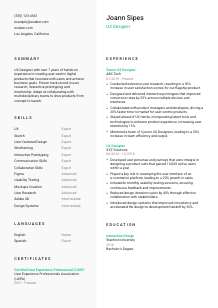
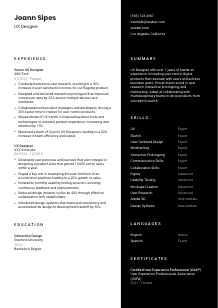
Crafting user journeys, but your resume feels like a maze? Navigate this UX Designer resume example, created with Wozber free resume builder. Learn how to lay out your user-centric skills to match company needs, making your career path as intuitive and engaging as the interfaces you create!
UX hiring moves quickly past vague claims. Teams want to see how you turn research into product decisions, how your wireframes and prototypes improve the experience, and how well you work with product managers and engineers when tradeoffs appear. Your resume needs to make that workflow visible, not just say that you care about users.
When the wording reflects the job's actual UX work, reviewers can tell much faster whether your background lines up with their product process and tool stack. Wozber's free resume builder helps you shape that experience into an ATS-compliant resume, so research, prototyping, collaboration, and platform-relevant tools are easier to read in both ATS screening and human review.
The top of a UX resume should remove friction immediately. Hiring teams should see who you are, what kind of work you do, and whether practical details such as contact information and location support the application.
Use your full name as the main header in a clean, readable size. UX hiring often starts with portfolio review and cross-functional sharing, so make your name easy to spot when your resume is passed between recruiters, design leads, and product stakeholders.
Place your target title directly under your name. If you are applying for a UX Designer position, say "UX Designer" rather than a broad label like "Designer" or a mixed one such as "Creative Technologist" unless that wording truly matches your work. Clear role labeling helps reviewers place your experience in the right product and research context.
Add a phone number and a professional email address that you actively monitor. UX interview processes often include recruiter screens, portfolio walkthroughs, and design exercises, so missed messages can slow things down. If you include a portfolio site, make sure the projects, case studies, and outcomes support the resume claims.
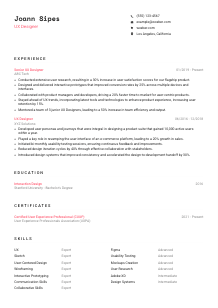
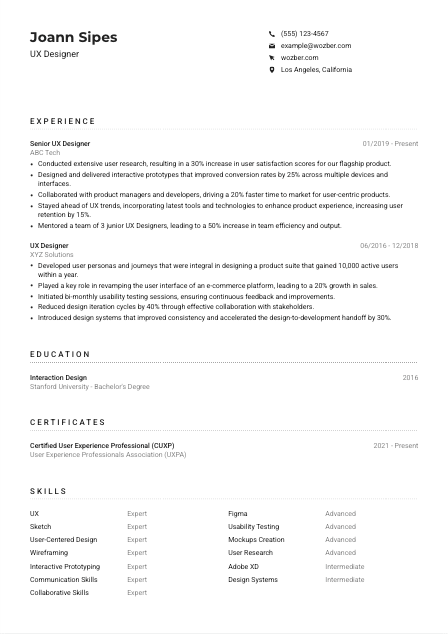
Include your city and state when geography matters to the role. Here, listing Los Angeles, California directly answers a stated requirement and removes doubt about local availability. If a posting is remote or flexible, location still helps set expectations without taking up much space.
A portfolio or LinkedIn profile can strengthen the section when it shows real UX artifacts such as user flows, prototypes, usability findings, or design system work. Keep those links current and consistent with the tools, industries, and outcomes described elsewhere on the resume.
This section should answer the practical basics at a glance. If the reviewer can immediately see your role, contact path, portfolio access, and any relevant location detail, they can move straight to your UX work.




For UX roles, experience is where hiring teams look for proof of process and outcome. They want to see research, design execution, collaboration, and the business or user results that followed, not a list of generic design duties.
Start by identifying the recurring themes in the job description, then bring those same themes forward in your bullets. For a UX Designer role, that often means user research, usability testing, wireframes, prototypes, cross-functional collaboration, and user-centered decision-making. In the example, "Conducted extensive user research" and "Designed and delivered interactive prototypes" work well because they directly mirror the responsibilities in the posting.
List positions in reverse chronological order with job title, company name, and dates. That structure helps recruiters track your progression from execution-focused UX work to broader ownership, such as mentoring junior designers or influencing product direction. It also keeps your resume easy to parse in an ATS-friendly resume format.
Each bullet should show what you did, how you did it, and what changed because of it. Instead of writing "responsible for wireframing," write about the deliverables and outcomes, such as prototyping across devices, improving handoff, or reducing iteration cycles. The sample bullet about improving conversion rates by 25% through interactive prototypes is effective because it links a core UX deliverable to a measurable business result.
UX impact is often measured through user satisfaction, conversion, retention, task success, adoption, usability findings addressed, or time saved in the design-to-development process. Choose numbers that reflect your actual scope. The example resume uses gains in satisfaction, retention, and time to market, which makes the work feel concrete rather than theoretical.
Prioritize experience that supports the kind of UX work the employer needs. If the role emphasizes research, collaboration, and interactive prototypes, those points should lead. Less relevant achievements can stay shorter or drop off entirely, especially if they do not support product design, user insight, or delivery with cross-functional teams.
By the end of this section, a design lead should understand the kinds of products you have worked on, how you approach UX process, and whether your work has moved key product metrics or improved team execution.
Education matters most when it confirms design training that relates to research, interaction patterns, information architecture, or digital product work. For early-career candidates, it can also help explain where core UX methods were developed before deeper professional experience took over.
If a posting calls for a bachelor's degree in UX Design, Interaction Design, or a related field, make that match easy to spot. A degree such as "Bachelor's Degree in Interaction Design" directly supports your candidacy because it connects to common UX foundations like user behavior, interface design, and prototyping.
List the degree, field of study, school, and graduation year in a clean format. Do not overdesign this section. UX resumes can show visual judgment, but the education block should still read quickly for recruiters and ATS systems.
When your degree lines up closely with the job, keep the wording precise. The example education entry works because "Interaction Design" is closely related to the employer's requirement and needs no extra explanation. If your degree is adjacent, such as psychology or human-computer interaction, use the exact formal title and let your experience reinforce the UX connection.
If you are newer to UX, a short note on coursework or projects can add substance, especially when it covers user research, usability testing, prototyping, or accessibility. If you already have several years of product design work, those details usually matter less than your shipped work and measurable outcomes.
Academic honors, design competitions, or relevant student leadership can strengthen the section when they relate to UX practice or research. Keep them brief and relevant. Once your professional portfolio is established, education should support the story, not compete with your experience.
Your education section should quickly show that your training fits digital product design work. Once that is clear, the rest of the resume can carry the heavier proof through projects, tools, and results.
Certifications are not always required in UX, but they can strengthen your profile when they reflect current practice, specialized methods, or continued growth in a fast-moving product environment.
List certifications that relate to user research, interaction design, accessibility, service design, or recognized UX practice. A credential such as "Certified User Experience Professional (CUXP)" adds weight because it supports your commitment to formal UX standards and ongoing development.
Do not crowd this section with general online course completions unless they clearly support the target role. Prioritize certifications that deepen your expertise in areas the employer values, such as research methods, prototyping, or collaborative product design.
Certification dates help show whether your learning is recent or ongoing. That is useful in UX, where tools, testing methods, and product expectations shift quickly. A date range like "2021 - Present" can indicate active maintenance or continued engagement with the field.
Hiring managers notice candidates who keep sharpening their craft. If you are pursuing additional learning, focus on areas that strengthen real work, such as accessibility standards, design systems, mobile UX, or advanced usability testing, rather than collecting unrelated badges.
Used well, certifications show that your UX knowledge is current and intentional. They are especially useful when they reinforce the methods, tools, or product thinking already visible in your experience.
A UX skills section should read like a practical toolkit for product work. The best versions balance research methods, design execution, collaboration, and the software you use to move ideas from concept to tested interface.
Start with the role's required capabilities, then match them to your real experience. In this posting, that includes tools such as Sketch, Figma, and Adobe XD, along with user-centered design, research, usability testing, and collaboration. If you have used these tools in shipped work, list them in language that matches the posting naturally.
A hiring team wants more than software familiarity. Show the combination of UX methods and working style that makes you effective, such as user research, wireframing, prototyping, design systems, stakeholder communication, and cross-functional collaboration. The example resume does this well by pairing platform skills with communication and collaboration strengths.
Resist the urge to include every design-related term you know. Choose the skills that support the target role and the work shown in your experience section. A shorter, better-matched list is more convincing than a long inventory that mixes core UX work with peripheral abilities.
This section should make your UX toolkit easy to scan. A recruiter or design manager should be able to tell within seconds whether your methods, tools, and collaboration style line up with the team's product workflow.
Language ability matters in UX when research, stakeholder communication, documentation, or team collaboration depend on it. Present it clearly and keep the focus on how well you can work in the communication environment of the role.
If the posting asks for strong English communication, state your English proficiency clearly. That matters in UX because research synthesis, design rationale, workshop participation, and developer handoff all depend on precise communication. Listing English as "Native" directly answers that requirement.
Additional languages can be valuable when products serve multilingual users or when teams operate across regions. For UX work, extra language ability may support better interviews, clearer user insight, or stronger collaboration with international stakeholders.
Use accurate levels such as Native, Fluent, Intermediate, or Basic. Overstating language ability can create problems in interviews, user research sessions, or cross-functional meetings where nuance matters.
If the company serves a diverse market, language range can become especially relevant. For example, Spanish may be useful in certain customer populations or team environments, but include it as added value rather than a universal requirement unless the posting says otherwise.
In UX, language is not only a communication skill. It can improve research quality, help interpret user feedback more accurately, and support more inclusive product decisions across different user groups.
Clear language details help employers understand how you will communicate with users, teammates, and stakeholders. In UX work, that can directly affect research quality and design clarity.
Your summary should quickly establish the kind of UX designer you are, the scope of your experience, and the work patterns you bring to a team. Keep it short, specific, and grounded in product outcomes.
Build the summary around the parts of UX the employer actually needs. For this role, that means user-centered design, research, prototyping, collaboration, and enough experience to work independently. The sample summary does this well by naming hands-on experience with digital products, user research, interactive prototyping, and multidisciplinary teamwork.
Start with your title and level of experience, then anchor it in real UX work. A line such as "UX Designer with 7+ years of experience designing user-centered digital products" gives immediate context and places the rest of the summary in a clear product-design frame.
Use the next lines to highlight what you are consistently strong at, such as translating research into flows and prototypes, improving conversion or retention, or mentoring junior designers. Choose strengths that are supported by the experience section so the summary feels credible.
Aim for three to five lines. That is enough space to establish seniority, methods, and one or two business outcomes without repeating your entire work history. In UX hiring, the summary should set up the portfolio and experience section, not compete with them.
A good summary gives the reader a fast, accurate picture of your UX focus. It should make clear whether you bring the mix of research, design execution, collaboration, and product judgment the role calls for.
Once each section reflects the role's actual language, your resume becomes much easier to review for product teams, recruiters, and ATS systems. Wozber's AI resume builder can help you align wording with the job description, strengthen ATS optimization, and surface missing requirements so your experience reads clearly in an ATS-friendly resume format.
The final check is simple. A hiring team should be able to see your design tools, research methods, collaboration style, and product impact without guessing. That is the standard your UX Designer resume should meet.