



Use Wozber and land your dream job
Create Resume
No registration required
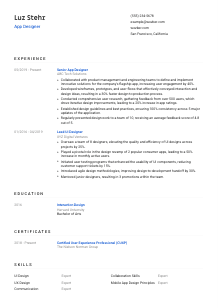
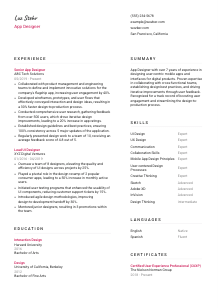
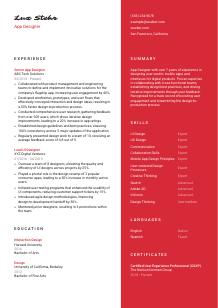
Designing top-rated apps, but your resume feels like it's buffering? Streamline it with this App Designer resume example, created with Wozber free resume builder. Learn how to sync your digital creativity with job specifics, so your career's user experience keeps getting five stars!
App design hiring usually turns on one question fast: can this person improve a mobile product through clear interaction thinking, not just polished screens. Hiring teams look for designers who can move from user research to wireframes, prototypes, and production-ready decisions while working closely with product managers and engineers. Your resume needs to make that workflow visible.
A tailored resume helps separate mobile product designers from adjacent UI or visual design profiles by showing how your work influenced usability, engagement, release speed, or design consistency. Wozber's free resume builder supports that tailoring in an ATS-friendly resume format, so the language around flows, prototyping, research, and cross-functional delivery comes through clearly in both screening and portfolio review.
For App Designer roles, the top of the resume should immediately confirm professional identity and practical eligibility. Keep it clean, current, and aligned with the way product design candidates are typically reviewed.
Your name should sit at the top in a clear, readable size so the resume feels professional at a glance. App design is a detail-sensitive field, and even simple choices like spacing, hierarchy, and typography signal whether you understand presentation.
Place the job title directly under your name when it matches the role you are pursuing. Using "App Designer" helps frame your background around mobile product work, user flows, prototyping, and interface decisions instead of leaving the reader to guess whether you lean more toward graphic design, web design, or broader UX.
Recruiters and design leads should be able to reach you quickly for portfolio review, interviews, or design exercise follow-up. Use contact details that look professional and need no interpretation.
If a role has a location requirement, address it directly in this section. Here, the posting asks for someone based in San Francisco, California, so listing that city and state removes a basic screening obstacle right away. If you are relocating, state that plainly rather than leaving the employer to guess.
For an App Designer, a portfolio link often matters as much as a LinkedIn profile. Include a current website or portfolio that shows mobile screens, user flows, prototypes, design rationale, and shipped product work. If your LinkedIn also reflects the same projects and dates as your resume, that consistency helps during screening.
This section should quickly establish who you are, what role you do, and whether you are easy to contact and eligible to move forward. For app design hiring, that clarity matters before anyone even opens your portfolio.




App design experience is rarely judged by years alone. Hiring managers want to see how you shaped the product experience, worked with engineering and product partners, and improved outcomes through research, iteration, and clear design decisions.
Read the job description for the actual design work behind the title. In this case, the strongest themes are mobile UI/UX, collaboration with product and engineering, user research, prototyping, and design standards. Those themes should guide which projects you feature and how you phrase your bullets.
List roles in reverse chronological order with title, company, and dates clearly shown. That structure lets hiring teams quickly track how your app design responsibilities grew, whether from execution-heavy UI work into ownership of flows, systems, research, or team feedback.
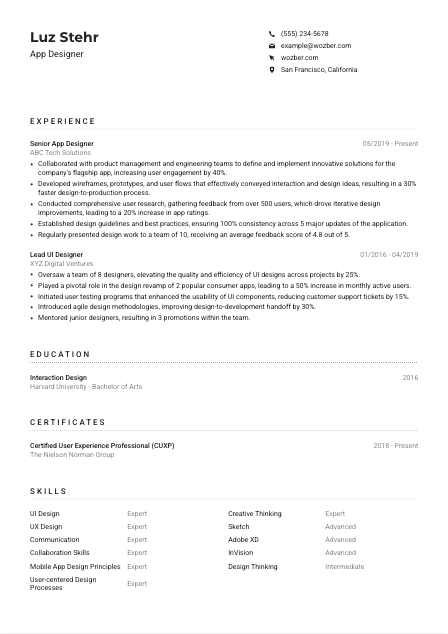
Each bullet should connect what you designed, how you worked, and what changed because of it. Good App Designer bullets mention deliverables such as wireframes, prototypes, user flows, usability testing, or design guidelines, then tie them to results. The sample resume does this well by linking collaboration on a flagship app to a 40% rise in user engagement and showing how better wireframes and prototypes sped up design-to-production by 30%.
Quantify work with measures that actually matter in digital product teams. Engagement lift, app rating improvements, reduced support tickets, faster handoff, stronger consistency across releases, or user research sample size all tell a stronger story than vague claims about creativity. Metrics like feedback from 500 users or consistency across five major updates make the scope of the design work much more concrete.
Prioritize experience that supports mobile app design, cross-functional collaboration, research-driven iteration, and design system thinking. If a past achievement does not help explain how you improve product experience or work with development teams, it can usually be trimmed. Relevance matters more than trying to preserve every detail from every job.
Your experience section should show that you can take product problems from concept to shipped interface decisions and improve the user experience along the way. When those bullets are specific about workflows, collaboration, and results, the role becomes much easier to picture you in.
Education matters most in app design when it confirms your grounding in interaction design, UX thinking, visual communication, or related digital product disciplines. Keep it straightforward and relevant to the level of experience you bring.
When a posting asks for a bachelor's degree in Design, Interaction Design, or a related field, make sure that qualification is easy to find. If your degree matches directly, say so clearly. In the sample, degrees in Interaction Design and Design both map well to the academic background the employer requested.
List the degree, field of study, school, and graduation year in a consistent format. App design resumes benefit from clarity and order, and the education section should reflect that same discipline in how information is structured.
If your program name lines up closely with the posting, use the full degree title rather than shortening it. "Bachelor of Arts in Interaction Design" gives a hiring team a much faster read than a generic mention of a bachelor's degree, especially when they are scanning for design-specific training.
Coursework can strengthen this section if you are earlier in your career or if the role leans into a specialized area such as mobile interaction, human-computer interaction, usability testing, or information architecture. For an experienced App Designer, coursework is optional unless it adds something your experience section does not already show.
Honors, design labs, capstone projects, or student product work can be useful when they reinforce app design skills such as prototyping, user research, or interface systems. Keep these additions brief and only include them if they add real context to your candidacy.
This section should confirm that your training supports the kind of interaction, interface, and user-centered work the role requires. Once that is clear, let your product experience carry the heavier weight.
Certifications are not always required for App Designer roles, but the right one can reinforce your depth in UX practice, research methods, accessibility, or product design standards. Use this section to support your core experience, not replace it.
Start with the posting. If certifications are not required, include only the ones that sharpen your positioning for app and UX work. A credential in user experience, usability, or interaction design can add weight because it connects directly to research-driven product decisions and user-centered methods.
Focus on certifications tied to the responsibilities you want to own, such as UX research, mobile experience design, accessibility, prototyping, or design systems. The sample's Certified User Experience Professional credential works because it complements responsibilities like evaluating user feedback and improving the application experience through iteration.
Certification dates show whether the training is recent and whether you have stayed active in your field. In digital product design, current knowledge around testing practices, accessibility expectations, and evolving design workflows can matter.
If you continue adding relevant training, it signals that your design practice is developing with the field. That can be especially useful when tools, mobile conventions, and research expectations change quickly across product teams.
A well-chosen certification tells the employer that your app design practice is backed by formal learning in areas that affect real product work. Keep the list relevant and current.
The best App Designer skills sections read like a concise map of how you work. They should combine design craft, research capability, tool fluency, and collaboration strengths that matter in mobile product teams.
Look beyond the keyword list and identify the working skills behind the role. Here, that includes UI/UX design for digital products, mobile design principles, user-centered processes, prototyping, collaboration, and presentation. Those are the terms worth mirroring when they genuinely match your background.
Lead with capabilities that describe how you design, then include the tools you use to execute that work. For an App Designer, core skills such as UI Design, UX Design, user research, interaction design, mobile design principles, and design systems usually matter more than listing software alone. Tools like Sketch, Adobe XD, and InVision still belong here when the posting names them.
Put the most role-relevant skills first so the section reflects the employer's immediate needs. In the sample, mobile app design principles, user-centered design processes, communication, and collaboration all support the actual work described in the posting. Keep the list tight enough that each item earns its place.
When this section is aligned well, a hiring manager can quickly see the blend of UX thinking, mobile interface craft, and team collaboration you would bring to a product team. That is far more useful than a long generic list.
Language ability matters in app design when it affects collaboration, user research, documentation, or communication with stakeholders. Keep this section simple and include it when it adds genuine value to the role.
If the posting names a language requirement, list it clearly. Here, spoken and written English is essential, so your proficiency should be easy to spot. For design roles, this matters not only in meetings but also in design critiques, research synthesis, annotations, and handoff documentation.
Order languages by job relevance. Put required or primary working languages first, then add others that may support international collaboration, multilingual products, or broader user research.
Additional languages can be useful if the company serves diverse user groups or global markets. They are especially relevant if you have done research interviews, localization-aware design, or testing across multiple language audiences.
Use clear labels such as Native, Fluent, Intermediate, or Basic. Accurate levels are important because language ability in design work often shows up in presentation, workshop participation, written rationale, and user interview settings.
Do not treat languages as filler. Include them when they support the work, whether that means collaborating with distributed teams, understanding multilingual user feedback, or contributing to products used across markets.
For App Designer roles, languages should strengthen the picture of how you collaborate and communicate around product work. If they do that, this section earns its space.
The summary sits at the top of the resume, so it needs to establish your design focus quickly. For an App Designer, that means years of experience, product context, and the kind of outcomes your design work has driven.
Before writing, identify the few themes the employer cares about most. In this case, the role centers on mobile app UI/UX, user-centered design, collaboration with product and engineering, and iteration based on research. Your summary should reflect that mix instead of sounding like a generic creative profile.
Lead with your professional identity and level of experience in a direct line. A phrase like "App Designer with over 7 years of experience" works because it tells the reader immediately what kind of designer you are and how long you have been working in digital product environments.
Add the capabilities that matter most for the target role, such as designing user-centered mobile experiences, partnering with cross-functional teams, improving products through user feedback, or setting design standards. The sample summary works because it ties those strengths to real outcomes like boosting engagement and improving the design-to-production process.
Aim for a short paragraph that can be read in seconds. Skip soft claims about passion or creativity unless they are backed by actual product work. The best summaries sound grounded in shipped apps, research-informed decisions, and measurable improvements.
A focused summary helps the reader place you immediately in the kind of app design work they need filled. By the time they reach your experience section, they should already expect to see product thinking, collaboration, and measurable design impact.
You now have the core pieces of an App Designer resume that reflects how mobile product roles are actually reviewed: clear identity, relevant experience, the right design foundation, and proof of results tied to user experience and team delivery.
Use Wozber's free resume builder to shape that content into an ATS-compliant resume, refine role-specific language with its AI resume builder workflow, and check alignment with an ATS resume scanner before you apply. The finished resume should make one thing easy to judge: you can design app experiences that work for users and for the product team building them.




