



Use Wozber and land your dream job
Create Resume
No registration required
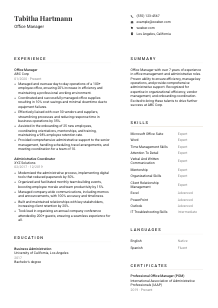
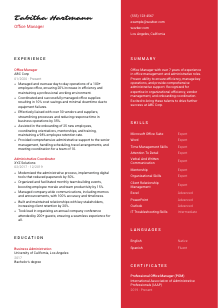
Mastering workplace dynamics, but your resume seems stuck in filing papers? Check out this Office Manager resume example, created with Wozber free resume builder. Learn how to present your organizational prowess and leadership flair in a way that matches job specifications, ensuring your career stays at the forefront of the office parade!
Office managers keep the workplace running when dozens of moving parts compete for attention at once. A hiring team wants to see whether you can coordinate vendors, support leadership, manage supplies and service issues, and keep daily operations professional without letting details slip.
The resume gets more traction when those responsibilities are translated into the employer's language, especially around office operations, scheduling, onboarding, and software use. Wozber's free resume builder helps shape that into an ATS-friendly resume format that highlights the right terminology and makes your administrative scope easier to read at a glance.
For an Office Manager, the contact section does more than identify you. It shows professionalism, accuracy, and whether you already meet practical requirements such as location and communication readiness. Keep it clean, complete, and easy to scan.
Use your full name as the most visible text at the top of the resume. Office management is a coordination-heavy role, so the header should feel orderly and businesslike from the first line.
Place "Office Manager" beneath your name if that is the role you are targeting. This immediately frames your background around office operations, administrative support, vendor coordination, and workplace oversight rather than broader administrative work.
Include a reliable phone number and a professional email address you check often. Since this role often supports senior leaders, handles scheduling, and manages time-sensitive issues, even the basics should suggest responsiveness and sound judgment.
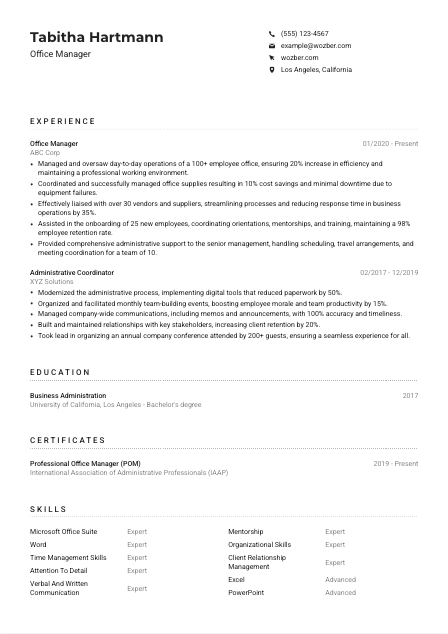
If the posting calls for a specific city or region, include it clearly. In the example, listing Los Angeles, California directly supports the stated location requirement and removes a common screening question early.
A LinkedIn profile or professional website can be useful when it reinforces your administrative background, software familiarity, or career progression. Only include it if the information is current and consistent with the resume.
This section should confirm that you are reachable, professional, and aligned with any practical requirement named in the posting. For office management, that kind of precision already reflects how you are likely to handle the work.




This section carries the most weight for most Office Manager roles. Hiring teams look for proof that you can manage operations, keep systems moving, support executives, and handle people, vendors, and logistics without losing control of timelines or details.
Read the posting line by line and note the operational priorities. For this role, that includes day-to-day office oversight, supplies and equipment management, vendor coordination, onboarding support, calendar and travel administration, and basic IT troubleshooting. Those are the themes your experience bullets should reflect.
List positions in reverse chronological order and give the most space to jobs where you owned office processes, administrative systems, or cross-functional coordination. If your background includes titles like Administrative Coordinator, highlight the parts of that work that connect directly to office management responsibilities.
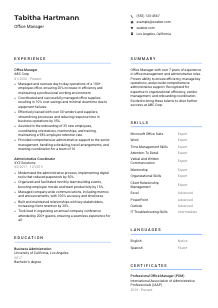
Replace generic task descriptions with bullets that show what improved because of your work. The example does this well by tying office oversight to a 20% efficiency gain, supply coordination to 10% cost savings, and vendor management to a 35% faster response time. Those outcomes make the scope of the role more credible.
Quantify the scale of the environment whenever you can. Useful metrics here include office headcount, number of vendors managed, retention tied to onboarding support, travel or meeting volume, budget savings, downtime reduction, or process speed. In the sample, supporting a 100+ employee office and onboarding 25 new hires quickly tells the reader the work was substantial.
Office managers often wear many hats, but not every duty belongs on every application. Prioritize accomplishments that show operational efficiency, confidentiality, executive support, vendor handling, and administrative systems. Leave out lower-value tasks unless they directly support the role you want.
An Office Manager resume works best when it shows both control of routine operations and measurable business impact. After reading this section, an employer should be able to picture you keeping the office running smoothly under real workload.
Education is usually a supporting section for Office Managers, but it matters more when the posting asks for a specific degree. Present it clearly so the employer can confirm the academic baseline without hunting for it.
If the employer asks for a bachelor's degree in Business Administration or a related field, make sure that information is easy to find. In the example, the degree in Business Administration aligns directly with the posting and strengthens the application before experience is even reviewed in depth.
List the degree, field of study, school name, and graduation year. Office management work depends on organized presentation, so this section should be concise and orderly rather than overdesigned.
When your degree is relevant to operations, administration, business processes, or management, include the full field name. That connection matters in roles involving office procedures, scheduling, vendor relationships, and support for leadership teams.
Most experienced Office Managers do not need a long academic breakdown. Include coursework, projects, or honors only if they support the role in a practical way, such as business administration, operations, communications, or organizational management.
If you are earlier in your career, academic distinctions can help fill out the picture. If you already have several years of office management experience, keep education brief and let your operational results carry more of the argument.
Education should quickly show that you meet the stated academic requirement and have a relevant foundation in business or administration. Then the resume can move the reader back to the experience that proves you can run the office.
Certifications are rarely the deciding factor for an Office Manager, but the right one can reinforce your professionalism, systems knowledge, and commitment to improving how you manage operations.
Choose credentials that support administrative leadership, office systems, coordination, or workplace management. A certification such as Professional Office Manager fits naturally because it signals structured knowledge in the same area as the role.
Only include certificates that strengthen your case for this type of work. A short list of relevant credentials is more persuasive than a crowded section filled with unrelated training.
Add the year earned or active date range so the reader can see whether the certification is current. For roles that depend on organized systems, software use, and evolving administrative practices, recency adds value.
As you take on more office-wide coordination, executive support, onboarding, or facilities-related work, look for certifications that match that broader scope. This section should evolve with your level of responsibility.
Relevant certifications can support the picture already established by your experience. For an Office Manager, they work best as proof that you take administrative standards, process improvement, and professional development seriously.
A hiring team expects an Office Manager to combine software fluency with calm coordination and dependable follow-through. Your skills section should reflect the tools you use, the administrative work you handle, and the people-facing strengths that keep an office functioning well.
Start with the language in the job description. For this role, that means Microsoft Office Suite, Word, Excel, PowerPoint, Outlook, time management, attention to detail, communication, confidentiality, and basic IT troubleshooting. Using those exact terms where they genuinely match your background improves alignment for both human readers and ATS screening.
List only skills that are backed up elsewhere in the resume. If you claim vendor management, onboarding, scheduling, or IT troubleshooting, the experience section should show where you used those capabilities in a real office setting.
Put the most important skills near the top, especially the ones named in the posting. In the sample, Microsoft Office Suite, organizational skills, communication, time management, and attention to detail all belong high on the list because they connect directly to daily office operations and executive support.
An effective skills list reads like a summary of the tools and capabilities you actually rely on to run an office. If each item connects back to real work, the section strengthens both ATS matching and hiring confidence.
Language ability matters in office management because the role often handles internal communication, scheduling, onboarding, and executive support across different teams. Present this section clearly, with English proficiency stated directly when the employer asks for it.
If the posting specifies strong English proficiency, list English clearly and give an accurate proficiency level. That is especially important in roles involving professional correspondence, meeting coordination, and confidential communication.
List languages from strongest to least strong so the reader can interpret them quickly. Native and fluent levels should appear first, followed by intermediate or basic languages.
Additional languages can be valuable in offices that work with diverse staff, clients, or vendors. In the example, Spanish adds practical communication range without distracting from the core requirement of strong English.
Use direct labels such as "Native," "Fluent," "Intermediate," or "Basic." Office managers are trusted with communication that affects schedules, onboarding, service coordination, and leadership support, so overstating proficiency can create real problems.
Think about who you will interact with in the role. If the office supports multilingual teams, external vendors, or customer-facing departments, an extra language can strengthen your application even when it is not listed as a requirement.
This section should be clear, accurate, and practical. For an Office Manager, that mirrors the job itself: communicate well, state details plainly, and make the information easy to use.
The summary should quickly establish the level of office environment you can manage and the kinds of operational problems you are trusted to handle. Keep it short, but make sure it covers experience, core strengths, and the business value you bring.
Before writing, identify the main themes in the posting. Here, that includes office operations, administrative support, vendor coordination, onboarding, and Microsoft Office proficiency. Those points should shape the opening lines of your summary.
Start with your professional identity and relevant tenure, such as "Office Manager with 7+ years of experience in office management and administrative operations." That gives immediate context and helps distinguish you from more junior administrative candidates.
Choose strengths that matter in this profession, such as improving efficiency, coordinating vendors, supporting senior leadership, reducing delays, or managing onboarding workflows. The example summary points to organizational efficiency, vendor management, and onboarding coordination, which matches the target role closely.
Aim for a short paragraph that can be read in seconds. Avoid broad adjectives and focus on operational scope, tools, and results. A concise summary with clear office management language does more work than a longer paragraph full of general claims.
When the summary is tailored well, it tells the reader right away what kind of office environment you can manage and where you add value. That opening snapshot should make the rest of the resume feel consistent, relevant, and ready for review.
An Office Manager resume should leave no doubt that you can keep daily operations organized, support leaders, coordinate vendors and supplies, and handle administrative details with consistency. When each section reflects those priorities, the application reads as focused rather than generic.
Use Wozber to sharpen that alignment from top to bottom. Its free resume builder, ATS resume scanner, and ATS-compliant resume tools help you match the language of the posting, surface missing requirements, and present your background in a format that makes your office management capability easy to judge.




