



Use Wozber and land your dream job
Create Resume
No registration required
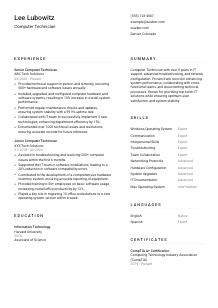
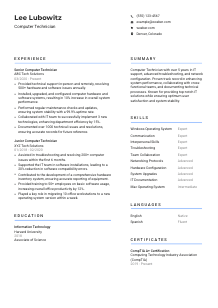
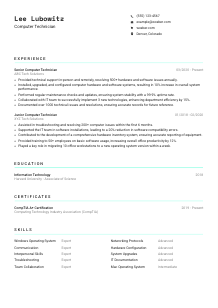
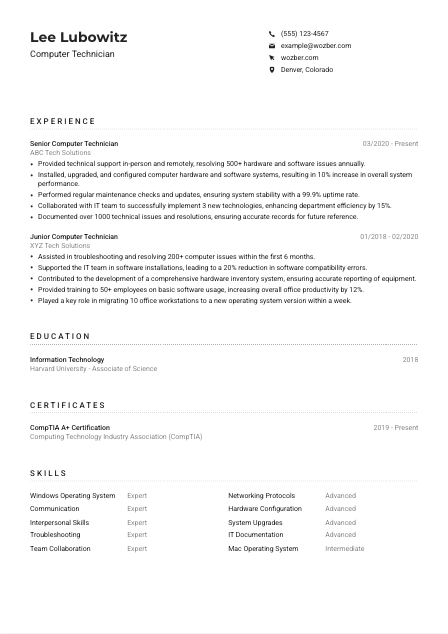
Debugging systems, but your resume isn't booting up right? Check out this Computer Technician resume example, created with Wozber free resume builder. It shows how to format and highlight your hardware and software skills to match job requirements, so your career journey doesn't face a blue screen of death!
Computer Technician resumes are read through the lens of day-to-day support pressure. Hiring teams want to see whether you can keep users productive when a workstation fails, a software install breaks, or a networked device drops offline. Your resume should make that operating reality visible through the kinds of systems you support, the issues you resolve, and the stability or efficiency you improve.
A tailored resume changes how quickly your technical range comes through, especially when the role spans hands-on repair, remote support, and documentation. Using Wozber's free resume builder alongside solid ATS optimization helps you match the posting's language around Windows, Mac, troubleshooting, networking, and maintenance, so reviewers can quickly see where your background lines up with the support environment they need covered.
For a Computer Technician, the top of the resume should answer a few practical questions fast: who you are, how to reach you, and whether you match any basic logistics the employer has already spelled out. Keep this section clean and factual so the hiring manager can move straight into your support experience and technical scope.
Use your full name in a larger, readable font so it anchors the page without distracting from the technical content below. This role is about dependable support and clear communication, so a simple presentation works better than branding flourishes.
Place "Computer Technician" under your name if that is the role you are pursuing. When your current title is close but not identical, this helps frame your background around desktop support, troubleshooting, repair, maintenance, and end-user assistance from the first glance.
Include a phone number and a professional email address that you check regularly. If you also add a website or LinkedIn profile, make sure it supports your candidacy with relevant IT work, certifications, ticketing experience, or project examples rather than a generic online presence.
Some Computer Technician roles are tied to on-site support, equipment handling, or local response needs. Here, the employer asks for someone located in Denver, Colorado, so listing Denver, Colorado in your header immediately removes doubt about availability for in-person support.
A digital profile can help if it reinforces the same story as your resume. For this profession, that might include LinkedIn details on support environments, hardware work, operating systems, or certifications like CompTIA A+. Skip any link that does not strengthen your IT credibility.
Your personal details should confirm that you are reachable, professionally presented, and logistically aligned with the role. Once that is clear, the rest of the resume can stay focused on troubleshooting depth, system support, and technical results.




This is the section most hiring managers will study first for a Computer Technician role. They want proof that you have handled real support volume, worked across hardware and software issues, and kept systems functioning through upgrades, maintenance, and user-facing problem solving. Generic duty lists will not do much here. Concrete support outcomes will.
Prioritize positions where you diagnosed device issues, repaired or replaced hardware, supported end users, configured systems, or handled OS and network-related problems. For this job, experience with both in-person and remote support matters, so make sure those delivery modes appear if they are part of your background.
List roles in reverse chronological order with job title, employer, and dates. For technical support hiring, a clear sequence helps reviewers see your progression from junior troubleshooting tasks into broader ownership such as maintenance, upgrades, documentation, or team collaboration.
Each bullet should show what you handled and what changed because of your work. Use language that naturally reflects the posting, such as resolving hardware and software issues, installing or upgrading systems, performing maintenance checks, or documenting resolutions. The sample resume does this well by tying core support work to outcomes like system performance and department efficiency.
Quantify support volume, uptime, error reduction, workstation migrations, deployment speed, or issue resolution counts when you can back them up. Metrics such as resolving 500+ issues annually, maintaining 99.9% uptime, or documenting 1000+ incidents quickly tell a hiring team how much operational load you have handled.
Space is valuable. Keep bullets that strengthen your case for desktop support, hardware configuration, system maintenance, user communication, or network troubleshooting. If a point does not help explain your ability to keep systems stable and users working, trim it or rewrite it.
Your experience section should show that you can step into a support environment and contribute quickly, whether that means fixing machines, improving performance, handling ticket volume, or keeping records that help the rest of the IT team work faster.
Education carries weight in Computer Technician hiring when it lines up with the technical foundation behind the work. Degrees in Information Technology, computer systems, or related fields signal formal grounding in hardware, operating systems, networking, and support practices. Present that background clearly and keep the emphasis on relevance.
If the posting asks for an Associate degree in Information Technology or a related field, use that wording accurately in your education section. In this case, listing an Associate of Science in Information Technology directly supports a requirement the employer has already named.
Include degree, field of study, school, and graduation year or date. A straightforward layout helps both human reviewers and ATS parsing pick up the credential without confusion, which matters when the degree is part of the posted requirements.
You do not need to overload this section, but relevant coursework can help earlier-career candidates. Classes in networking, hardware systems, operating systems, cybersecurity basics, or device maintenance can reinforce the kind of support work the role involves.
Clubs, labs, capstone projects, or school-based tech support work can be useful if they involved troubleshooting, hardware setup, system imaging, inventory control, or user support. These details are especially helpful if you are building your first few years of experience.
Workshops, training programs, or adjacent study can support the degree, especially when they connect to operating systems, networking, device repair, or help desk workflows. If a certification is substantial, keep the full detail in the Certifications section and let education stay uncluttered.
For a Computer Technician resume, education should confirm the technical base behind your hands-on work. Keep it concise, accurate, and clearly connected to the support environment you are targeting.
Certifications help hiring teams gauge technical baseline and continued learning, especially in support roles where practical troubleshooting knowledge matters. They are most useful when they reinforce the kind of systems, devices, or service environment the role actually involves.
Even when a posting does not require a credential, recognized certifications can strengthen your case. For Computer Technician roles, CompTIA A+ is a strong example because it aligns with hardware repair, operating systems, troubleshooting, and general support fundamentals.
List the certifications that connect most directly to desktop support, networking, endpoint maintenance, or operating system administration. A short list of closely matched credentials is usually stronger than a long list with only partial relevance to the work.
Add the year earned, and if applicable, show whether the certification is current. In IT support, date context matters because tools, operating systems, and best practices evolve, and employers want a sense of how current your training is.
If you are pursuing additional certifications, make sure they build on the support path you want. Credentials tied to networking, Apple or Microsoft environments, security basics, or endpoint management can be especially useful when they match the systems named in the job description.
This section works best when it supports the same story told in your experience and skills. Keep the emphasis on credentials that strengthen your case for reliable troubleshooting, system support, and current technical knowledge.
A Computer Technician skills section should read like the toolkit behind your actual work. Hiring teams are looking for a mix of operating system knowledge, hardware and network understanding, and the communication skills needed to help users who may not speak in technical terms.
Pull the most important skill language directly from the posting when it reflects your experience. Here, that includes Windows, Mac operating systems, networking protocols, hardware configuration, troubleshooting, and communication. Matching that language helps both ATS screening and human review without forcing awkward keyword stuffing.
Do not list every tool or trait you have touched. Choose the skills that support the work most Computer Technicians are hired to do: diagnose issues, configure systems, maintain devices, support users, and coordinate with IT teammates. The sample resume stays close to that by combining operating systems, troubleshooting, networking, documentation, and collaboration.
Place the most relevant technical skills near the top, then follow with support-adjacent soft skills such as communication and interpersonal ability. If you use categories, keep them intuitive, for example Operating Systems, Hardware and Networking, Support and Documentation, and Communication.
Your skills section should quickly confirm that you can work across the devices, systems, and user interactions the job requires. Keep it concise, accurate, and closely tied to the support work described elsewhere in the resume.
Computer Technicians spend a lot of time translating technical problems into clear next steps for users, teammates, and sometimes vendors. Language skills matter most when they affect support quality, user training, or workplace communication.
If the posting asks for English speaking proficiency, list English prominently and use an honest level such as Native or Fluent. That immediately confirms you can handle support conversations, remote troubleshooting, and issue documentation in the language the role requires.
Additional languages can be helpful in support environments with varied employee or customer groups. They are not a substitute for technical skill, but they can strengthen your ability to guide users through fixes, setup steps, and training.
Choose simple descriptors such as Native, Fluent, Intermediate, or Basic. These are easy to understand and set realistic expectations for spoken support, written communication, and documentation.
For this profession, extra language ability is most useful when it improves user interaction. If you have supported bilingual users, delivered software training, or handled front-line help in multiple languages, the language section can reinforce that service range.
If language ability is not a major factor in the role, keep this section brief so the resume still gives priority to troubleshooting, systems knowledge, repair work, and support outcomes.
List languages in a way that supports the practical demands of the role. For a Computer Technician, the point is clear user communication, accurate documentation, and smooth support across the environment you serve.
The summary sits at the top of the resume and should quickly establish the kind of support professional you are. For Computer Technician roles, that usually means years of experience, support scope, core systems knowledge, and one or two outcomes that show reliability under real operating conditions.
Open with your role and years of experience, for example a Computer Technician with 5+ years in IT support, troubleshooting, and system maintenance. That gives immediate context before the reader moves into the rest of the resume.
Use the summary to mention the most relevant areas only, such as Windows and Mac support, hardware repair, software installation, network configuration, or remote troubleshooting. Keep the language close to the job description so the fit is obvious without sounding copied.
A short metric or result can make the summary more concrete. The sample resume points to improved system performance, stable uptime, and strong issue resolution volume, all of which are credible ways to show support impact in this field.
Aim for 3 to 5 lines that sound like a real professional snapshot, not a slogan. Avoid vague claims about passion or excellence unless they are supported by actual support scope, tools, or results elsewhere on the page.
Your summary should give the hiring manager a fast, accurate read on your support background and technical range. When it is tailored well, the rest of the resume feels like proof of a technician who can handle the workload described in the posting.
A Computer Technician resume works when it makes your troubleshooting range, system knowledge, and user support experience easy to spot in a few seconds. Keep each section tied to the actual work: resolving issues, maintaining stable systems, documenting fixes, and collaborating with IT teams.
Use Wozber's free resume builder to shape that experience into an ATS-compliant resume with language that matches the role, and use its ATS resume scanner to refine the alignment before you apply. The final result should make it easy for a hiring team to see that you can step in and support their environment with confidence.




