



Use Wozber and land your dream job
Create Resume
No registration required
Juggling digital realms, but your resume keeps buffering? Check out this Computer Operator resume example, created with Wozber free resume builder. It shows how to channel your tech skills to match job specs, ensuring your career path is always running at full processing speed!
Computer operators are trusted with the steady, behind-the-scenes work that keeps systems available, backups running, and issues contained before they disrupt users or business operations. Your resume needs to show that operational discipline clearly, especially your experience with system monitoring, recovery procedures, equipment handling, and day-to-day reliability.
Hiring teams often need to separate candidates who have general IT support experience from those who can manage live operations with consistency and good judgment under pressure. Wozber's free resume builder helps you shape that distinction into an ATS-compliant resume by aligning your language with the posting and presenting your work in a clean, ATS-friendly resume format that makes your operational scope easy to read.
For a Computer Operator, the personal details section should be quick to scan and free of friction. Keep it clean, professional, and aligned with any practical requirements in the posting so recruiters can move straight to your operations background.
Use your full name at the top in a slightly larger font than the rest of the page. This is a simple section, but it sets the tone for an organized resume, which matters in operations roles where accuracy and consistency are part of the job.
Place the title "Computer Operator" directly below your name when that matches the role you are pursuing. If your current title is adjacent, such as IT Technician or Operations Technician, you can still target the posting by using the job title here when your experience supports system monitoring, backup, recovery, and operational support work.
List the phone number and email address you actively monitor. For an operations role that may involve incident response or shift-based coordination, your contact details should look dependable and current.
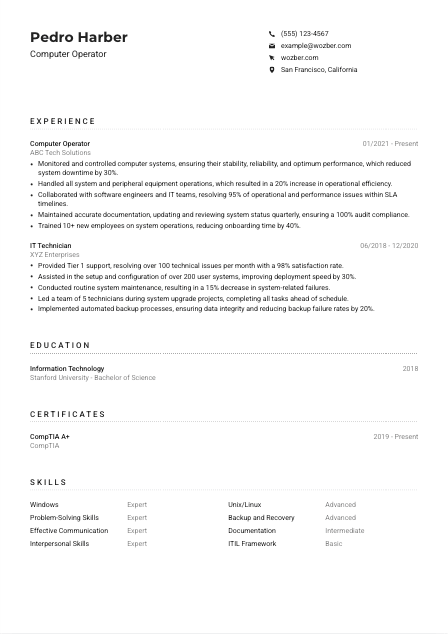
If the employer requires you to be in a specific city or open to relocation, include that in your contact details. In this example, listing San Francisco, California helps address a stated requirement early instead of leaving the recruiter to guess about availability.
A LinkedIn profile can help if it expands on your operations work, certifications, or technical environment. Make sure the titles, dates, and core achievements match your resume, especially if you reference operating systems, backup processes, or support responsibilities in both places.
Do not include age, gender, marital status, or other non-work information unless a local legal or job-specific requirement makes it necessary. For Computer Operator roles, hiring attention stays on availability, technical environment, and operational track record.
This section should remove any basic obstacles before your experience is reviewed. When your title, contact details, and location are aligned with the opening, the reader can focus on whether you have handled live systems reliably.




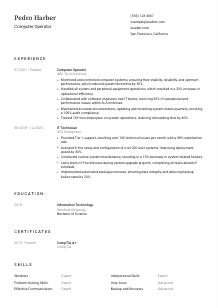
This is the section where a Computer Operator resume earns credibility. Hiring managers look for evidence that you have kept systems stable, followed procedures, responded to issues quickly, and worked well with engineers or support teams when something needed escalation.
Read the job description for the work patterns behind the wording. For a Computer Operator, that usually means system monitoring, backup and recovery, peripheral equipment operations, troubleshooting, documentation, and coordination with technical teams. Those are the priorities your bullets should mirror, using terms that match your actual experience.
List your jobs in reverse chronological order, and make the most applicable operations work easy to find. Include your title, company, and dates, then use bullet points that show what systems you supported, what procedures you followed, and what outcomes improved under your watch.
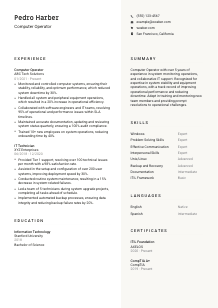
Do not stop at listing responsibilities like monitoring systems or maintaining equipment. Show what changed because you handled that work well. The sample resume does this effectively by tying system monitoring to a 30% reduction in downtime and training support to faster onboarding. That kind of phrasing tells hiring teams you can execute routine operations and improve them.
Numbers are especially useful in infrastructure and support work because they show scale and dependability. Use metrics such as uptime improvement, reduced downtime, SLA performance, incident resolution rate, audit compliance, deployment speed, backup success rate, or onboarding time for new operators. These are more persuasive than broad claims about being efficient or dependable.
Prioritize experience that supports live systems, resolves operational issues, or maintains records and procedures. If you also have broader IT experience, keep the bullets that connect most directly to computer operations. In the example, even the earlier IT Technician role stays relevant by focusing on support volume, maintenance, system setup, and backup automation rather than unrelated help desk tasks.
A hiring team should be able to scan this section and quickly understand what environments you supported, how you responded when systems failed or slowed, and what performance improved because of your work. That is the core of a Computer Operator resume.
Education usually plays a supporting role for Computer Operator jobs, but it still helps frame your technical foundation. Present it cleanly and give it enough detail to show relevance without taking attention away from your operating experience.
Some Computer Operator openings focus heavily on hands-on experience, while others prefer a degree in Information Technology, Computer Science, or a related field. Read the posting carefully and decide whether education should sit quietly in the background or be positioned as a stronger supporting credential.
Keep the entry easy to parse by listing your field of study, degree, school, and graduation year if appropriate. This is not the section for long explanations. Clarity matters more than detail unless a project or specialization directly connects to systems operations.
If your degree directly supports the opening, place it clearly and name the field. The example resume lists a Bachelor of Science in Information Technology, which fits naturally with a role centered on operating systems, troubleshooting, and technical procedures. If your education is less directly related, let experience carry more of the resume.
You do not need to pad this section, but selected coursework can help early-career candidates. Focus on classes or lab work tied to system administration, operating systems, networking, hardware support, backup practices, or IT service management. Include these only if they add something your experience section cannot yet show.
Honors, scholarships, or technical capstone work are worth adding if they reinforce discipline, technical depth, or project ownership. For an experienced Computer Operator, keep this brief. For a newer candidate, one relevant distinction can help round out the profile.
This section should confirm your technical grounding without competing with your operations history. When it is concise and role-related, it strengthens the overall picture instead of distracting from your hands-on work.
Certifications matter in Computer Operator hiring because they can confirm baseline technical knowledge, process awareness, and ongoing development. They are especially useful when the posting mentions specific credentials or when you want to strengthen an experience profile built across adjacent IT roles.
When a posting mentions certifications such as CompTIA A+ or ITIL Foundation, include them prominently if you have them. These credentials speak directly to technical support fundamentals and service-oriented operations, both of which are relevant when monitoring systems, handling incidents, and following established procedures.
Choose certifications that support the environment and responsibilities of the role. For Computer Operator jobs, that often means hardware and operating system fundamentals, service management, infrastructure support, or platform-specific administration. A focused list is usually stronger than a long list of unrelated badges.
Add the year earned and renewal or active status when relevant. This helps show whether the certification reflects current knowledge. In fast-changing IT environments, employers notice whether your training is recent enough to support present-day tools and procedures.
Remove expired or outdated certifications that no longer add value unless they are still widely recognized and supported by recent experience. If you are actively renewing certifications or adding new ones, keep this section updated so it reflects your current operating knowledge, not just past coursework.
Certifications work best when they reinforce the experience already on the page. For a Computer Operator, they should strengthen your case around systems knowledge, process discipline, and readiness to work in a controlled IT environment.
A Computer Operator skills section should read like the environment you can actually handle. Focus on the operating systems, support capabilities, and workplace skills that matter in live operations, and avoid turning the section into a generic list of IT buzzwords.
Start with the requirements and responsibilities in the job ad. For this role, that includes Windows or Unix/Linux proficiency, problem-solving, prioritization in a fast-paced setting, communication, teamwork, backup and recovery, and documentation. Use the employer's wording where it matches your real background so both ATS screening and human review pick up the connection.
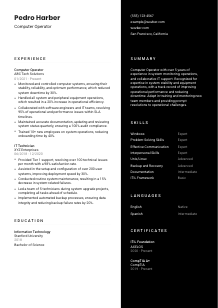
Computer Operators do more than watch screens. They work across operating systems, manage equipment processes, document status changes, and communicate with both technical and non-technical teams. Your list should reflect that mix. The example resume does this well by pairing Windows, Unix/Linux, and backup and recovery with communication and interpersonal skills.
Group your strongest and most relevant skills first, and only show proficiency levels if they are meaningful and consistent. A shorter list built around system operations will usually work better than a long inventory of loosely related tools. Every skill here should support the case that you can keep systems stable and respond well when issues appear.
This section should quickly tell the reader what platforms, procedures, and working habits you bring to operations. If the skills align with the posting and reflect your actual experience, they strengthen both ATS matching and the human read.
Language ability matters in Computer Operator work because incident handling, handoffs, status updates, and training all depend on clear communication. Keep this section practical and tied to how you work with users, teammates, and documentation.
If the posting asks for English, list it clearly with an accurate proficiency level. That matters in operations roles where written logs, verbal updates, and cross-team coordination all need to be handled without confusion or delay.
Place required or primary workplace languages first, then add others that may help in team communication or end-user support. This keeps the section easy to scan and ensures the hiring team sees the most important language qualification immediately.
Extra language skills can support training, frontline support, or communication across diverse teams, especially in larger organizations. In the example resume, Spanish is a useful secondary language, but English remains the priority because it is the stated requirement.
Choose levels that reflect how you can actually communicate on the job, especially in technical situations such as describing incidents, documenting actions taken, or explaining procedures to new staff.
Do not treat local presence as a language qualification. If the posting includes a city requirement, cover that in your personal details. In the language section, stay focused on communication ability that supports operations, training, documentation, and teamwork.
For this kind of role, language skills should reassure the employer that you can document issues clearly, coordinate with the team, and train others without avoidable misunderstandings.
The summary needs to establish your value quickly. For a Computer Operator, that usually means showing how long you have worked in IT operations or support, what technical environment you know, and what kind of operational results or reliability you have delivered.
Before writing, identify the two or three things the posting cares about most. In this case, system stability, operating system familiarity, issue resolution, documentation, and teamwork stand out. Your summary should reflect that mix rather than relying on broad claims about being hardworking or detail-oriented.
Start with your current or target professional identity and your years of relevant experience. A line such as "Computer Operator with 5+ years of experience in system monitoring and IT operations" works because it immediately places you in the right lane for the reader.
Use the next sentence to mention your strongest technical and operational points, such as monitoring live systems, improving uptime, supporting backup and recovery procedures, or resolving incidents with engineering teams. The sample summary handles this well by combining system stability, equipment operations, and operational performance improvements in a compact space.
Aim for a few sentences that can be backed up by the experience section. Skip vague adjectives unless they are anchored to work outcomes. A concise summary with real operating language sets up the rest of the resume far better than a generic paragraph full of soft claims.
By the time someone finishes your summary, they should already understand that you can support stable operations, work well with technical teams, and handle the routines and interruptions that come with keeping systems running.
You now have a clearer framework for presenting Computer Operator experience in a way that matches how these roles are actually reviewed. Focus on system stability, incident response, backup and recovery, documentation, and the measurable results that show you can handle operational responsibility.
Use Wozber's free resume builder to organize that experience into an ATS-friendly resume template, then review it with an ATS resume scanner to check how well your wording matches the target posting. When the final draft is aligned, a hiring team should be able to tell quickly that you can keep systems running, communicate clearly, and step into the operational rhythm of the job.




