




Use Wozber and land your dream job
Create Resume
No registration required
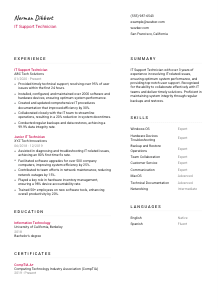
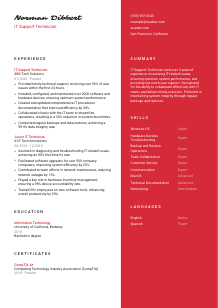
Solving tech puzzles, but your resume is glitching? Browse this IT Support Technician resume example, built with Wozber free resume builder. Learn how to match your tech-savvy skills to job expectations, so your career doesn't hit a system error!
IT support work is judged in the middle of other people's interruptions. Hiring teams want to see whether you can restore access, troubleshoot across devices, explain fixes clearly, and keep the desktop environment stable without creating more downtime. Your resume should make that operating standard visible fast, especially through ticket resolution, hardware support, documentation, and day-to-day user support.
A tailored resume changes how quickly your background reads against support requirements such as Windows, MacOS, hardware setup, backups, and end-user communication. Wozber's free resume builder helps organize that experience into an ATS-compliant resume, so core support work is easy to match to the posting instead of being buried in generic IT language. That matters when employers need to separate hands-on support technicians from broader IT generalists.
This section should read like a technician who is ready to be contacted and onboarded, not like a full profile. Keep it clean, professional, and aligned with the practical details the employer can confirm immediately.
Use your full name in a clear, readable style so it anchors the page right away. For IT support roles, the header should feel organized and dependable, much like the documentation and user communication expected on the job.
Place "IT Support Technician" under your name if that matches the role you are pursuing. This helps frame the rest of the resume around end-user support, troubleshooting, hardware setup, and system maintenance instead of leaving your focus open to interpretation.
Include a phone number and a professional email address, then check them carefully. In support roles, where responsiveness and clear communication matter, even small mistakes in contact information can create the wrong impression before anyone reads your experience.
If a job specifies a city or relocation requirement, include your location in the header. In the example, listing San Francisco, California directly supports the employer's stated requirement. For other applications, use location only when it helps remove a clear logistical question.
A current LinkedIn profile, portfolio, or technical blog can reinforce your support background, especially if it includes systems work, certifications, documentation, or user-facing projects. Only include links that are polished and consistent with the resume's job target.
Your personal details should confirm that you are reachable, professionally presented, and aligned with any practical requirement the employer has already flagged. Keep the section simple so attention moves quickly to your support experience.




For IT support hiring, experience carries the most weight when it shows what environments you supported, what problems you solved, how quickly you responded, and what improved because of your work. Focus less on generic duties and more on the support outcomes that teams actually rely on.
Read the job description closely and prioritize bullets that reflect the same kind of work. For this role, that includes technical support, hardware and software setup, maintenance of computing equipment, documentation, backups, and collaboration with the IT team. The example resume does this well by leading with user issue resolution and device support instead of broad IT statements.
List positions in reverse chronological order and include job title, company, and dates for each one. Hiring teams often skim for recent support scope first, so make it easy to follow your progression from junior support work to handling a larger desktop environment or more independent troubleshooting.
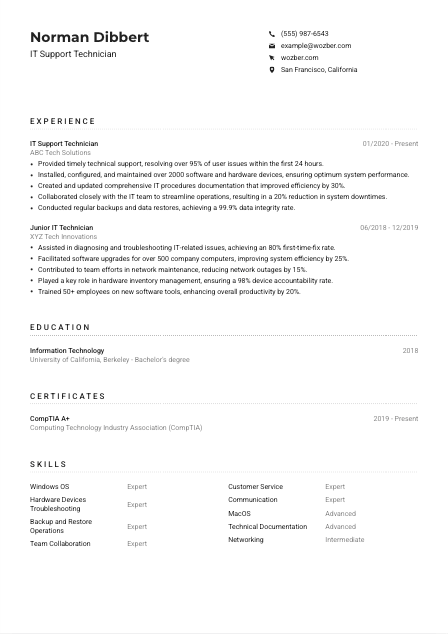
Each bullet should answer a practical support question: Did you reduce downtime, improve first-response performance, maintain device health, or make troubleshooting easier for users and teammates? "Resolved over 95% of user issues within the first 24 hours" works because it ties support activity to service speed, which is a real performance measure in IT support.
Numbers are especially effective here when they reflect ticket volume, resolution time, first-time-fix rate, number of devices supported, downtime reduction, documentation efficiency, or backup reliability. In the sample, metrics such as 2000 devices maintained and a 99.9% data integrity rate make the scale and consistency of the work easy to understand.
If a bullet does not help prove troubleshooting ability, user support, device administration, documentation, system upkeep, or teamwork in an IT environment, it can probably go. Save the space for details that show how you operate in real support settings, whether that is imaging laptops, resolving printer issues, assisting with software rollouts, or maintaining backup routines.
This section should leave little doubt that you can step into a support queue, manage common hardware and software issues, and keep users productive. Make the operational value of your work visible in every role.
Education matters most here as baseline technical preparation. It should quickly confirm that you have the academic grounding for support work, then get out of the way so your troubleshooting experience and certifications can do the heavier lifting.
If you have an Associate's or Bachelor's degree in Information Technology, Computer Science, or a related field, list it clearly and prominently. That directly covers the kind of educational requirement included in this posting and is often one of the first checklist items recruiters confirm.
Include degree, field of study, school, and graduation year or date. A clean format helps the reader confirm your background quickly without slowing down the resume's stronger sections, such as support experience, technical skills, and certifications.
If your degree matches the employer's stated preference, use the official wording from your diploma and the role where it fits naturally. The example's "Bachelor's degree in Information Technology" lines up closely with the requirement and avoids unnecessary interpretation.
Most experienced IT support technicians do not need a long course list. Include courses only if they strengthen your case, such as networking, operating systems, hardware support, information security, or systems administration, particularly if you are earlier in your career.
Honors, labs, capstone projects, or technical student work are worth including if they reinforce practical support ability. A systems troubleshooting project, help desk internship, or lab-based hardware work is more useful here than unrelated campus activities.
Keep education relevant and concise. It should confirm you meet the baseline technical requirement and support the larger story told by your hands-on support work.
Certifications carry real weight in IT support because they show current technical standards, baseline troubleshooting knowledge, and commitment to maintaining practical skills. For many help desk and desktop support roles, this section can directly strengthen your shortlist chances.
When a posting names a certification, make it easy to find. This role specifically asks for CompTIA A+ or a similar credential, so that certificate should appear at the top if you have it. In the example, leading with CompTIA A+ immediately supports the application.
Prioritize certifications tied to endpoint support, operating systems, hardware, networking, and service environments. A short list of relevant credentials is more effective than a long list that drifts into unrelated technical areas.
For active or recently earned certifications, dates help show that your knowledge is current. This matters in support work, where operating systems, device fleets, and standard troubleshooting practices change over time.
If you renew certifications or continue adding support-related credentials, include those updates. Employers often read certifications as a sign that you stay engaged with the tools and standards behind endpoint support, device maintenance, and user issue resolution.
Relevant certifications can quickly reinforce your technical foundation, especially when the job description names one explicitly. Keep this section current, support-focused, and easy to scan.
The skills section should reflect the real mix of technical range and user-facing ability that IT support work demands. Hiring managers expect to see operating systems, device troubleshooting, documentation, and communication all working together, not in isolation.
Start with the terms the employer actually uses, then include them only if they match your experience. In this posting, Windows, MacOS, hardware devices, troubleshooting, written and verbal technical help, and documentation are all core signals worth reflecting in your skills list.
Put your most relevant technical skills first, especially the environments you have worked in directly. For IT support, that often means Windows, MacOS, laptop and printer troubleshooting, device configuration, backup and restore work, networking basics, and desktop environment support.
Support technicians are often judged by how well they translate technical issues for users, document fixes, and keep people calm while resolving problems. Skills such as communication, customer service, and technical documentation belong here when they are backed by real support experience, as they are in the sample resume.
This section should show that you can handle the technical side of support and the user interaction that comes with it. Prioritize the systems, troubleshooting areas, and communication strengths that the target role depends on every day.
Language skills matter in support roles because troubleshooting often depends on precise explanations, clear written instructions, and calm back-and-forth with users. Even when English is the only required language, this section can reinforce how well you handle user communication.
Check the posting for explicit language expectations and list those clearly. Here, strong verbal and written English is required, so English should appear prominently with an honest proficiency level that supports user support, documentation, and step-by-step troubleshooting.
Terms such as Native, Fluent, Advanced, or Conversational make your capability easy to read. For support work, this matters because employers need to know whether you can explain fixes, write guides, and communicate effectively across tickets, chats, and in-person requests.
Additional languages can be useful in workplaces with diverse employee populations or regional client support. The sample includes Spanish, which can strengthen a support profile, though it is an added advantage rather than a universal requirement for every IT support job.
Do not overstate fluency. In support roles, language ability shows up quickly in live troubleshooting, knowledge base writing, and follow-up communication, so accuracy matters more than trying to impress.
Some IT teams support global offices, multilingual staff, or distributed users across time zones. If that applies to your background, language skills can reinforce your ability to handle service requests clearly and professionally across different user groups.
List languages in a way that supports the communication demands of the job. For IT support, clear English is often essential, and additional languages can widen the range of users you can assist effectively.
Your summary should tell a hiring team, in a few lines, what kind of support technician you are and what environments you can handle. This is where you frame your experience before the resume gets into ticket resolution, hardware support, documentation, and systems upkeep in more detail.
Start by identifying the main version of IT support you offer. Are you strongest in end-user troubleshooting, desktop support, hardware deployment, software configuration, backup routines, or a mix of these? That focus should shape the opening line instead of vague claims about being passionate or driven.
Lead with your title, years of experience, and the technical support areas you know well. The example summary works because it quickly covers user issue resolution, system performance, and support delivery without sounding inflated.
Use the summary to reflect role-specific priorities such as troubleshooting, collaboration with the IT team, documentation, or backups when those are genuine parts of your background. In this case, mentioning timely user support and backup integrity directly matches the employer's support environment.
Aim for three to five lines with concrete language. A concise summary should help the reader understand your support level, technical range, and operating style before they move into the rest of the resume.
A well-written summary should quickly position you as an IT support technician who can resolve issues, support users, and maintain a stable endpoint environment. Keep it focused enough that the rest of the resume can immediately back it up.
Once each section reflects real support work, your resume should show more than general IT familiarity. It should make clear that you can troubleshoot across devices, support users professionally, maintain systems, and document what keeps the environment running.
Use Wozber's free resume builder to structure your content in an ATS-friendly resume format, refine job-specific language with its AI resume builder features, and check alignment with an ATS resume scanner. The final result should make it easy for hiring teams to recognize hands-on IT support capability from the first scan.




