Use Wozber and land your dream job
Create Resume
No registration required
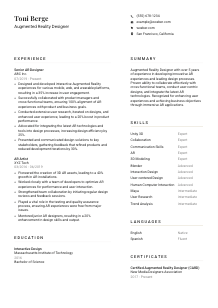
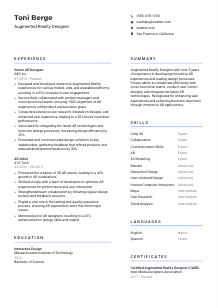
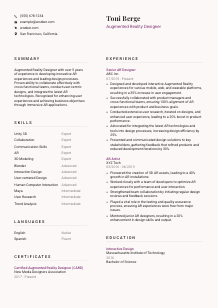
Blending virtual wonders, but your resume looks 'plain reality'? Check out this Augmented Reality Designer resume example, created with Wozber free resume builder. Learn how to layer your talents to match job dimensions, creating a career landscape as immersive as your creations!
Augmented Reality design sits at the intersection of spatial interaction, visual craft, and product thinking. Hiring teams want to see more than polished 3D scenes. They look for designers who can turn AR concepts into usable experiences across mobile, web, or wearable platforms, test how people move through them, and refine the work based on user behavior and technical limits.
A tailored resume helps your work read as product-ready AR design rather than adjacent experience in 3D art, UX, or visual design. Using Wozber's free resume builder to align your wording with the job description and maintain an ATS-friendly resume format makes it easier to surface the right tools, platforms, and user-centered design work first. That distinction matters when employers need to quickly see who has already designed AR experiences that can ship and perform.
This section should answer the basics fast and remove friction before anyone gets to your portfolio, prototypes, or project history. For an Augmented Reality Designer, that means presenting your identity and contact details cleanly, while reflecting any practical requirement the employer named, such as location or language.
Use your full name as the main header in a readable font and slightly larger size than the rest of the page. AR hiring often moves quickly between resumes and portfolios, so your name should be easy to spot when a recruiter, design lead, or product manager returns to your application after reviewing work samples.
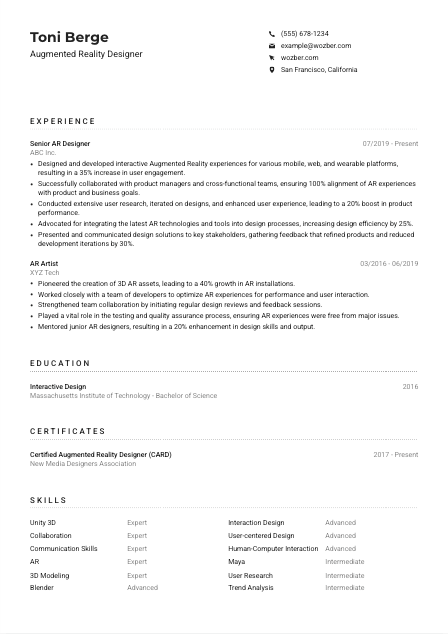
Place a clear role title directly under your name, such as "Augmented Reality Designer." This helps frame your experience immediately, especially if your past titles vary between AR Designer, XR Designer, Spatial Designer, or AR Artist. In the example resume, keeping the headline aligned with the target role makes the rest of the document easier to read in that context.
List a working phone number and a professional email address with no casual wording. If you include a website, make it a portfolio or professional profile that shows shipped AR work, interaction flows, 3D assets, prototypes, or case studies. For this profession, a strong link often adds more value than a generic social profile because employers want to see how you think through immersion, usability, and execution.
Some AR roles are tied to a studio, product team, or hardware collaboration hub. When a posting specifies location, reflect that clearly in your personal details. Here, listing "San Francisco, California" directly addresses a stated requirement and removes uncertainty about relocation or local availability.
For AR design, your portfolio is often as important as the resume itself. Link to work that shows platform context, interaction decisions, user testing, and visual execution, not only final renders. A portfolio that explains why an AR experience was designed a certain way will support the resume far better than a gallery of isolated visuals.
Keep this section clean, accurate, and directly relevant to the role. Once the basics are easy to confirm, the reader can move straight to your AR work, platform experience, and design judgment.




This is where an Augmented Reality Designer resume either becomes credible or stays vague. Hiring managers look for evidence that you have built experiences people actually used, improved performance through iteration, and worked effectively with product, engineering, and stakeholder groups.
Read the posting for the work patterns behind the bullet points. Here, the emphasis is on designing AR experiences across platforms, collaborating with product and development teams, conducting user research, and improving performance through iteration. Your experience bullets should respond to those priorities with concrete examples from shipped products, prototypes, or production pipelines.
List positions in reverse chronological order and make each entry easy to scan with job title, company, and dates first. Then use accomplishment bullets that show what you designed, which platforms or tools were involved, who you worked with, and what changed because of your work. That structure helps separate hands-on AR design experience from broader creative or visual roles.
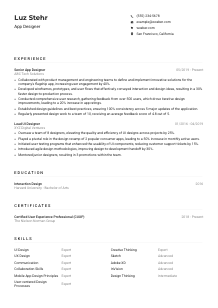
Generic bullets like "responsible for AR design" tell very little. Use results tied to user engagement, performance, adoption, workflow efficiency, or iteration speed. The example resume does this well with achievements such as a 35% increase in user engagement and a 20% boost in product performance. Metrics like these make AR work feel product-based rather than purely conceptual.
AR design is rarely a solo exercise. Mention the environments and workflows you used when they are relevant, such as Unity 3D, Blender, Maya, user research, design reviews, prototyping, or testing with developers. Also make collaboration visible. If you partnered with engineers to optimize interaction performance or aligned concepts with product goals, say so directly.
Keep the section centered on experience that supports the role you want now. Remove bullets that do not help explain your spatial design work, interaction thinking, user research, cross-functional collaboration, or measurable impact. If an older role included broader digital design work, keep only the parts that connect to immersive experience design or 3D interaction.
The best experience sections show how your ideas moved from concept to tested, collaborative, high-performing experiences. When those points are clear, your resume reads like someone who can contribute to product decisions, not only visual output.
Education matters most here when it confirms relevant design training and gives context for your technical and interaction background. For AR roles, degrees tied to interaction design, interactive media, digital art, HCI, or related fields can strengthen the story behind your tools and project work.
Start by matching the educational level and field the employer requested. This posting asks for a Bachelor's degree in Interaction Design, Interactive Media, Digital Art, or a related discipline. If your degree falls into that family, state it clearly so the connection is obvious at first glance.
List your degree, field of study, school, and graduation year or date. Keep it simple and consistent. For example, the sample resume's "Bachelor of Science in Interactive Design" from MIT works because the qualification is easy to verify and the field is closely aligned with the role.
Not every candidate will have "Augmented Reality" in the degree name. If your background is in a related area such as interaction design, digital media, game design, visual computing, or HCI, present it in a way that makes the connection to AR design intuitive. The point is to show a foundation in designing interactive systems, not to force an exact wording match that does not reflect your record.
Early-career candidates can benefit from including courses or projects involving 3D modeling, immersive media, interface design, user research, animation, prototyping, or spatial computing. Choose only the material that supports the role. A capstone involving interactive environments is more useful than a long list of unrelated classes.
If you graduated with distinction, built a notable immersive installation, or led a research project tied to user interaction or digital environments, include it when it reinforces your direction as an AR designer. These details are most useful when professional experience is still limited or when the work is directly relevant to the job.
This section should quickly confirm that your training fits the discipline. Once that is clear, the focus can return to your AR projects, product thinking, and platform-specific design work.
Augmented Reality changes quickly, and employers notice candidates who keep their skills current. Certificates are helpful when they strengthen your credibility in immersive design tools, spatial interaction, 3D workflows, or adjacent areas like UX research and prototyping.
This job does not require a certification, so only include credentials that add relevant depth. A certificate should strengthen your AR profile by pointing to current knowledge in immersive design, 3D production, interaction design, or AR-specific workflows.
Choose certifications that relate directly to the role's needs, especially software, design process, or AR specialization. In the example, "Certified Augmented Reality Designer" is worth keeping because it clearly connects to the target position instead of adding a generic professional development line.
AR tools and production methods evolve fast, so dates can help show that your learning is recent or still active. If a credential has an ongoing validity period or reflects current platform knowledge, include that information to show that your skill set is up to date.
Use this section to show momentum in the areas that matter for the jobs you want next. That might mean courses in Unity workflows, spatial UX, 3D animation, prototyping for wearable devices, or user testing in immersive environments. Choose learning that maps to real AR deliverables, not random software accumulation.
A short, relevant certifications section can reinforce your commitment to the field and your familiarity with evolving tools and practices. Keep it selective and closely tied to the kind of AR work you want to do.
A hiring team scanning for an Augmented Reality Designer wants to see the mix of software fluency, interaction design knowledge, and collaboration ability that the work requires. Your skills section should make that combination easy to spot without turning into a long inventory of unrelated tools.
Start with the skills explicitly named in the job description, then add related capabilities you genuinely use. Here that includes Unity 3D, Blender or Maya, human-computer interaction, user-centered design, collaboration, and communication. You can also include adjacent AR skills such as prototyping, 3D asset integration, user research, and cross-platform interaction design if they reflect your actual work.
Place the most relevant technical and process skills first, especially the ones tied to daily work. For an AR Designer, that usually means AR design, Unity 3D, 3D modeling, interaction design, user research, and platform-aware collaboration. The example resume balances technical skills with soft skills well by pairing tools like Unity and Blender with collaboration and communication that matter in product teams.
Do not crowd the section with every creative tool you have ever touched. Choose the skills that support the role and match your experience bullets. If you use ratings, keep them believable and consistent. A shorter list of clearly relevant skills is more convincing than a broad list that does not connect to your project history or portfolio.
The section should quickly confirm that you can design AR experiences, work within the right tools, and collaborate through real product development cycles. That combination is what gives the role substance.
Language skills matter in AR work when they affect collaboration, stakeholder presentations, user research, or market reach. Most resumes should keep this section simple, with emphasis on the language proficiency the role explicitly requires.
This posting asks for fluent English, so that should appear first and be stated clearly. For an AR Designer, strong English matters not only for conversation but also for presenting concepts, discussing user feedback, documenting design rationale, and working through iteration with product and engineering teams.
After English, include other languages you can use in professional settings. Extra languages can be useful if the role touches international teams, user research across markets, or global product experiences. In the example, Spanish adds breadth without distracting from the required English fluency.
Choose straightforward labels such as Native, Fluent, Advanced, or Conversational. Hiring teams should understand quickly how well you can communicate in meetings, workshops, or research sessions. Avoid vague descriptions that make your actual ability hard to interpret.
If language skills helped you conduct interviews, collaborate with distributed teams, or design for multilingual user contexts, that is worth mentioning elsewhere in the resume. In the language section itself, keep the presentation concise and factual.
For most AR roles, languages support the application rather than define it. Include what is accurate, satisfy the stated requirement, and let your portfolio, experience, and design outcomes remain the main focus.
This section should confirm that you can communicate in the environment the role requires. Once that is clear, the attention should return to your AR design process, collaboration, and product results.
The summary sits at the top of the resume, so it needs to establish your direction fast. For Augmented Reality Designer roles, that means combining years of experience with the kind of work you have delivered, the tools or methods that shape it, and the business or user outcomes your design decisions influenced.
Before writing the summary, identify the two or three themes the employer cares about most. In this case, that includes AR experience, user-centered design, cross-functional collaboration, and work that supports product goals. Your summary should reflect those themes directly instead of offering broad creative language.
Lead with a concise line that states who you are and how long you have been doing relevant work, such as "Augmented Reality Designer with 5+ years of experience." That opening immediately positions you for the role and helps separate you from candidates whose experience sits mainly in adjacent fields like motion, game art, or general UX.
Mention the kinds of AR experiences you design, the tools or practices you rely on, and one or two outcomes that show value. The sample summary works because it combines experience, cross-functional collaboration, user-centered design, and business impact in a compact form. You can make yours even stronger by naming platforms, prototypes, engagement gains, or product improvements when space allows.
Aim for a short paragraph that can be scanned in seconds. Three to five lines is usually enough. Cut generic descriptors and keep the wording grounded in AR practice, such as immersive interaction, user research, spatial design, iteration, or platform-specific development support.
A good summary tells the reader, early and without clutter, that you design AR experiences with both creative and product discipline. When it is tailored well, the rest of the resume lands faster.
Your Augmented Reality Designer resume should now show the full picture: relevant education, AR-focused tools, user-centered design work, collaboration with product and development teams, and outcomes that prove your work performs outside a concept deck.
Use Wozber's free resume builder to tighten structure, refine role-specific language, and create an ATS-compliant resume that reflects the terminology in the job description. Wozber's ATS resume scanner can also help you spot missing requirements, strengthen keyword alignment, and present your experience in an ATS-friendly resume format that keeps the focus on your actual AR design capability.
When the resume is tailored well, hiring teams can quickly see whether you are ready to design AR experiences that users can understand, enjoy, and use in the real world.