



Use Wozber and land your dream job
Create Resume
No registration required
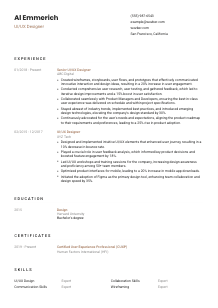
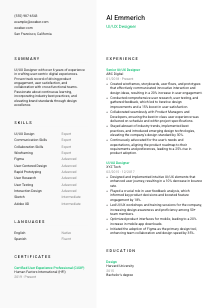
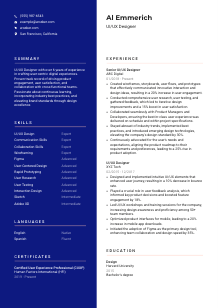
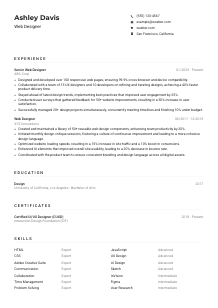
Crafting interactive user experiences, but your resume feels static? Explore this UI/UX Designer resume example, created with Wozber free resume builder. Learn how to present your inventive interface skills in line with job requirements, ensuring your career journey flows as smoothly as your user journeys!
UI/UX hiring moves quickly from visuals to thinking. Teams want to see how you define user flows, test assumptions, iterate from feedback, and work with product managers and developers to ship experiences people can actually use. Your resume needs to make that design process visible, not just show that you have worked on screens.
When a UI/UX resume is tailored well, the first scan makes your design workflow easy to follow. Wozber's free resume builder helps you shape that story in an ATS-friendly resume format, so keywords such as wireframing, prototyping, user research, and collaboration are easy to parse while your real product impact stays clear. That matters when a hiring team needs to quickly distinguish polished visuals from proven UX practice.
This section is brief, but it still does practical work in UI/UX hiring. It should identify you clearly, confirm you are applying for the right design track, and point reviewers toward the portfolio or site where they can inspect your interaction work, case studies, and visual decisions.
Use your full name as the clearest identifier on the page. Keep the styling clean and readable. For a UI/UX Designer, this small choice already signals judgment around hierarchy and restraint, which matters more than decorative typography on a resume.
Match your title to the role you want. If you are applying as a "UI/UX Designer," say that directly under your name so recruiters and ATS filters do not have to infer your direction from broader labels like Product Designer or Visual Designer.
Include a phone number and a professional email address that you check regularly. Hiring conversations for design roles often move from portfolio review to interview scheduling quickly, so accuracy matters.
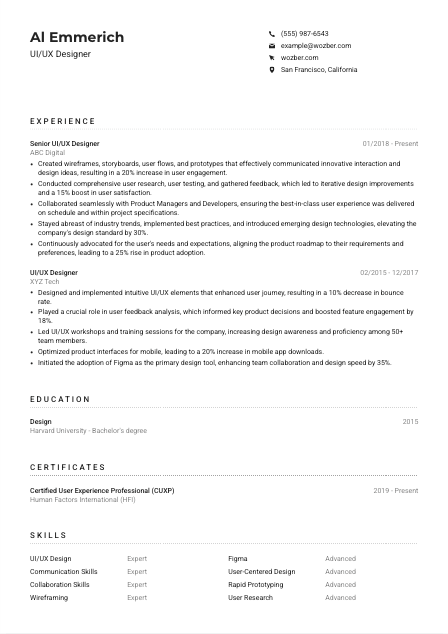
Some design roles are location-specific because of hybrid collaboration, workshop schedules, or team overlap. Here, listing San Francisco, California directly supports the stated requirement and removes an obvious question early in the review.
A UI/UX resume without a portfolio link leaves out a major part of how your work is judged. Include your website, portfolio, or case study hub, and make sure it shows process artifacts such as wireframes, flows, prototypes, research findings, and final outcomes rather than only polished mockups.
Skip details such as age, marital status, or other unrelated personal information unless a local application standard specifically requires them. Keep the focus on design capability, communication, and product work.
Your personal details should do three things well: identify you, confirm basic application requirements, and direct the reader to your portfolio. Once that is in place, the rest of the resume can focus on how you research, design, test, and improve user experiences.




For UI/UX roles, experience is where employers look for proof of process. They want to see what kind of product problems you worked on, how you explored solutions, how you collaborated with engineering and product, and what changed after your designs went live.
Start by marking the responsibilities the employer repeats or emphasizes. In this case, that includes wireframes, storyboards, user flows, prototypes, user research, testing, feedback loops, and cross-functional collaboration. Those themes should appear across your bullets in language that matches your actual work.
Lead with your most recent role so reviewers can immediately see your current scope and level. For each position, include your title, company, and dates. UI/UX hiring teams often compare seniority through project ownership, so a clean timeline helps them place your progression quickly.
Do not stop at "created wireframes" or "worked with developers." Show what your design work changed. Strong bullets connect the artifact to the outcome, such as improving user engagement, reducing bounce rate, raising satisfaction scores, or speeding collaboration between design and engineering. The sample resume does this well by tying prototypes, research, and cross-functional work to adoption and satisfaction gains.
UI/UX impact is often measured through engagement, completion rates, retention, satisfaction, conversion, usability findings, or release efficiency. If you have numbers, use them. A bullet that mentions a 20% increase in user engagement or a 15% lift in user satisfaction is stronger than a generic claim about better experiences because it shows the effect of your design decisions in product terms.
Prioritize work that shows user-centered design process, prototyping, research, testing, interaction design, accessibility thinking, or close partnership with product and engineering. If an older role leaned heavily toward visual production or general marketing design, keep only the parts that support your UI/UX direction.
This section should leave no doubt about how you operate as a designer. When your bullets show process, collaboration, iteration, and measurable product outcomes, reviewers can picture you contributing to real design cycles rather than only producing interfaces.
Education matters in UI/UX because it helps explain where your design thinking began, especially around human-centered methods, research, interaction principles, and visual communication. For experienced designers, this section is shorter, but it still helps confirm the academic background requested in many postings.
If the posting asks for a bachelor's degree in Design, Human-Computer Interaction, or comparable experience, make that connection easy to see. A directly relevant degree should be listed clearly so the reviewer does not have to search for it.
List the degree, field of study, school, and graduation information in a consistent format. This section does not need design flourishes. It needs to be readable at a glance, just like the rest of an ATS-friendly resume.
When you have a directly relevant degree, keep the wording close to the job description where accurate. In the example, a bachelor's degree in Design aligns cleanly with the stated requirement and helps the education section do its job immediately.
Coursework can help if you are earlier in your career, changing fields, or applying to a more specialized UX role. Subjects like interaction design, usability testing, information architecture, or human-computer interaction can add context when your work history is still developing.
Honors, awards, thesis work, or research projects are worth adding only if they connect to design practice or user-centered problem solving. If they do not help explain your ability to work on digital products, leave them out and keep the section lean.
For a UI/UX Designer, education should quickly confirm relevant training and then get out of the way. If the degree supports the role and the formatting is clean, the section has done its job.
Certifications are not mandatory for every UI/UX Designer, but they can strengthen your resume when they sharpen your positioning. They are most useful when they show formal study in UX methods, research, accessibility, or a specialized area of product design.
Choose certificates that support the kind of design work you want to be hired for. User research, UX strategy, accessibility, interaction design, and product thinking are more useful than broad generic learning badges.
Lead with certifications that hiring managers will immediately connect to the role. In the sample, the Certified User Experience Professional credential supports the candidate's user-centered design profile and adds credibility without crowding the section.
Add the year earned and, if relevant, the validity period. In design, current learning matters because tools, testing practices, accessibility standards, and collaboration workflows keep changing.
Ongoing development is especially valuable in a field shaped by evolving tooling and product expectations. Courses or certifications in accessibility, design systems, mobile UX, research methods, or prototyping can all strengthen future applications when they match the work you want to do.
A certification section works best when it adds focus. It should reinforce the methods, standards, or specialties that support your product design work, not read like a list of every course you have ever taken.
The skills section needs to do more than repeat buzzwords. For UI/UX roles, it should quickly show your working toolkit, your design methods, and the collaboration strengths that help you move work from concept to shipped product.
Start with the capabilities the employer names directly. Here, that includes design tools such as Figma, Sketch, or Adobe XD, along with user-centered design, communication, presentation, and collaboration. These belong near the top if they reflect your real experience.
A useful UI/UX skills section mixes practical design execution with the collaboration needed to deliver work. Include hard skills such as wireframing, prototyping, user research, user testing, interaction design, and relevant software. Then include soft skills that matter in review cycles, stakeholder presentations, and handoff discussions.
Do not overload this section with every design-adjacent term you know. Focus on the capabilities that match the role and your recent work. The sample resume keeps the list anchored in core UI/UX competencies instead of drifting into unrelated creative software or broad business terms.
When this section mirrors the role and matches what appears in your experience bullets, it becomes much more believable. Hiring teams should see a coherent toolkit that supports research, interaction design, prototyping, and product collaboration.
Language proficiency matters in UI/UX mostly through collaboration. Research sessions, design critiques, stakeholder presentations, and handoff conversations all depend on clear communication, so list languages in a way that reflects practical working ability.
If the job asks for proficient English communication, make sure English appears clearly and prominently. For a UI/UX Designer, that supports everything from workshop facilitation to documenting design rationale and presenting user findings.
Order your languages by job relevance, not personal preference. If English is required for the role, list it first so the reviewer can confirm it immediately.
Extra languages can strengthen your profile, especially for products serving multilingual users, international markets, or diverse research pools. They are a bonus, not a substitute for the main language requirement.
Choose straightforward levels such as Native, Fluent, Intermediate, or Basic. Avoid vague wording. A hiring manager should be able to tell whether you can conduct interviews, present work, or collaborate in that language.
In some UI/UX environments, language ability can improve user research coverage, stakeholder communication, or localization awareness. If that kind of value is relevant to your target jobs, the languages section can quietly reinforce it.
List languages clearly, rank them by relevance, and describe proficiency honestly. For UI/UX work, the main question is simple: can you communicate effectively with teammates, stakeholders, and, when needed, users?
Your summary is the quickest explanation of how you work. In UI/UX hiring, it should establish your level, your design approach, and the kind of outcomes you have influenced before the reader gets into the detailed bullets.
Use the job description to identify the few points that belong in your opening lines. For this role, that includes professional UI/UX experience, user-centered design, collaboration, and comfort with core design tools and research practices.
State your title and years of experience right away. A line such as "UI/UX Designer with 6+ years of experience" gives immediate context and helps the reader place the rest of your background.
Follow with two or three specifics that connect to the target role. Mention strengths like prototyping, user research, cross-functional collaboration, or design system work, then tie them to product outcomes such as engagement, satisfaction, adoption, or usability improvements. The sample summary works because it combines years of experience with user-centered design and measurable impact themes.
Aim for three to five lines. That is enough room to show your focus and value without repeating details that belong in the experience section. Tight summaries perform better because they quickly establish your direction and leave space for the evidence below.
A good UI/UX summary tells the reader what kind of designer you are, how long you have been doing the work, and what kinds of product results tend to follow. If those points are clear, the rest of the resume has a strong starting frame.
You now have a structure that helps hiring teams read your resume the way they review design candidates in practice: first for role alignment, then for process, collaboration, and product impact. Wozber's free resume builder can help you turn that experience into a clean, ATS-optimized resume that keeps your portfolio, methods, and outcomes easy to find.
Use Wozber's ATS-friendly resume template and ATS resume scanner to align your wording with the posting, surface missing requirements, and tighten section-by-section relevance. The result should be a resume that makes your UX thinking, design execution, and cross-functional value easy to judge from the first pass.




