



Use Wozber and land your dream job
Create Resume
No registration required
Crafting visual marvels, but your resume seems pixelated? Check out this Multimedia Designer resume example, made with Wozber free resume builder. Learn how to layer your creative exploits with job specifications, ensuring your career snapshot is always high-resolution and ready for the spotlight!
Multimedia design work is reviewed through output. Hiring teams look for people who can move from concept to finished asset across web, video, interactive, and brand work without losing consistency, usability, or production quality. Your resume needs to make that range visible quickly, especially when your background spans adjacent titles such as graphic designer, digital designer, or content designer.
Screening gets easier when the resume connects your tools, project scope, and results to the kind of multimedia work the employer actually needs. Wozber's free resume builder helps you shape that content into an ATS-compliant resume, so Adobe workflows, UI/UX knowledge, responsive design experience, and cross-functional delivery are easy to surface. That gives the hiring team a faster read on whether you can produce polished assets for real business use, not just attractive visuals.
For multimedia roles, the top of the resume should feel as organized as the work itself. Keep this section clean, current, and aligned with the posting so a hiring manager can immediately confirm who you are, what role you do, and whether you meet any practical requirements tied to the opening.
Your name should be the most visible text on the page, using a clean font treatment that fits the rest of the resume. Designers are often judged on presentation choices, so even this small element should show restraint, hierarchy, and consistency rather than decorative styling.
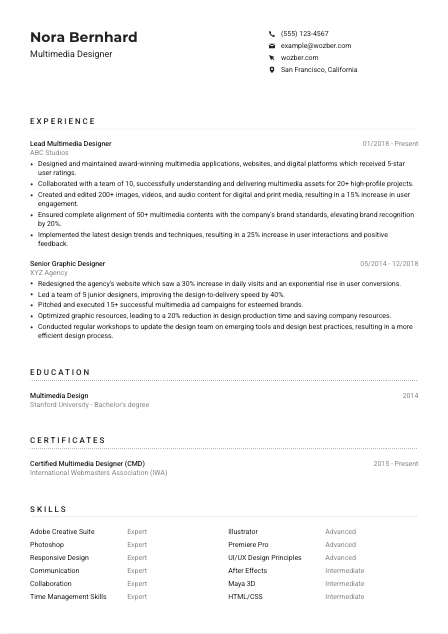
Place the role title under your name and match it to the job posting when it reflects your experience. For a role like this, "Multimedia Designer" is the right label because it immediately aligns your profile with digital asset creation, platform design, and cross-channel production.
Include a reliable phone number and a professional email address that uses your real name. These details should be effortless to scan. If a recruiter likes your portfolio mix of web, motion, and brand work, you do not want a casual email handle or missing contact field to slow the process.
Some multimedia roles include a hard location filter because of hybrid collaboration, studio access, or local team requirements. Here, listing San Francisco, California directly supports a stated requirement and prevents unnecessary doubt about availability. Treat location this way only when the posting makes it relevant.
A website or portfolio link is especially useful in multimedia hiring because the resume can summarize scope, but the portfolio proves execution. Make sure the work shown there matches the kind of assets mentioned on the resume, such as websites, motion pieces, brand content, or responsive digital experiences.
This section should answer the practical first questions fast: who you are, how to reach you, what role you do, and whether you meet any stated location requirement. For a multimedia designer, a portfolio link is part of that first impression.




This is the section that carries the most weight for multimedia design hires. Employers want to see what you built, which formats you worked in, how you collaborated, and what changed because of your work. A useful experience section reads like a record of shipped assets, solved design problems, and measurable performance improvements.
Before rewriting bullets, mark the responsibilities and tools that define the role. In this posting, the priorities are clear: multimedia applications, websites, digital platforms, Adobe Creative Suite, UI/UX principles, responsive design, collaboration, and brand alignment. Those themes should reappear naturally in your experience section if they reflect your actual work.
Use reverse chronological order and make each entry easy to parse with title, company, and dates. Then show scope quickly. A title such as "Lead Multimedia Designer" signals ownership, while the accompanying bullets should clarify whether you handled product interfaces, campaign assets, web design, motion graphics, or team coordination.
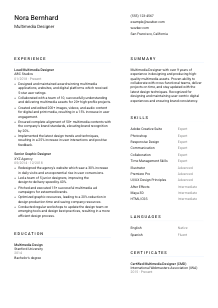
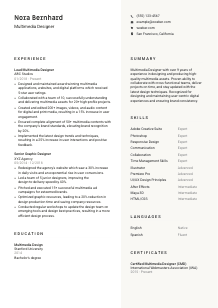
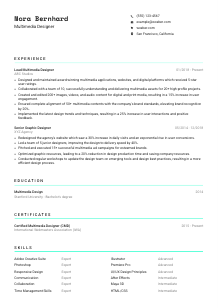
Replace generic task descriptions with bullets that show what you created and why it mattered. "Created and edited multimedia assets" is vague. A stronger version names the deliverables and outcome, such as producing images, video, and audio content that lifted engagement or supported high-profile launches. In the sample resume, the bullet about 200+ assets and a 15% increase in user engagement is a strong model because it ties production volume to business response.
Multimedia resumes benefit from metrics that reflect delivery and performance. Use figures tied to engagement, conversion, project count, production speed, brand consistency, audience growth, review scores, or turnaround time. The example resume does this well with metrics like 20+ projects, 25% higher user interactions, and a 40% faster design-to-delivery cycle.
Do not try to preserve every achievement from every past role. Keep the bullets that support this kind of work first: digital platform design, multimedia asset production, responsive design, teamwork with marketers or developers, and brand execution across channels. If an older role was more print-heavy or outside digital production, keep only the points that still reinforce your fit for multimedia design.
By the end of this section, a reader should understand the formats you work in, the tools and teams you work with, and the outcomes your design work produces. That is what turns experience into a clear case for interview.
Education matters most here as a qualification check and as context for your design foundation. For multimedia roles, it helps confirm training in visual communication, digital media, interaction design, or related creative disciplines. Keep it straightforward, then add detail only if it strengthens your case.
If the posting asks for a bachelor's degree in Multimedia Design, Graphic Design, or a related field, state your degree clearly and use the formal field name. In the example, "Bachelor's degree" in "Multimedia Design" maps directly to the employer's requirement, which makes the education section do its job immediately.
List degree, field of study, school, and graduation year in a consistent order. Hiring teams usually spend only a few seconds here, so readability matters more than extra description. Save space for your portfolio-driven sections unless you are early in your career.
Relevant coursework can strengthen this section if you have limited experience or if your program included work closely tied to the job, such as UI/UX, motion graphics, interactive media, web design, or digital storytelling. Keep these additions selective and directly connected to the kind of multimedia output the role requires.
Honors, design awards, exhibition work, or leadership in creative clubs can add value when they reinforce your training or creative credibility. For experienced candidates, these details are optional. For newer designers, they can help show initiative, taste, and active involvement in the field.
Multimedia design changes quickly, especially across motion tools, responsive workflows, and interface standards. If you have recent coursework, workshops, or structured learning tied to current design software or digital production practices, include it when it strengthens your profile beyond the degree itself.
Your education should confirm that you meet the baseline requirement and have formal grounding in digital design work. Keep it concise, relevant, and supportive of the more decisive evidence in your experience and portfolio.
Certifications are not always required for multimedia design roles, but they can help when they sharpen your technical profile or show recent learning in tools and workflows the employer values. They work best when they support the job target rather than simply adding another line to the resume.
Prioritize certifications tied to multimedia production, design software, interaction design, or digital content creation. A certification such as "Certified Multimedia Designer" fits naturally because it supports the broader role, even though the posting does not require a specific credential.
Include the certification name, issuing organization, and date or active period. That structure gives hiring teams enough context to judge relevance and recency, especially when the credential relates to tools or methods used in digital production.
In design hiring, outdated tool knowledge can become obvious quickly. If a certification is current or recently renewed, include that timing. It helps show that your knowledge is not frozen in an older version of the software or workflow.
This field changes through new software features, motion workflows, responsive design practices, and evolving content formats. Ongoing certification or structured learning can support a narrative of staying current, especially if your recent work includes video, web, or cross-platform asset production.
Certifications should strengthen your credibility around tools, media formats, or current design practice. Include the ones that support the role clearly and leave out anything that does not add useful context.
For multimedia designers, the skills section should read like a practical toolkit, not a keyword dump. Employers want to see the software, design knowledge, and working habits that support real production across websites, multimedia assets, and collaborative delivery.
Start with the skills the employer named directly, then add closely related ones you genuinely use. Here that includes Adobe Creative Suite, Photoshop, Illustrator, Premiere Pro, After Effects, UI/UX design principles, responsive design, communication, collaboration, and time management. This keeps the section aligned with both ATS matching and actual role needs.
If you use ratings, keep them honest and easy to interpret. A profile that shows "Expert" in Photoshop and "Advanced" in Premiere Pro works when the rest of the resume supports those claims through project examples. Tool names should also be specific enough to match the work. "Adobe Creative Suite" is useful, but individual applications often matter more in screening.
Order matters. Lead with the tools and capabilities most central to the target role, then place secondary skills after them. For this job, responsive design and UI/UX knowledge belong near Adobe tools because the role goes beyond asset creation into digital experience work. Less central items, such as related coding or 3D tools, can stay if they support your range without distracting from the core match.
A recruiter should be able to scan this list and understand your production stack, your design strengths, and how closely you match the role's daily work. Keep it focused on the tools and capabilities you can back up in the rest of the resume.
Language skills matter in design roles when they affect collaboration, presentation, or audience reach. For a multimedia designer, this section is usually brief, but it becomes important when a posting explicitly calls for communication in a specific language or when the work touches global teams or multilingual content.
Read the posting carefully for required communication skills. In this case, effective English communication is mandatory, so English should appear clearly in the section. When language is stated that directly, do not leave it implied elsewhere on the resume.
List the required language at the top and note your actual proficiency level, such as "Native" or "Fluent." This is especially relevant for multimedia roles that involve presenting concepts, discussing revisions, interpreting briefs, or collaborating with marketers, developers, and stakeholders.
Extra languages can help if your work involves international brands, multilingual campaigns, or geographically distributed teams. In the example, Spanish adds useful breadth, though it should remain secondary to the required English proficiency.
Choose direct terms such as "Native," "Fluent," "Intermediate," or "Basic." Avoid vague wording. Hiring teams need to know whether you can run a design review, write client-facing copy notes, or simply navigate casual conversation.
Do not overbuild this section if language is not central to the role. For most multimedia designer resumes, it is a supporting detail. Give it enough space to satisfy the posting and then let your experience, portfolio, and skills carry the main case.
This section should quickly confirm that you can communicate in the language the role requires and note any additional languages that broaden your usefulness. Keep it accurate and concise.
A multimedia designer summary should work like a sharp project introduction. In a few lines, it should tell the reader how long you have worked, what kind of multimedia output you handle, and what strengths define your contribution. This section matters because it shapes how the rest of the resume is read.
Use the posting to identify the themes your summary should emphasize. Here, those are multimedia design experience, Adobe proficiency, UI/UX understanding, responsive design, brand consistency, and collaboration. That gives you the right raw material without turning the summary into a checklist.
Start with a direct professional label and years of experience. "Multimedia Designer with over 9 years of experience" works because it establishes seniority and specialization immediately. If your title has varied across roles, use the version that best fits the target job and is supported by your background.
After the opening, name the capabilities most relevant to the role, such as creating multimedia assets, maintaining digital platforms, collaborating across teams, or designing user-centered experiences. The sample summary handles this well by combining production quality, collaboration, and brand consistency in a concise way.
Avoid soft, generic claims about being passionate or creative unless they are tied to how you work. A better summary shows professional value through outcomes and operating style, such as delivering polished digital experiences, improving engagement, or maintaining cohesive brand execution across formats.
Your summary should make the hiring team expect relevant experience before they reach the first bullet in your work history. When it is tailored well, it frames you as a multimedia designer who can produce strong digital assets, collaborate smoothly, and support the brand across channels.
A multimedia designer resume works best when every section supports the same hiring story: you know the tools, you understand digital experience work, and you have a track record of producing assets that perform. Keep the content aligned with the posting, use metrics where they reflect real outcomes, and make sure your portfolio reinforces the claims in your experience.
Wozber's free resume builder can help you organize that story into an ATS-friendly resume template, refine wording with AI support, and check alignment with an ATS resume scanner so the right design, motion, and UI/UX terms are easy to find. The final result should make one thing clear fast: you can step into the role and deliver polished multimedia work with real business value.




