



Use Wozber and land your dream job
Create Resume
No registration required
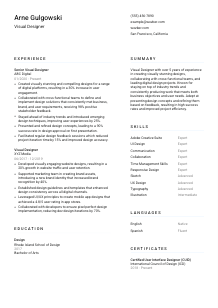
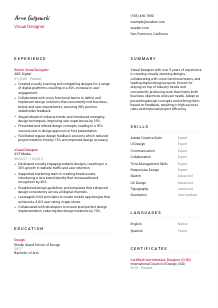
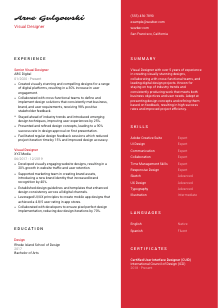
Painting palettes, but your resume seems grayscale? Check out this Visual Designer resume example, created with Wozber free resume builder. It shows how to highlight your design flair and layout literacy to match job specifics, adding vibrant hues to your career canvas!
Visual design hiring moves quickly once a team sees work that can hold up across real product surfaces. A resume for this field has to show more than aesthetic taste. It needs to point to digital execution, brand judgment, collaboration with product or marketing partners, and the ability to carry a design from concept through handoff without losing quality.
The first pass often happens through an ATS before your portfolio gets serious attention, so the wording on the page matters. Wozber's free resume builder helps you shape an ATS-compliant resume around the language used in the role, making software, UI and UX fluency, and implementation-facing design experience easier to recognize fast.
For Visual Designers, the header should feel clean, current, and easy to act on. Hiring teams expect immediate access to your role identity, contact details, and portfolio, especially when the work involves digital campaigns, interfaces, and brand systems.
Use your name as the clearest element in the header. Keep the typography polished and readable. Visual design roles reward taste, but your resume header should show restraint first, not decorative styling that competes with the content.
Place "Visual Designer" directly under your name if that is the work you want to be hired for. It aligns your resume with the posting and helps recruiters immediately place you in the right candidate pool, especially when they are sorting between visual, brand, product, and UI-focused profiles.
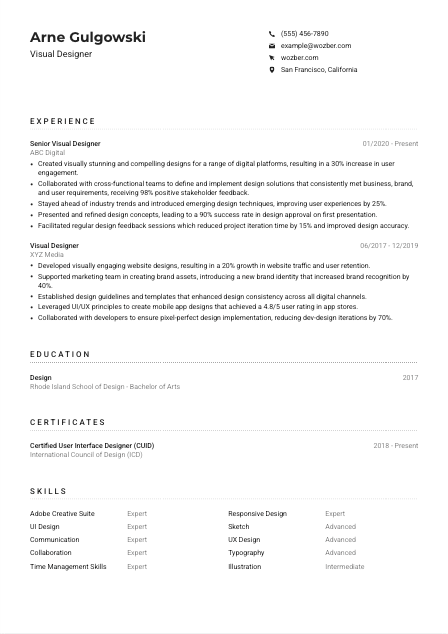
If the employer asks for local availability or relocation, include your city and state in this section. In the example, listing San Francisco, California directly answers a stated requirement. For other applications, only add location details that matter to the hiring process.
Add your portfolio, personal site, or selected work link beside your contact details. For Visual Designers, this is essential. Make sure the projects support the claims on the resume, whether that means responsive web design, mobile UI, campaign assets, or brand system work, and keep the featured pieces current.
This section should make you easy to contact and easy to place. If your title, location, and portfolio link are clear at a glance, the reviewer can move straight to your design experience.




This is where a Visual Designer proves range and results. Hiring teams look for work across digital touchpoints, a clear sense of business context, and signs that your designs performed well once they were live, not just while they were in a mockup.
Read the job description closely and reflect its real priorities in your experience section. For this role, that means digital platform design, cross-functional collaboration, UI and UX best practices, presenting concepts, and working with developers during implementation. Mirror that language where it truthfully matches your background so both recruiters and ATS filters can connect your work to the role.
List your most recent role first and make promotions or increased scope easy to spot. Moving from Visual Designer to Senior Visual Designer, as in the example, tells a hiring team you took on broader ownership, stronger stakeholder communication, or more complex design delivery over time.
Replace generic task lists with outcomes tied to engagement, consistency, speed, ratings, or approval rates. A bullet such as increasing user engagement by 30% or improving first-round design approval to 90% tells a much stronger story than "created digital assets." For Visual Designers, measurable impact can come from campaign performance, app ratings, design efficiency, or stronger brand recognition.
Use numbers where they reflect how your work was evaluated. That might include engagement lift, reduced iteration cycles, faster production, higher stakeholder approval, improved retention, or stronger app-store feedback. The example's 70% reduction in dev-design iterations works well because it connects design quality to implementation efficiency, which is highly relevant when collaborating with developers.
Prioritize experience that matches the environment and outputs of the job you want. If the employer needs digital platform design, lead with websites, mobile apps, social content, design systems, and handoff collaboration. If your background spans print and digital, give the digital work more space. The reader should quickly see that your experience maps to current visual design practice, not adjacent creative work alone.
Your experience section should show where you designed, what you shipped, who you worked with, and how the work performed. When those points are clear, your resume reads like someone who can contribute from the first review cycle.
Education matters in Visual Designer hiring when it supports the craft behind the portfolio. It gives context for your training in design principles, typography, composition, digital media, or user-centered work, especially when the posting asks for a bachelor's degree or related field.
If the role asks for a bachelor's degree in Design, Fine Arts, or a related discipline, list that qualification clearly. In the example, a Bachelor of Arts in Design directly meets the requirement and should be easy to find without extra scanning.
Include degree, field of study, school name, and graduation year or date. That is usually enough for design hiring. Clear structure helps reviewers confirm credentials quickly while keeping attention on your professional work and portfolio.
The field listed next to your degree can help clarify your design focus. "Design" is already aligned for a Visual Designer role, but related fields such as visual communication, graphic design, digital media, or fine arts can also support your candidacy when your experience connects them to digital execution.
Early-career candidates can use select coursework, capstones, or thesis projects to show practical experience with interface design, branding, motion, editorial layout, or digital campaigns. Keep this focused. Add only what supports the work the employer actually needs.
Awards, exhibitions, design competition placements, or leadership in student publications can add value if they reflect visual craft, concept development, or presentation skills. For more experienced candidates, keep these brief unless they still carry strong industry relevance.
In most Visual Designer resumes, education confirms your foundation and then gets out of the way. Present it clearly, connect it to the role where useful, and let your professional work carry the most weight.
Certifications are not always required for Visual Designers, but the right ones can reinforce specialized strengths. They are most useful when they point to interface design, UX practice, accessibility, design systems, or platform-specific tools that matter in your target roles.
Choose credentials that support the kind of design work you want to do. A certification in UI, UX, accessibility, or a major design tool can help if it deepens your profile. The example's UI-focused certification works because the job calls for knowledge of UI and UX design best practices.
A short list of well-chosen credentials reads better than unrelated certificates gathered over time. For Visual Designer roles, one respected course or certification tied to interface design, digital product work, or brand execution is often more persuasive than several generic learning badges.
Add the completion date or active date range so employers can see whether the training is current. Design tools, accessibility standards, and interface conventions change quickly, and recent learning carries more weight than undated credentials.
If your core degree is older, certifications can show that your practice has stayed current with modern workflows. That could include newer interface conventions, prototyping tools, responsive design, or collaboration methods used in product and marketing teams.
This section works best when it sharpens your profile rather than padding it. Keep the focus on learning that strengthens the kind of digital design work the employer is hiring for.
A Visual Designer skills section should quickly separate your core tools from your broader creative strengths. Employers scan here for software proficiency, interface fluency, and collaboration skills that affect how well you can work inside a product, marketing, or agency workflow.
Start with the tools and capabilities named in the posting. For this role, that includes Adobe Creative Suite or Sketch, UI and UX best practices, communication, collaboration, and time management. Use the employer's wording where accurate so the connection is immediate for both human reviewers and ATS screening.
List hard skills such as Adobe Creative Suite, Sketch, responsive design, typography, and UI design alongside the working skills that shape execution, like presenting concepts, collaborating across teams, and managing deadlines. Visual Designers are hired on both craft and reliability, so the mix matters.
Do not turn this into a complete inventory of every design or creative skill you have ever used. Prioritize the tools and capabilities most relevant to the target position. If the role centers on digital product and brand work, those skills should appear before less relevant items such as occasional illustration techniques or niche software.
A focused skills list should confirm your toolkit in seconds. Lead with the software, interface knowledge, and collaboration strengths that the role depends on most.
Language skills matter in design when communication is part of the job. Presenting concepts, discussing feedback, and aligning with developers, marketers, or clients all require clarity, so list languages in a way that reflects real working ability.
If the posting calls for English proficiency, place English first and state your level plainly. In this case, proficient English is a stated requirement, so it should be visible without the reviewer needing to infer it from the rest of the resume.
After the required language, list any others that may support collaboration with clients, regional teams, or international audiences. Additional languages are especially useful in agency, brand, or global product settings where design reviews and campaign context cross markets.
Terms like "Native," "Fluent," "Intermediate," and "Basic" are enough. Avoid vague phrasing. Hiring teams want a realistic sense of how comfortably you can present ideas, discuss revisions, or write in a professional setting.
If you speak another language well, include it. It can add value for cross-market campaigns, multilingual content work, or collaboration across offices. Just keep the emphasis proportional. Language skill should support your design profile, not distract from it.
For roles that involve international brands, distributed product teams, or localized digital content, multilingual ability can be a practical asset. When it genuinely helps your case, this section can reinforce that you communicate well beyond your core design output.
Keep this section honest and concise. For Visual Designers, language proficiency matters most when it improves feedback loops, presentation quality, and collaboration across teams.
The summary should tell a hiring team what kind of Visual Designer you are before they reach the first job entry. In a few lines, it should establish your level, your digital design focus, and the kinds of results or collaboration patterns that define your work.
Study the posting and identify the recurring themes. Here, the priorities include digital platform design, UI and UX awareness, stakeholder collaboration, concept presentation, and implementation fidelity. Your summary should reflect that mix instead of using a generic creative statement.
Start with a direct introduction such as "Visual Designer with 5+ years of experience in digital product and brand design." That immediately tells the reader whether you meet the seniority threshold and whether your background is relevant to web, app, and campaign work.
Choose achievements or strengths that fit the role's real demands. Good examples include raising engagement, improving approval rates, creating consistent brand assets across channels, or collaborating smoothly with developers to protect design fidelity. The sample summary works because it ties experience to business objectives and user needs rather than describing creativity in the abstract.
Aim for three to five lines with no filler. Avoid broad claims like "passionate designer" unless they are backed by concrete strengths. A hiring manager should finish the summary with a clear sense of your digital design focus, your level of experience, and the value you tend to bring to projects.
A well-written summary gives the reader a fast, accurate picture of your design profile. When it is tailored to the role, the rest of the resume has a clear frame to build on.
A Visual Designer resume should make your digital craft, collaboration style, and execution quality easy to spot quickly. When your portfolio link, experience bullets, skills, and summary all point in the same direction, hiring teams can picture you working across design reviews, stakeholder feedback, and developer handoff with much less guesswork.
Use Wozber's free resume builder to organize that story in an ATS-friendly resume format, then refine the wording with ATS optimization and role-aligned phrasing where it reflects your real background. The final version should make one thing clear fast: you can create strong visual work and carry it successfully into production.




