Use Wozber and land your dream job
Create Resume
No registration required
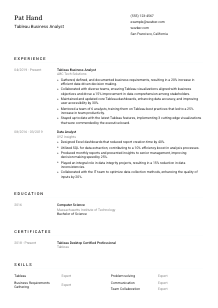
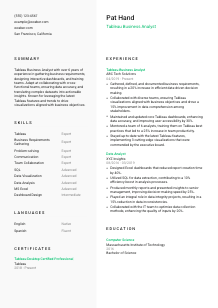
Visualizing data, but your resume seems blurry? Focus in on this Tableau Business Analyst resume example, created with Wozber free resume builder. Learn how to align your analytical insights with job criteria, ensuring your career graph always shows a prosperous upward trend!
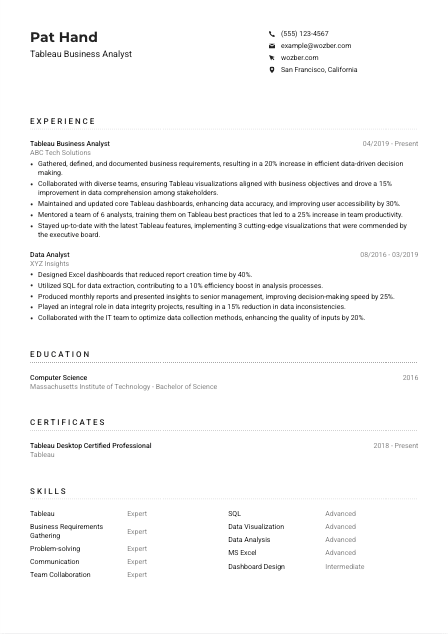
Tableau Business Analyst hiring usually turns on one practical question: can you turn messy business questions and complex data into dashboards people actually use to make decisions. Resumes often miss that mark by listing reporting tasks without showing requirement gathering, dashboard ownership, data accuracy work, or the business results those visualizations supported.
A tailored resume makes your Tableau work easier to recognize in both ATS screening and human review, especially when the role sits between data, stakeholders, and decision-makers. Wozber's free resume builder helps you align titles, keywords, and project language into an ATS-compliant resume, so hiring teams can quickly see your experience with requirements translation, dashboard maintenance, and cross-functional communication.
This section is brief, but it still does important work for a Tableau Business Analyst application. It should present you as easy to contact, professionally aligned with the role, and available in the market the employer is hiring for.
Use your full name in a clean, readable format at the top of the page. Keep the styling professional and slightly more prominent than body text so the header is easy to scan without distracting from your analytical and reporting experience.
Place the job title directly under your name when it matches your target role. For this opening, "Tableau Business Analyst" works well because it immediately connects your profile to the employer's search and reinforces the core combination of business analysis and dashboard expertise.
List your phone number, professional email, and location clearly. Accuracy matters here. If a posting asks for a specific location, reflect it plainly. In the example, "San Francisco, California" answers that requirement right away and avoids unnecessary uncertainty about local availability.
Include LinkedIn or a professional portfolio link if it strengthens your application. For Tableau Business Analyst roles, this is especially useful when it supports your resume with dashboard samples, project context, stakeholder-facing work, or a fuller career history that matches the language in your application.
Skip details that do not help with hiring decisions, such as age, marital status, or a photo unless specifically requested. Keep the header focused on information that supports communication, location alignment, and professional presentation.
Your header should confirm who you are, what role you are targeting, and whether you match any basic logistical requirements. Keep it simple, accurate, and tailored to the posting.




For this role, experience is where employers look for proof that you can move from requirement gathering to usable reporting. Hiring teams want to see how you worked with stakeholders, handled data questions, built or maintained Tableau dashboards, and improved decision-making with reliable analysis.
Read the job description closely and identify the recurring work patterns before you rewrite anything. For a Tableau Business Analyst, that usually includes gathering and documenting requirements, translating them into dashboards, maintaining visualization quality, working with cross-functional teams, and communicating findings clearly. Those are the themes your bullets should reflect first.
List positions in reverse chronological order and focus each role on the parts of your work that connect to analytics delivery. If you have held both business analyst and data analyst positions, shape the bullets to show requirement definition, reporting cadence, SQL use, dashboard development, and stakeholder support rather than generic task lists.
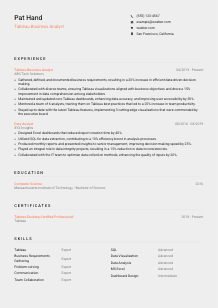
Metrics matter when they reflect how your reporting work changed business decisions, speed, or usability. The example does this well with outcomes such as a 20% increase in data-driven decision making and a 30% improvement in dashboard accessibility. Numbers like these help hiring managers understand the scale and practical value of your Tableau work.
Keep the section centered on analysis, reporting, visualization, and business collaboration. Remove older or unrelated details unless they add something useful, such as data quality work, presentation experience, or process improvement that connects naturally to a Tableau Business Analyst position.
This job is not limited to building dashboards in isolation. Include examples of working with product, operations, finance, or leadership teams, and mention training or mentoring when you have done it. In the sample resume, mentoring 6 analysts on Tableau best practices directly supports the posting's emphasis on training team members and sharing visualization standards.
By the end of this section, the reader should be able to see how you gather business needs, turn them into Tableau reporting, maintain data trust, and support decisions across teams. That is the core story this role needs.
Education is often a checkpoint for Tableau Business Analyst roles, especially when the posting asks for a degree in business, analytics, computer science, or a related field. Present it clearly so the requirement is easy to confirm and the reader can move on to your analytical experience.
If the job asks for a bachelor's degree in a relevant field, make sure your degree is listed in a straightforward format. This role specifically names Business, Analytics, Computer Science, or a related discipline, so matching that language where accurate helps confirm eligibility quickly.
Include degree, field of study, school name, and graduation year. Keep the structure consistent and easy to scan. Tableau Business Analyst hiring rarely needs extra narrative here unless your academic background directly explains a move into analytics or business intelligence work.
When your degree aligns naturally with the posting, do not bury it. In the example, a Bachelor of Science in Computer Science from MIT supports the technical side of the role, especially where SQL, data handling, and dashboard logic matter.
Most experienced candidates can keep this section short. Add relevant coursework, capstone projects, or academic analytics work only if it helps fill an experience gap or reinforces skills such as data analysis, business intelligence, database querying, or visualization design.
If you are early in your career or shifting from another path, honors, student consulting projects, research work, or analytics competitions can add useful context. Choose items that show applied analysis, structured problem-solving, or communication of insights, not generic campus involvement.
Your education section should answer the degree requirement quickly and support the analytical foundation behind your Tableau work. Keep it concise unless your academic background adds role-relevant proof.
Certifications can strengthen your resume when they support the tools and methods the role actually uses. For a Tableau Business Analyst, the best credentials show current platform knowledge, visualization standards, or related analytics capability.
Start with credentials that directly support dashboard creation, business intelligence, or data analysis. Even when a posting does not require certification, a credential like "Tableau Desktop Certified Professional" adds weight because it connects directly to the tool named in the role.
Do not pad this section with unrelated courses or outdated badges. A short list of relevant certifications is more effective than a long inventory. For this kind of role, Tableau, analytics, SQL, or BI-related certifications usually carry the most value.
Dates help employers understand whether your certification is current or ongoing. In the example, listing "2018 - Present" signals continued relevance and supports the requirement to stay current with Tableau features and standards.
This field changes as Tableau releases new capabilities and teams adopt new reporting expectations. Certifications can show that you keep your dashboarding approach current, whether that means better visualization practices, stronger data storytelling, or more effective use of platform features.
Use this section to reinforce tool credibility and continued growth in analytics work. For Tableau-focused roles, one relevant credential can strengthen the case more than several generic ones.
The best skills sections for Tableau Business Analyst roles are selective and role-specific. They should echo the language of the posting while staying grounded in skills you can demonstrate in your experience, projects, or certifications.
Start with the technical and analytical skills the employer names or strongly implies. Here, that includes Tableau, SQL, data visualization, business requirements gathering, analytical problem-solving, communication, and collaboration. These are the terms most likely to matter in both ATS matching and hiring review.
A Tableau Business Analyst sits between data and decision-makers, so do not list only tools. Pair platform and analysis skills with communication, workshop facilitation, requirements documentation, and cross-functional collaboration if those are real strengths in your background.
Put the highest-value skills first, especially the tools and capabilities the job description emphasizes. The example resume does this well by leading with Tableau, business requirements gathering, problem-solving, communication, and SQL. That ordering tells the reader what kind of analyst you are before they reach the experience section.
This section should make your toolkit easy to scan and easy to connect to the job. Lead with Tableau, analysis, requirements work, and stakeholder communication if those define your strongest contributions.
Language skills matter more in roles that rely on gathering requirements, presenting findings, and training others. For a Tableau Business Analyst, clear business communication is part of the job, so list languages in a way that supports that expectation without overstating their importance.
If the posting calls out English communication skills, include English with an honest proficiency level. This role does, so stating "Native" or another accurate level helps confirm that you can handle stakeholder interviews, documentation, dashboard walkthroughs, and presentation work in English.
List additional languages if they are relevant to your background or the company's environment. They can be helpful in multinational teams, regional reporting contexts, or stakeholder groups that span more than one market, but they should remain secondary to your analytics and Tableau qualifications.
Use simple, recognizable labels such as Native, Fluent, Advanced, or Intermediate. Clear levels set expectations for meetings, written communication, and collaboration without forcing the reader to interpret vague wording.
For some Tableau Business Analyst roles, extra languages may matter when presenting to distributed teams, interpreting business terminology across regions, or supporting global reporting. If that applies to your background, let the language section complement your collaboration experience rather than stand apart from it.
Additional languages are worth including when they add genuine professional value. In the example, Spanish is a useful secondary skill, but the resume still keeps the focus on Tableau, analysis, and business-facing communication.
Use language details to support the communication demands of the role, especially when English proficiency is explicitly required. Keep the emphasis on business communication, not on listing languages for their own sake.
For Tableau Business Analyst roles, the summary works best when it quickly links your years of experience to the kind of reporting and stakeholder work the employer needs. A vague profile wastes space. A focused one can frame the rest of the resume in a few lines.
Start from the actual mix of responsibilities in the posting. For this position, that means business requirements gathering, Tableau dashboard development, data accuracy, and turning complex datasets into actionable insights. Those ideas should shape the summary more than broad claims about being results-driven.
Lead with your years of experience and your main area of expertise. A line such as "Tableau Business Analyst with 6+ years of experience" works because it immediately establishes seniority and role alignment before you move into business analysis and visualization strengths.
Choose two or three details that match the role closely, such as cross-functional collaboration, dashboard maintenance, stakeholder presentation, SQL use, or mentoring on Tableau best practices. The example summary does this effectively by linking dashboard design, team training, and actionable insights in a tight space.
Aim for a short paragraph that sounds precise, not packed. You do not need to summarize your full career here. Give the reader a clear picture of the analyst you are and the business problems you are equipped to solve with Tableau.
Your summary should quickly tell the reader that you can gather requirements, build useful Tableau reporting, and communicate insights in a business setting. If it does that clearly, the rest of the resume has a strong opening.
A tailored Tableau Business Analyst resume should make four things easy to find: your Tableau depth, your business analysis process, your ability to work with stakeholders, and the outcomes your reporting delivered. When those points are visible across the summary, experience, skills, and certifications, the application reads as intentional rather than generic.
Use Wozber's free resume builder and ATS resume scanner to tighten wording, align role-specific terminology, and present everything in an ATS-friendly resume format. The finished resume should make it easy to judge whether you can turn business requirements into trusted dashboards that people use.