



Use Wozber and land your dream job
Create Resume
No registration required
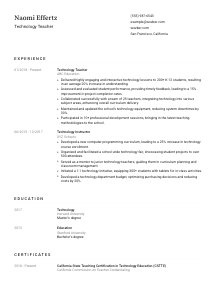
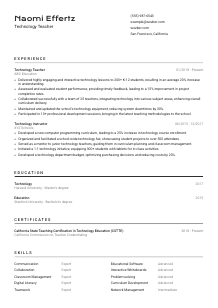
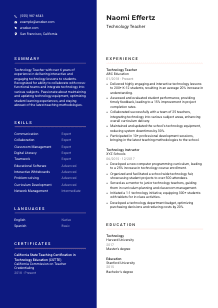
Unmasking the wonders of tech, but your resume seems glitchy? Check out this Technology Teacher resume example, built with Wozber free resume builder. Learn how to present your edtech expertise to match job criteria, setting your career on a path as clear as error-free code!
Technology teaching sits at the intersection of instruction and infrastructure. Schools look for educators who can run an engaging classroom, translate digital tools into real learning, and keep devices, software, and day-to-day technology use working for students and staff. Your resume needs to make that mix visible quickly, especially where lesson delivery, assessment, and school-wide tech support overlap.
When a resume is tailored well, the hiring team can immediately see whether your background is classroom-centered, technically capable, and aligned with the school's technology environment. Wozber's free resume builder helps you shape that story in an ATS-friendly resume format, so terms like curriculum standards, educational software, interactive whiteboards, and 1:1 device support are easy to read in both ATS screening and principal review. That clarity matters when schools are sorting true K-12 technology educators from general IT or general teaching applicants.
School leaders should be able to confirm the basics in seconds. For a Technology Teacher, that means clear identification, reliable contact information, and any location detail the posting specifically asks for, without cluttering the top of the page.
Use your full name as the clearest element on the page. Keep formatting simple and professional so the focus stays on your teaching background, classroom results, and technology expertise rather than on design effects.
Place "Technology Teacher" directly under your name when that is the role you are applying for. Matching the posting title helps frame the rest of your resume correctly, especially when schools are reviewing candidates from both instructional and technical backgrounds.
List a phone number and professional email address that you monitor regularly. Accuracy matters here. A missed digit or outdated email can cost you an interview, particularly in school hiring cycles where communication moves around scheduling, credential review, and panel interviews.
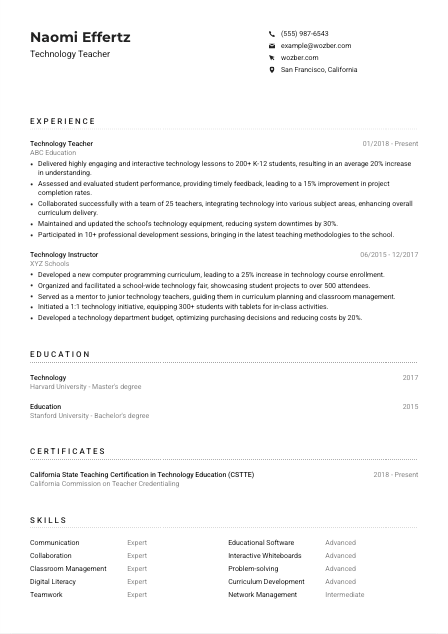
If the posting requires local presence, show your city and state clearly. In this example, listing San Francisco, California directly supports a stated requirement and removes an early question about eligibility or relocation.
Include LinkedIn or a professional site only if it strengthens your application. For Technology Teachers, that might mean a profile showing curriculum projects, edtech training, classroom initiatives, or district-facing technology work. Leave it off if it is incomplete or unrelated.
Keep this section clean, accurate, and aligned with the posting. It should quickly confirm who you are, how to reach you, and whether you meet any immediate logistical requirement tied to the role.




This is where schools look for proof that you can teach technology, support student progress, and work across a real K-12 environment. The strongest entries show what you taught, how you measured learning, what tools or systems you handled, and what changed because of your work.
Read the posting for the work that will matter most once you are hired. Here, that includes interactive technology lessons, student assessment, cross-subject collaboration, support for equipment and software, and ongoing professional development. Those themes should shape which bullets you keep and how you word them.
List your most recent teaching position first and make each entry easy to scan with job title, school or employer, and dates. For education roles, this helps hiring teams quickly trace your classroom progression, grade-band exposure, and continuity in technology instruction.
Daily responsibilities matter, but impact carries more weight. Instead of only saying you taught technology classes, show what your instruction produced. The sample does this well with outcomes such as a 20% increase in student understanding and a 15% improvement in project completion rates after timely feedback.
Quantify where it fits naturally. Useful metrics for this field include number of students taught, improvement in completion or proficiency rates, device rollout scale, teacher collaboration scope, attendance at school events, or reduction in downtime. The example's "200+ K-12 students," "300+ students" in a 1:1 initiative, and "30%" reduction in system downtime all give the work clear scope.
Not every achievement needs space. Lead with experience tied to curriculum delivery, educational software, classroom devices, interactive whiteboards, network or equipment upkeep, and collaboration with teachers. If you have older or less relevant work, trim it so the hiring team sees your K-12 technology teaching strengths first.
Your experience section should make it easy to picture you in a classroom and in the wider school technology ecosystem. Show instruction, student outcomes, collaboration, and operational reliability in the same record.
Schools check education credentials early because they connect directly to subject knowledge, teaching preparation, and state requirements. Present your degrees clearly so the reader can confirm that your academic background supports both instruction and technology education.
If the posting asks for a Bachelor's degree in Education, Technology, or a related field, make sure that credential is easy to find. In this example, a Bachelor's in Education directly supports the requirement and establishes the expected academic foundation.
Use a simple order such as degree, field of study, school, and graduation year. That structure is easy for administrators, HR staff, and ATS parsing to read, especially when they are checking qualifications across many applicants.
If you also hold a master's degree in a relevant area, list it. A graduate degree in Technology, instructional technology, curriculum, or a related discipline can reinforce your subject depth and your ability to lead stronger classroom integration work.
Early-career candidates can benefit from including relevant coursework, capstones, or student teaching tied to coding, digital literacy, instructional design, classroom technology integration, or educational assessment. If you already have several years of K-12 teaching experience, those details are usually less important than your classroom results.
If you completed honors work, research, or academic projects connected to edtech implementation, curriculum design, or student technology access, include them selectively. Keep the emphasis on what helps explain your readiness for a Technology Teacher role rather than on listing every academic distinction.
Your education section should confirm that your academic preparation matches the teaching and technology demands of the position. Make that check easy and immediate.
For school roles, certifications are often a hiring gate, not a bonus. This section should quickly show that your teaching authorization is current and that any additional credentials support your work with technology instruction or school systems.
When a job calls for a valid state teaching certification in Technology Education or an equivalent credential, list that first. It is one of the fastest ways for a school to confirm you are eligible for the classroom responsibilities attached to the role.
Focus on certifications tied to teaching, educational technology, digital instruction, device management, or related school technology work. A shorter, relevant list is easier to review than a broad collection of unrelated certificates.
Show the issuing body and the active dates or issue date for each credential. In the sample, the California teaching certification is stronger because it names the commission and shows current validity, which matters in regulated school hiring.
Technology teaching changes quickly. If you have recent coursework, platform training, or certifications related to digital classrooms, online learning tools, assistive technology, or STEM instruction, include them when they support the role you are targeting.
This section should answer two questions fast. Are you cleared to teach, and are you keeping your technology knowledge current enough for today's classrooms?
A Technology Teacher needs a skills section that reads like real school work, not a generic keyword list. The best mix includes classroom capabilities, instructional technology, collaboration skills, and any technical support strengths that show up in the posting.
Start by identifying both sides of the role. In this case, the school wants communication, collaboration, and problem-solving alongside proficiency with educational software, interactive whiteboards, and 1:1 technology initiatives. Build your list so both teaching and technology are visible.
If you have direct experience with the tools or workflows named in the job description, use that wording. Terms like "educational software," "interactive whiteboards," and "1:1 technology initiatives" help the resume align naturally with ATS screening and with the school's expectations.
Lead with the abilities most likely to affect classroom success and school operations. The sample skills list works because it balances classroom management, curriculum development, digital literacy, and collaboration with platform and device-related knowledge. Keep the list focused on what you can apply immediately in a K-12 environment.
Your skills should show that you can teach effectively, work well with staff and students, and handle the technology that supports instruction. Relevance matters more than volume.
Language ability matters in education when it affects instruction, family communication, staff collaboration, or a stated requirement in the posting. Keep this section factual and give English the right level of emphasis when it is essential to the role.
If the posting states that strong English ability is essential, list English first with an honest proficiency level. For a teaching role, this supports classroom instruction, written feedback, meetings with staff, and communication with families.
Order the section by job relevance, not personal preference. English should come first here because it is directly tied to the role. Additional languages can follow if they add value in a diverse school community.
Extra language skills can be useful in parent communication, student support, and broader community engagement. They are usually secondary to teaching credentials and classroom results, but they can still strengthen your profile when presented clearly.
Choose terms such as Native, Fluent, Intermediate, or Basic and stay accurate. In schools, overstating language ability can create real communication issues, so clarity is better than optimism.
Some schools serve multilingual student populations or rely heavily on family outreach across languages. In those cases, additional language ability deserves more visibility. In others, it remains supportive rather than central. Let the posting and school context guide how much space this section gets.
List languages in a way that supports the job's communication demands. For most Technology Teacher roles, English must be clear first, with any additional language ability presented as added school-community value.
Your summary sits near the top of the resume, so it needs to establish your professional profile quickly. For a Technology Teacher, that usually means years of K-12 experience, core teaching strengths, and the specific kind of technology integration or classroom support you bring.
Before writing, identify the few requirements that define the role. Here, those include K-12 technology teaching, interactive lesson delivery, assessment, collaboration with other teachers, and management of school technology resources. Use those themes to decide what belongs in the opening lines.
Start with a direct statement that tells the reader who you are professionally. A line such as "Technology Teacher with 6+ years of K-12 experience" immediately establishes classroom relevance and seniority without wasting space.
Choose strengths tied to how the role is actually performed. That may include standards-based technology instruction, student assessment, cross-curricular integration, educational software use, or device and classroom technology support. The sample summary works because it combines teaching, collaboration, and school technology maintenance rather than leaning on generic enthusiasm.
Aim for a short paragraph that can be scanned in seconds. Avoid broad claims about passion unless they are supported by specifics. Your summary should sound like the top line of your record, not a personal statement. Tight wording also improves ATS readability and keeps the focus on qualifications the school can use right away.
By the time someone finishes your summary, they should already understand your teaching level, your technology focus, and the kind of contribution you can make in a K-12 school. Set that direction early, then let the rest of the resume back it up.
A Technology Teacher resume works best when it shows the full scope of the job: classroom instruction, student growth, staff collaboration, and practical technology support. Each section should help a school see how you teach, how you integrate digital tools, and how you keep learning environments running smoothly.
Use the job description as a filter, not a script. Keep the credentials, tools, and achievements that match the opening, and cut anything that pulls attention away from K-12 technology teaching. Wozber's AI resume builder can help you tailor the language, strengthen ATS optimization, and organize your content into an ATS-compliant resume that stays easy for school hiring teams to review.
When the resume is finished, it should make one thing clear fast: you can teach technology well and support the school's wider digital learning environment from day one.




