



Use Wozber and land your dream job
Create Resume
No registration required
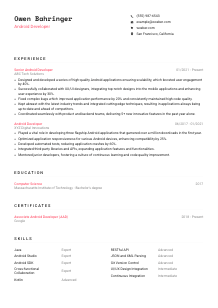
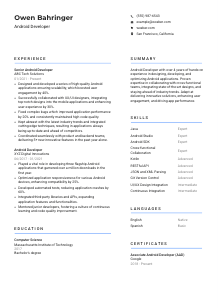
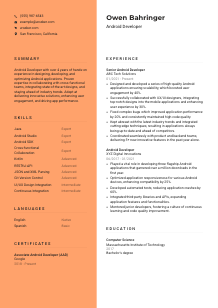
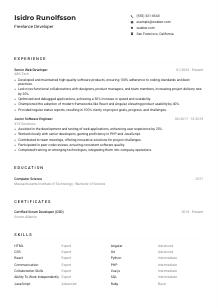
Crafting apps but feel your resume isn't on the main thread? Check out this Android Developer resume example, made with Wozber free resume builder. Learn how to bundle your Kotlin or Java genius to match job specs, making sure your career stays as responsive as your latest UI!
Android hiring usually turns on execution details that weak resumes blur. Teams want to know whether you have built and maintained production apps that stay stable across devices, integrate cleanly with backend services, and hold up when new features ship fast. Your resume needs to surface that engineering range clearly, from Kotlin or Java work to performance fixes, testing habits, and collaboration with design and product.
When those details are tailored to the posting, the resume is easier to process in the same way the role is evaluated: by stack match, mobile scope, and delivery history. Wozber's free resume builder helps structure that information in an ATS-friendly resume format, so tools and reviewers can quickly connect your Android Studio, Android SDK, API integration, and cross-functional work to the kind of app development the team needs.
For Android roles, the personal details section is simple, but it still carries a few practical signals. Hiring teams need a clean way to reach you, and if the posting includes location or work eligibility constraints, this is where you remove friction early.
Use your full name as the most visible text at the top of the resume. Keep it clean and professional. In engineering hiring, that top line should feel straightforward and credible, more like a GitHub profile header than a branding exercise.
Place "Android Developer" directly under your name if that is the role you are pursuing. If your background is broader, such as mobile or software engineering, using the target title helps align the resume with the opening and improves ATS recognition for exact title matches.
Include a reliable phone number and a professional email address. Use an email that looks standard and easy to trust, ideally based on your name. Recruiters moving quickly between technical screens, portfolio reviews, and interview coordination should not have to guess how to reach you.
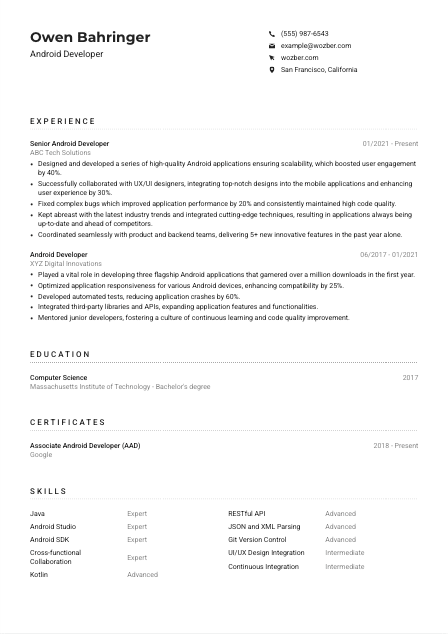
If a posting names a city, add your current city and state when it supports your candidacy. Here, listing San Francisco, California mirrors the stated requirement and immediately answers a common screening question. If you are relocating, make that clear in a concise way rather than leaving room for assumptions.
A portfolio site, GitHub profile, or polished LinkedIn page can add useful depth for Android candidates, especially if it shows shipped apps, open-source work, code samples, or mobile project context. Make sure every link leads to current, relevant material that supports the same story as the resume.
Your header should answer the basics without wasting attention: who you are, what role you are targeting, how to contact you, and whether any location requirement is already covered. That lets the rest of the resume stay focused on Android work.




This section carries the most weight for Android developers because it shows whether you have built, improved, and supported real mobile products. Hiring teams look for concrete work with app architecture, APIs, UI implementation, device compatibility, release quality, and measurable outcomes such as crash reduction, performance gains, or feature delivery.
Before editing bullets, mark the responsibilities and stack details that show up repeatedly. For this role, that includes Kotlin or Java development, Android Studio, Android SDK knowledge, RESTful API integration, performance improvement, bug fixing, and collaboration with product, backend, and UX/UI. Those are the themes your recent work should echo in plain language.
List positions in reverse chronological order with your job title, company name, and dates. That structure matters because mobile hiring often tracks progression from implementation work to broader ownership, such as mentoring, architecture input, release coordination, or leading feature delivery across teams.
Bullets should show what you built, improved, or shipped, not just what you were assigned. Focus on app development outcomes such as feature launches, API-driven functionality, UI implementation across screen sizes, performance tuning, or code quality improvements. The sample resume does this well by tying Android app development to engagement growth, UX improvements, and new feature delivery instead of generic task lists.
Quantify results wherever the work naturally allows it. For Android roles, useful metrics include crash reduction, startup time improvements, ANR reduction, engagement lift, app downloads, release frequency, test coverage, or device compatibility gains. A bullet like improving application performance by 20% or reducing crashes by 60% is far more persuasive than saying you "optimized the app."
Every bullet should help explain your value as an Android developer. Prioritize work tied to Android frameworks, API integrations, device support, testing, CI, performance, or cross-functional shipping. If a line could sit on any software engineer resume without mentioning mobile context, rewrite it until the Android-specific scope is clear.
By the end of the experience section, a reviewer should understand the scale of apps you have worked on, the mobile problems you have solved, and the results you delivered. Wozber's free resume builder can help keep those achievements in an ATS-friendly resume format while preserving the technical detail that matters in Android hiring.
Android development is heavily skills-driven, but the education section still matters because many postings use it as an initial qualification check. For this kind of role, a degree in computer science, engineering, or a related field supports your grounding in software fundamentals, data structures, operating systems, and application design.
If the role calls for a bachelor's degree in Computer Science, Engineering, or a related field, write that information clearly and completely. A line such as "Bachelor's degree, Computer Science" makes the requirement easy to confirm for both ATS filters and human reviewers.
List the institution, degree, field of study, and graduation year or date in a consistent format. Reverse chronological order is standard. This section should scan quickly without forcing the reader to decode where you studied or what technical discipline you completed.
Where your degree directly supports Android work, make that connection obvious through the field name rather than extra explanation. In the example resume, a Computer Science degree from MIT already reinforces the technical baseline the posting asks for. Your own school name matters less than making the qualification easy to read.
If you are earlier in your career, relevant academic projects can help fill the gap between education and professional work. Mobile app development, software engineering, distributed systems, UI engineering, or API-driven projects are worth mentioning when they relate to Android development. If you already have several years of production experience, keep this section lean.
Android changes fast, from Jetpack libraries to testing tools and architecture patterns. If you have recent coursework, specialized training, or technical study that supports your current stack, include it selectively. Use it to reinforce current relevance, not to pad the section.
Your education entry should quickly establish that you meet the baseline academic requirement and have the technical foundation to work in a production Android environment. Wozber's free resume builder helps present that information in an ATS-compliant resume format without burying the essentials.
Certifications are rarely the deciding factor for Android roles, but the right one can strengthen your profile by showing focused platform knowledge and continued investment in the craft. They are most useful when they connect directly to mobile development tools, practices, or the Android ecosystem.
List certifications that support your credibility as a mobile engineer, especially those tied to Android development, software engineering, testing, cloud services used in mobile backends, or secure app delivery. If a certificate has little connection to app development, leave it out.
When you hold a certification with clear industry recognition, put it in front. An example is Google's Associate Android Developer credential, which immediately reinforces platform-specific capability. That kind of certification supports the resume best when it complements real project experience rather than trying to replace it.
Certification dates help show currency, especially in a field where tooling and frameworks shift quickly. If the credential has an active period or renewal cycle, include that information so employers can see whether the knowledge is recent.
Even when a posting does not require certifications, relevant credentials can underline that you keep your Android knowledge current. That matters for teams working with evolving SDKs, modern architecture guidance, performance expectations, and changing device requirements.
A well-chosen certification section adds another layer of Android-specific credibility without distracting from experience. Wozber's ATS resume scanner can help you place these credentials where they support the overall story and remain easy to read in ATS optimization workflows.
For Android developers, the skills section should read like a concise map of the tools and capabilities you can use on the job. Keep it grounded in the stack, workflows, and collaboration needs the role actually names, rather than turning it into a long inventory of every technology you have touched.
Start with the posting and extract both technical and collaboration requirements. Here that means Java or Kotlin, Android Studio, Android SDK, support for multiple screen resolutions and device types, RESTful API integration, JSON and XML parsing, and effective cross-functional communication. Those are the skills worth prioritizing because they speak directly to day-to-day Android work.
Mirror the language of the posting when it is accurate. If the role says "RESTful API integration," use that phrasing instead of a vaguer alternative. The same goes for Android Studio, Android SDK, and business communication. This improves ATS alignment and makes your resume easier to map to the opening without forcing unnatural keyword stuffing.
Lead with the skills most likely to drive interview decisions for an Android developer. That usually means programming languages, core Android tooling, API work, testing or CI familiarity, version control, and collaboration with design and backend teams. The sample skills list works because it balances platform tools with practical team-facing abilities instead of drifting into unrelated software terms.
Your skills list should make it obvious that you can build, debug, and ship Android applications in a team environment. Each item should reinforce the stack and workflows the role depends on, not just fill space.
Language sections are brief, but they matter when the posting explicitly mentions communication requirements. In Android work, clear communication affects design handoff, API discussions with backend engineers, bug reporting, sprint planning, and written updates across distributed teams.
If the role specifies English for business communication, list English at the top with an honest proficiency level. That tells the employer you can participate in technical discussions, write clear updates, and work effectively with product, design, and engineering stakeholders.
Extra languages are worth listing when they are real working skills. They may support collaboration with international teams, vendor communication, or user-facing work in multilingual markets. They are a bonus, not a substitute for the required communication language.
Stick to standard descriptors such as Native, Fluent, Intermediate, or Basic. These are easier to interpret than creative scales and help reviewers quickly understand how you can contribute in meetings, documentation, or cross-team communication.
For most Android developer resumes, languages should stay concise unless multilingual communication is central to the job. Include what is useful, but keep the emphasis on the technical and collaborative work that drives hiring decisions.
If you are actively improving a language and it is relevant to the work environment, you can include it at an accurate level. Just avoid overstating proficiency. Clear communication matters in engineering teams, and honesty here is more valuable than an inflated label.
This part of the resume should quickly show that you can handle the communication demands of the role, especially in English, while adding any extra language capability that could support team collaboration.
The summary is where you set the technical direction of the resume in a few lines. For Android roles, that usually means clarifying your years of experience, core platform strengths, product impact, and the kind of team environment you have worked in before the reader reaches the first job entry.
Read past the surface wording of the posting and identify what the team actually needs from an Android hire. In this case, they need someone who can build robust apps, work comfortably with APIs and varied devices, collaborate across functions, and keep quality high as features ship. Let that shape the opening lines of your summary.
Open with a direct statement of who you are professionally, such as "Android Developer with 4+ years of experience." That immediately places your background in context and helps the reader anchor the rest of the summary against the level of the role.
Choose strengths that reflect real Android delivery, not broad personality claims. Good examples include performance optimization, REST API integration, UI implementation with design teams, code quality improvements, or shipping features across multiple device types. The sample summary is most effective where it connects collaboration and app performance to concrete delivery value.
Aim for a short paragraph that reads cleanly and avoids buzzwords. You are giving a hiring manager a quick sense of your Android scope, not retelling your whole career. A concise summary with role-specific terms will land better than a generic statement about passion, innovation, or problem-solving.
A strong summary should make your Android background understandable in seconds and create a clear thread into the experience section. When it is tailored well, the reader already knows what kind of apps, engineering work, and team contribution to expect from the rest of the resume.
Your resume should now show the parts of Android development that matter in hiring: platform experience, app quality, API integration, collaboration with design and backend teams, and results you can measure. Keep the wording close to the posting when it reflects your real work, and keep the proof grounded in shipped features, performance improvements, and code quality outcomes.
Wozber's free resume builder and ATS resume scanner can help you tighten that alignment, surface missing requirements, and present everything in an ATS-friendly resume format. The finished resume should make one thing easy to judge: you can step into Android development work and contribute to production apps with confidence.




