



Use Wozber and land your dream job
Create Resume
No registration required
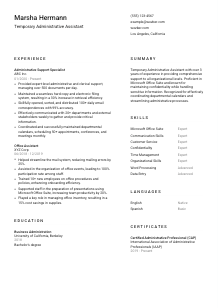
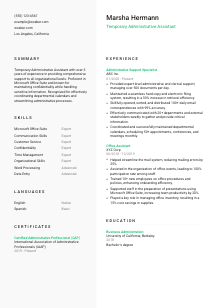
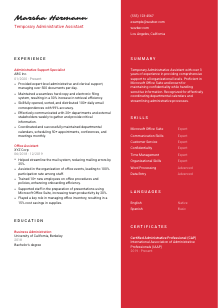
Juggling tasks, but your resume feels like a short-term gig? Hop into this Temporary Administrative Assistant resume example, created with Wozber free resume builder. Learn how to show your adaptable admin skills in line with job expectations, ensuring your career trajectory is more than just a quick office stop!
Temporary Administrative Assistant hiring moves quickly because the work supports day-to-day operations from the first week. Teams need someone who can keep calendars moving, route correspondence correctly, maintain filing systems, and handle sensitive information without constant supervision. Your resume should make that operational dependability easy to see, not bury it under generic office language.
When administrative resumes are tailored well, screeners can immediately tell whether the candidate has handled the same mix of scheduling, document control, communication, and office support the role requires. Wozber's free resume builder helps you shape that experience into an ATS-friendly resume format, so terms like Microsoft Office, calendar coordination, and clerical support are presented clearly enough for both ATS screening and a hiring manager reviewing how quickly you could step into the workflow.
Administrative support work depends on accuracy, responsiveness, and professionalism, and that starts with the first lines of the resume. This section should confirm who you are, how to reach you, and, when relevant to the posting, whether your location aligns with the employer's immediate hiring needs.
Place your full name at the top in a clean, readable format. For an administrative role, presentation matters. A cluttered header can undermine the organized image you want to project before the reader reaches your experience.
Add "Temporary Administrative Assistant" under your name if that matches the role you are pursuing. This helps frame your background immediately and keeps your resume aligned with the posting, especially when recruiters are reviewing several office support candidates at once.
Include a reliable phone number and a professional email address. Administrative assistants are often the point of contact for managers, departments, and outside partners, so your contact details should look business-ready and error-free.
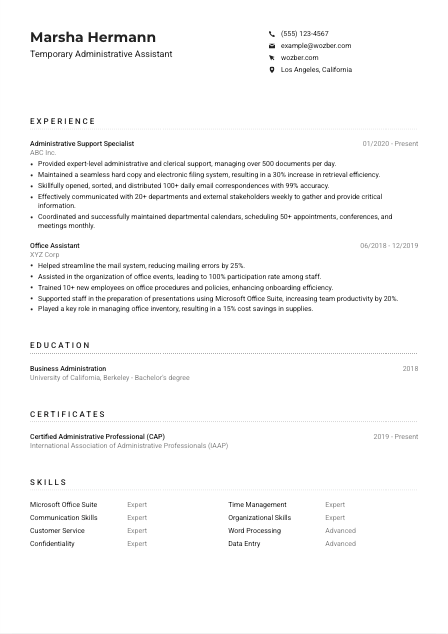
If the employer specifies a location requirement, list your city and state clearly. In this example, "Los Angeles, California" addresses a stated requirement and removes doubt about local availability or relocation plans. That kind of detail matters more in temporary hiring, where start dates are often tight.
A LinkedIn profile or professional website can support your application when it reflects the same work history, titles, and skills shown on your resume. For administrative candidates, consistency matters. If the profile is outdated or incomplete, leave it off until it matches your current resume.
A precise personal details section tells the employer they can reach you easily and that you meet the practical basics of the opening. That is exactly the tone an administrative resume should set.




This section carries most of the hiring weight for a Temporary Administrative Assistant. Employers want to see that you have already handled the flow of office support work, whether that meant managing correspondence, maintaining files, supporting managers, or keeping schedules on track under daily volume.
Before rewriting your bullets, mark the responsibilities that define the job. Here, that includes clerical support, mailing, scanning, faxing, copying, filing, correspondence handling, information sharing, and calendar coordination. Those are the functions your experience section should reflect in plain language.
List your most recent position first, then work backward. For each job, include title, employer, and dates. That structure helps reviewers quickly understand your administrative progression, whether you moved from office support into broader coordination work or strengthened the same core skills across multiple employers.
Go beyond saying you "assisted with office tasks." Show what you handled, for whom, and at what scale. The example resume does this well by pointing to document volume, filing efficiency, daily email routing, and monthly scheduling activity. Those details make administrative work feel real and transferable.
Administrative work produces measurable results, even when the role is support-focused. Include figures such as document volume, calendar load, response accuracy, retrieval speed, departments supported, or error reduction. Metrics like "managed over 500 documents per day" or "scheduled 50+ meetings monthly" show capacity and control better than broad claims about being organized.
Keep the emphasis on work that speaks to office operations, communication, coordination, and discretion. If a past role included unrelated tasks, either trim them or rewrite them through an administrative lens. The goal is to show that your background matches the daily rhythm of the opening, not to list every task you have ever done.
The best experience sections for administrative roles make office support visible in action. If your bullets show pace, accuracy, and coordination, the employer can picture you handling the desk, the inbox, and the calendar with minimal ramp-up.
Education tends to be a straightforward section for administrative roles, but it still helps confirm that you meet the baseline requirements. When the posting accepts a bachelor's degree or equivalent administrative experience, present whichever qualification best supports your candidacy, clearly and without extra filler.
Start with the exact education threshold in the job description. Here, the employer asks for a bachelor's degree or equivalent work experience in administrative support. If you have the degree, list it plainly. If your experience is the stronger qualifier, make sure the experience section carries that weight.
Include your degree, field of study, school, and graduation year or date. Administrative hiring rarely depends on long academic detail unless you are early in your career, so clean formatting matters more than adding unnecessary description.
If your degree aligns with the posting, say so directly. A "Bachelor's degree in Business Administration" clearly meets the requirement in this example and supports the office-focused nature of the role without needing extra explanation.
Relevant coursework can help if you are early in your career or changing fields. Classes in business communication, office systems, records management, or information processing can reinforce your readiness for filing, correspondence handling, and calendar support. If you already have several years of solid administrative experience, this is usually optional.
Honors, leadership roles, or notable projects belong here only when they add useful context. For example, leadership in a student organization can support communication and coordination skills, but it should not crowd out more relevant professional experience once you have it.
For this kind of role, education should answer the requirement quickly and stay out of the way. Once that box is checked, your administrative experience does the heavier lifting.
Certifications are not always required for Temporary Administrative Assistant roles, but the right one can strengthen your credibility, especially when it reflects office systems, communication standards, or professional administrative practice. Use this section to add relevance, not decoration.
Review the posting before adding certifications. If no certification is required, choose ones that still support the work, such as administrative practice, office software, records handling, or customer service. The section should deepen your fit for the role, not look like a generic course list.
A credential such as Certified Administrative Professional fits naturally because it supports the core demands of coordination, communication, and office support. In the example resume, CAP adds useful weight without distracting from the stronger experience section.
Include issue dates or active validity periods when the timing matters. This is especially useful for current certifications, since it signals that your knowledge is recent and maintained rather than dated.
Short, relevant training in Microsoft Office, business communication, records management, or confidentiality practices can be valuable additions, especially for temporary roles where employers want someone who can step into established processes quickly.
Certificates work best when they reinforce a resume that already shows real administrative execution. Choose the ones that sharpen your credibility for filing, scheduling, communication, and office support.
For an administrative assistant, the skills section should reflect the tools and work habits that keep an office running smoothly. Focus on abilities that connect directly to correspondence, document handling, scheduling, customer service, and communication rather than broad traits that could belong on any resume.
Start with the terms the employer already uses. In this posting, Microsoft Office Suite, interpersonal communication, customer service, confidentiality, and English reading ability stand out. Matching that language helps both ATS systems and human reviewers connect your background to the actual work.
Put the highest-value skills near the top, especially software and communication strengths that affect daily performance. Microsoft Word, Excel, Outlook, and PowerPoint are central here because the role includes document preparation, email handling, and meeting coordination. Strong communication and customer service belong alongside them because administrative assistants often relay information across teams and external contacts.
Choose skills you can support through experience. A tight list with relevant capabilities such as calendar management, data entry, filing systems, confidentiality, and time management is more convincing than a long collection of vague strengths. In the example resume, the best entries are the ones that clearly connect to documented work in office support.
If your skills list matches the tools, communication demands, and organizational work named elsewhere in your resume, it strengthens the whole document. The employer should see a candidate who can handle the workflow, not someone listing generic strengths.
Administrative assistants often work across departments, answer questions, process written information, and handle messages with little room for misunderstanding. If the posting names a language requirement, address it clearly and rate your proficiency accurately.
Check whether the role requires spoken fluency, reading ability, or bilingual support. In this case, the employer specifically requires the ability to read complex texts in English, so your English proficiency should be easy to find.
If English is your native language or you use it fluently in professional settings, label it accordingly. For a role involving correspondence, scheduling, and information sharing, clear written comprehension is part of doing the job well.
Additional languages can be useful, especially in offices that serve diverse internal teams or external clients. Spanish, for example, may be helpful in some Los Angeles workplaces, but it should be treated as an added asset unless the posting specifically requests it.
Use levels that reflect what you can actually do in a workplace, such as Native, Fluent, Intermediate, or Basic. Administrative roles often involve live communication and written follow-up, so overstating your level can create immediate problems once interviews begin.
If the employer works with multilingual customers, vendors, or community groups, extra language skills may deserve more visibility. If language is not central to the role, keep this section short and factual.
For this role, the key point is clear English comprehension and communication. Any additional language should support that story rather than distract from it.
A Temporary Administrative Assistant summary should quickly establish that you can step into an active office, support managers, handle routine clerical work accurately, and communicate professionally. Keep it short, but make sure it reflects the actual work of the role rather than a generic office profile.
Review the posting and identify the recurring themes. Here, those are administrative support, clerical accuracy, filing, correspondence handling, scheduling, communication, and confidentiality. Your summary should capture that combination in two to four focused lines.
Start with your professional label and the amount of experience you bring, such as 1-2 years, 3+ years, or similar. That gives the reader immediate context and helps position you against the level of support the employer needs.
Mention the strongest matching skills and one or two concrete strengths from your background. The example summary works because it ties years of experience to Microsoft Office proficiency, confidentiality, calendar coordination, and process support, all of which connect directly to the posting.
Aim for a summary that can be read quickly without losing substance. Four lines are usually enough to establish your administrative background, relevant tools, and the kind of support you handle well. Save longer detail for the experience section, where proof carries more weight.
A well-written summary tells the employer, right away, what kind of administrative support you provide and how close your background is to their immediate needs. That makes the rest of the resume easier to read in your favor.
Your resume should now show a Temporary Administrative Assistant who can manage correspondence, maintain files, coordinate calendars, and support daily office operations with accuracy and discretion. That is the hiring picture the employer needs to see quickly.
Use Wozber's AI resume builder to tighten your wording, improve ATS optimization, and organize your experience in an ATS-compliant resume that reflects the language of the posting. When the structure is clear and the details are relevant, your application gives a hiring team a much faster read on whether you can step in and keep the office running.




