



Use Wozber and land your dream job
Create Resume
No registration required
Keeping the office humming, but your resume isn't harmonizing? Check out this Administrative Assistant resume example, created with Wozber free resume builder. Learn how to keep your organizational symphony in tune with job requirements, leading to a career crescendo that keeps your tasks on beat and your opportunities on the rise!
Administrative Assistant work is judged in the details. Calendar changes, travel logistics, meeting materials, document accuracy, and confidential information all move through your hands, often under time pressure. Your resume needs to show that you can keep executives organized, keep office workflows moving, and handle routine coordination without routine mistakes.
When that experience is tailored well, hiring teams can quickly tell whether you have supported the kind of office rhythm they need, and whether your background will survive ATS screening with the right administrative terms. Wozber's free resume builder helps you shape an ATS-compliant resume around the language of scheduling, reporting, correspondence, filing systems, and executive support so your application reads like someone ready to step in and keep operations on track.
Administrative hiring starts with practical basics. If your contact details are incomplete, inconsistent, or missing a stated requirement such as location, it creates friction before anyone reaches your experience. Keep this section clean, professional, and aligned with the posting.
Use your full name at the top in a clear, readable format. Administrative roles rely on accuracy and presentation, so even the header should feel orderly and polished rather than decorative or crowded.
Place "Administrative Assistant" directly under your name if that is the role you are pursuing. Matching the title helps frame the rest of the resume around executive support, scheduling, document preparation, and office coordination instead of looking overly broad.
Include your phone number and a professional email address, then check them carefully. For a role built on written communication and follow-through, a typo in your contact information sends the wrong message immediately.
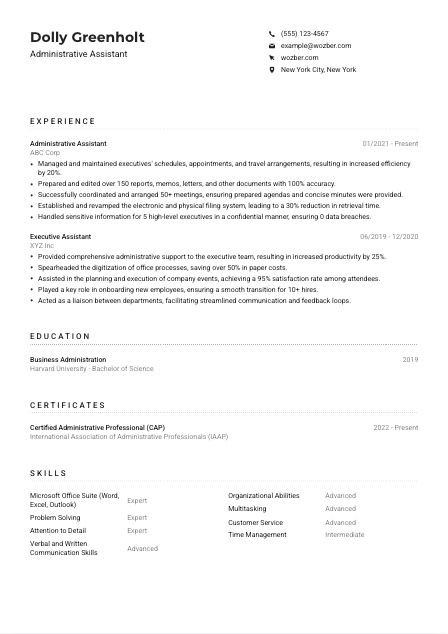
If a job requires local availability, include your city and state. Here, listing "New York City, New York" directly addresses the employer's stated requirement and removes an early question about whether you can work on-site or nearby.
A LinkedIn profile or professional website can support your application when it reflects the same work history, titles, and strengths shown on the resume. For administrative work, consistency matters. Make sure dates, employers, and role scope match across both.
This section should confirm that you are reachable, professional, and already aligned with the practical conditions of the job. For Administrative Assistant roles, clean presentation is part of the qualification.




This is the section most likely to decide whether your resume moves forward. Administrative hiring managers look for proof that you have supported leaders, managed competing priorities, produced accurate documents, and kept office systems organized without constant supervision.
Mark the responsibilities that appear central to the role, then make sure your bullets address them using your own experience. In this posting, that means schedule management, travel coordination, meeting support, document preparation, filing systems, and confidential handling of information.
List jobs in reverse chronological order with title, employer, and dates. If your previous title was Executive Assistant, Office Assistant, or another support role, that is still relevant as long as the bullets show the administrative work behind it.
Focus each bullet on what you handled and what improved because of your work. Strong Administrative Assistant bullets often cover calendar management, reporting, correspondence, meeting logistics, records maintenance, vendor or team coordination, and executive support that saved time or reduced confusion.
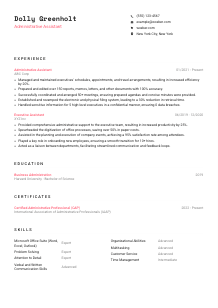
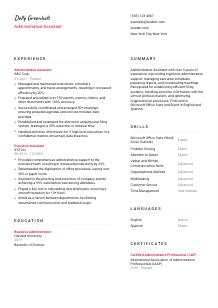
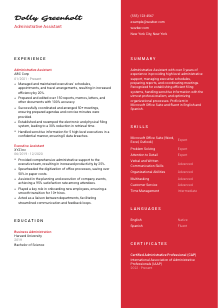
Administrative work produces measurable results, and numbers help hiring teams understand your scope. The sample resume does this well by showing a 20% efficiency gain from schedule management, 150+ documents prepared with 100% accuracy, 50+ meetings coordinated, and a 30% reduction in file retrieval time.
Trim bullets that do not strengthen your case for administrative work. Prioritize examples that show organization, multitasking, discretion, communication, and process improvement. Even broader achievements, such as onboarding support or cross-department coordination, should connect back to office operations and executive support.
Hiring teams want to see that you can manage the daily mechanics behind an executive or office team. If your bullets show smoother scheduling, accurate documentation, organized records, and trusted handling of sensitive information, this section is doing its job.
Education is rarely the deciding factor for experienced Administrative Assistants, but it still adds context. It can reinforce business familiarity, office communication skills, and professional discipline, especially if your degree or coursework relates to administration, operations, or business support.
Some Administrative Assistant jobs require only experience, while others may prefer coursework in business, communications, or office administration. This posting does not set a strict degree requirement, so education should support your profile rather than carry it.
List your degree, field of study, school, and graduation date in a clean structure. Administrative resumes benefit from clarity, and this section should be instantly readable without extra explanation.
If your degree connects to business operations, communications, management, or similar office-focused work, let that relevance stand. A Business Administration degree, like the one in the sample resume, naturally supports roles involving coordination, reporting, and organizational processes.
Early-career candidates can include coursework in office technology, business writing, records management, or project coordination if it fills a gap in work experience. If you already have solid administrative experience, keep this section lean.
Honors, leadership roles, or relevant student organization work can strengthen your resume if they point to communication, organization, or administrative responsibility. If they do not add much beyond your work history, leave them out and keep attention on experience.
For this profession, education should support the case you make in experience and skills. A concise, relevant entry is enough when the rest of your resume already shows dependable administrative performance.
Certifications can add weight to an Administrative Assistant resume because they show formal training in office procedures, executive support, records handling, communication, or workflow management. They are especially useful when the posting mentions them directly, even as a preference.
If the employer mentions administrative or secretarial certification, put those credentials first. A certification such as Certified Administrative Professional fits naturally here because it speaks to the exact support environment the role requires.
List certifications that add to your case as someone who can manage office processes, communication, software tools, or executive support responsibilities. Relevance matters more than volume. One strong credential beats a list of unrelated courses.
Show the issue date or active period for certifications, especially if the credential is current or renewed. That gives hiring teams a quick read on whether your training reflects present-day office practices and tools.
If you are adding new credentials, focus on areas that improve day-to-day administrative performance, such as advanced Microsoft Office use, business communication, meeting coordination, records management, or professional administrative practice. That keeps the section practical instead of generic.
A relevant certificate adds another layer of confidence to your application, especially when the employer has named it as a plus. It works best when it clearly connects to the office support, organization, and communication the role depends on.
A generic skills list does not help much in administrative hiring. This section should mirror the tools and working habits the job actually depends on, from Microsoft Office use to communication, prioritization, and handling multiple requests without losing accuracy.
Start with the required and preferred skills named in the job description. Here, that includes Microsoft Office Suite, verbal and written communication, organization, multitasking, and English proficiency. Those should be visible in your skills section if they reflect your real background.
Administrative Assistants are usually hired for a mix of tool fluency and dependable coordination. Pair hard skills such as Word, Excel, Outlook, document formatting, calendar management, or filing systems with execution skills such as time management, discretion, communication, and problem solving.
Order the list around what the role will use most often. In this case, Microsoft Office Suite and communication belong near the top, followed by organizational ability, multitasking, and detail-oriented office support. The sample resume handles this well by leading with Office tools and core administrative strengths.
When this section is tailored well, it reads like the toolkit behind your experience. The hiring team should be able to connect each skill to the actual flow of administrative work in the role.
Administrative Assistants often sit at the center of communication. They draft emails, relay updates, prepare documents, and speak with executives, staff, clients, or vendors. Language skills matter most when they support that daily communication clearly and honestly.
If the posting specifies English, list it first with your actual proficiency level. In this case, effective communication in English is a stated requirement, so it should appear clearly rather than being left implied.
After the required language, add any others you speak in descending order of proficiency or usefulness. For many administrative roles, additional languages can support front-office communication, cross-team coordination, or work with diverse clients and colleagues.
A second language is not mandatory for every Administrative Assistant position, but it can broaden your usefulness in multilingual offices or customer-facing environments. Spanish, for example, may be a practical advantage in some workplaces, as shown in the sample resume.
Use clear labels such as Native, Fluent, Intermediate, or Basic. Administrative work depends on accurate communication, so this is not the place to overstate ability.
If the job involves frequent correspondence, phone coverage, visitor interaction, or support for a diverse executive team, language capability becomes more relevant. Include it when it strengthens how you will operate in that environment, not simply to make the section longer.
For Administrative Assistant roles, language skills should clarify how well you can support communication in the office. Lead with the required language, state your level plainly, and keep the section grounded in the work.
Your summary should read like a concise hiring case for the specific support role you want. In a few lines, show your years of experience, the type of administrative work you handle, the tools you use, and the office results you are known for delivering.
Before writing, identify the few requirements that define the job most clearly. For this posting, the strongest themes are administrative support experience, Microsoft Office proficiency, communication, organization, meeting coordination, and confidentiality.
Start with your title and years of experience, then add the type of support you provide. A line such as "Administrative Assistant with 3+ years of experience supporting executives and coordinating daily office operations" tells the reader much more than a vague statement about being motivated or organized.
Mention the responsibilities or outcomes that define your value. That might include managing calendars and travel, preparing reports and correspondence, maintaining filing systems, coordinating meetings, or improving office efficiency. The sample summary succeeds because it ties experience directly to executive support, process improvement, confidentiality, and Microsoft Office use.
Aim for 3 to 5 sentences with no filler. This section should quickly position you as someone who can handle the daily demands of an administrative desk, communicate clearly, and support executives or teams with reliable organization.
A focused summary helps the reader understand your administrative range before they reach the bullet points. When it names your experience level, support scope, tools, and office strengths clearly, the rest of the resume lands faster.
A well-tailored Administrative Assistant resume should make four things easy to spot: the level of support you have provided, the office tools you use confidently, the way you keep schedules and documents under control, and the professionalism you bring to sensitive information.
Use Wozber's free resume builder, ATS-friendly resume template, and ATS resume scanner to align your wording with the job description and strengthen ATS optimization across each section. The finished resume should read like someone who can step into a busy office, support executives effectively, and keep daily operations organized from day one.




