



Use Wozber and land your dream job
Create Resume
No registration required
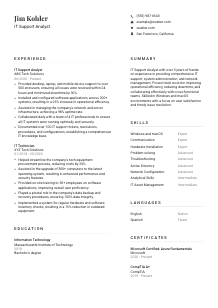
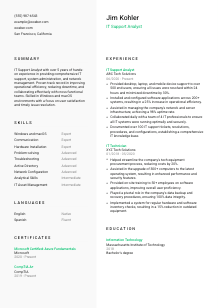
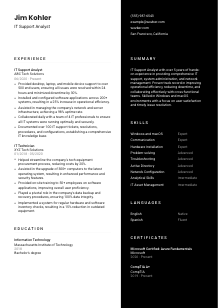
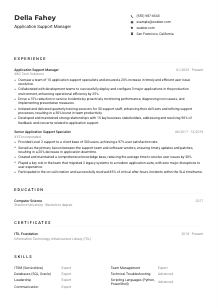
Juggling tech fixes, but your resume's signal seems weak? Check out this IT Support Analyst resume example, made with Wozber free resume builder. It shows how to detail your troubleshooting talents and customer service acumen to match job requirements, ensuring your IT career gets all the network coverage it deserves!
IT support work is measured in how quickly you restore access, how clearly you troubleshoot, and how reliably you keep people productive when devices, software, or systems fail. A resume for an IT Support Analyst should make that operational value visible early, especially your hands-on support scope across desktops, laptops, mobile devices, user requests, and day-to-day technical fixes.
Screeners often need to separate candidates who have done true end-user support from those with only light technical exposure. Using Wozber's free resume builder helps you shape an ATS-compliant resume around the language employers use for ticket handling, operating systems, device support, and infrastructure assistance, so your background reads as practical support experience instead of general IT interest.
For IT support roles, the top of the resume should answer a few practical questions right away. Can the employer reach you easily, do you present yourself professionally, and do basic details line up with the role's requirements? Keep this section clean, accurate, and easy to scan.
Your name should be the most visible text on the page. Use a simple, professional font and enough size contrast so it stands apart from the rest of the header. In IT support hiring, clarity matters, and that starts with a resume that does not make the reader work to find basic information.
Place "IT Support Analyst" directly under your name when that is the role you are pursuing. Matching the title helps position your experience correctly, especially when your past titles vary between support analyst, IT technician, or desktop support. It tells the reader immediately where your background fits.
Include a current phone number and a professional email address. Double-check both. Support jobs depend on responsiveness, and small mistakes here can create the wrong impression before anyone reads your troubleshooting or system support experience.
If a posting specifies a location, show that detail in your header when it applies. Here, listing San Francisco, California directly supports the stated requirement and removes a common point of uncertainty for the employer. Save space by using city and state only, not a full street address.
Include LinkedIn or a personal site if it adds real value. For an IT Support Analyst, that might mean a profile with consistent job dates, certifications, or project details related to support environments, device rollouts, or system administration tasks. If the link is sparse or outdated, leave it off.
Your header should quickly confirm that you are reachable, professionally presented, and aligned with any basic logistics tied to the opening. That keeps attention on your support experience instead of avoidable questions.




This section carries the most weight for IT Support Analyst hiring. Employers want to see the environments you supported, the volume you handled, the tools or systems you worked with, and the results of your troubleshooting, deployment, and maintenance work. Structure matters, but substance matters more.
Start by identifying the support work the employer actually needs. In this case, the posting centers on end-user device support, software and hardware setup, infrastructure assistance, collaboration with the IT team, and documentation. Use those themes to choose which bullets from your history deserve space, and mirror the employer's wording where it matches your real work.
List jobs in reverse chronological order with title, employer, and dates. That straightforward structure helps hiring teams follow your path from hands-on support into broader responsibilities such as network assistance, server support, or asset management. It also keeps ATS parsing clean.
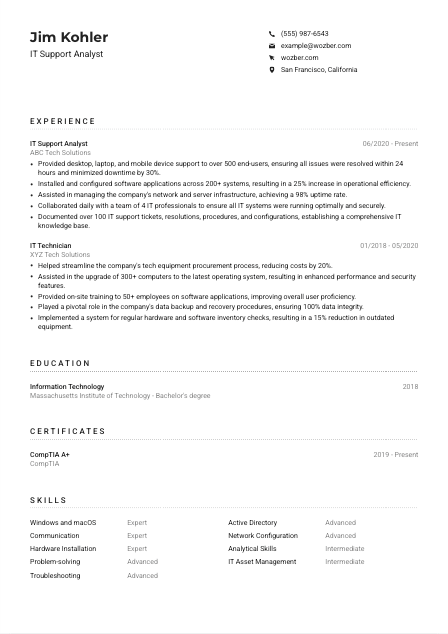
Your bullets should show what users or systems needed, what you did, and what improved. For IT support, that often means resolving incidents, configuring devices, reducing downtime, supporting upgrades, or improving service consistency. The sample resume does this well with points like supporting more than 500 end users and resolving issues within 24 hours, which gives the reader both scope and service standard.
Quantify with measures that matter in technical support: user volume, ticket resolution time, device count, uptime, rollout scale, training reach, or reduction in downtime. "Configured software across 200+ systems" or "achieved 98% uptime" tells a hiring manager far more than broad claims about being efficient or results-driven.
Choose accomplishments that reinforce your value in support operations. Desktop support, operating system upgrades, user training, hardware deployment, backup procedures, inventory control, and infrastructure assistance all strengthen this profile. If an older bullet does not help prove troubleshooting ability, technical breadth, or service impact, replace it with one that does.
Your experience section should make it easy to picture you supporting users, maintaining devices, and contributing to stable IT operations. Prioritize scale, speed, reliability, and the technical tasks you handled directly.
Education is usually a straightforward section for IT support roles, but it still needs to align with the posting. When a bachelor's degree in Information Technology or a related field is requested, list that information in a way that is direct and easy to verify.
If you hold a bachelor's degree in Information Technology or a closely related field, make that easy to spot. In the example, "Bachelor's degree" and "Information Technology" clearly satisfy the requirement without extra explanation. If your degree is in a related area such as computer science or information systems, keep the field name accurate and let your experience reinforce the connection.
List your degree, school, field of study, and graduation year or date. That is enough for most IT Support Analyst applications. A neat format helps the reviewer confirm eligibility quickly and keeps attention on your experience section, where most technical support decisions are made.
If the field of study is highly relevant, do not bury it. Information Technology, systems administration, networking, or computer support coursework can strengthen the match, especially for candidates with lighter professional experience. You do not need to over-explain a strong degree title.
Relevant courses can help if your degree title is broader than the role or if you are earlier in your career. Include courses tied to support environments, operating systems, networking, cybersecurity, or hardware maintenance only when they add context that the rest of the resume does not already provide.
Projects, honors, or technical lab work are worth mentioning when they relate to troubleshooting, system setup, infrastructure, or user support. Keep these additions selective. In IT support hiring, a focused academic detail is useful when it shows practical technical grounding, not when it reads like a full transcript.
This section should confirm that you meet the academic bar and, where useful, reinforce your technical foundation. Clear degree information is usually enough.
Certifications can add weight to an IT Support Analyst resume, especially when they point to practical support knowledge, operating system familiarity, cloud basics, or commitment to staying current. They work best when they are relevant and up to date.
Prioritize certifications that relate to troubleshooting, hardware, operating systems, endpoint support, networking, or core IT knowledge. CompTIA A+ fits naturally for support roles, and a certificate like Azure Fundamentals can also help when the environment touches cloud services or Microsoft ecosystems.
Include the earned date or active period when relevant. In a field shaped by changing platforms, device policies, and security practices, recent certification timing can reinforce that your knowledge has not gone stale.
A short, relevant certification list is stronger than a crowded one. Focus on credentials that support the work described in the posting, such as user support, system configuration, Microsoft environments, or infrastructure awareness. Leave off anything that does not help explain your fit for technical support work.
Hiring teams notice when support professionals continue building their technical range. Certifications can show movement beyond basic ticket handling into adjacent areas like cloud platforms, security awareness, or administration fundamentals. That progression is useful when the role includes assisting with servers or network infrastructure.
Well-chosen certifications reinforce the kind of support environment you can step into and the systems you can handle with confidence. Keep them relevant, current, and easy to read.
The skills section should read like the environment you can support, not like a generic list of traits. For IT Support Analyst roles, that usually means operating systems, troubleshooting, device setup, infrastructure basics, and communication strong enough to work with both users and technical teammates.
Start with the posting and pull out the hard skills that shape the day-to-day work. Here, Windows and macOS should appear because they are explicitly required. If you also have hands-on experience with tools or environments connected to the role, such as Active Directory, hardware installation, mobile device support, or network configuration, include them when they are backed by experience.
Do not try to catalog everything you know. Emphasize the skills most relevant to support delivery, device maintenance, issue resolution, and user-facing communication. The sample resume balances technical items like Windows and macOS, Active Directory, and network configuration with support-critical soft skills like communication and problem-solving.
Use a consistent format so the reader can pick out technical capabilities quickly. Grouping by function can help if you have a broader range, such as operating systems, support tools, infrastructure, and interpersonal skills. Whether you use a simple list or categories, the goal is fast recognition by both the reviewer and the ATS.
A focused skills list should reinforce the systems, tools, and service abilities already shown in your experience. Relevance matters more than volume.
Language ability matters in IT support because the work depends on clear explanations, ticket updates, user guidance, and calm communication during technical issues. If the role explicitly requires strong English communication, make that visible first.
When a posting calls for clear English communication, list English prominently with an honest proficiency level. For support work, this is not a minor detail. You may need to explain fixes, gather issue details, write documentation, and coordinate with teammates across technical and non-technical groups.
Additional languages can be useful in employee-facing or customer-facing environments, especially when support teams serve diverse user groups. If you speak another language well enough to assist users or collaborate smoothly, include it after English.
Use straightforward levels such as Native, Fluent, Intermediate, or Basic. Overstating language ability can create problems later, especially in roles where real-time issue intake and explanation are part of the job.
Multilingual ability can support onboarding, training, user support, or communication across distributed teams. It is usually a secondary advantage for an IT Support Analyst, but it can still add value when your work involves a broad user base.
Language skills should support your application, not take over it. For this profession, technical support range, troubleshooting results, and system knowledge remain the main drivers. Treat languages as a useful add-on unless the employer places special emphasis on them.
List languages in a way that reinforces your ability to support users clearly and document issues accurately. For most IT support roles, English proficiency should be unmistakable.
The summary should quickly tell the reader what kind of support professional you are, how much experience you bring, and which technical areas define your work. For an IT Support Analyst, the best summaries connect user support, troubleshooting range, and operational outcomes without drifting into vague claims.
Identify the main thread in your experience before you write. That might be end-user support, desktop administration, mixed OS environments, infrastructure assistance, or high-volume troubleshooting. The sample summary opens with hands-on IT support, system administration, and network management, which immediately places the candidate in a practical support context.
Begin with a clear line that states your role identity and years of experience, such as "IT Support Analyst with 5+ years of experience." This helps the reader quickly place your seniority and keeps the summary anchored in professional scope rather than personality language.
Mention two or three details that match the job, such as supporting Windows and macOS environments, reducing downtime, improving operational efficiency, managing device deployments, or maintaining strong user satisfaction. Choose strengths you can prove elsewhere in the resume.
Aim for a compact paragraph, usually three to five lines. Skip broad statements about passion or hard work unless they are tied to actual support outcomes. A hiring manager should finish the summary with a clear sense of your support scope, technical range, and the kind of environment you can handle.
Your summary should frame you as someone who can step into support operations, handle user issues with confidence, and contribute to stable day-to-day IT service. That is the tone to set before the reader reaches your experience.
An effective IT Support Analyst resume shows more than technical familiarity. It shows who you supported, what systems you touched, how quickly you resolved issues, and how your work improved uptime, productivity, or user experience.
Use Wozber's free resume builder to organize that experience into an ATS-friendly resume template, refine the wording with role-specific terminology, and check alignment with an ATS resume scanner. The final result should make it easy to judge your readiness for hands-on support, device management, and dependable day-to-day IT operations.




