



Use Wozber and land your dream job
Create Resume
No registration required
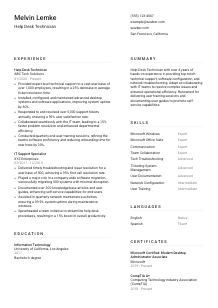
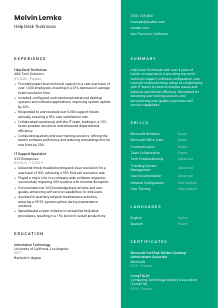
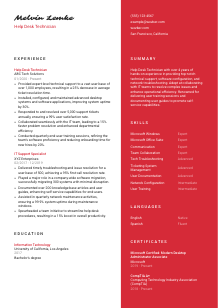
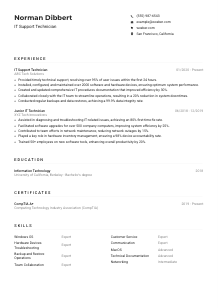
Troubleshooting tech, but your resume needs a reset? Check out this Help Desk Technician resume example, created with Wozber free resume builder. Learn how to lay out your support savvy to match job requirements, ensuring your career doesn't end up in the queue!
Help desk work is where technical troubleshooting meets frontline service. Hiring teams look quickly for proof that you can handle a steady flow of user issues, work calmly through Windows, Office, hardware, and network problems, and keep support moving through clear ticket documentation and practical fixes.
On a tailored resume, those strengths are easier to recognize fast, especially when your wording matches the support environment the employer runs. Wozber's free resume builder helps you shape an ATS-compliant resume around the job description, so core details like ticket volume, first-level troubleshooting, desktop support, and user training are visible before your application gets filtered out or misread.
For a Help Desk Technician, the top of the resume should make you easy to contact and easy to place. This section is simple, but it still carries hiring value when the role includes shift coverage, onsite support, or location-based requirements.
Use your full name as the most prominent text at the top. Keep it clean and readable so the hiring manager can identify you immediately when scanning through a stack of support candidates.
Place "Help Desk Technician" directly under your name if that is the role you are targeting. That quick label helps frame the rest of your experience around end-user support, ticket handling, and desktop troubleshooting rather than broader IT work.
List a reliable phone number and a professional email address. For support roles, responsiveness matters, so make sure every detail is accurate. One typo in your phone number can cost you an interview for a role built around timely communication.
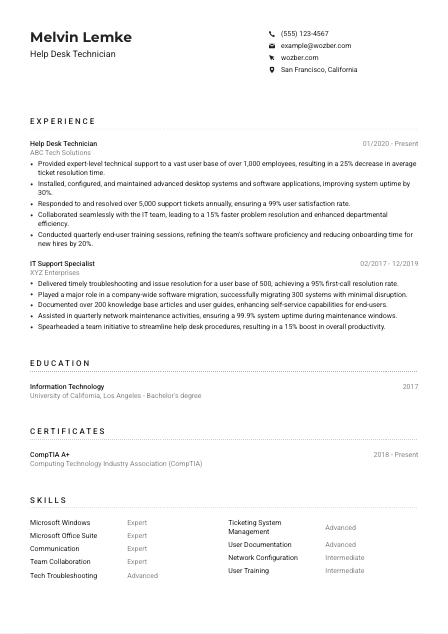
If the employer needs someone in a specific area or open to relocation, say so clearly in your location line. Here, listing San Francisco, California immediately answers a stated requirement and removes doubt about onsite availability.
Include LinkedIn or a professional site when it reinforces your help desk profile. Useful additions might show IT support experience, certifications, internal documentation work, or project-based troubleshooting. Keep the content aligned with the resume rather than treating it as a separate story.
Your personal details should tell an employer two things right away: how to reach you and whether you match the practical setup of the role. For help desk work, that clarity matters early.




This section carries the most weight on a Help Desk Technician resume. Hiring teams want to see the kind of support environment you handled, the issues you resolved, the systems you worked on, and whether your work improved response times, uptime, or user satisfaction.
Read the posting closely and mark the support tasks that appear repeatedly. For this role, that means first-level troubleshooting, desktop setup and maintenance, ticketing system use, coordination with escalated support, and end-user training. Those are the areas your bullets should cover if they reflect your background.
Start with your most recent position and include job title, employer, and dates. That straightforward structure helps employers understand how recently you handled frontline support work and whether your background shows consistent progression in technical support environments.
Do not stop at "provided technical support." Show what kind of support you handled and what changed because of your work. The sample resume does this well with bullets on resolving 5,000+ tickets annually, improving uptime, and running user training sessions. That tells a hiring team far more than a generic task list.
Metrics are especially effective here because support performance is measurable. Include ticket volume, average resolution time, first-call resolution, uptime, user satisfaction, system rollout volume, or documentation output when you have them. Numbers like a 25% drop in resolution time or 99% satisfaction make your day-to-day support impact concrete.
Favor achievements that show troubleshooting, device or software support, customer communication, escalation handling, and knowledge sharing. If you have broader IT work, keep the bullets that connect directly to help desk performance. A migration project, for example, matters when you explain your role in keeping users supported and systems stable during the change.
After reading your experience section, an employer should understand the scope of users you supported, the systems you touched, and the results you delivered. That is what turns past support work into a credible fit for the next help desk seat.
Education gives context to your technical foundation, especially when the posting calls for a degree in IT or a related field. For help desk roles, it supports your experience rather than replacing it, unless you are early in your career.
When a job asks for a Bachelor's degree in Information Technology or a related field, make that qualification easy to find if you have it. In the example, a Bachelor's degree in Information Technology aligns directly with the requirement and reinforces technical preparation for desktop and user support work.
List your degree, field of study, school, and graduation year. That is usually enough. Keep this section easy to scan so employers can confirm your academic background without digging through extra text.
If your degree is directly tied to systems support, networking, information technology, or computer science, keep the wording specific. A closely matched field signals that your training covered the operating systems, software environments, and troubleshooting basics common in help desk work.
If you are newer to the field, coursework, lab work, capstone projects, or academic honors can strengthen this section. Include details that connect to support work, such as desktop administration, networking fundamentals, system maintenance, or user support projects.
Help desk work changes with endpoint management tools, operating systems, security practices, and collaboration platforms. If you have recent coursework or training in areas like Windows administration, Microsoft environments, or troubleshooting workflows, it can add useful context to your current readiness.
Your education should confirm that you have the technical grounding to support users, systems, and workplace software with confidence. Keep it concise, relevant, and connected to the kind of support work you want next.
Certifications matter in help desk hiring because they show current technical knowledge in a format employers recognize quickly. They are especially useful when the role names specific credentials or when several candidates have similar support experience.
When the employer calls out credentials such as CompTIA A+ or Microsoft Certified: Modern Desktop Administrator Associate, move those to the top if you hold them. In this job, both map closely to hardware, operating system support, and desktop administration expectations.
Choose certificates that strengthen your case for troubleshooting, desktop support, Windows administration, Microsoft environments, device management, or customer-facing IT service. A shorter, relevant list is more persuasive than a long list of loosely related credentials.
Certification dates help employers judge whether your knowledge is recent, especially for vendor-specific credentials. If a certification is active or renewed, show that clearly. Current credentials can strengthen your resume in competitive support hiring.
Help desk technicians often grow into desktop support, systems administration, or endpoint management roles. Continuing to add certifications shows you are building on core support skills instead of standing still. That matters in IT teams that value dependable growth and adaptability.
Relevant certifications give hiring teams another quick reason to trust your technical baseline. For a help desk role, they work best when they support the same Windows, desktop, and user-support strengths shown in your experience.
The skills section should read like a real help desk toolkit, not a generic list of buzzwords. Focus on the systems, support capabilities, and service skills that match the environment described in the posting.
Use the job description to identify the terms that matter in screening. Here, Microsoft Windows, Microsoft Office Suite, technical support, troubleshooting, ticketing systems, communication, and customer service are all important. Include them when they reflect your actual experience so your resume aligns naturally with ATS optimization.
Put the most relevant tools and capabilities first. For help desk work, that often means operating system support, hardware and software troubleshooting, user support, ticket management, desktop configuration, and knowledge base documentation before less central skills.
A help desk technician needs both technical command and user-facing judgment. Pair hard skills like Windows support and network troubleshooting with soft skills like communication, patience, and collaboration. The sample resume handles this well by combining Microsoft Windows and ticketing system management with communication and team collaboration.
Your skills list should show that you can resolve user issues in the actual support environment, not just talk about technology in broad terms. Keep it specific enough that a hiring manager can picture you working the queue.
Language skills are straightforward on a resume, but they can still matter in help desk work. Clear communication is part of issue intake, troubleshooting, training, and follow-up, especially when you support a diverse employee or customer base.
If the job states that you must communicate effectively in English, list English clearly with an honest proficiency level. That confirms you can handle ticket notes, user conversations, and training materials in the language the support team uses.
Start with the language required for the role, then include additional languages that may help in user support. In some workplaces, extra language ability can improve service for employees or customers who are more comfortable describing technical issues in another language.
Be precise about your level. Use terms such as Native, Fluent, Advanced, or Conversational only when they match your real ability. Help desk work involves live troubleshooting and written follow-up, so overstating proficiency can become obvious quickly.
Multiple languages can improve user experience when the support desk serves international teams or multilingual offices. They are especially useful in roles that involve walkthroughs, onboarding support, or training sessions where clarity matters as much as technical accuracy.
For most help desk positions, language skills support the application rather than drive it. Include them as an advantage, but keep the main emphasis on troubleshooting, systems support, and ticket-based service delivery unless multilingual support is central to the job.
List languages clearly and honestly. In help desk work, they matter most when they strengthen user communication, training, and support coverage without distracting from your technical qualifications.
Your summary should give a hiring manager a fast read on the kind of support professional you are. In a few lines, connect your experience level, technical environment, and strongest results so the rest of the resume lands with context.
Before writing, identify the core themes in the posting. For this job, that includes first-level technical support, troubleshooting across hardware and software, desktop setup, ticket handling, and user training. Your summary should reflect that mix rather than sounding like a generic IT profile.
Begin with your current profession and the amount of relevant experience you bring. A line like the sample's "Help Desk Technician with over 4 years of hands-on experience" works because it establishes role fit immediately and keeps the focus on practical support work.
Follow with specific capabilities that match the employer's environment, such as Windows support, Microsoft Office troubleshooting, ticket resolution, desktop configuration, collaboration with IT teams, or knowledge base documentation. Choose the strengths you can back up in the experience section.
Stay concise, usually three to five lines. Aim for a summary that tells the reader what you support, how you work, and what results tend to follow, whether that is faster resolution, stronger uptime, smoother user onboarding, or better self-service documentation.
By the time someone finishes your summary, they should already understand your level, your support focus, and the kind of operational value you bring to a help desk team. That makes the rest of the resume easier to trust.
A Help Desk Technician resume works best when it shows practical support scope, steady troubleshooting performance, and clear communication with users and IT teammates. When those pieces are easy to find, hiring teams can quickly see whether you are ready to handle their ticket flow, desktop environment, and frontline support demands.
Use Wozber's free resume builder to shape your content into an ATS-friendly resume format, then review it with an ATS resume scanner to tighten job-specific wording and section alignment. The final version should make one thing obvious: you can step into the help desk queue and start solving problems.




