



Use Wozber and land your dream job
Create Resume
No registration required
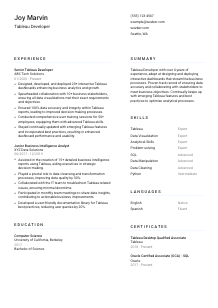
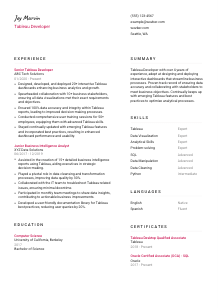
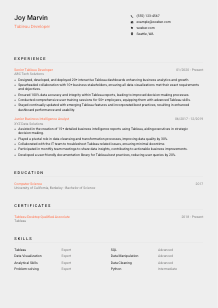
Visualizing data, but your resume looks like raw numbers? Check out this Tableau Developer resume example, created with Wozber free resume builder. Learn how to blend your visualization wizardry with job prerequisites, making sure your career story is as crisp and vibrant as your dashboards!
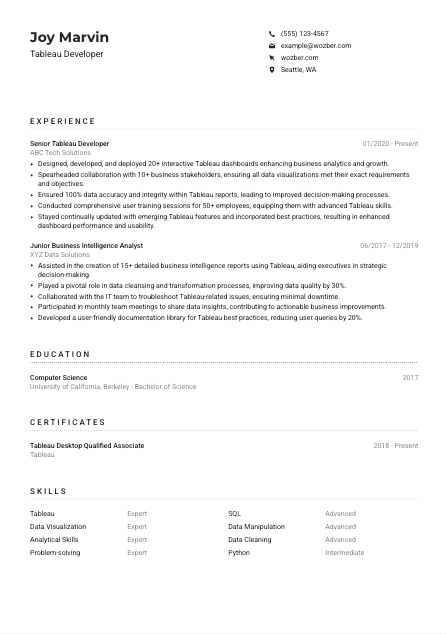
Tableau Developer resumes are strongest when they show how you turn messy business questions into dashboards people actually use. Hiring teams want to see more than chart-building ability. They look for proof that you can work with stakeholders, shape requirements into usable views, write the SQL behind the reporting layer, and protect data accuracy when decisions depend on what appears on screen.
A tailored resume makes that business intelligence workflow easier to read in seconds, especially when it is built in Wozber's free resume builder with ATS optimization in mind. Clear alignment between the job description and your dashboard work, stakeholder collaboration, SQL use, and training experience helps employers quickly understand whether you can deliver reliable Tableau reporting in a live business environment.
For a Tableau Developer, the header should establish professional alignment fast. Keep this section clean and practical so the hiring team can immediately confirm who you are, what role you do, and whether basic requirements such as location and contact access are already covered.
Your name should be the most visible line in the header. Use the version you use professionally across LinkedIn, Tableau Public, and your portfolio so recruiters can easily connect your resume to your dashboard work and online presence.
Place "Tableau Developer" directly under your name when that is the role you are applying for. This removes guesswork and positions you as a specialist in data visualization and BI reporting rather than a broad analytics candidate.
List a phone number you actively answer and a professional email address in a simple format. If hiring managers want to discuss dashboard development, SQL skills, or stakeholder support experience, they should not have to hunt for a reliable way to reach you.
If the job requires a specific location, include it clearly in your header. Here, listing "Seattle, WA" addresses a stated requirement and signals that your candidacy is workable from the start, without adding relocation uncertainty.
Include LinkedIn, Tableau Public, or a portfolio site if it strengthens your application. For this profession, a link to dashboards, reporting examples, or BI project summaries can reinforce the experience claims in your resume and show how you design for usability, not just aesthetics.
Your header should answer the practical basics right away: your professional identity, your target role, how to contact you, and any stated location requirement. Keep it tight and job-aligned so the reader can move straight into your Tableau work.




This section carries the most weight for Tableau Developer hiring. Employers are looking for dashboard delivery, SQL-backed analysis, stakeholder collaboration, data quality discipline, and evidence that your reporting work improved decisions, adoption, or efficiency.
Read the posting for the work patterns behind the keywords. In this case, the priorities include interactive dashboard development, stakeholder requirement gathering, data accuracy, user training, and current Tableau best practices. Those themes should shape your bullet points so your past work maps naturally to the role.
List your most recent position first and include job title, company, and dates in a consistent format. Tableau hiring often involves comparing progression from analyst or BI support work into full dashboard ownership, so your timeline should make that development easy to follow.
Focus on what you built, who used it, and what changed because of it. Strong Tableau bullets mention dashboards, data sources, stakeholder groups, reporting goals, or support responsibilities. The sample resume does this well with lines like "Designed, developed, and deployed 20+ interactive Tableau dashboards," which directly connects output to the core responsibility in the posting.
Quantify scope and outcomes where you can. Useful metrics for this profession include number of dashboards launched, user groups supported, reporting accuracy, query or refresh improvements, training attendance, adoption rates, reduced support tickets, or faster decision cycles. Numbers such as "50+ employees trained" or "improved data quality by 30%" make your contribution easier to judge.
Prioritize experience that shows Tableau, SQL, reporting logic, data preparation, stakeholder communication, or BI support. Older bullets that do not contribute to that picture can be shortened or removed. Every line should help explain why you can build trusted dashboards and support business users effectively.
Your experience section should read like a record of delivered reporting work, not a list of duties. When the bullets show dashboard scope, data quality, stakeholder partnership, and measurable outcomes, your Tableau background becomes much easier to trust.
Education is usually not the deciding section for an experienced Tableau Developer, but it still matters when the job calls for a specific academic foundation. Keep it simple, accurate, and aligned with the level of technical grounding the employer expects.
When a posting asks for a bachelor's degree in Computer Science, Information Systems, or a related field, make sure that qualification is easy to find. This requirement is straightforward, so your education section should confirm it without extra formatting or explanation.
List your degree, field of study, school, and graduation year or date. Hiring teams scanning for technical qualifications should be able to confirm your academic background in one quick pass.
If your degree aligns closely with the role, let that alignment work for you. In the example resume, a Bachelor of Science in Computer Science clearly supports the technical side of Tableau development, including SQL use, data structures, and analytical problem-solving.
Early-career candidates can strengthen this section with relevant coursework or projects in databases, data visualization, analytics, or information systems. If you already have several years of Tableau experience, keep the section lighter and let professional work carry more weight.
Honors, research, or student projects are worth adding when they relate to analytics, reporting, or technical problem-solving. Skip unrelated details. The section should support your readiness for BI work, not read like a complete academic history.
Education should confirm that you meet the formal baseline for the role and have the technical foundation to work with data, reporting logic, and BI tools. Once that is clear, let your experience do the heavier lifting.
Certifications carry real weight in Tableau-focused hiring when they support the exact platform knowledge the role requires. Use this section to highlight recognized credentials that reinforce your ability to build, manage, and support Tableau reporting in a business setting.
Put the certification most relevant to the job first. For this posting, "Tableau Desktop Qualified Associate" is specifically requested, so it belongs at the top of the section. If you hold a newer or equivalent Tableau credential, label it clearly so the match is obvious.
Only include certifications that support the position. Tableau, SQL, data analytics, or related BI credentials can help. The sample resume adds an Oracle SQL certification, which works because SQL proficiency is also named in the requirements.
Include dates so employers can gauge how current the credential is. In a platform-driven role where Tableau features, performance practices, and interface changes evolve over time, date context adds useful credibility.
If you continue to refresh your Tableau knowledge through updated certifications, training, or product learning, make that visible where appropriate. This role includes performance, usability, and support responsibilities, so current platform knowledge matters beyond the certificate itself.
Relevant certifications reinforce that your Tableau skills are formalized, current, and aligned with the platform expectations of the role. Used well, this section adds technical confidence without taking focus away from your project results.
The skills section should mirror the actual work of a Tableau Developer. That means balancing platform skills with the supporting technical and business-facing abilities that make dashboards reliable, usable, and relevant to decision-makers.
Start with the language the employer already uses. Here, Tableau development, data visualization, SQL, analytical thinking, and problem-solving are all explicit priorities. If you genuinely use them, include those exact terms so both hiring teams and ATS filters can connect your background to the role.
Order matters. Lead with Tableau, data visualization, SQL, and related BI capabilities before broader tools or secondary languages. In the sample resume, Tableau and Data Visualization appear first, which keeps the section centered on the core work rather than peripheral tools.
Avoid turning this section into a software inventory. Include skills that support dashboard development, data querying, data preparation, reporting quality, and business collaboration. If you list Python, for example, it should make sense as a supporting analytics or automation skill rather than distract from Tableau specialization.
This list should quickly confirm that you can build dashboards, work with data behind them, and solve reporting problems in a business context. Prioritize the tools and abilities that matter most in day-to-day Tableau work.
Language skills matter here because the role includes stakeholder collaboration, user training, and ongoing support. If the job posting names a language requirement, make that match easy to confirm without overcomplicating the section.
List English clearly if the posting requires it. A rating such as "Native" or "Fluent" immediately addresses the requirement and supports the communication side of the role, especially for requirements gathering, training sessions, and end-user support.
If you speak other languages well enough to use them professionally, include them. They can be helpful in companies with distributed teams, multilingual user groups, or cross-regional reporting support, though they are usually secondary to Tableau and SQL capability.
Be precise about fluency. If your work includes presenting dashboards, answering user questions, or documenting reporting logic, inflated language claims can become obvious very quickly. Clear ratings build credibility.
Some Tableau roles are heavily internal and English-only. Others involve wider business groups or international teams. Include language detail that adds practical value to the version of the resume you are sending.
Unless multilingual communication is central to the position, this should remain a compact section. Its main job here is to confirm the stated English requirement and note any additional capabilities that could help with user support or collaboration.
For a Tableau Developer, language details mainly support collaboration and training credibility. Meet the stated requirement clearly, then add other languages only when they strengthen the application.
A Tableau Developer summary should quickly establish your level, your core platform strengths, and the kind of reporting impact you deliver. Keep it concise, but specific enough that the reader immediately understands whether your background fits dashboard development in a live business environment.
Use the posting to decide which points belong in the opening lines. For this role, that means Tableau development experience, SQL capability, data accuracy, stakeholder collaboration, and support for business users. Those are stronger anchors than generic claims about being results-driven.
Start with your title and years of experience. A line like "Tableau Developer with over 4 years of experience" works because it immediately places you at the right level and aligns with a posting asking for at least 3 years in Tableau development and data visualization.
Choose strengths that reflect how Tableau work is actually delivered. Useful options include interactive dashboard design, SQL-based data querying, stakeholder requirement gathering, data quality control, or user training. The sample summary covers several of these without becoming a keyword list.
Aim for 3 to 5 sentences. That gives you enough room to establish your Tableau background, mention a few relevant strengths, and point to business impact, while keeping the top of the resume clean and easy to parse.
Your summary should make the hiring team expect solid Tableau execution before they even reach your experience section. If it clearly connects your platform skills to business reporting outcomes, it is doing its job.
A Tableau Developer resume should make one thing easy to see: you can turn business requirements into accurate, usable dashboards and support the people who rely on them. When your experience, skills, certifications, and summary all reinforce that story, the document reads with much more authority.
Use Wozber's free resume builder to shape that content into an ATS-compliant resume, then refine the language with the ATS resume scanner so your Tableau, SQL, stakeholder, and data quality experience matches the posting naturally. The final version should make your readiness for production dashboard work clear at a glance.




