



Use Wozber and land your dream job
Create Resume
No registration required
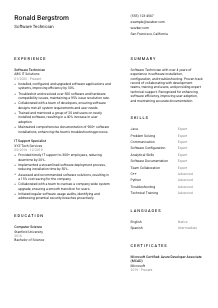
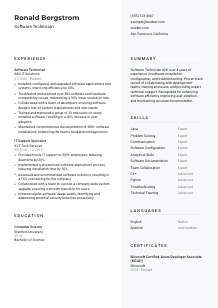
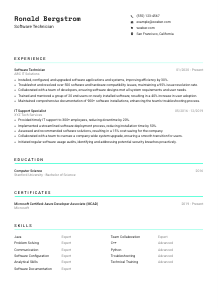
Debugging code, but your resume seems stuck? Check out this Software Technician resume example, made with Wozber free resume builder. Learn how to patch up your programming prowess to match job requirements, ensuring your career runs smoothly and without any runtime errors!
Software Technician resumes get attention when they show more than general IT support. Hiring teams want to see hands-on work with software installs, version upgrades, troubleshooting, user support, and the day-to-day discipline of keeping systems stable for end-users. If your resume blurs together help desk tasks, development exposure, and systems work without showing where you solved software-specific problems, it becomes much harder to place you in the right technical lane.
The first screen often comes down to whether your resume clearly connects your background to the environment the team is hiring for, including installation work, compatibility fixes, documentation, and support at scale. Wozber's free resume builder helps shape that story into an ATS-compliant resume that uses the right technical language and structure, so the hiring team can quickly see where you've handled software rollouts, issue resolution, and end-user adoption.
For a Software Technician, the header should do one thing well: confirm that you're reachable, professionally presented, and aligned with any practical requirements named in the posting. Keep it clean, accurate, and easy to scan so nothing slows down the review before your technical experience even starts.
Use your full name as the most visible text at the top of the page. Keep the formatting simple and professional. This section does not need design tricks. It needs to make your resume easy to identify in a stack of technical applicants.
Place "Software Technician" directly below your name when that is the role you are applying for. This immediately positions your background around software deployment, configuration, troubleshooting, and user support rather than broader IT or development work.
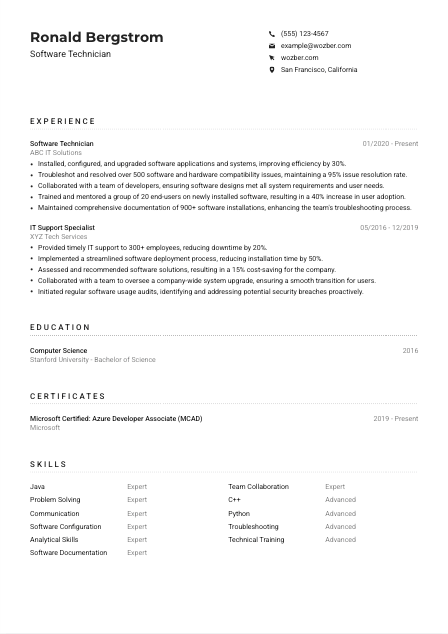
If the posting names a location requirement, reflect it clearly in your header. In this example, listing "San Francisco, California" answers a stated requirement and removes questions about local availability. For other Software Technician roles, only include location detail that helps confirm eligibility.
Include LinkedIn or a professional site if it supports your resume with matching titles, dates, certifications, or technical projects. Make sure it reflects the same software support history, tools, and responsibilities you present on the resume.
Your personal details should confirm identity, contact accuracy, and any logistical requirement tied to the role. Once those basics are clear, the reader can focus on your installation work, troubleshooting depth, and support experience.




This is where Software Technician candidates separate themselves. Employers look for concrete proof that you can deploy software, resolve compatibility issues, work with users under pressure, and document what changed so the next fix is faster and cleaner.
Start by pulling out the work patterns that define the role. For Software Technician jobs, that often includes software installation, configuration, upgrades, troubleshooting, hardware and software compatibility fixes, user training, and technical documentation. Then make sure those exact responsibilities appear naturally in your experience bullets where they reflect real work you have done.
List roles in reverse chronological order with job title, employer, and dates. That structure helps reviewers quickly track whether you have the three or more years of relevant experience often requested for this kind of position, and whether your recent work is close to the software support environment they need.
Each bullet should show action, technical context, and result. Instead of writing that you were responsible for support, specify what you installed, configured, upgraded, or fixed, and what changed because of your work. The example resume does this well with points like resolving more than 500 compatibility issues while maintaining a 95% resolution rate, which tells the reader both scope and performance.
Metrics make technical support work easier to judge. Good numbers for this role include issue resolution rate, deployment volume, installation count, reduction in downtime, faster rollout time, user adoption after training, or documentation volume. The sample's "900+ software installations" and "40% increase in user adoption" work because they connect directly to technician responsibilities, not generic business claims.
Prioritize experience that points toward software operations, troubleshooting, end-user support, systems coordination, or collaboration with developers. If an older role is only loosely related, pull forward the parts that involve deployment, incident response, or technical training and leave out unrelated detail.
After reading your experience, the employer should understand what systems and users you supported, how you handled software problems, and what results followed from your work. That is the clearest proof that you can step into a Software Technician role and contribute quickly.
Education matters most here as confirmation of technical grounding. For Software Technician roles, a degree in Computer Science, Information Technology, or a related field shows formal exposure to systems, programming, and software fundamentals that support day-to-day troubleshooting work.
When a posting asks for a bachelor's degree in Computer Science, Information Technology, or a related discipline, make that qualification easy to find. If your degree aligns directly, as it does in the example with a Bachelor of Science in Computer Science, place it clearly without burying it behind extra detail.
List degree, field of study, school, and graduation year in a simple order. Hiring teams scanning for baseline qualifications should be able to confirm your academic background in seconds.
The field matters as much as the degree label. A software support role benefits from coursework and foundations tied to operating systems, programming, networking, databases, or systems analysis. If your degree title is broad, the field of study helps clarify why it fits the role.
If you are early in your career or moving from another technical path, include selected coursework, labs, or projects that support the job target. Choose items that connect to software configuration, debugging, scripting, system compatibility, or application support rather than listing classes broadly.
Honors, scholarships, or relevant student projects can help when they reinforce technical ability or initiative. Keep them only if they add something meaningful to your story, especially if your professional experience is still developing.
Your education section should confirm that you have the technical base the role calls for and, when needed, add context for how you built that foundation. Keep it direct and relevant to software support work.
Certifications are especially useful in Software Technician resumes when they reinforce platform knowledge, development awareness, or current technical standards. They work best when they match the employer's environment or reflect the kinds of systems you support.
If the job description calls out certain certifications, move matching or closely related ones to the top of the section. In this case, Microsoft Certified: Azure Developer Associate and CSDP were listed as preferred, so those credentials deserve priority because they connect directly to the employer's stated preferences.
Do not crowd the section with every certificate you have ever earned. Focus on credentials that support software deployment, cloud environments, troubleshooting, development collaboration, or system administration. Relevance carries more weight than volume.
Certification dates help employers understand how current your knowledge is, especially in environments where platforms, deployment practices, and support tooling change quickly. If a credential is active or recently renewed, show that clearly.
A current certification list suggests you stay engaged with evolving tools and environments. For a Software Technician, that can strengthen your profile when the role touches cloud-hosted applications, modern deployment processes, or tighter collaboration with engineering teams.
Well-chosen certifications add another layer of trust to your resume. They can support your technical range, show current learning habits, and strengthen your case when the employer has named preferred credentials.
The skills section should read like the toolkit behind your day-to-day work. For Software Technician jobs, that means balancing technical skills such as programming languages, software configuration, and troubleshooting with the support-facing abilities needed to train users and explain issues clearly.
Review the job description for named tools, languages, and capability areas. Here, Java, C++, Python, troubleshooting, communication, and analytical ability all appear directly. Those terms matter for ATS optimization when they match your real background, especially in an ATS-friendly resume format.
List skills that are both relevant and supported by your experience. If you include Python, Java, or software configuration, there should be evidence elsewhere on the resume through installations, troubleshooting work, support tasks, or collaboration with development teams.
Keep the list focused enough that a reviewer can understand your strengths fast. A mix like programming languages, troubleshooting, software documentation, technical training, and communication works well because it reflects how Software Technicians actually operate across systems, users, and support processes.
A targeted skills section should make your technical profile legible at a glance. Choose the skills that best support the job and that your experience section can clearly substantiate.
Language ability matters in Software Technician roles because technical work often depends on clear communication with end-users, teammates, and sometimes developers. When a job posting names a required language, address it directly and keep the section factual.
If English fluency is required, list English clearly with an accurate proficiency level. That immediately answers a stated condition of the role and supports responsibilities such as user training, issue explanation, and documentation.
Lead with the language used for support interactions, ticket updates, training sessions, and internal communication. In this case, English belongs at the top because the role explicitly requires fluent communication.
Additional languages can be useful in support environments with varied user groups, global teams, or customer-facing work. Include them when they are genuine and current, not as filler.
Use clear levels such as Native, Fluent, Intermediate, or Basic. Honest labeling matters because language skill affects live troubleshooting, documentation accuracy, and user training quality.
Not every Software Technician role is multilingual, but extra language ability can still help in distributed teams or user environments with mixed language needs. Keep the emphasis on practical communication value rather than treating it as a generic bonus.
For this role, language details should confirm that you can explain technical issues clearly and support users effectively. Lead with the required language and add others only if they strengthen the picture.
The summary is where you establish your technical identity in a few lines. For this role, it should quickly connect your years of experience to the kind of software support work the employer needs, then back that up with one or two concrete strengths or results.
Start from the core of Software Technician work rather than broad IT language. Installation, configuration, troubleshooting, upgrades, user support, and documentation are all stronger anchors than a generic claim about being passionate about technology.
A line such as "Software Technician with over 4 years of experience in software installation, configuration, and troubleshooting" works because it immediately places you in the right lane. It tells the reader both your tenure and your area of technical practice.
Choose strengths that match the opening and reflect how you work. Collaboration with developers, end-user training, issue resolution, and software efficiency improvements all fit this profession. The example summary is effective because it ties technical support, user adoption, and documentation into one coherent profile.
Aim for a short paragraph of about 3 to 5 lines. Include enough detail to show your focus, but save the full metrics and examples for the experience section where they can carry more weight.
Your summary should tell the reader, early and clearly, that you have the software support background they need. When it is specific, concise, and aligned with the posting, the rest of your resume lands with much more force.
A Software Technician resume works best when every section points to the same professional story: you can install and configure software, troubleshoot issues methodically, support end-users, and document technical work with precision. That consistency matters as much as any single bullet.
Wozber's free resume builder can help you structure that story into an ATS-friendly resume template, align your wording with the job description, and strengthen ATS optimization with clearer technical phrasing. Use that support to make your experience, certifications, and skills easier to connect to the role you are targeting.
When the resume is tailored well, a hiring team can quickly see your scope, your problem-solving range, and your readiness to handle software support in a live environment.




