



Use Wozber and land your dream job
Create Resume
No registration required
Mastering SharePoint sites, but feeling lost in your resume maze? Navigate this SharePoint Developer resume example, created with Wozber free resume builder. Learn how to smoothly integrate your SharePoint savvy with job demands, laying out a career path where collaboration and customization always click!
SharePoint work sits at the intersection of development, platform administration, and business process improvement. Hiring teams look past generic web-development claims and want to see how you build sites, customize features, improve workflows, and keep the environment stable when users rely on it every day. Your resume should make that operating range visible fast.
A tailored SharePoint Developer resume changes how quickly reviewers can place you. When your experience uses the same language as the target role, from SharePoint Online customization to troubleshooting and cross-system integration, Wozber's free resume builder helps you shape that into an ATS-compliant resume that reads clearly in both ATS screening and technical review. The result is a resume that shows where your SharePoint experience is hands-on, current, and relevant.
For SharePoint Developer roles, the header does more than identify you. It should confirm that you are easy to contact, professionally presented, and, when the posting asks for it, already in the right market. Keep this section clean and factual so the hiring team can move straight to your technical background.
Place your name at the top in a clean, readable format. Avoid decorative styling. For technical roles, clarity matters more than flair, and a simple presentation keeps the focus on your SharePoint development experience and platform knowledge.
Add "SharePoint Developer" beneath your name when that is the role you are pursuing. Matching the title used in the job description helps frame the rest of the resume immediately, especially when your background also includes adjacent work such as .NET development, intranet support, or Microsoft 365 administration.
List a reliable phone number and a professional email address. Double-check both. If a recruiter wants to discuss your SharePoint Server background, troubleshooting experience, or availability for interviews, any typo here creates an avoidable delay.
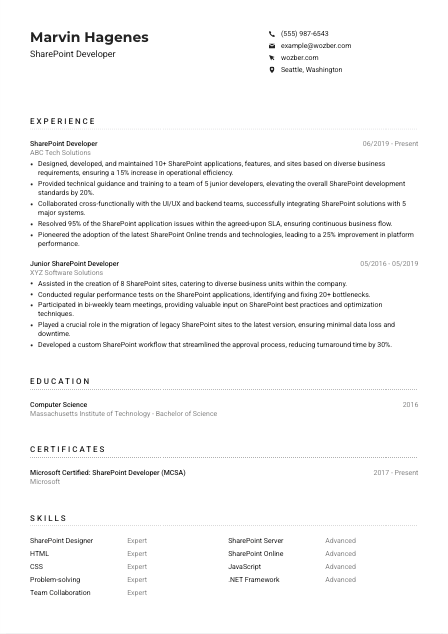
Some SharePoint roles are tied to a specific office, client site, or regional support model. In the example job description, Seattle, Washington is a stated requirement, so listing city and state helps remove uncertainty early. If relocation is relevant, make that clear in the same area.
Include LinkedIn or a professional website if it reinforces your resume. For a SharePoint Developer, this can be useful when your profile shows Microsoft stack work, project history, certifications, or broader experience with web technologies such as JavaScript, HTML, CSS, and .NET. Keep the details aligned with the resume.
This section should confirm the basics quickly and support the role you are targeting. When your title, contact details, and location are handled cleanly, reviewers can focus on whether your SharePoint background fits their environment.




This is the section most likely to decide whether your resume moves forward. SharePoint hiring teams want to know what you built, how complex the environment was, which business problems you solved, and whether you improved platform performance, adoption, or support reliability. Write your bullets around delivered work, not generic responsibility lists.
Read the job description closely and underline the work patterns behind it. For this role, that includes SharePoint development and customization, technical guidance, integration with other systems, troubleshooting, and keeping up with platform changes. Those are the themes your experience bullets should mirror so the hiring team can quickly connect your background to the work they need done.
List positions in reverse chronological order and include title, employer, and dates. This matters in SharePoint hiring because teams often want to see progression, such as moving from site support or junior customization work into solution design, governance input, migrations, or platform-wide development.
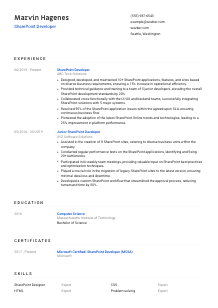
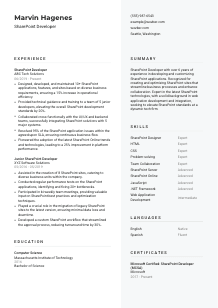
Focus on what you designed, customized, integrated, or fixed. Strong SharePoint bullets mention outputs such as applications, sites, workflows, features, dashboards, or migrations. In the sample resume, "Designed, developed, and maintained 10+ SharePoint applications, features, and sites" works because it names the actual deliverables and links them to business use.
Use numbers where they reflect how the work was measured. For SharePoint roles, that may include application count, workflow turnaround time, SLA resolution rate, performance improvement, user adoption, migration volume, or reduction in manual effort. The example's 95% issue resolution within SLA and 25% platform performance improvement are good models because they show operational results, not vague impact.
If you have broader software or IT experience, keep the emphasis on the parts that connect to SharePoint delivery. Hiring teams care most about customization, web technologies, platform support, governance, and integration work. If an older role is less relevant, trim it to the elements that still support your case, such as .NET development, front-end customization, or enterprise system integration.
Your experience section should leave no doubt that you can build and support SharePoint solutions in a live business setting. When your bullets show scope, tools, collaboration, and results, the hiring team can picture you handling their platform with confidence.
Education is usually a supporting section for SharePoint Developers, but it still matters. It confirms your technical foundation and helps match degree requirements, especially in roles that ask for computer science, information systems, or related study. Present it clearly and keep the emphasis on relevance.
Start with the educational qualification the posting asks for. Here, a Bachelor's degree in Computer Science, Information Systems, or a related field is part of the requirement, so your degree should be easy to find and easy to match against that standard.
List degree, field of study, school, and graduation year. Do not overdesign this section. In technical hiring, a clean structure helps reviewers confirm the credential quickly and move back to the experience that shows your SharePoint work in practice.
If your degree aligns closely with the posting, name it precisely. The sample resume's Bachelor of Science in Computer Science is a strong fit because it supports the web, systems, and development background behind SharePoint customization and integration work.
This is most useful if you are early in your career or moving into SharePoint from adjacent development work. Include coursework or academic projects only when they reinforce relevant skills such as web development, databases, .NET, enterprise systems, or collaboration platforms.
Honors, technical clubs, or major capstone work can help if they add something concrete to your profile. For experienced SharePoint Developers, these details usually matter less than production work, so keep them only when they support the role rather than fill space.
This section should confirm that you meet the academic baseline without distracting from your project work and platform experience. If the degree aligns well, let it do that job cleanly and move the emphasis back to your SharePoint delivery record.
Certifications can strengthen a SharePoint resume when they show current investment in the Microsoft ecosystem or deeper platform knowledge. They are rarely a substitute for hands-on work, but they can support your credibility in development, administration, or Microsoft 365 environments.
Look for required or preferred certifications before deciding what to include. The example job description does not ask for one, so a SharePoint or Microsoft certification becomes supporting evidence rather than a gatekeeping requirement. That is useful context when deciding placement and emphasis.
Prioritize credentials tied to SharePoint, Microsoft 365, Azure, or related Microsoft development paths. In the sample resume, "Microsoft Certified: SharePoint Developer (MCSA)" directly reinforces the core role and fits naturally with the candidate's experience in customization and platform improvement.
Dates help reviewers understand whether your certification reflects current or recent knowledge. That matters in SharePoint work, where hiring teams may care about your familiarity with modern SharePoint Online patterns, migrations, governance changes, or evolving Microsoft tooling.
SharePoint environments change with Microsoft 365 updates, integration methods, and governance expectations. If you keep certifications current or complete relevant training, include that progression to show that your knowledge has kept pace with the platform rather than staying tied to an older version.
A well-chosen certification adds weight when it matches the role and the platform. Include the credentials that sharpen your SharePoint profile, then let your project work and technical results carry the main argument. Wozber's free resume builder also helps place these credentials cleanly in an ATS-friendly resume template so they are easy to spot.
The skills section should read like a believable toolkit for the job, not a software inventory. For SharePoint Developers, that means balancing platform-specific tools with the web and collaboration skills that make customizations, integrations, and troubleshooting possible in production environments.
Start with the named skills in the posting, then add closely related capabilities you genuinely use. Here, SharePoint Designer, SharePoint Server, SharePoint Online, HTML, CSS, JavaScript, .NET, problem-solving, and team collaboration are all directly relevant because they connect to development, customization, and support work.
Lead with the skills most likely to drive shortlisting. For a SharePoint Developer, platform-specific tools and technologies should usually come before broader traits. If the posting emphasizes SharePoint Online and web technologies, make sure those appear prominently instead of being buried under generic software terms.
Choose skills you can back up in your experience section. A compact list that includes SharePoint Server, SharePoint Online, JavaScript, HTML, CSS, .NET Framework, workflow development, troubleshooting, and cross-functional collaboration is stronger than a long list with weak relevance. In the sample resume, the best entries work because the experience bullets support them with real outcomes.
When this section mirrors the posting and matches the work in your experience bullets, it helps both ATS optimization and human review. Wozber's ATS resume scanner is useful here for spotting missing SharePoint terms, web technologies, and platform language before you submit.
Language proficiency may look secondary on a developer resume, but it matters when the role involves documentation, end-user communication, training, or cross-functional work. For SharePoint Developers, clear English is often essential because the job includes translating business requirements into usable platform solutions.
If the posting specifies English, include it with an honest proficiency level. In this case, strong written and verbal English is part of the requirement, so your resume should make that visible rather than leaving it implied.
Additional languages can be helpful in global organizations, distributed support teams, or user environments that span regions. They are supplementary, though, so keep the emphasis on the language required to handle documentation, stakeholder conversations, training, and issue resolution in the target role.
Terms like Native, Fluent, Intermediate, and Basic are easy to read and widely understood. Avoid vague labels. A hiring team should be able to tell whether you can lead meetings, write support documentation, or collaborate with business users without needing clarification.
SharePoint Developers often do more than code. They explain best practices, gather requirements, document customizations, and sometimes train users or junior team members. If your language ability supports that part of the work, it has real value beyond simple conversation.
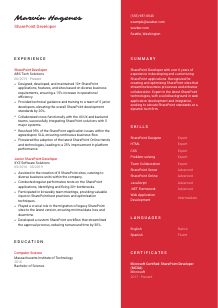
Treat languages as a functional part of the role, not a decorative extra. The sample resume lists English as Native and Spanish as Fluent, which works well because the required language is clear and the additional language adds breadth without distracting from the technical profile.
For this kind of role, language skills should support the collaborative side of SharePoint work, from requirements gathering to user guidance. Keep the section honest, concise, and tied to how you actually work with teams and stakeholders.
The summary sits at the top of the resume, so it should establish your level, technical focus, and the kind of SharePoint work you have handled. Avoid generic claims about being driven or versatile. Use those lines to anchor your years of experience, platform strengths, and the outcomes you are known for.
Read the posting and identify the main version of the job. Is it focused on development, modernization, governance, support, or Microsoft 365 collaboration? For this role, the summary should point clearly toward SharePoint development and customization, with enough context to show you can also support integration and platform improvement.
Your first sentence should quickly state your level and area of specialization. The sample resume does this well with "SharePoint Developer with over 6 years of experience in developing and customizing SharePoint applications." That opening works because it is direct, role-specific, and immediately relevant to the posting.
Choose details that reflect the actual demands of the role. Good examples for SharePoint include building sites and applications, improving workflows, supporting migrations, integrating with other systems, or raising platform performance. Mention the business result where possible, but keep the wording tight.
Aim for a short paragraph, usually three to five lines. That gives you enough room to establish experience, technical focus, and one or two outcomes without repeating bullets that belong in the experience section. A concise summary helps reviewers decide quickly whether your SharePoint background matches the environment they are hiring for.
A sharp summary gives the reader a fast, accurate picture of your SharePoint background before they reach the detailed sections. Use it to establish your level, your platform focus, and the kind of results your work has produced. Wozber's AI resume builder can help tighten that language so the opening aligns with the role and stays readable in ATS screening.
Your resume should now make three things easy to understand: how much hands-on SharePoint development experience you have, which technologies and environments you have worked in, and what business results your customizations, integrations, and troubleshooting produced.
Before you apply, check the wording against the target posting one more time. Use the same platform terms where they reflect your real experience, keep the format clean, and make sure each section supports an ATS-friendly resume format. Wozber helps you do that quickly, from structure to ATS optimization to final tailoring.
When the document reads clearly, a hiring team can spend less time decoding your background and more time seeing you as someone who can build, support, and improve their SharePoint environment from day one.




