



Use Wozber and land your dream job
Create Resume
No registration required
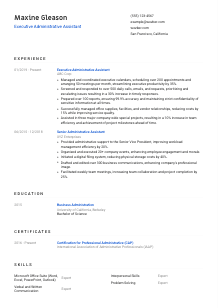
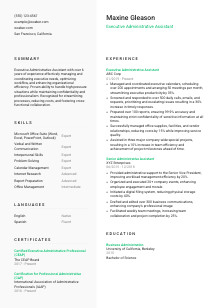
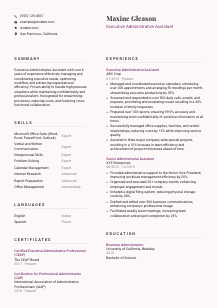
Supporting top-tier executives, but your resume doesn't quite match the corner office vibe? Sync up with this Executive Administrative Assistant resume example, created with Wozber free resume builder. Learn how to align your managerial support prowess with corporate expectations, making your career trajectory as impressive as the executive suites you oversee!
Executive support work runs on judgment, timing, and discretion. An Executive Administrative Assistant is often the person keeping calendars from colliding, travel from unraveling, and sensitive communication from slowing down senior leadership. Resumes for this role need to show more than general admin experience. They should make it clear that you can manage priorities around executives, protect confidentiality, and keep daily operations moving without constant direction.
When that context is missing, your background can read like broad office support instead of high-level executive coordination. A tailored resume fixes that by surfacing the exact language tied to scheduling, correspondence handling, document preparation, vendor coordination, and special projects. Wozber's free resume builder helps shape that experience into an ATS-friendly resume format, so both hiring teams and applicant tracking systems can quickly recognize your executive support scope.
For an Executive Administrative Assistant, the contact section should feel organized, professional, and easy to act on. This is a role built around precision, responsiveness, and polished communication, so even the top of the resume should reflect those standards. Keep the section simple, accurate, and aligned with the role you want.
Place your name at the top in a clear, professional font that stands out without looking flashy. Executive support roles value clean presentation, and a cluttered header can work against that. Your name should be the easiest detail to spot, much like the clean documents and meeting materials you would be expected to produce on the job.
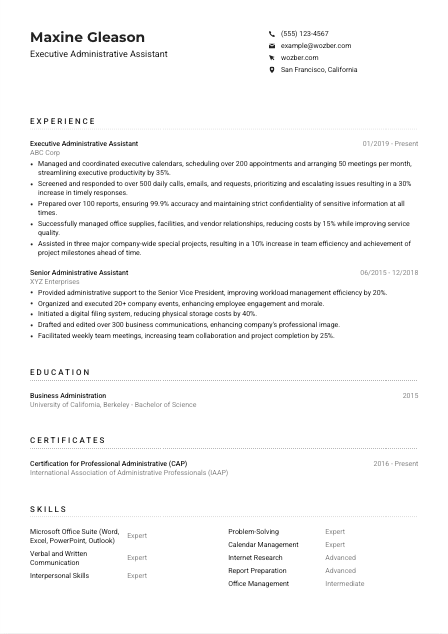
Add "Executive Administrative Assistant" below your name if that is the role you are targeting. This helps frame your experience immediately, especially if your recent titles include close variations such as Senior Administrative Assistant or Executive Assistant. In the sample resume, using the exact title makes the candidate's fit for executive calendar management, communication handling, and office coordination clear from the first lines.
If a posting specifies a location or relocation requirement, include your city and state to remove uncertainty. Here, being based in San Francisco, California directly addresses a stated hiring condition. For other jobs, only add location when it helps confirm your availability for onsite or hybrid executive support.
Include your LinkedIn profile or another professional page if it is current and consistent with your resume. For executive support candidates, that profile should reinforce your experience with calendar management, document preparation, event coordination, office operations, and communication across leadership teams. Consistency matters because hiring teams often compare the two quickly.
This section does not need personality flourishes. It needs accuracy, professionalism, and no friction. When your contact details are clean and aligned with the role, the rest of the resume starts on solid footing.




This is the section hiring teams read most closely for executive administrative roles. They want to see how you handled executive calendars, shifting priorities, communication flow, document preparation, office logistics, and confidential information in real business settings. Vague admin bullets are easy to overlook. Specific scope, volume, and outcomes are what move this section forward.
Read the job description closely and mark the responsibilities that define the role. For this one, that includes calendar coordination, scheduling, travel arrangements, screening calls and emails, preparing reports and presentations, vendor liaison work, and support on special projects. Those are the themes your experience bullets should echo, using truthful language from your own background.
List your job title, employer, and dates in a consistent structure for every entry. That matters for both human readers and ATS parsing. If you have supported senior leaders under a different title, do not hide that value. A title like "Senior Administrative Assistant" can still carry strong executive support weight if the bullets show work done for a vice president, leadership team, or cross-functional executives.
Do not stop at saying you managed calendars or answered emails. Show the complexity and result. The sample resume does this well by tying calendar management to more than 200 appointments and 50 meetings per month, and by connecting communication triage to a 30% increase in timely responses. That kind of phrasing shows pace, prioritization, and business value, not just task ownership.
Quantify work in ways that feel native to the role. Useful metrics include appointment volume, meeting cadence, response time improvements, report accuracy, travel coordination load, vendor savings, event count, filing efficiency, or project milestone support. Numbers such as 99.9% report accuracy or a 15% vendor cost reduction strengthen your credibility because they reflect outcomes executive teams actually notice.
Choose bullets that prove you can support leadership, protect confidential information, and keep operations organized under pressure. A digital filing project, event coordination, or weekly meeting facilitation can absolutely belong here if it shows process improvement, communication discipline, or support for senior stakeholders. Cut or shorten unrelated work that does not reinforce executive support capability.
The best experience sections for this role make one thing obvious: executives could rely on you. If your bullets show control over schedules, communication flow, documents, vendors, and high-priority tasks, you are presenting the substance this role is hired for.
Education usually plays a supporting role for experienced Executive Administrative Assistants, but it still matters when the posting names a degree requirement. Keep this section straightforward and easy to verify. The hiring team is usually checking for qualification alignment, not looking for a long academic story.
When a posting asks for a bachelor's degree in Business Administration or a related field, make sure your degree and field are listed clearly. If your background matches directly, that is worth surfacing without extra explanation. In the example, a Bachelor of Science in Business Administration aligns neatly with the stated requirement.
List degree, field of study, school, and graduation year in that order or another equally clear format. Executive support resumes benefit from clean structure throughout, and the education section should be no exception. Straightforward formatting also supports ATS readability.
If your degree title or field is close to the employer's wording, use the formal language that appears on your diploma and keep it recognizable. For example, "Business Administration" is more useful here than a vague abbreviation because it connects directly to the requirement without forcing the reader to interpret it.
If you are earlier in your career, coursework in business communication, operations, management, or office systems can help reinforce your preparation. If you already have 5+ years supporting executives, keep this section lean unless an academic distinction genuinely strengthens your candidacy.
Projects, student leadership, or honors belong here only if they support the role in a meaningful way, such as event coordination, administrative process work, or business communication. For senior candidates, professional experience should still carry most of the weight.
For this role, education is usually a confirmation point. Present it cleanly, match the stated requirement where applicable, and let your executive support experience remain the main driver of your candidacy.
Certifications are not required in every Executive Administrative Assistant search, but they can strengthen your positioning when a posting mentions them. They are especially useful for showing commitment to executive support standards, business communication, office operations, and professional development in the field.
If the employer mentions credentials such as CAP or CEAP, move those to the front of this section. That is a direct tailoring move and an easy ATS win. In the example, listing both CAP and CEAP immediately reinforces alignment with the posting's preferred qualifications.
Only include certifications that support executive assistance, administration, office management, communication, or related business functions. General certificates with little connection to scheduling, executive coordination, or office operations can distract from stronger qualifications.
Include the issuing organization and the date earned, plus renewal status when relevant. This matters because administrative certifications often signal ongoing professional standing. Clear dating also supports the detail-oriented image expected in a role that handles confidential documents, logistics, and executive priorities.
If you are actively pursuing certification, note it only when you can do so honestly and specifically. Continuing development in areas like executive support, business writing, project coordination, or office technology can strengthen your profile, especially when competing against candidates with similar years of experience.
A focused certificate section can sharpen your resume quickly. When the credentials connect directly to executive support work, they reinforce your professionalism without needing much space.
Skills sections work best when they mirror how the role is actually performed. For an Executive Administrative Assistant, that means balancing software fluency with communication, prioritization, discretion, and office coordination. The goal is not to list every ability you have. It is to surface the tools and working strengths that matter in executive support.
Start with the explicit requirements, then add the skills implied by the work. Here, Microsoft Office Suite, internet research, verbal and written communication, interpersonal ability, and problem-solving are directly named. Calendar management, confidentiality, travel coordination, vendor liaison work, and report preparation are also strongly implied by the responsibilities.
Lead with the skills most central to day-to-day performance. For many candidates, that means Microsoft Office, calendar management, communication, office management, report preparation, and stakeholder coordination. The sample resume handles this well by pairing software proficiency with executive support essentials such as calendar management and problem-solving.
Avoid turning this area into a long keyword dump. Choose skills you can support elsewhere in the resume through accomplishments and scope. If you list PowerPoint, Outlook, office management, or vendor coordination, your experience bullets should show where you used them in meetings, reports, scheduling workflows, or office operations.
A well-built skills section should read like the operating toolkit of someone who already supports executives effectively. Keep it aligned with the posting, grounded in real use, and easy to connect to your experience.
Language ability matters in administrative work because the role often sits at the center of communication. Executive Administrative Assistants field calls, write emails, coordinate meetings, and prepare documents, so any language listed should help the employer understand how you communicate in professional settings.
If the posting explicitly requires English proficiency, list English first and describe your level clearly. That responds directly to the requirement and is especially important for a role involving executive correspondence, meeting coordination, and document preparation.
After the required language, list any additional languages that could help in the workplace. Extra languages are not always essential, but they can be useful in companies with multilingual clients, vendors, or internal teams. In the example, Spanish adds value without distracting from the required English proficiency.
Additional languages are worth listing when you can apply them in conversation, email, scheduling, or relationship management. Leave off languages you know only at a minimal level unless the employer specifically values them.
Use familiar labels such as Native, Fluent, Intermediate, or Basic. Clear rating matters because this role often involves high-visibility written and verbal communication, where overstatement can become obvious quickly.
Consider the environment you are applying into. A domestic executive support role may only need strong English, while some organizations benefit from additional language capability for vendor coordination, travel arrangements, or cross-border communication. Tailor the emphasis accordingly rather than listing languages as filler.
For this role, languages should support real communication duties. Lead with the required proficiency, be honest about level, and let any extra language ability add relevant range to your profile.
Your summary should quickly establish the level of administrative support you provide, who you support, and the kinds of outcomes you influence. For Executive Administrative Assistant roles, that usually means showing experience with senior leaders, complex scheduling, communication management, confidentiality, and office or project coordination. Keep it concise, but make every line carry role-specific weight.
Before writing, identify the main themes in the posting. Here, the center of gravity is executive support for senior leadership, backed by scheduling, communication triage, document preparation, office coordination, and problem-solving. Your summary should reflect that mix rather than describing yourself in broad administrative terms.
Begin with your target title and years of experience. A line such as "Executive Administrative Assistant with over 6 years of experience" works because it immediately establishes profession and tenure. If your background includes support for C-level executives or senior leadership teams, mention that early because it is a core qualification in this search.
Use the next lines to connect your skills to business results. Strong examples for this profession include optimizing executive calendars, improving response flow, protecting confidential information, reducing office costs, supporting reports and presentations, or coordinating projects and events. The sample summary succeeds because it ties executive support to workflow optimization, cost reduction, and cross-functional collaboration.
Aim for 3 to 5 lines with concrete language. Skip generic traits unless they are connected to the work. "Professional under pressure" lands better when it sits beside examples of executive scheduling, confidentiality, communication handling, or process improvement, all of which are central to this role.
A good summary gives the reader a fast, accurate picture of your executive support scope. When it combines years of experience, leadership support, core tools, and measurable contribution, the rest of the resume has a clear frame.
An effective Executive Administrative Assistant resume should leave no doubt about your ability to support senior leaders, manage competing priorities, and keep communication, scheduling, documents, and office operations under control. When each section is tailored to that reality, your background reads as executive support, not general administration.
Use Wozber's free resume builder to organize that experience into an ATS-compliant resume, refine role-specific wording with AI support, and check alignment with an ATS resume scanner. The finished resume should make one thing easy to judge: you can step into a high-trust executive support environment and keep it running smoothly.




